
UE330 - USB Hub TP-LINK - Free user manual and instructions
Find the device manual for free UE330 TP-LINK in PDF.


| Product Type | USB to Ethernet Adapter |
| Brand | TP-Link |
| Model | UE330 |
| Color | Black |
| Dimensions (L x W x H) | 70 x 30 x 15 mm |
| Weight | 30 g |
| Material | Plastic |
| Interface to Computer | USB 3.0 Type-A |
| Ethernet Port | 1 x RJ45 10/100/1000 Mbps |
| Power Source | USB Bus Powered (5V, 500 mA) |
| Plug and Play | Yes (for most operating systems) |
| Driver Requirement | Automatic installation on Windows 10/11; manual download for older OS |
| Supported Operating Systems | Windows, macOS, Linux |
| LED Indicators | Link/Activity (green) |
| Operating Temperature | 0°C to 40°C |
| Storage Temperature | -40°C to 70°C |
| Humidity | 10% to 90% non-condensing |
| Certifications | CE, RoHS |
| Safety Precautions | Keep away from water, fire, humidity or hot environments. Do not disassemble. |
| Maintenance | Wipe with a dry cloth. Do not use liquids. |
| Package Contents | UE330 Adapter, Quick Installation Guide |
| Warranty | 2 years |
Frequently Asked Questions - UE330 TP-LINK
User questions about UE330 TP-LINK
0 question about this device. Answer the ones you know or ask your own.
Ask a new question about this device
Download the instructions for your USB Hub in PDF format for free! Find your manual UE330 - TP-LINK and take your electronic device back in hand. On this page are published all the documents necessary for the use of your device. UE330 by TP-LINK.
USER MANUAL UE330 TP-LINK
USB to Ethernet Network Adapter

For technical support, replacement services, the user guide and more information, please visit https://www.tp-link.com/support
©2024 TP-Link 7106511088 REV2.0.1 *Images are for demonstration only.
English
This adapter supports Plug and Play feature. Plug in and wait for seconds. Then this adapter is ready to use.
Note: For some operating systems, the adapter is not plug-and-play. If you see a prompt page after inserting the adapter, just click to install the driver; or download and install the driver from our official website: visit www.tp-link.com and search for the model.
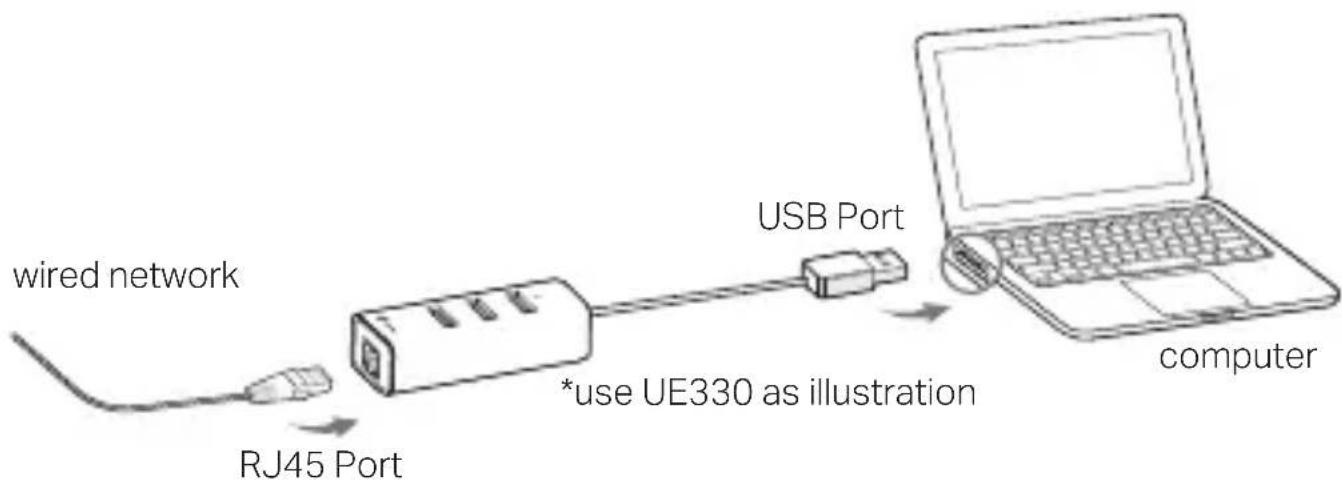
flowchart
graph LR
    A["wired network"] --> B["RJ45 Port"]
    B --> C["USB Port"]
    C --> D["computer"]
    style B fill:#f9f,stroke:#333
    note right of B "*use UE330 as illustration"
Български
TP-Link hereby declares that the device is in compliance with the essential requirements and other relevant provisions of directives 2014/30/EU, 2011/65/EU and(EU)2015/863. The original EU declaration of conformity may be found at https://www.tp-link.com/en/ce. Български
- Keep the device away from water, fire, humidity or hot environments.
- Do not attempt to disassemble, repair, or modify the device. If you need service, please contact us.
- This product can be powered only by computers that comply with Power Source Class 2 (PS2) or Limited Power Source (LPS) of IEC 62368-1.
Please read and follow the above safety information when operating the device. We cannot guarantee that no accidents or damage will occur due to improper use of the device. Please use this product with care and operate at your own risk.