
Dry ABC - Dehumidifier Meaco - Free user manual and instructions
Find the device manual for free Dry ABC Meaco in PDF.


| Product Type | Dehumidifier |
| Brand | Meaco |
| Model | Dry ABC (10 or 12 litres per day) |
| Dimensions (HWD) | 300 x 250 x 463 mm |
| Weight | 10.5 kg (ABC-10) / 11.2 kg (ABC-12) |
| Power Supply | 230V ~ 50Hz |
| Rated Power Consumption | 160W (ABC-10) / 180W (ABC-12) |
| Rated Current | 1.0A (ABC-10) / 1.1A (ABC-12) |
| Water Tank Capacity | 2.6 litres |
| Extraction Rate (30°C, 80% RH) | 10 litres/day (ABC-10) / 12 litres/day (ABC-12) |
| Extraction Rate (26.7°C, 60% RH) | 5.0 litres/day (ABC-10) / 6.5 litres/day (ABC-12) |
| Noise Level at 1m | < 40 dB(A) |
| Airflow (Nominal) | 100 m³/hour |
| Operating Temperature Range | 5°C to 35°C |
| Refrigerant | R134a |
| Fan Speeds | 2 (High/Low) |
| Display | Digital, shows room humidity |
| Humidistat | Variable (CO, 30-80% RH) |
| Special Modes | Laundry drying (6 hours), Continuous mode (CO) |
| Continuous Drainage | Yes, via 12mm hose (not included) |
| Filter | Washable dust filter (clean weekly) |
| Safety Features | Auto shut-off when tank full, child lock, defrost protection |
| Warranty | 2 years (register at www.meaco.com) |
Frequently Asked Questions - Dry ABC Meaco
User questions about Dry ABC Meaco
0 question about this device. Answer the ones you know or ask your own.
Ask a new question about this device
Download the instructions for your Dehumidifier in PDF format for free! Find your manual Dry ABC - Meaco and take your electronic device back in hand. On this page are published all the documents necessary for the use of your device. Dry ABC by Meaco.
USER MANUAL Dry ABC Meaco
MeacoDry ‘ABC’ Range Dehumidifiers
natural_image
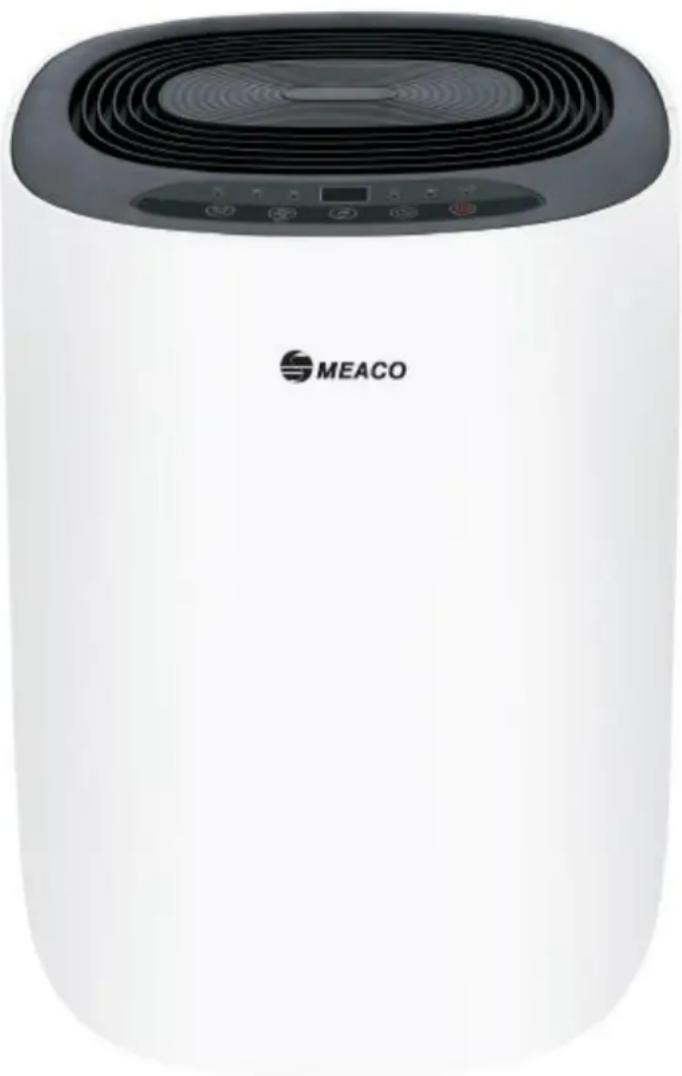
White cylindrical device with black ventilation grille and control panel, labeled 'MEACO' (no other text or symbols visible)Thank you for choosing Meaco, we really do appreciate it
SAFETY INFORMATION
ATTENTION
This dehumidifier must not be used in rooms under the following conditions:
- Potentially explosive atmosphere
- Aggressive atmospheres
- Featuring a high concentration of solvents
- An extremely high ratio of dust
Keep Children Away: Do not allow children to play with or around this unit, which could result in injury. Be sure the unit is inaccessible to children when not attended.
Keep Unit Grounded: Always operate the unit with a grounding plug and a grounded electrical outlet. A grounding plug is an essential safety feature that helps reduce the risk of shock or fire.
Protect Power Cord from Damage: Never operate a unit with a damaged power cord, as this may lead to electrical or fire hazards. If the power supply cord is damaged, it must be replaced by a cord of the same type and amperage rating.
Extension Cords: Extension cords must be grounded and able to deliver the appropriate voltage to the unit.
Handle with Care: Do not drop, throw or crash the dehumidifier. Rough treatment can damage the components or wiring and create a hazardous condition.
Run on Stable Surface: Always operate the unit on a stable, level surface, for example the floor or a strong counter, so that the dehumidifier cannot fall and cause injury.
Keep Out of Water: Never operate the unit in pooled or standing water, as this may create a risk of injury from electrical shock. Do not store or operate outdoors. If electrical wiring or components become wet, thoroughly dry them before using the unit. If in doubt do not use the dehumidifier and consult a qualified electrician or a Meaco approved engineer.
Do not let water drip onto the dehumidifier: When using the dehumidifier to dry clothes ensure that no water from the clothes can drip onto the laundry.
Do not use in a bathroom: Dry your bathroom by placing the dehumidifier outside of the room with the bathroom door open. Do not use your dehumidifier inside the bathroom.
Keep Air Intakes Clear: Do not clog or block the air intakes by placing the dehumidifier too close to curtains, walls or anything that will restrict the air inlet. This may cause the unit to overheat and result in a fire or electrical hazard.
Keep the filter clean: There is a filter on the air inlet to stop dust from getting inside the dehumidifier. If you allow the dust and dirt to build up on the filter then you will increase the pressure on the fan motor and you will reduce the amount of water extracted from the air. Not cleaning the filter reduces the lifespan of the dehumidifier, increases energy consumption and decreases water extraction. Please examine and clean the filter weekly.
Keep Electrical Components Dry: Never allow water inside the dehumidifier's electrical components. If these areas become wet for any reason, thoroughly dry them before using the dehumidifier. If in doubt do not use the dehumidifier and consult a qualified electrician or a Meaco approved engineer.
The operator must make the operating instruction available for the user and make sure that the user does understand the manual.
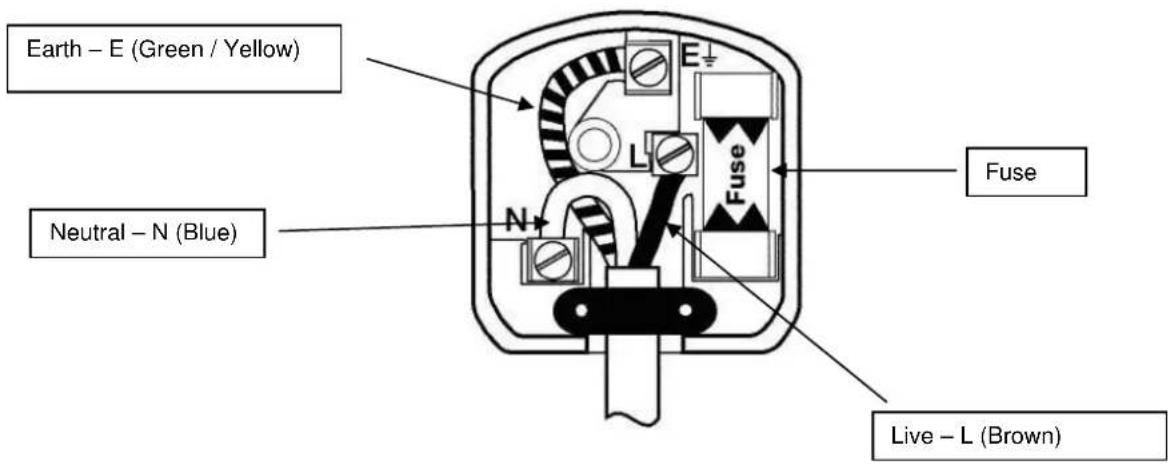
Wiring Instructions: Should it be necessary to change the plug please note the wires in the mains lead are coloured in accordance with the following code:
BLUE - NEUTRAL
BROWN - LIVE
GREEN AND YELLOW – EARTH
As the colours of the wires in the mains lead of this appliance may not correspond with the coloured markings identifying the terminals in your plug, proceed as follows:
- The BLUE wire is the NEUTRAL and must be connected to the terminal which is marked with the letter N or coloured BLACK.
- The BROWN wire is the LIVE and must be connected to the terminal which is marked with the letter L or coloured RED.
- The GREEN/YELLOW is the EARTH and must be connected to the terminal which is marked with the letter E or coloured GREEN OR GREEN/YELLOW.
- Always ensure that the cord grip is positioned and fastened correctly.
Only ever use the same fuse as fitted in the original product, if in doubt please contact Meaco first or a qualified electrician.
Example wiring for a standard British plug.
Please note. The Earth Terminal is marked with the letter E or Earth Symbol
1. GENERAL ADVICE
Before putting your dehumidifier into operation for the first time, the instruction manual should be studied carefully.
After receiving the unit, you should check your dehumidifier for any transport damage. In case of damage, you should inform the sender immediately.
Keep the packaging for the dehumidifier in a safe place in order to be able to despatch the dehumidifier safely if it requires a service. In order to save space, you can simply cut through the adhesive tape using a knife and fold up the cardboard box.
2. DEHUMIDIFIER PRINCIPLES
You can use your dehumidifier to;
Dry rooms suffering from damp problems
Dry clothes after washing
Help to prevent condensation problems in the winter
Help to maintain a healthier humidity level in the home.
Run your dehumidifier 24/7 and allow the humidistat to decide when the dehumidifier should turn on or off. The dehumidifier will only run when your home will benefit from it doing so.
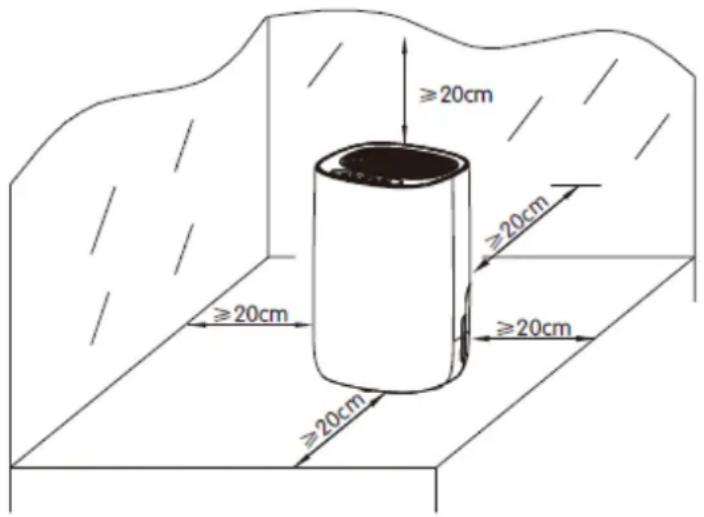
- Place the dehumidifier in an upright position on a flat, stable, surface or floor.
- Ensure the dehumidifier is a safe distance from furniture, clothes and walls.
- Allow 50cm clearance for the air inlet.
• Make sure the tank is correctly fitted (if it is not the tank light will on and the machine will not run). - Turn on the power and run the machine as per instructions below.
This dehumidifier does not come with a hose to reduce the amount of plastic in landfill. The majority of dehumidifier users do not use a hose for continuous drainage so including one in every box just creates waste. Hoses can be purchased locally or direct from Meaco.
3. PRODUCT IDENTIFICATION
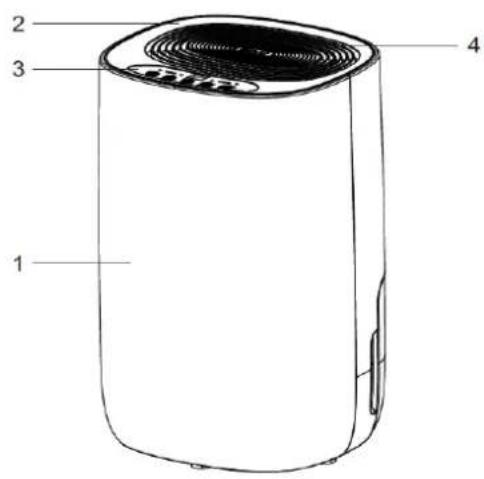
1 Front of the dehumidifier 2
4 Air outlet 5
7 Water tank 8
10 Mains lead
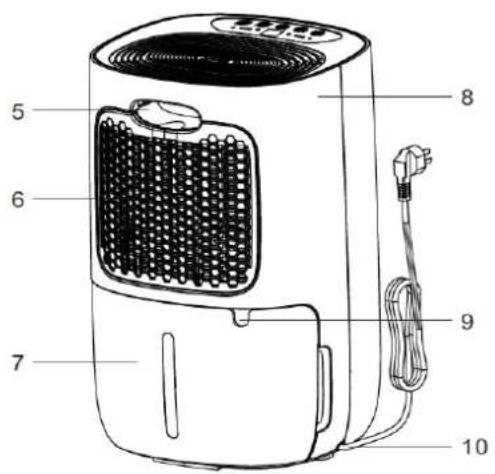
Top cover 3 Control panel
Handle 6 Air inlet filter
Rear cover 9 Continuous drain outlet
14 Fan speed/Child lock button 15
20 Tank full light 21
Timer button 13 Humidistat button
Laundry drying 16 Laundry light
Press to turn the dehumidifier on or off, the appliance makes a 'beep' sound when turned on and enters the standby state.
Timer Button
Use this if you want to turn the dehumidifier off after a set number of hours running, for example when drying laundry. You can select from 1 to 24 hours running time. This is a once only operation and is not a daily run timer. To cancel the timer press the timer twice in five seconds or turn the machine off and on using the on/off button.
Humidistat Button
Use this to select your target relative humidity, 55%rh is recommended for most applications. Pressing the button will scroll through the options of CO-30-35-40-45-50-55-60-65-70-75-80-CO.
Press the button once to see what humidity has been selected, after a few seconds the display will revert to the current room humidity.
CO STANDS FOR CONTINUOUS OPERATION, THE DEHUMIDIFIER WILL RUN AND RUN AND WILL NOT TURN OFF.
Fan Speed Button
Use this to select high or low fan speed as desired. The lights directly above the fan speed button (numbers 17 and 18 indicate which speed has been selected).
Child Lock Button
Hold the fan speed button down for 2 seconds to lock the control panel and repeat to deactivate the child lock.
Laundry Drying Button
The dehumidifier will run at high speed and will turn off automatically after six hours.
Tank Full Light
Comes on when the tank is full and needs to be emptied. The machine automatically turns off when the tank is full.
Dehumidification Light / Defrost Light
When the dehumidifier is in normal dehumidification mode the light is on. The light will flash when the temperature in the room is below approximately 18^ C to indicate that it is defrosting internally, this is not a fault, it is part of normal operation to maintain good dehumidification.
5. ELECTRICAL CONNECTIONS AND OPERATING CONDITIONS
This dehumidifier was designed to operate in a 230V\~50Hz electrical installation. Make sure that the electric sockets are connected to earth and that all safety precautions are taken.
This dehumidifier can be operated within an ambient temperature range from +5^ to +35^ and with a non-condensing relative humidity.
6. SPECIFICATIONS
| MeacoDry ABC - 10 | MeacoDry ABC - 12 | |
| Extraction Rate at 30°C and 80%rh | 10 litres per day | 12 litres per day |
| Extraction Rate at 26.7°C and 60%rh | 5.0 litres per day | 6.5 litres per day |
| Digital display | Yes | |
| Variable humidistat | Yes | |
| Laundry Mode | Yes | |
| Air flow (nominal) | 100m3/hour | 100m3/hour |
| Filter | Washable dust filter | |
| Noise level at one metre | <40dB(A) | <40dB(A) |
| Power supply | 230V, 50Hz | |
| Rated power consumption | 160W | 180W |
| Rated current | 1.0A | 1.1A |
| Fan speeds | Two | Two |
| Operating temperatures | 5......35°C | |
| Refrigerant | R134a | |
| Tank | 2.6 litres | 2.6 litres |
| Dimensions (HWD) | 300 x 250 x 463mm | 300 x 250 x 463mm |
| Weight | 10.5Kgs | 11.2Kgs |
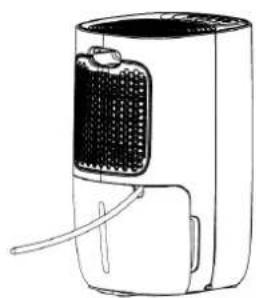
7. CONTINUOUS DRAINAGE
natural_image
Technical line drawing of a portable air purifier with labeled component (23), showing internal structure and housing (no text or symbols beyond label)23
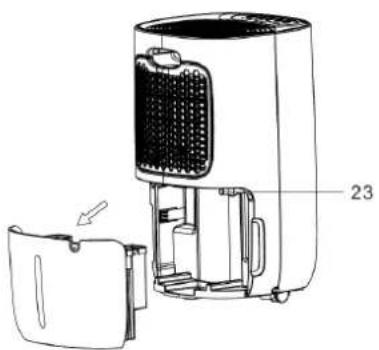
Drainage outlet spout
natural_image
Technical line drawing of a portable air purifier with labeled component (no text or symbols beyond label)24
natural_image
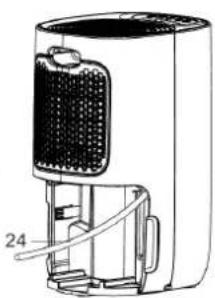
Line drawing of a portable electric heater with cooling fins and ventilation slots (no text or symbols)Drainage hose
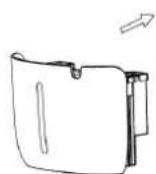
To get the water to drain down the hose rather than into the tank firstly remove the tank. Push a 12mm internal diameter hose onto the spout. Put the tank back in place and ensure that the hose is running downhill with no kinks or blockages and cut off an excess length. This dehumidifier does not come with a hose to reduce the amount of plastic in landfill. Hoses can be purchased locally or direct from Meaco.
8. CLEANING AND STORAGE
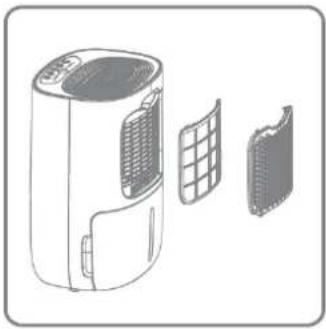
Always turn the dehumidifier off and unplug it from the socket before cleaning. Clean the dehumidifier with a soft, dry cloth, do not allow the dehumidifier to get wet.
natural_image
Illustration of a portable air conditioner unit with internal components (no text or symbols)The filter can either be cleaned using a vacuum cleaner or in warm, soapy water below 40^ C. Make sure that the filter is completely dry before reinserting back into the dehumidifier.
When storing the dehumidifier please store in its plastic bag or original box to protect the dehumidifier from dust. If you are not storing in it's box then please store out of direct sunlight.
- TROUBLESHOOTING
| Problem | Cause | Solution |
| The unit does not work. | The power is not connected. | Insert the plug into the wall outlet. |
| The device does not dehumidity. | The water container is full. | Remove the water from the container. |
| The water container has not been replaced correctly. | Place the water container in the correct position. | |
| The air filter is clogged. | Clean the air filter. | |
| The temperature or relative humidity in the room where the device is operating is too low. | It is normal that the device does not dehumidify in these conditions. | |
| Set humidity is too high | Select a new, lower, target humidity. | |
| The dehumidifier works, but reduces the relative humidity insufficiently/there is little water in the water tank. | The space is too large. | Allow the dehumidifier to run for longer or consider a larger machine. |
| There are too many sources of moisture. Bathing, washing, drying clothes and cooking all puts moisture into the air. Bottled gas heating can add too much moisture into the air for a dehumidifier. | We recommend using a dehumidifier with a greater capacity. Consider using a different heat source to a bottled gas heater. | |
| There is too much ventilation. | Reduce ventilation (e.g. close windows and shut doors.) | |
| The air filter is blocked and the reduce air flow is effecting performance. | Clean the air filter. | |
| The windows were clear and now condensation has returned. | The outside air temperature has dropped and the windows are colder. | Use the dehumidifier on a lower relative humidity setting and run it 24 hours a day. |
| I cannot remove the condensation from my windows, even in continuous mode. | The surface temperature of the windows is too low for a dehumidifier to prevent condensation. Common with single glazed windows and when the outside air temperature drops below freezing. | Keep running the dehumidifier on continuous 24 hours a day and when the air temperature outside increases the windows should clear of condensation. |
| Dehumidifier is blowing out warm air. | The dried air is passed over heating coils before it is blown into the room as part of the dehumidification process. | This is normal, a dehumidifier is not an air cooler. |
| Dehumidifier is blowing out cold air | The dehumidifier does not cool the air, the air might feel cooler because it is moving in the same way as the air from a fan in summer feels cooler. | The room temperature will not be reduced by the dehumidifier and it is not cooling the air. |
| The display is not showing the humidity set point. | The display shows the room relative humidity not the set point. | Press the up or down buttons once to see the target relative humidity. |
| I keep my finger on the buttons but the display does not change | The buttons only move one step at a time. | Press the button and then lift your finger and press the button again to move through the settings. |
| The dehumidifier is noisy. | The air filter is blocked or the unit is on an uneven surface. | Clean the filter and or put the dehumidifier on a flat surface. A dehumidifier will also be noisier on wooden floors than on carpet. |
| Display Error Codes | ||
| Displayed Code | E1 | E2 |
| Error | Coil temperature error | Humidity sensor broken |
| Display | Flashes every 30 seconds | Flashes every 30 seconds |
| What is happening | Unit stills dehumidifies but in defrost mode only. | Units still dehumidifies but in continuous mode only. |
If you get these or any other strange characters on the display then just call the office on 01483 234900 or your local dealer, some faults can be fixed over the phone.
To avoid issues please clean the filter at least every couple of weeks.
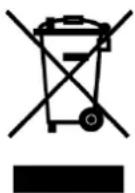
This marking indicates that this product should not be disposed with other household wastes throughout the EU. To prevent possible harm to the environment or human health from uncontrolled waste disposal, recycle it responsibly to promote the sustainable reuse of material resources. To return your used device, please use the return and collection systems or contact the retailer where the product was purchased. They can take this product for environmental safe recycling.

10. WARRANTY AND CUSTOMER SERVICE
There is a two year warranty on your dehumidifier from the date of purchase. Please register your warranty at www.meaco.com, as a thank you we will enter you into our monthly free prize draw.
All material or manufacturing defects will be repaired free of charge.
The following applies:
- Any repairs or replacement of components during the warranty period will not result in an extension of the warranty period.
- The warranty will expire if any alterations have been made, not genuine components have been fitted or if the dehumidifier has been repaired by a third party.
- Components subject to normal wear and tear, are not covered by the warranty.
● The warranty is only valid on presentation of the original, unaltered, and date-stamped purchase receipt. - The warranty does not cover damage caused by actions that deviate from those as described in the user's manual or by neglect.
● The warranty does not cover faults caused by dirt or third party products.
● The warranty does not cover accidental damage.
● All claims for compensation, including consequential damage, will not be entertained.
To prevent unnecessary expenses, we recommend that you always carefully read the user's manual first. If this does not provide a solution, call Meaco and we will be happy to help.
This appliance is not intended for use by person (including children) with reduced physical, sensory or mental capabilities, or lack of experience and knowledge, unless they have been given supervision or instruction concerning use of the appliance by a person responsible for their safety.
Children should be supervised to ensure that they do not play with the appliance.
This dehumidifier has been imported into the U.K. by;
Meaco (U.K.) Limited
Meaco House
Parklands
Railton Road
Guildford
GU2 9JX
Telephone: 01483 234900
Email: service@meaco.com
Website: www.meaco.com
Fax: 01483 232700
Please record, for future reference, your date of purchase and where you bought the dehumidifier from here.
Date of purchase....
Purchased from www.meaco.com (if not, then please record the supplier's name below).
Serial number:......
If you do develop a fault at any time then please do call us and we will always try and help you as best we can.
Please save the box just in case we need to collect the dehumidifier from you for a service.
- MeacoDry ‘ABC’ Range Dehumidifiers
- SAFETY INFORMATION
- ATTENTION
- GENERAL ADVICE
- DEHUMIDIFIER PRINCIPLES
- PRODUCT IDENTIFICATION
- Timer Button
- Humidistat Button
- Fan Speed Button
- Child Lock Button
- Laundry Drying Button
- Tank Full Light
- Dehumidification Light / Defrost Light
- ELECTRICAL CONNECTIONS AND OPERATING CONDITIONS
- SPECIFICATIONS
- CONTINUOUS DRAINAGE
- CLEANING AND STORAGE
- WARRANTY AND CUSTOMER SERVICE
- The following applies:
Brand : Meaco
Model : Dry ABC
Category : Dehumidifier