
Mi Music Alarm Clock - Alarm Clock Xiaomi - Free user manual and instructions
Find the device manual for free Mi Music Alarm Clock Xiaomi in PDF.


| Product Type | Alarm Clock with Bluetooth Speaker |
| Brand | Xiaomi |
| Model | Mi Music Alarm Clock |
| Connectivity | Bluetooth 5.0 |
| Power Source | USB charging (5V) |
| Charging Indicator | Red LED when charging, off when fully charged |
| Display | LED digital display with time and indicators |
| Alarm Modes | Single or repeat (snooze up to 2 times, 9 min intervals) |
| Music Playback | Stream audio from paired device |
| Control | Rotary button with single, double, long press, and scroll |
| Night Mode | Automatic 23:00-7:00 with reduced volume and disabled indicators |
| App Compatibility | Mi Home / Mijia app (iOS & Android) |
| Smart Home Integration | Compatible with Mi Smart Home devices |
| Bluetooth Pairing | Automatic on first use; manual via long press of power button |
| Alarm Melody Selection | Scroll through built-in melodies; save or discard |
| Reset Function | Press and hold reset button for 2 seconds |
| Auto Exit Settings | Exits setting mode after 8 seconds of inactivity |
| Warranty | 12 months (China consumer law) |
| Cleaning | Wipe with dry cloth; avoid liquids |
Frequently Asked Questions - Mi Music Alarm Clock Xiaomi
User questions about Mi Music Alarm Clock Xiaomi
0 question about this device. Answer the ones you know or ask your own.
Ask a new question about this device
Download the instructions for your Alarm Clock in PDF format for free! Find your manual Mi Music Alarm Clock - Xiaomi and take your electronic device back in hand. On this page are published all the documents necessary for the use of your device. Mi Music Alarm Clock by Xiaomi.
USER MANUAL Mi Music Alarm Clock Xiaomi
natural_image
Line drawing of a cylindrical electronic device with a black handle and two side slots, labeled 'MI' and 'Sewing system' (no text or symbols on the device itself)Back side of Mi Music Alarm Clock
Operations
On/OFF
In the off state, press and hold the alarm button for 3 seconds; To turn off the alarm, press and hold the power button for 5 seconds.
Bluetooth connect
The first time you use the alarm, Bluetooth automatically activates the pairing mode. Mi Music Alarm Clock remembers the previously connected device and subsequently automatically mates with it. To connect a new Bluetooth device, press and hold the power button for 3 seconds to turn on Bluetooth pairing.
Music playback
After successfully pairing the alarm clock with the device, turn on the music playback function, and enjoy listening to your favorite tracks.
Alarm settings
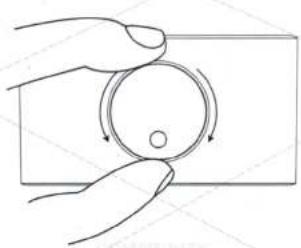
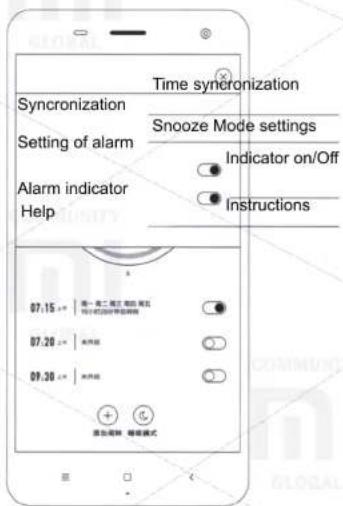
In either mode, press the power button twice to open the alarm settings. Scroll the button clockwise to set the minutes; Counterclockwise to set the clock. After a single press of the button, all settings are saved, if you double click on the button, settings are not saved. LED digital display indicates a clock, a round small dot indicates minutes. After 12 hours, an «crescent moon» appears on the alarm clock, indicating PM's afternoon (12:00 - 24:00).
Alarm settings
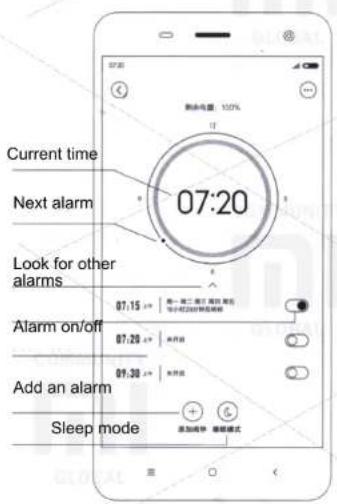
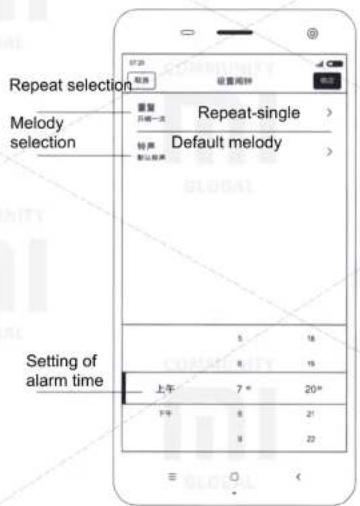
In any mode, the second double-click on the power button opens the alarm setting mode. Scroll the button clockwise to set the minutes; Counterclockwise to set the clock. Open the alarm call settings. If the alarm has already been paired with your device, an alarm icon will appear when you enter the alarm settings.
Setting the Alarm Clock
In any mode, the third time you press the power button, the alarm melody mode is activated. Scrolling the power button, select a melody. Click once on the button to save the settings, click twice to not save the settings.
Turn off the alarm
In any mode, the third time you press the power button, the alarm melody mode is activated. Scroll the power button to the right or left until you hear a voice prompt to turn off the alarm. Press the button once to turn off the alarm.
During an alarm call
- You can press once or scroll the power button, otherwise the alarm will ring for 3 minutes, after which the repeat mode will turn on. After 9 minutes, you will hear again the alarm clock. The repeat mode is enabled only 2 times.
- Double-click the power button to turn off the alarm.
Other
If no operations are performed for 8 seconds when the function setting mode is activated, the alarm clock switches to the main time demonstration mode.
Press and hold the reset button for 2 seconds to reset the settings, after which the alarm can reset.
Night mode: in the period from 23:00 - 7:00 the volume of the audio signal is reduced; Bluetooth indicator and warning signal can be disabled without user settings.
Function button
natural_image
Line drawing of a hand holding a circular object with rotation arrows, no text or symbols present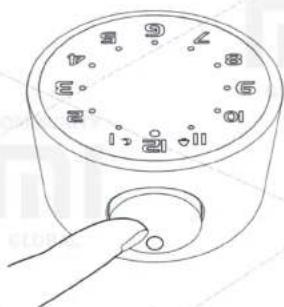
natural_image
Line drawing of a hand pressing a button on a circular device with numbered dial (no text or symbols)| Single-click | Double click | Long press | Scrolling the button clockwise | Scrolling the button counter clockwise | Long press and scrolling |
| Confirmation | Switching modesA) Time settingsB) Alarm settingsC) Select an alarm tone / CancelD) Turn off the alarm | On/OffLooking for Bluetooth devices | Volume upMinutes setting | Volume downHours setting | Clockwise: next trackCounter clockwise: previous track |










































Indicators
Quick setting
| Mode | Status of indicator | Sound signal |
| Enable | Bluetooth LED Lights blue LED and 26 LED indicators for 1 second | 1. The device is on |
| Restoring communication with device | Bluetooth LED indicator continuously flashes blue twice at intervals of 5 seconds / 10 seconds | 2. The device is fully charged / charged at half / charge level low |
| Connecting mode | Bluetooth LED indicator flashes alternately blue and red | Search for Bluetooth devices |
| Devices connected | Once Bluetooth LED indicator flashes blue and off for 7 seconds | Search for Bluetooth devices |
| Charging | During charging Bluetooth LED light is red; Once fully charged the red indicator disappears | |
| Disabling | Bluetooth LED indicator lights red for 1 second; all lights are off | The device is off |
This device is already on the list of Mi Smart Home devices, supports the MIUI system, and can also interface and interact with other Mi Smart Home devices.
- Installing the APP
To install the Mijia application (Mi Home), find and download it to the APP Store or scan the QR code.
- Adding a new device
Open the application, click on the «my devices» icon and add «Mi Music Alarm Clock» to your list. After the successful addition of the device, find it in the list of «Smart Devices».

Even more smart devices you can find on the site mi.com or purchase devices in the mobile application Mi «Smart Home»
Mi Music Alarm Clock
Warranty
Warranty service is carried out in accordance with the law on «Consumer Rights of the People's Republic of China» and «Law on the quality of China's products.» Warranty service includes:
Within 7 days from the date of purchase, in case of a problem from the «Fault List», the Xiaomi Service Center determines the cause of the problem, after which you can choose the return or one-time free replacement of the same model.
Within 15 days from the date of purchase, in case of a problem from the «Fault List», the Xiaomi Service Center identifies the problem, after which you choose a one-time free replacement of the same model or repair.
Within 12 months from the date of purchase, in case of a problem from the «Fault List», the Xiaomi Service Center determines the problem, after which you are provided with free repair.
Conditions, that are not included in the warranty service
Conditions, that are not included in the warranty service
List of circumstances under which warranty service is impossible:
- Damage resulting from improper use of the device, its care or storage;
- The warranty has expired;
- Damage caused by force majeure;
- Breakdowns that have occurred as a result of maintenance of the device in unauthorized service centers or unauthorized persons.
| Name | Toxic and hazardous substances and elements | |||||
| Pb | Hg | Cd | CrVI | PBB | PBDE | |
| Circuit board components | X | O | O | O | O | O |
| Battery | X | O | O | O | O | O |
| Housing | O | O | O | O | O | O |
| Panel, adhesive tape and other small additional components | O | O | O | O | O | O |
These table is provided in accordance with SJ / T 11364.
O: Toxic and harmful substances in all components of this device are contained below the limit value in accordance with GB/T 26572.
X: the presence of toxic and noxious substances in at least one of the components of this device in an amount exceeding the limit value, according to GB / T 26572.
Brand : Xiaomi
Model : Mi Music Alarm Clock
Category : Alarm Clock