
Mi Body Fat Smart Scale - Smart Scale Xiaomi - Free user manual and instructions
Find the device manual for free Mi Body Fat Smart Scale Xiaomi in PDF.


| Product Type | Body Fat Smart Scale |
| Brand | Xiaomi |
| Model | XMTZC02HM |
| Dimensions | 300 mm x 300 mm x 20 mm |
| Net Weight | 1.6 kg |
| Weight Capacity | 5 kg – 150 kg |
| Measurement Graduation | 50 g |
| Units | Jin, kg, lb |
| Material | ABS plastic |
| Wireless Connectivity | Bluetooth 4.0 |
| Operating Temperature | 0°C – 40°C |
| Power Source | 4 AAA batteries (included) |
| Compatible Operating Systems | Android 4.4+, iOS 8.0+ |
| App | Mi Fit (available on Xiaomi App Store, App Store) |
| Measurement Functions | Weight, body fat, body composition (via app) |
| Cleaning Instructions | Use a damp cloth and neutral detergent; avoid organic solvents |
| Safety Precautions | Use on dry, hard surface; do not use with wet feet; not for persons with pacemakers |
| Spare Parts | 4 AAA batteries (replaceable) |
| Warranty | 12 months from purchase (conditions apply) |
Frequently Asked Questions - Mi Body Fat Smart Scale Xiaomi
User questions about Mi Body Fat Smart Scale Xiaomi
0 question about this device. Answer the ones you know or ask your own.
Ask a new question about this device
Download the instructions for your Smart Scale in PDF format for free! Find your manual Mi Body Fat Smart Scale - Xiaomi and take your electronic device back in hand. On this page are published all the documents necessary for the use of your device. Mi Body Fat Smart Scale by Xiaomi.
USER MANUAL Mi Body Fat Smart Scale Xiaomi
Xiaomi scales with the function of measuring body fat
Precautions
- Do not place weight on wet and slippery surfaces, and should not stand on the scale with wet feet or stand on a wet surface weights to avoid slipping.
- When weighing both feet must be located in the center of scale to avoid tipping of device.
- Operational environment must be dry, it is forbidden to put weight in water.
- Use a damp cloth and neutral detergent to clean the surface of the weights, contact with organic solvents and other chemicals is forbidden.
- When battery charge is over, immediately remove a battery to avoid leakage of electrolyte and damage of scales.
- Persons with pacemakers and other medical equipment is not recommended to use this device. In body composition analysis of professional athletes, pregnant women or others, who are a few special provisions, result can be error.
Main specifications
Dimensions: 300mm x 300mm x 20 mm; Net Weight: 1.6 kg;
Limit of measurement: 5 kg - 150 kg; Units of measurement: Jin / kg / pound;
Step of measurement: 50 g;
Case Material: ABS plastic;
Wireless: Bluetooth 4.0;
Operating temperature 0^ C \~ 40^ C;
Battery: 4 AAA batteries;
Hardware Requirements: OS Android 4.4 / iOS 8.0; and above, supports Bluetooth 4.0.
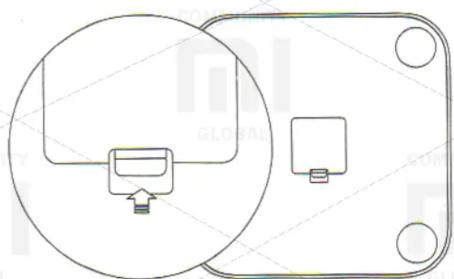
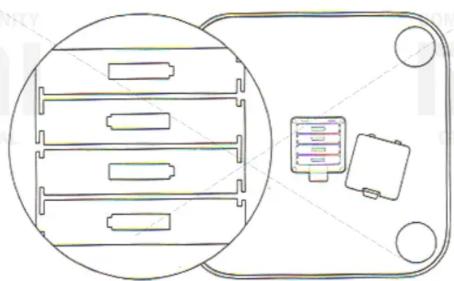
Installing of battery
natural_image
Pure electrical circuit lines without any symbolsOpen a battery compartment cover, under direction from the picture, insert four batteries are included.
natural_image
Pure electrical circuit lines without any symbolsInstalling the App
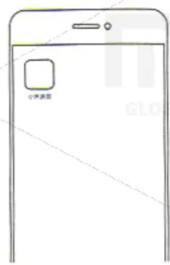
Enter a search «Mi Fit» at Xiaomi app store or App Store, or scan the QR-code below to download and install the latest version.

Adding the scales
Open MiFit Xiaomi app and add scales, follow the prompts to enter personal data. After adding scales view a history of weighing and information on the state of the body in a mobile application.
Usage
Place the scales on a hard, flat surface. Barefoot stand on the surface of the scales as indicated in the picture, provide good contact of skin with two metal electrodes.
Once weight indicator stabilized, starts measuring a composition of body. When a progress indicator below the display weight flashes, which means that a measurement is completed, then you can enter at MiFit application to view the information of body composition.
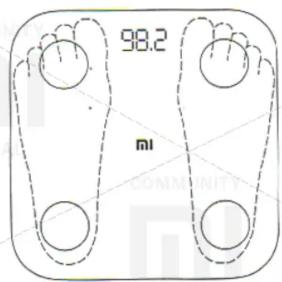
Body composition, that the device shows, used for informational purposes only and is not a medical opinion.
Setting units of weight
In factory settings of Xiaomi scales installed «jing», please open MiFit, menu settings wt replace equipment unit weights. Scales supports three measurement units, «Jin», «kg» and «pound».
Literal tips
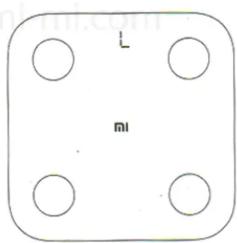
If the icon «L» flashes while weighing, it means low battery, please replace the battery.
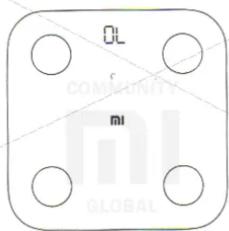
If the icon «OL» flashes while weighing, it means, that the measurements exceeded the maximum limit of 150 kg weight.
Warranty
After-service of Xiaomi floor scales with function of measuring body fat is obliged to: perform warranty after-sales service under the Law of the PRC «Consumer Protection» and the Law of the PRC «Quality of the product» warranty service involves: During the warranty period you have a right to repair, exchange or return of goods, according to the regulations. Repair, exchange and return of goods carried if the sales receipt.
- Within 7 days of purchase, in case of failure indicated in the «List of faults», which was approved by Xiaomi service centers, you are entitled to a free refund, exchange or repair the goods.
- Within 8-15 days after the purchase, in case of a malfunction, indicated «List of faults», which was approved by Xiaomi service centers, you are entitled to free repair or exchange of goods.
- Within 12 months from the date of purchase, in case of failure, indicated in the «List of faults», which was approved by Xiaomi service centers, you are entitled to free repair.
List of faults
Failure in the functions, mentioned in the manual. You can not turn on the device, it is impossible to measure weight, fat mass.
No image on the display / present errors / broken pixels.
Can not sync with these devices.
Crack the shell, incurred due to the structure or materials used.
The following conditions are not covered by the warranty:
- The quality faults, resulting from unauthorized repair, misuse, falling into a liquid, accident, modification, misuse of components, not designed for this device or install the system software; break, fix labels or serial number of the device.
- Expiration of warranty.
- Damage, caused by force majeure.
- Do not meet the faults, listed in the «List of faults»
The title and content of harmful substances in the product
| Name of part | Harmful substances | |||||
| Pb | Hg | Cd | CrIV | PBB | PBDE | |
| Housing | O | O | O | O | O | O |
| Circuit board | X | O | O | O | O | O |
| Support of scales | O | O | O | O | O | O |
This table has been compiled in accordance with SJ / T 11364.
O: means, that the content of harmful substances in homogeneous material of this component is within the requirements of the provisions of GB / T 26572. X: means, that the content of harmful substances in at least one of the homogeneous materials of this component, exceeds the threshold requirements set GB / T 26572.
This product complies with RoHS environmental regulations; Currently there are no technology, that can replace or reduce the led content in electrotechnical ceramics and copper alloys.
The term environmentally sound use of the term, refers to a safe period within which under normal operating conditions contained in this product are harmful substances or elements pose no danger.
Before using the product, please read this manual and keep it properly.
Xiaomi scales with the function of measuring body fat
Model: XMTZC02HM;
CMIIT ID: 2016DP6264;
Applicable standards: Q / HM02-201;
Producer: Ltd. «Anhui Huami Informeyshn Technologies»
Address: Hefei Economic Zone and scientific development, ul.
Vantsyansi 800 Dunman state database, build. A4, Suite 1201;
Visit web page after-service Xiaomi: www.mi.com/service or phone number service support Xiaomi and learn more about after-sales service.
Brand : Xiaomi
Model : Mi Body Fat Smart Scale
Category : Smart Scale