CC8 - Lighting Ikan - Free user manual and instructions
Find the device manual for free CC8 Ikan in PDF.


| Product Type | Bi-color LED Panel Light |
| Brand | Ikan |
| Model | CC8 |
| Light Source | 336 x 1.0W LEDs |
| Color Temperature Range | 2750K - 6500K (CCT) + Full RGB |
| Beam Angle | 120° |
| Brightness Adjustment | 0-100% incremental |
| Control Interface | Digital knob with LCD display |
| Fixture Dimensions | 20 x 10 x 0.5 in (508 x 254 x 12.7 mm) |
| Fixture Weight | 1 lb (0.45 kg) |
| Power Supply Input | 110-240VAC |
| Power Supply Output | 15VDC |
| Fixture Power Consumption | 14W; 7.4-14.8VDC |
| Cooling System | Passive cooling |
| Mounting | 5/8" baby pin receiver with 90° holes |
| Material | Flexible fabric |
| Included Accessories | CC8 panel, controller box, power cord, power supply, soft box, egg crate, X-holder with ball mount, hanging strap, baby pin |
| Special Modes | CCT, RGB, HSI, Gel Library, SFX (Police, Candle, etc.) |
| Cleaning | Mild soap and water on damp cloth; do not submerge |
| Storage | Roll up and store in carrying bag; LEDs facing out |
| Warranty | 1 year free service for manufacturing defects |
Frequently Asked Questions - CC8 Ikan
User questions about CC8 Ikan
0 question about this device. Answer the ones you know or ask your own.
Ask a new question about this device
Download the instructions for your Lighting in PDF format for free! Find your manual CC8 - Ikan and take your electronic device back in hand. On this page are published all the documents necessary for the use of your device. CC8 by Ikan.
USER MANUAL CC8 Ikan
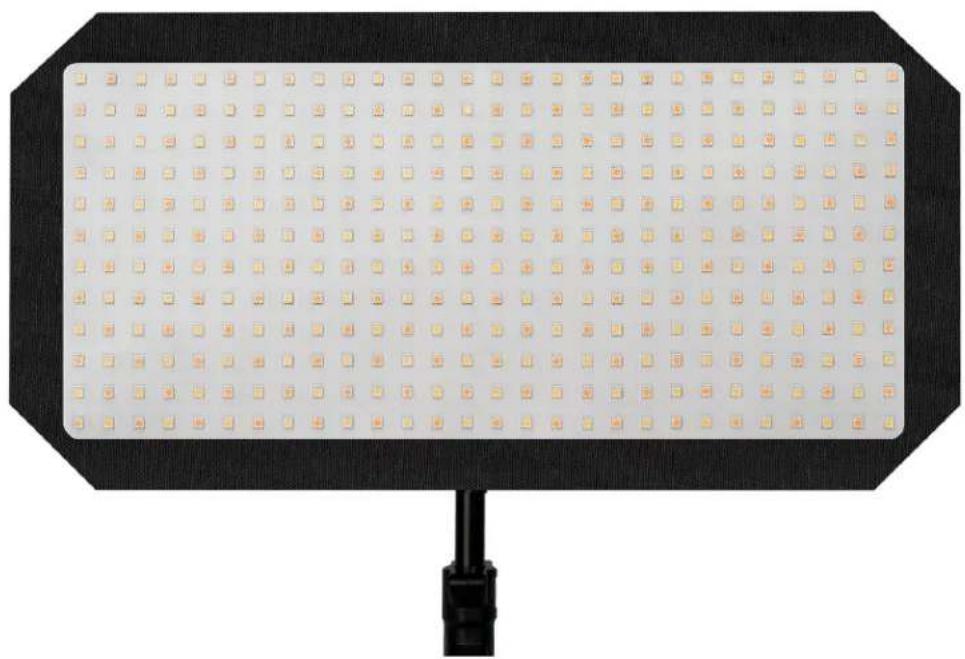
Canvas Full Color Bendable LED Panel
natural_image
Black octagonal LED array mounted on a black base with a black cable at the bottom (no text or symbols visible)What's Included
□ 1 x CC8 Bi-color LED Panel Light
□ 1 x 5/8" Baby Pin with 90 degree Mount Holes
□ 1 x Controller box
□ 1 x Egg Crate
□ 1 x Hanging Strap
□ 1 x Power Cord
□ 1 x Power Supply
□ 1 x Soft Box
□ 1 x X-Holder with Ball Mount
Getting Started
Thank you for buying the CC8 Canvas Full Color Bendable Panel Light from Ikan. Please carefully read the instructions and guide before operating the products. The guide includes product usage and maintenance. When you operate the product, please make sure that you have read the instructions carefully. All the content of the manual is based on up-to-date information; technical data subject to change without notice.
Safety Instructions
- Connect the AC power cable to the controller box before plugging into the power source. You risk electrocution by not following this instruction.
- Don't drag cables with excessive force. Any repairs on the products should be performed by Ikan technicians. Users should not remove the power supply, or substitute a different power supply. This might damage the unit and will not be covered under warranty.
- Be sure that the power is off before connecting and changing the fixture head or disconnecting your cable from the power source. We recommend using Ikan connecting cables and connectors to avoid electrical shock.
- The voltage shouldn't exceed the value in the technical specifications. If the voltage is greater than, or less than the regulated values, it could damage the product.
Overview
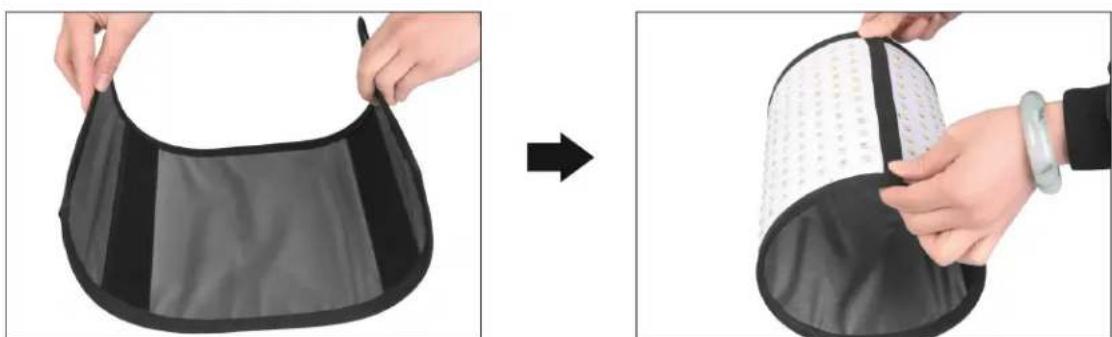
The care and cleaning of the Canvas Bendable LED light. The CC8 should be rolled up and placed back into the carrying bag when not in use. The LEDs should be facing out when placed into the carrying bag. The two ends of the Canvas light should meet.
natural_image
Two-step illustration showing hands holding a black-and-white fabric with a circular patch, before and after modification (no text or symbols)If the LED's should get dirty or covered in dust the unit can be cleaned with mild soap and water on a damp cloth.
DO NOT SUBMERAGE THE UNIT IN WATER
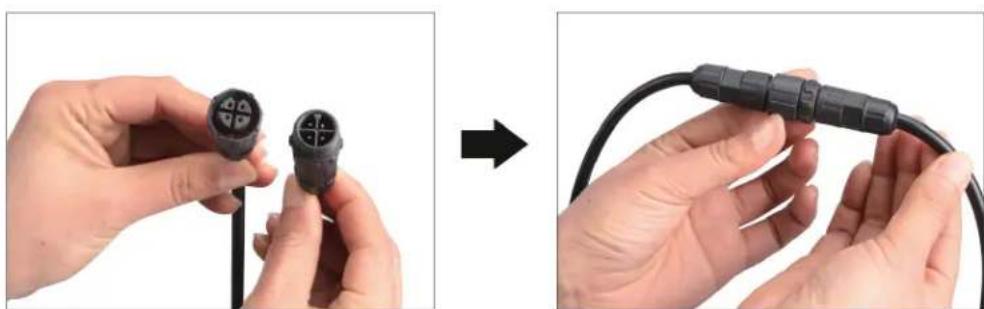
Connecting the 4 prong cable between the controller box and the panel light.
natural_image
Two-step illustration showing hands holding a black connector with four pins, before and after assembly (no text or symbols)Align the male and female plugs so they line up and screw together until the cable is tight.
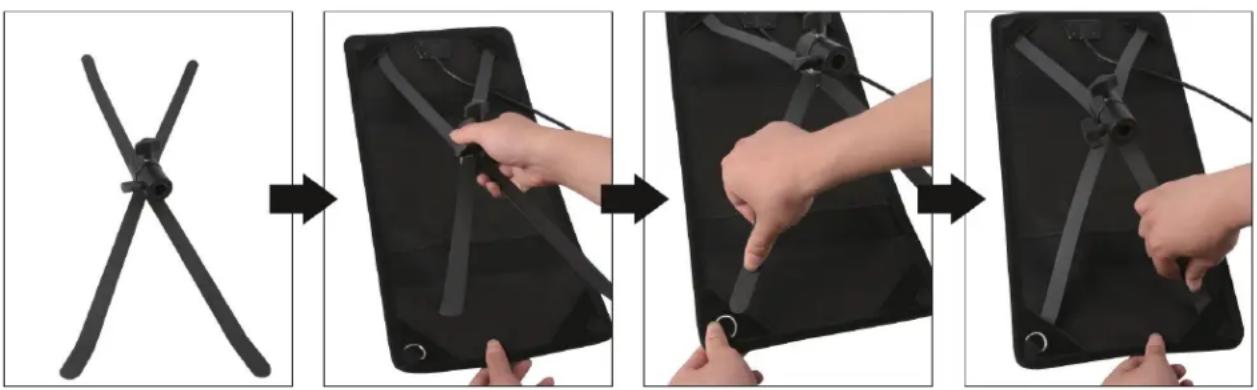
Installation of the X-Holder with ball mount
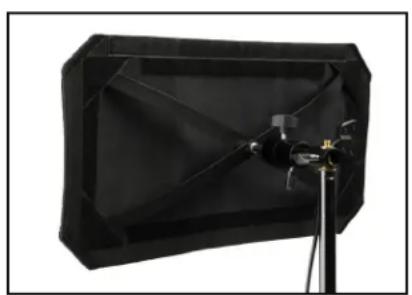
The X-holder should be loose before inserting the struts into the hook & loop corners.
- Place the struts into the hook & loop flaps at the corners of the panel.
- Place them in opposite of each other for them to stay in place.
- Tighten the tension knob at the center to keep the struts locked in place.
flowchart
graph LR
    A["Start: Flat Blade"] --> B["Step 1: Hand positioning"]
    B --> C["Step 2: Assembly with hands and legs"]
    C --> D["Step 3: Setup hand positions"]
    D --> E["Step 4: Use hand position on tablet"]
Note: To avoid damage to the LED's, place the panel light LED side down on soft material.
When placing the light mount on the 5/8" baby pin, this allows you to adjust the light in any desirable position.
natural_image
Black geometric studio lighting equipment with tripod stand (no visible text or symbols)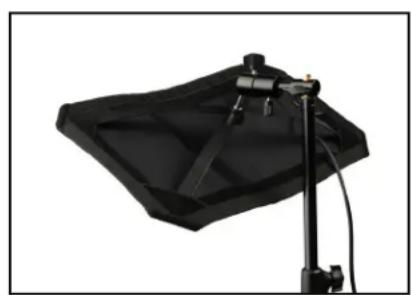
natural_image
Black studio lighting setup with a flat-screen lamp and stand (no text or symbols visible)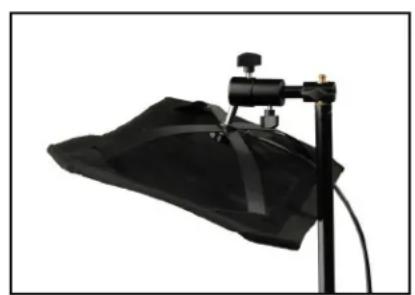
natural_image
Black studio lighting setup with a black lamp and stand (no text or symbols visible)Ikan developed the CC8 bendable light to handle multiple situations whether you need traditional 5600K (daylight) and 3200K (tungsten) or the full color wheel spectrum. The CC8 offers a professional and customizable LED source. In addition, the light features cooling flex system for optimizing heat dissipation. Specially, the CC8 offers the following features:
- The 0-100% brightness incremental adjustment of the 2750K – 6500K temperature enable fine-tuning.
- Adjust RGB colors manually, rotate through HSI color wheel, or select from our commonly used gels.
- Ultra-low noise and active cooling technology contribute to excellent thermal stability.
- The bright LCD readout is easy to view, enabling smooth adjustment of functions.
- Digitally adjustable knob allows you to adjust menu settings quickly and accurately.
- AC/DC power control box allows the light to be powered by battery or DC power supply.
- The softbox with grid cloth and 60 degree egg crate is included with the light.
Appearance & Structure - Light
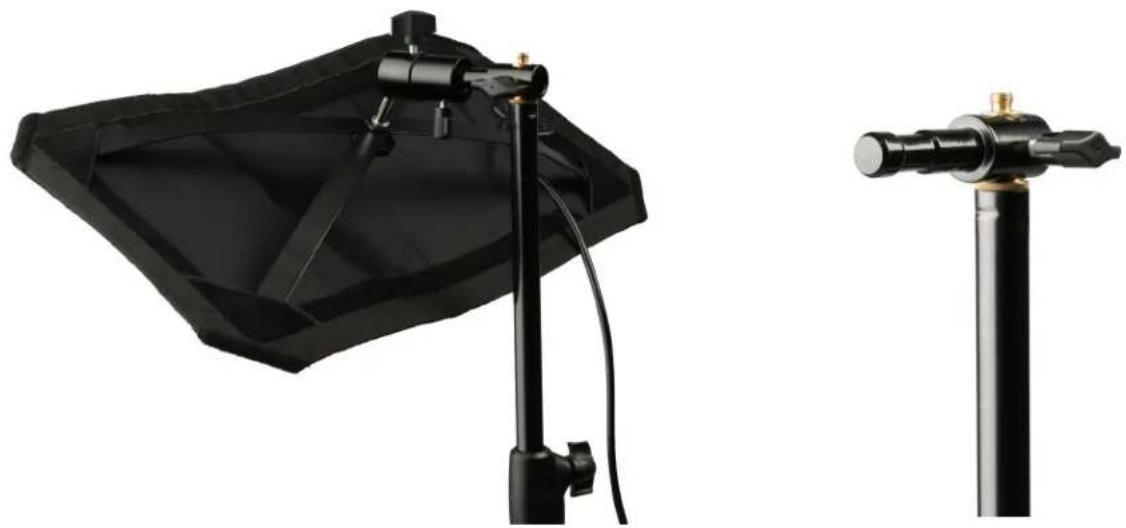
CC8 is illustrated as follows
5/8 Receiver: attaches to a stand or a 5/8" baby pin w/90 degree holes
Mount: Adjustable lighting direction
Hook & Loop around the edge of the light
natural_image
Two black professional lighting equipment setups: a black studio lamp and a cylindrical stand (no text or symbols visible)Appearance & Structure - Control Box
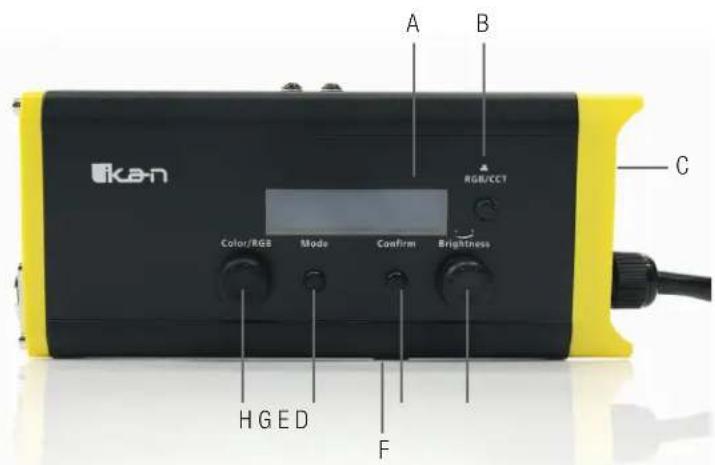
A. LCD Display Screen
B. Toggles Between CCT Mode(2750K - 6500K) and Full RGB Mode
C. Power On/Off Switch Location
D. CCT Form – Adjust Light Brightness
RGB Form – Adjust Lighted Value
E. Confirm Selection
F. Battery Release Button
G. Access and toggle menu within CCT Mode or RGB Mode
H. CCT Mode—Color Adjustment Knob
RGB Mode – Rotate Between Changeable Options
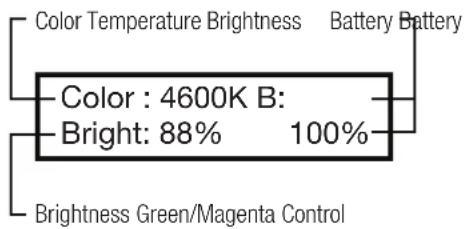
Screen Display Function
CCT Form
- CCT
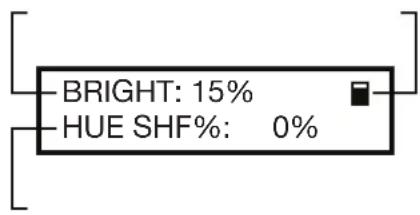
- CCT Hue Shift
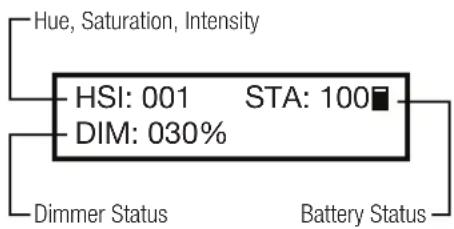
RGB Form
- HSI
- RGB Mode
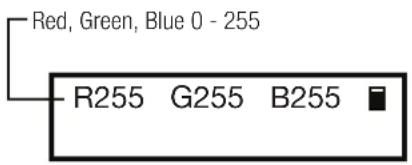
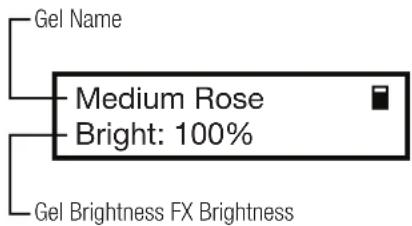
- Gel Mode (select a Gel for the name to show)
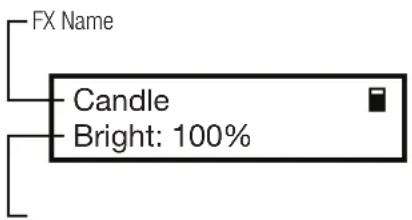
- SFX Mode
Gel List
| Bastard Amber | Sky Blue | Light Rose |
| Medium Bastard Amber | Brilliant Blue | Rose |
| Golden Amber | Light Green Blue | Lilac |
| Soft Golden Amber | Bright Blue | Lavender |
| Pale Apricot | Hamburg Lavender | Pea Green |
| Rose Gold | Daylight Blue | Pale Yellow |
| Flesh Pink | Medium Yellow | Green |
| Salmon Pink | Straw | Moss Green |
| Pale Rose Pink | Fire | Gaslight |
| Surprise Pink | Flame | Green |
| Steel Blue | Light Red | Chroma |
| Booster Blue | Medium Red | Green |
SFX List
| Police |
| Lighting |
| TV Flicker |
| Candle |
| Scene Yellow |
| Scene Blue |
| Scene Green |
| Scene Pink |
Installation & Power Supply
- Ensure power is off before setting up light.
- Place the light on the Ikan customized stands, release the tension knob on the 5/8" receiver, adjust the light in the desired direction, and then tighten the tension knob on the 5/8" receiver.
- When connecting the power cords, plug the 4-pin XLR power cord into the controller box.
Notice & Maintenance
- The CC8 working temperature range must be regulated. Overheating will reduce the LED working life. Please allow adequate ventilation when using the Canvas light.
- Products must be placed on a stable, dry, flat surface. Avoid exposure to sunlight and operating in an environment with high humidity or extreme moisture levels.
- Don't beat, knock or shake the lighting equipment during the operation.
- If the CC8 isn't working normally, please contact the Ikan repair department. Please don't disassemble/re-assemble by yourself.
- Please place the CC8 in a cool and dry place when you don't use it for an extended period of time.
Troubleshooting
| Failure Failure Cause Troubleshooting | ||
| Unit Won’t Turn On The power is connected | incorrectly or the power switch in not turned on. | Turn on the light with the switch on the controller box. Make sure the unit is plugged into AC power. |
| During the operation lamp is out. The unit may have malfunctioned.The unit’s connecting cable may not be properly secured. | Try turning the control box off than on again.The cable can be disconnected and then reconnected. | |
Specifications Electrical Specifications
| Light Source 336 x 1.0w | att LEDs |
| Head Type 2750K-6500K + RGB | |
| Beam Angle 120 Degree | |
| Control/Dimming Knob Control | |
| Build Material Flexible Fabric Material | |
| Cooling System Passive Cooling | |
| Mounting System Baby 5/8" receiver | |
| Fixture Size 20 x 10 x .5 in. | |
| Fixture Weight 1lb | |
| Power Supply Input 110-240VAC | |
| Power Supply Output 15VDC | |
| Fixture Power Consumption 14W; 7.4-14.8VDC | |
Optional Accessories
Some other products that work well with the CC8 available from Ikan include:
IBG-STND Stand Bag
IBG-SB15 Saddle Sandbag & Weight Bag - 15 lb
CP-STND-V3 Compact Light Stand
HD-STND-V2 Heavy Duty Light Stand
Learn More
More dynamic information at official website: www.ikancorp.com
Support
Contact email: support@ikancorp.com
CONDITIONS OF WARRANTY SERVICE
- Free service for one year from the day of purchase if the problem is caused by manufacturing errors.
- The components and maintenance service fee will be charged if the warranty period is expired.
Free Service will not be Provided in the Following Situations:(*Even if the product is still within the warranty period.)
- Damage caused by abuse or misuse, dismantling, or changes to the product not made by the company.
- Damage caused by natural disaster, abnormal voltage, and environmental factors, etc.
©2020 Ikan International. All rights reserved.
- What's Included
- Getting Started
- Safety Instructions
- Overview
- Installation of the X-Holder with ball mount
- Appearance & Structure - Light
- Appearance & Structure - Control Box
- Screen Display Function
- CCT Form
- RGB Form
- Installation & Power Supply
- Notice & Maintenance
- Optional Accessories
- Learn More
- Support
- CONDITIONS OF WARRANTY SERVICE
Brand : Ikan
Model : CC8
Category : Lighting