
Echo Show 8 - Pregnant AMAZON - Free user manual and instructions
Find the device manual for free Echo Show 8 AMAZON in PDF.


| Product Type | Smart Display / Smart Speaker |
| Brand | Amazon |
| Model | Echo Show 8 |
| Dimensions (without stand) | 7.9 x 5.4 x 3.5 inches (200 x 137 x 88 mm) |
| Weight | 1.65 lbs (748 g) |
| Screen Size | 8-inch touchscreen |
| Power Supply | AC adapter (included), 30W |
| Connectivity | Wi-Fi (802.11 a/b/g/n/ac), Bluetooth 5.0, USB-C (for wired Ethernet via adapter) |
| Audio | Dual 2-inch front-firing speakers, Dolby Audio |
| Camera | 13 MP front-facing camera with shutter |
| Main Functions | Voice assistant (Alexa), video calls, music, smart home control, display weather/news, photos, calendar, timer, alarms, compatible with Zigbee and Matter hub |
| Care & Cleaning | Unplug before cleaning. Wipe with a soft, dry cloth. Do not use any harsh chemicals or liquids. |
| Safety | Keep away from water and moisture. Do not disassemble. Use only the provided power adapter. Refer to user manual for full safety instructions. |
| Spare Parts & Repairability | Spare parts such as power adapter and stand can be purchased from Amazon. Device is not user-serviceable; contact Amazon support for repair options. |
Frequently Asked Questions - Echo Show 8 AMAZON
User questions about Echo Show 8 AMAZON
0 question about this device. Answer the ones you know or ask your own.
Ask a new question about this device
Download the instructions for your Pregnant in PDF format for free! Find your manual Echo Show 8 - AMAZON and take your electronic device back in hand. On this page are published all the documents necessary for the use of your device. Echo Show 8 by AMAZON.
USER MANUAL Echo Show 8 AMAZON
Getting to know your Echo Show 8
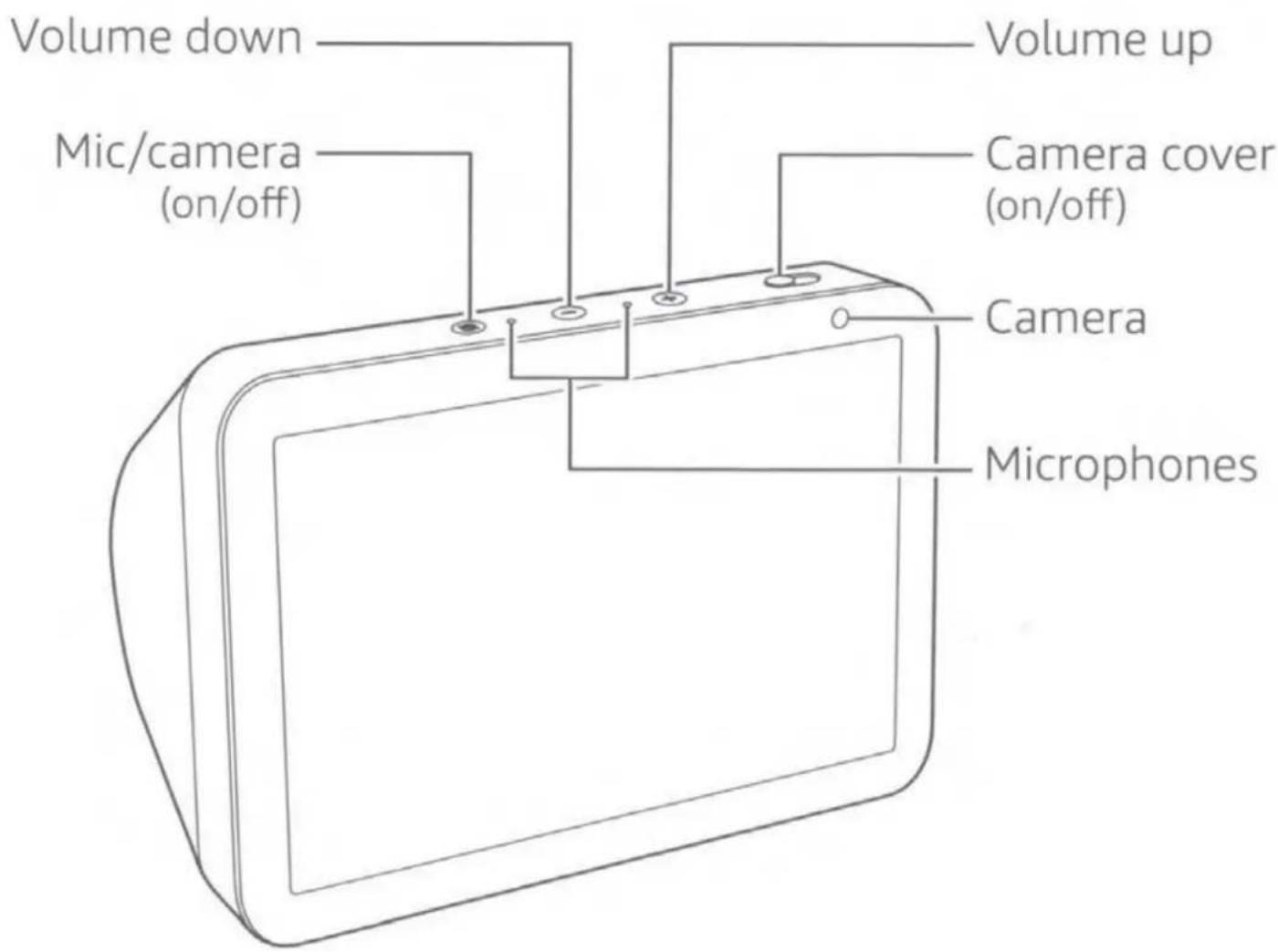
Also included: Power adapter
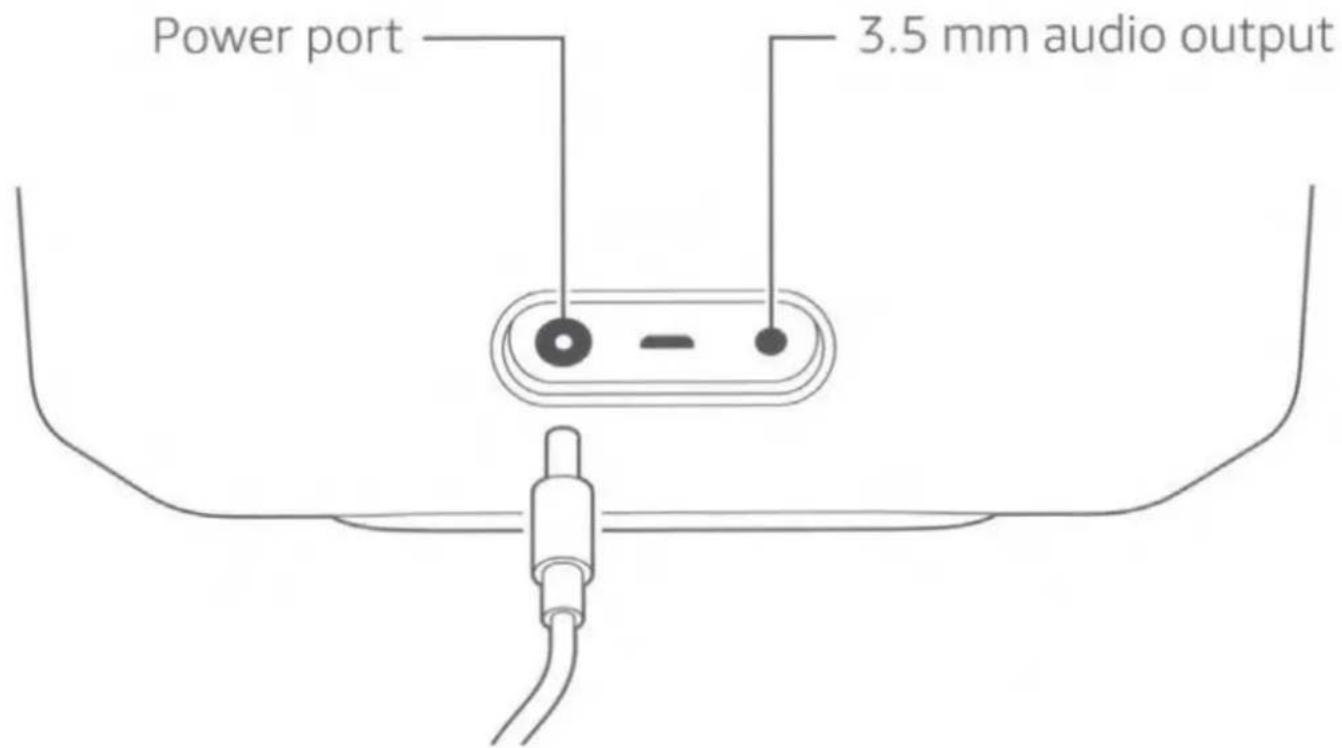
1. Plug in your Echo Show 8
Plug your Echo Show 8 into an outlet using the included power adapter. In about a minute, the display will turn on and Alexa will greet you.
2. Set up your Echo Show 8
Follow the on-screen instruction to set up your Echo Show 8. During setup, you will connect your Echo Show 8 to the internet so you can access Amazon services. Please make sure you have your Wi-Fi password.
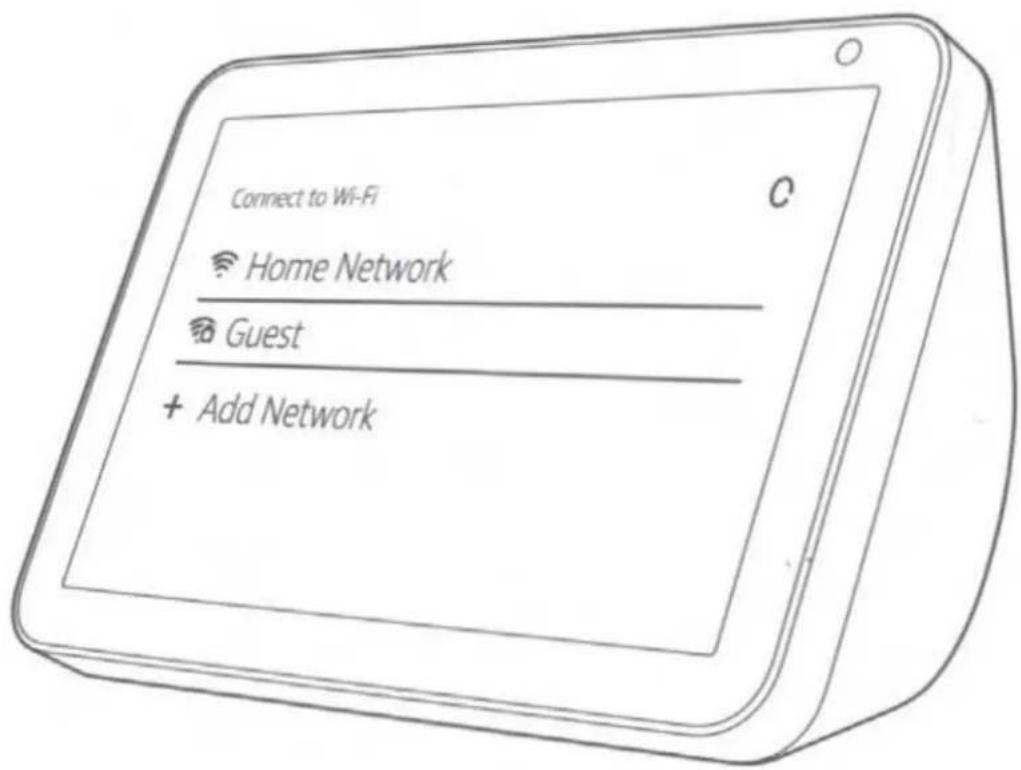
For help and troubleshooting, go to Help & Feedback in the Alexa app or visit www.amazon.com/devicesupport.
3. Getting started with your Echo Show 8
Interacting with your Echo Show 8
- To power your Echo Show 8 on and off, press and hold the mic/camera button.
• To turn off the microphones and camera, press and release the mic/camera button. The LED will turn red.
• To cover the camera, slide the built-in shutter. - You can use your Echo Show 8 via voice commands or using the touchscreen.
To change your settings
To access Settings, swipe down from the top of the screen, or say, "Alexa, show Settings."
To access your shortcuts, swipe left from the right side of the screen.
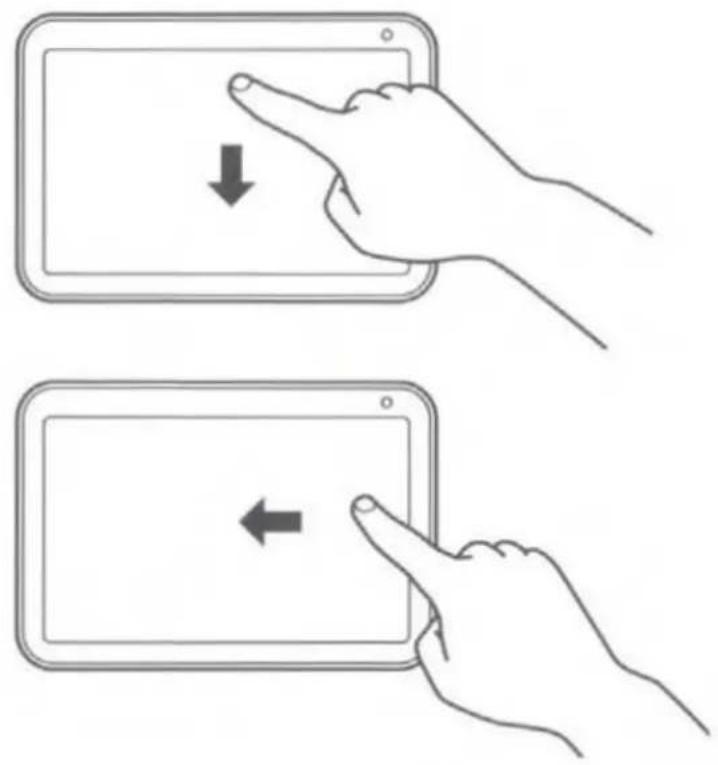
natural_image
Illustration of two hand gestures interacting with a tablet device, showing left and right movement (no text or symbols)Using the Amazon Alexa app
The Alexa app helps you get more out of your Echo Show 8. It's where you see an overview of your requests and manage your contacts, lists, news, music, and settings.
Download and install the latest version of the app from the app store.
Designed to protect your privacy
Amazon designs Alexa and Echo devices with multiple layers of privacy protection. From microphone and camera controls to the ability to view and delete your voice recordings, you have transparency and control over your Alexa experience. To learn more about how Amazon protects your privacy, visit amazon.com/alexaprivacy.
Give us your feedback
Alexa will improve over time, with new features and ways to get things done. We want to hear about your experiences. Use the Alexa app to send us feedback or visit www.amazon.com/devicesupport.
Important Product Information
Safety Information

FAILURE TO FOLLOW THESE SAFETY INSTRUCTIONS COULD RESULT IN FIRE, ELECTRIC SHOCK, OR OTHER INJURY OR DAMAGE.
Do not expose your device or adapter to liquids. If your device or adapter gets wet, carefully unplug all cables without getting your hands wet and wait for the device and adapter to dry completely before plugging them in again. Do not attempt to dry your device or adapter with an external heat source, such as a microwave oven or a hair dryer. If the device or adapter appear damaged, discontinue use immediately. Use only accessories supplied with the device to power your device. To avoid risk of electric shock, do not touch your device or any wires connected to your device during a lightning storm.
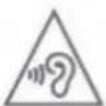
AVOID PROLONGED LISTENING AT HIGH VOLUME. Prolonged listening of the player at high volume can damage the ear of the user. To prevent possible hearing damage, users should not listen at high volume levels for long periods.
Recycling Your Device Properly
In some areas, the disposal of certain electronic devices is regulated. Make sure you dispose of or recycle your device in accordance with your local laws and regulations. For Information about recycling your device, go to www.amazon.com/devicesupport.
Additional Safety & Compliance Information
Additional safety, compliance, recycling and other important information regarding your device can be found in the Alexa app in Help & Feedback > Legal & Compliance.
Amazon Terms & Policies
Echo Show 8 is an Alexa device. Before using it, please read all applicable terms, rules, policies and usage provisions found in the Alexa app in Help & Feedback > Legal & Compliance and available at www.amazon.com/devicesupport (collectively, the "Agreements").
By using your Echo device, you agree to be bound by the Agreements.
Limited Warranty
Your new or Certified Refurbished Echo Show 8 is covered by a 1-year Limited Warranty, detailed in the Alexa app in Help & Feedback > Legal & Compliance and at www.amazon.com/devicesupport.
Product Specifications
Model Number: C7H6N3 Electrical Rating: 18V = MAX 1.67A Temperature Rating: 0–35°C
FCC Compliance
This device complies with part 15 of the FCC Rules. Operation is subject to the following two conditions:
(1) This device may not cause harmful interference, and
(2) This device must accept any interference received, including interference that may cause undesired operation.
The party responsible for FCC compliance is Amazon.com Services, Inc. 410 Terry Ave. North, Seattle, WA 98109 USA.
If you wish to contact Amazon visit www.amazon.com/devicesupport, select United States, click Help & Troubleshooting, then scroll to the bottom of the page and under the Talk to an Associate option, click on Contact Us.
Device Name: Echo Show 8 Model: C7H6N3
©2019 Amazon.com, Inc. or its affiliates. Amazon, Alexa, Echo, Echo Show, and all related logos and motion marks are trademarks of Amazon.com, Inc. or its affiliates.
Things to try with your Echo Show 8
Watch TV shows, movies, videos and photos
Alexa, start watching The Grand Tour.
Alexa, show my photos from Hawaii.
Enjoy your favorite music and audio books
Alexa, play a rock music playlist.
Alexa, resume my audiobook.
Get answers to your questions
Alexa, how tall is Mt. Everest?
Alexa, what can you do?
Get news, podcasts, weather, and sports
Alexa, tell me the news.
Alexa, show me the weekend weather forecast.
Voice control your smart home
Alexa, show the front door camera.
Alexa, turn off the lamp.
Stay connected
Alexa, video call with Mom.
Alexa, drop in on the family room.
Some features may require customization in the Alexa app, a separate subscription, or an additional compatible smart home device.
For more examples, select Things to Try from the Alexa app menu, or visit amazon.com/askAlexa.

22-001848-01
- Getting to know your Echo Show 8
- Plug in your Echo Show 8
- Set up your Echo Show 8
- Getting started with your Echo Show 8
- Interacting with your Echo Show 8
- To change your settings
- Using the Amazon Alexa app
- Designed to protect your privacy
- Give us your feedback
- Important Product Information
- Safety Information
- Recycling Your Device Properly
- Additional Safety & Compliance Information
- Amazon Terms & Policies
- Limited Warranty
- Product Specifications
- FCC Compliance
- Things to try with your Echo Show 8
Brand : AMAZON
Model : Echo Show 8
Category : Pregnant