
One - Smartphone ONEPLUS - Free user manual and instructions
Find the device manual for free One ONEPLUS in PDF.


| Product Type | Smartphone |
| Brand | OnePlus |
| Model | One |
| Dimensions | 152.9 x 75.9 x 8.9 mm (6.02 x 2.99 x 0.35 in) |
| Weight | 162 g (5.71 oz) |
| Display | 5.5-inch LTPS IPS with Touch-on-Lens, 1080p Full HD (1920 x 1080), 401 PPI, Gorilla Glass 3 |
| Operating System | CyanogenMod 11S |
| Processor | Qualcomm Snapdragon 801 (quad-core 2.5 GHz) |
| RAM | 3 GB |
| Storage | 16 GB / 64 GB (non-expandable) |
| Rear Camera | 13 MP Sony Exmor IMX214 with dual-LED flash |
| Front Camera | 5 MP distortion-free |
| Battery | 3100 mAh embedded rechargeable Lithium-Polymer (non-removable) |
| Charging | Micro USB 2.0, 5V/2A charger |
| SIM Card | Micro-SIM (unlocked) |
| Connectivity | 2G: GSM 850/900/1800/1900; 3G: HSDPA 850/900/1700/1900/2100; 4G: LTE bands 1/3/4/7/17/38/40 |
| Audio | Bottom-facing dual speakers, 3.5mm headphone jack, tri-microphone with noise cancellation |
| Sensors | Accelerometer, gyroscope, proximity, compass, ambient light |
| Maintenance | Clean with soft, dry cloth. Avoid liquids and abrasive cleaners. |
| Safety | Use only OnePlus approved charger and cable. Do not expose to water or extreme temperatures. |
| Spare Parts & Repairability | Battery and screen replacement by authorized service. SIM tray removable with ejector pin. |
Frequently Asked Questions - One ONEPLUS
User questions about One ONEPLUS
0 question about this device. Answer the ones you know or ask your own.
Ask a new question about this device
Download the instructions for your Smartphone in PDF format for free! Find your manual One - ONEPLUS and take your electronic device back in hand. On this page are published all the documents necessary for the use of your device. One by ONEPLUS.
USER MANUAL One ONEPLUS

QUICK START
GUIDE
Thank You ♥
The OnePlus One you are holding is the culmination of the strong support our community has given us — one that you are part of.
If you encounter any issues with your OnePlus One, please contact us at oneplus.net/support.
What's in the box?
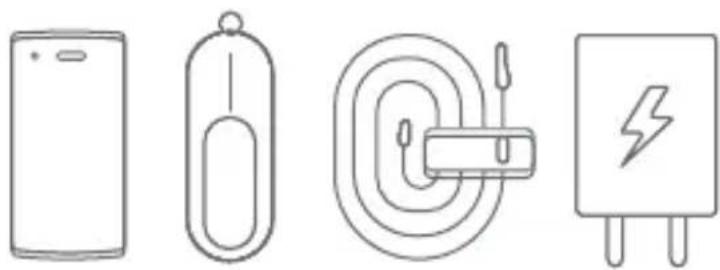

1 x OnePlus One
1 x SIM ejector pin
1 x USB data & charging cable
1 x Charger
1 x Nano SIM card tray
1 x User manual
Technical Specifications
SystemSystem
Operating system: CyanogenMod 11S
Connectivity
SIM card: Micro-SIM
2G: GSM 850 / 900 / 1800 / 1900
3G: HSDPA 850 / 900 / 1700 / 1900 / 2100 (WCDMA 1/2/4/5/8)
4G: LTE 700 / 1700 / 1800 / 2100 / 2300 / 2600 (Bands 1/3/4/7/17/38/40)
Body
Dimensions: 152.9 x 75.9 x 8.9mm (6.02 x 2.99 x 0.35in)
Weight: 162g (5.71oz)
Display
Type: LTPS IPS with TOL (Touch-on-Lens), manufactured by JDI
Size: 1080p Full HD (1920 x 1080 pixels), 401 PPI
Glass: Gorilla Glass 3
Camera
13 Megapixel - Sony Exmor IMX 214
Dual-LED flash
5 Megapixel distortion free front-facing camera
Sound
Bottom Facing Dual Speakers
Tri-microphone with noise cancellation
Battery
Embedded rechargeable 3100 mAh Lithium-Polimer (LiPo) battery
Ports
Data & charging: Micro USB 2.0
Audio: 3.5mm 4-pin jack with microphone and remote control contacts

Ready? Here we go.
Power
Turn on your OnePlus One by pressing and holding the

Charging
Refuel the built-in battery from a power outlet with your OnePlus One charger. Note that if your battery is completely drained, it may require a few minutes of charging before your device can power on.

Hardware Buttons
Tips on using the Navigation Buttons:
Press-and-hold


- QUICK START
- GUIDE
- THANK YOU ♥
- WHAT'S IN THE BOX
- TECHNICAL SPECIFICATIONS
- CAMERA
- SOUND
- BATTERY
- PORTS
- READY? HERE WE GO
- CHARGING
- HARDWARE BUTTONS
- LAUNCHER
- SIM CARD
- MAKING A CALL
- MESSAGING
- CAMERA & PHOTOS
- GALLERY
- SET UP E-MAIL & ACCOUNTS
- OTHER E-MAIL (IMAP/EXCHANGE)
- ADDING ADDITIONAL E-MAIL ACCOUNTS
- NOTIFICATIONS & STATUS BAR
- PLAY STORE
- SETTINGS
Brand : ONEPLUS
Model : One
Category : Smartphone