
GameSir T1d - Joystick DJI - Free user manual and instructions
Find the device manual for free GameSir T1d DJI in PDF.


| Product Type | Joystick Controller |
| Brand | DJI |
| Model | GameSir T1d |
| Compatibility | DJI Tello, Ryze Tech Tello, and other compatible drones |
| Dimensions | 150 x 100 x 50 mm (5.9 x 3.9 x 2.0 in) |
| Weight | 200 g (7.1 oz) |
| Battery Type | Built-in Lithium-ion rechargeable battery |
| Battery Capacity | 1000 mAh |
| Battery Life | Up to 8 hours continuous use |
| Charging Time | Approximately 2 hours |
| Connectivity | Bluetooth 5.0 |
| Operating Range | Up to 10 m (33 ft) |
| Number of Buttons | 10 programmable buttons + 2 analog joysticks |
| Joystick Type | Hall effect sensing for precision |
| Special Features | Ergonomic design, programmable macro buttons, low latency |
| Maintenance and Cleaning | Wipe with a soft, dry cloth. Avoid liquids and abrasive cleaners. |
| Safety Warnings | Do not expose to water or extreme temperatures. Keep away from children. |
| Spare Parts Availability | Replacement parts available from official service centers |
| Repairability | Moderate; recommended to contact authorized repair services |
Frequently Asked Questions - GameSir T1d DJI
User questions about GameSir T1d DJI
0 question about this device. Answer the ones you know or ask your own.
Ask a new question about this device
Download the instructions for your Joystick in PDF format for free! Find your manual GameSir T1d - DJI and take your electronic device back in hand. On this page are published all the documents necessary for the use of your device. GameSir T1d by DJI.
USER MANUAL GameSir T1d DJI
Bluetooth controller
Operating Manual
I. Product Introduction
Bluetooth controller T1d, support Bluetooth 4.0 wireless connection. It is suitable for Android devices (version 4.3 or above) and Apple devices (system version iOS8.0 or above). This product fully intelligent and automatically identifies various models of equipment, no need to manually set Android or iOS mode, connect and play.
II. Product Parameters
| Name of the product | Bluetooth controller T1d |
| Model of product | T1d |
| Supporting platform | Android, iOS |
| Bluetooth | Bluetooth 4.0 |
| Battery type | 600mAh, polymer lithium battery |
| Input | 5V-1A |
| Packaging size | 185*180*80mm |
| Product size | 162*101*67mm |
III. Concept of Controller
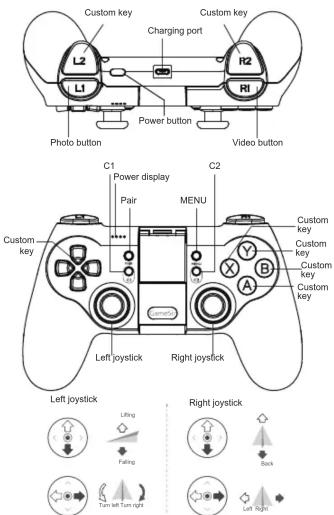
Note: The factory default setting of the controller is the "America hand". The left joystick control the height and the direction, the right joystick control the forward, backward, and left direction of the flight.
IV. Function Description
- Turn on and connect the controller
1) Short press the button to turn on, if it starts successfully, the ABXY button of the controller will be always on.
2) Power display LED flickers slowly; Enter the Bluetooth mode directly to wait for the APP connection;
3) Enter the flight control APP to connect the controller;
4) After connecting, the power display LED is always on and show the quantity of electricity.
5) If the controller has been connected to other phones, press the "Pair" button of the controller to force the controller to enter the state of waiting match.
2. Turn-off
1) Long press the power button for 3-5 seconds, shut down the controller, turn off all the LED lights;
3. Automatic turn-off
1) The controller is in connecting state, if it is idle for more than 5 minutes, the controller will turn off automatically.
2) The controller is in disconnecting state (waiting for connection), if no connection for 2 minutes, the controller will turn off automatically.
4. Check the power
After the controller connected successfully, the LED lamp will show current power information.
The LED lamp group shows the proportion: Fully bright is about 75% to 100%; 3 lights are about 50% to 75%; 2 lights are about 25% to 50%; 1 light is about 1% to 25%
5. Low battery alarm
-
When the available power is lower than the low power alarm voltage, the LED light group lasts double flash;
-
When the available power is lower than the battery protection voltage, the controller will turn off automatically.
6. Battery charging
1) LED lights 1-4 flicker slowly during charging;
2) When the charge is over (full), the LED light group is always on; Disconnect the charging cable after charging.
7. Reset
Press the pinhole on the back of the controller quickly with the paperclip, to force the entire controller to power off once, and reboot.
8. Firmware upgrading(OTA)
Connect the controller through the mobile phone APP Bluetooth, to process OTA upgrade. Support Android 4.3 +, iOS8.0 + system; App download address: www.gamesirhk/t1d
1) After entering the upgrade mode, the LED keeps on Lantern Dance, and waits for the upgrade.
2) After the upgrade is completed, turn off the machine and restart it automatically.
※Troubleshoot
-
When you can't start the machine, Maybe the built-in battery is out of power. Please recharge the controller with the USB line and start up again.
-
If the controller crashed or dropped please don't keep it far away from the device, or reconnect.
-
Factory setting (reset): There is a small hole on the back of the controller, press it down with a toothpick or other hard bar object, press RESET key to restore the factory setting.
※Product notes
- Avoid strong vibration, don't disassemble, refit, repair by yourself.
- Avoid storing in humid, high temperature, fumes and other places
- Avoid the water or other liquids entering the inside of the controller, it may affect the controller function.
- There are batteries inside, do not drop the controller into the fire, there is a danger of explosion.
-
The charging voltage of this product is USB 3.7-5.5V DC power supply (ordinary Android mobile phone charging power can be used directly), otherwise it may not be able to charge or cause damage.
-
Children need to use this product in the custody of an adult.
- If there is a quality problem or suggestion, please contact the seller or after sales personnel, and see the contact information on the outer packing.
Chicken Run, all rights reserved, version: 2018v1.0
※I IMPORTANT SAFETY INSTRUCTIONS
For all products:
-
Read these instructions.
-
Keep these instructions.
3.Heed all warnings.
- Follow all instructions.
5.Do not use this apparatus near water.
-
Clean only with a dry doth.
-
Do not block any ventilation openings. Install this apparatus in accordance with the manufacturer^ instructions.
-
Do not install this apparatus near any heat sources such as radiators, heat registers, stoves or other apparatus (including amplifiers) that produce heat.
-
Do not defeat the satiety purpose of the polarized or grounding-type plug. A polarized plug has two blades with one wider than the other. A grounding-type plug has two blades and a third grounding prong. The wide blade or the third prong is provided for your safety. If the provided plug does not fit into your outlet, consult an electrician for replacement of the obsolete outlet.
-
Protect the power cord from being walked on or pinched, particularly at plugs, convenience receptacles and the point where they exit from the apparatus.
-
Use only attachments/accessories specified by the manufacturer.
-
Use only with the cart, stand, tripod, bracket or table
specified by the manufacturer or sold with the apparatus. When a cart is used, use caution when moving the cart/apparatus combination to avoid injury from tip-over.
-
Unplug this apparatus during lightning storms or when unused for long periods of time.
-
Refer all servicing to qualified service personnel. Servicing is required when the apparatus has been damaged in any way, such as when the power-supply cord or plug is damaged, liquid has been spilled or objects have fallen into the apparatus, or the apparatus has been exposed to rain or moisture, does not operate normally or has been dropped.
-
Do not expose this apparatus to dripping or splashing, and ensure that no objects filled with liquids, such as vases, are placed on the apparatus.
-
To disconnect this apparatus from the AC mains completely, disconnect the power-supply cord plug from the AC receptacle.
-
The mains plug of the power-supply cord shall remain readily operable.
- Do not expose batteries to excessive heat such as sunshine, fire or the like.
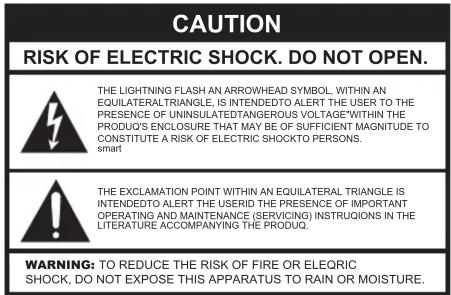
CAUTION FCC AND IC STATEMENT FOR USERS (USA AND CANADA ONLY)
This device complies with part 15 of the FCC Rules. Operation is subject to the following two conditions: (1) This device may not cause interference; and (2) This device must accept any interference, including interference that may cause undesired operation of the device.
CAN ICES-3(B)/NMB-3(B)
Federal Communication Commission Interference Statement
This equipment has been tested and found to comply with the limits for a Class B digital device, pursuant to Part 15 of the FCC Rules. These limits are designed to provide reasonable protection against harmful interference in a residential installation. This equipment generates, uses and can radiate radio frequency energy and, if not installed and used in aaordance with the instructions, may cause harmful interference to radio communications. However, there is no guarantee that interference will not occur in a particular installation. If this equipment does ause harmliil interference to radio or television reception, which can be determined by turning the equipment off and on, the user is encouraged to try to correct the interference by one or more of the following measures:
- Reorient or relocate the receiving antenna.
- Increase the separation between the equipment and receiver.
- Connect the equipment into an outlet on a circuit different from that to which the receiver is connected.
- Consult the dealer or an experienced radio/TV technician for help.
Caution: Changes or modifications not expressly approved by the party responsible for compliance could void the user's authority to operate the equipment.
For Products That Transmit RF Energy:
IC INFORMATION FOR USERS
There are no restrictions in use in EU
WARNING
DO NOT INGEST BAHERY, CHEMICAL BURN HAZARD [The remote control supplied with] This product contains a coin/button cell battery. If the coin/button cell battery is swallowed, it can cause severe internal burns in just 2 hours and can lead to death. Keep new and used batteries away from children. If the battery compartment does not dose securely, stop using the product and keep it away from children. If you think batteries might have been swallowed or placed inside any part of the body, seek Immediate medical attention.
For All Products Except Those with Wireless Operation:
GuangZhou Chicken Run Network Technology Co,Ltd.Hereby declares that this equipment is in compliance with the EMC 2014/30/EU Dirertive, LVD 2014/35/EU Dirertive,ErP 2012/27/EU Directive and RoHS 2011/65/EU Directive. The declaration of conformity may be consulted in the support section of our Web site, accessible from www.gamesir.hk
For All Products with Wireless Operation:
GuangZhou Chicken Run Network Technology Co,Ltd. hereby declares that this equipment is in compliance with the essential requirements and other relevant provisions of Directive 2014/53/EU,ErP 2012/27/EU Directive and RoHS 2011/65/EU Directive The declaration of conformity may be consulted in the support section of our Web site, accessible from www.gamesir.hk

FCC&IC Statement:
This device complies with Part 15 of the FCC Rules. Operation is subject to the following two conditions: (1) this device may not cause harmful interference, and (2) this device must accept any interference received, including interference that may cause undesired operation. CAN ICES-3(B) / NMB-3(B)
- Bluetooth controller
- Operating Manual
- Product Introduction
- Function Description
- Turn-off
- Automatic turn-off
- Check the power
- Low battery alarm
- Battery charging
- Reset
- Firmware upgrading(OTA)
- ※Troubleshoot
- ※Product notes
- ※I IMPORTANT SAFETY INSTRUCTIONS
- For all products:
- CAUTION FCC AND IC STATEMENT FOR USERS (USA AND CANADA ONLY)
- CAN ICES-3(B)/NMB-3(B)
- Federal Communication Commission Interference Statement
- For Products That Transmit RF Energy:
- IC INFORMATION FOR USERS
- WARNING
- For All Products Except Those with Wireless Operation:
- For All Products with Wireless Operation:
- FCC&IC Statement:
Brand : DJI
Model : GameSir T1d
Category : Joystick