
MyAir - Air purifier BISSELL - Free user manual and instructions
Find the device manual for free MyAir BISSELL in PDF.


| Brand | Bissell |
| Model | MyAir |
| Product Type | Personal Air Purifier |
| Fan Speeds | Low, High, Sleep |
| Timer Settings | 1 hour, 4 hours, 8 hours |
| Night Light | Yes, on/off button |
| Filter Replacement Indicator | Flashing button; press and hold to reset after replacing filter |
| Recommended Filter Replacement Interval | Every 3 months |
| Control Panel | Buttons for fan speed, timer, night light, filter reset |
| Power Source | AC, polarized plug (120V typical) |
| Usage | Indoor household use only |
| Safety Features | Polarized plug, automatic shut-off when tipped? (Not specified), do not use in damp locations |
| Warranty | Limited 1-year warranty from date of purchase |
| Certifications | Not specified, likely ETL or UL listed |
| Maintenance | Wipe exterior with dry cloth; do not immerse in water |
Frequently Asked Questions - MyAir BISSELL
User questions about MyAir BISSELL
0 question about this device. Answer the ones you know or ask your own.
Ask a new question about this device
Download the instructions for your Air purifier in PDF format for free! Find your manual MyAir - BISSELL and take your electronic device back in hand. On this page are published all the documents necessary for the use of your device. MyAir by BISSELL.
USER MANUAL MyAir BISSELL
natural_image
Interior scene with a white air purifier labeled 'myair' and a cat on a window, no visible text or symbols.Safety Instructions

WARNING: TO REDUCE THE RISK OF FIRE, ELECTRIC SHOCK OR INJURY:
Use indoors only.
Do not use for any purpose other than described in this user guide.
Use only manufacturer's recommended accessories.
Do not use with damaged cord or plug.
If appliance is not working as it should, or has been dropped, damaged, left outdoors, or dropped into water, have it repaired at an authorized service center.
Do not move or carry by cord, use cord as a handle, close a door on cord, or pull cord around sharp corners. Keep cord away from heated surfaces.
Do not run cord under carpeting. Do not cover cord with throw rugs, runners or similar coverings. Do not route cord under furniture or appliances. Arrange cord away from traffic areas so it will not be tripped over.
Do not unplug by pulling cord. To unplug, grasp the plug, not the cord.
Do not handle plug or appliance with wet hands.
Do not put any object into openings. Do not use with any opening blocked; keep openings free of dust, lint, hair and anything that may reduce airflow.
Keep hair, loose clothing and fingers away from openings.
Turn OFF device controls before unplugging the appliance.
Do not use appliance in an enclosed space filled with vapors given off by oil-based paint, paint thinner, moth-proofing substances, flammable dust or other explosive or toxic vapors.
Keep appliance on a level surface.
Do not immerse the unit in waters or other liquids, do not pour liquids into or around the unit or openings.
Do not use the appliance near water or in a damp or wet location.
This appliance has a polarized plug (one blade is wider than the other). To reduce the risk of electric shock, this plug is intended to fit in a polarized outlet only one way. If the plug does not fit fully in the outlet, reverse the plug. If it still does not fit, contact a qualified electrician. Do not attempt to defeat this safety feature.
Do not use the appliance with any dimmer switch or solid state speed control device.
Read & Save These Instructions

WARNING
This model is for household use only.
Plastic fi Im can be dangerous. To avoid danger of suff ocation, keep away from children.
Do not plug in your air purifi er UNTIL you are familiar with all instructions and operating procedures.
To reduce the risk of electrical shock, turn power switch OFF and disconnect polarized plug from electrical outlet BEFORE performing maintenance or troubleshooting checks.
Initial Use
Step 1
Remove the air purifier from its box.
Step 2
Remove both the plastic bag from the air purifier and the protective plastic bag from the filter.
Step 3
Plug in and power on your new MyAir personal air purifi er!
Need Some Help?
For more support and information, please visit BISSELLair.com
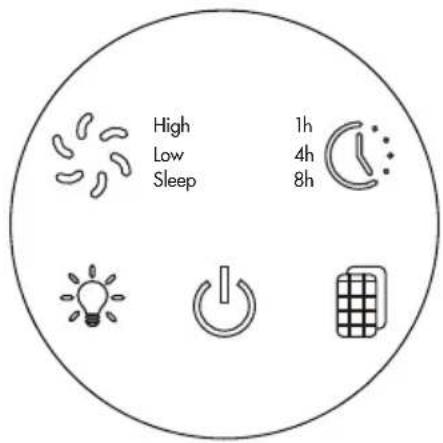

Fan Speed Settings
Press Fan Speed Button to select desired fan speed. Note: When powered ON, MyAir will default to low fan speed.
- Press once to select HIGH
- Press twice to select SLEEP
- Press three times to select LOW

Timer Settings
Press Timer Button to select desired timer option.
- Press once to select 1 hour
- Press twice to select 4 hours
- Press three times to select 8 hours

Night Light Button
Press the Night Light Button to turn the night light ON or OFF. The night light can be turned ON or OFF to contribute to a peaceful sleeping environment.

Filter Reset Button
The Filter Reset Button will fl ash when the fi lter needs to be changed. After replacing the fi lter, press and hold the fi lter reset button until you hear a beep. Once reset, the fi lter reset button will stop fl ashing.
Filter Replacement
For your safety, always turn OFF and unplug your air purifi er before replacing the fi Iter.

- Remove the base of your air purifi er. To unlock and remove the base cover, grip the twist handle and fi rmly turn the base clockwise.

- Remove the base cover to access the fi lter. Remove the dirty fi lter.

- Remove the protective plastic from your new filter.

- Insert the new fi Iter into the air purifi er. Align the locking notches on the base cover to the air purifi er.
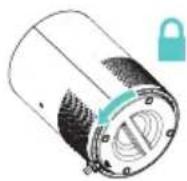
- To lock the base cover back in place, align the locking notches, grip the twist handle, and firmly turn counterclockwise until it clicks into locking place.
NOTE: Filter life varies based on runtime and existing air conditions. It is recommended to replace the filter once every 3 months.
Warranty
This warranty gives you specific legal rights, and you may also have other rights which may vary from state to state. If you need additional instructions regarding this warranty or have questions regarding what it may cover, please contact BISSELL® Consumer Care by E-mail, telephone, or regular mail as described below.
It may be necessary to obtain some of your personal information, such as a mailing address, to fulfil ll terms of this warranty. Any personal data will be handled pursuant to BISSELL's Privacy Policy, which can be found online at www.BISSELL.com/privacy-policy.
Limited One-Year Warranty
Subject to the *EXCEPTIONS AND EXCLUSIONS identified below, upon receipt of the product BISSELL will repair or replace (with new, refurbished, lightly used, or remanufactured components or products), at BISSELL's option, free of charge from the date of purchase by the original purchaser, for one year any defective or malfunctioning part.
See information below on "If your BISSELL product should require service".
This warranty applies to product used for personal, and not commercial or rental service. This warranty does not apply to fans or
routine maintenance components such as filters. Damage or malfunction caused by negligence, abuse, neglect, unauthorized repair, or any other use not in accordance with the user guide is not covered.
BISSELL IS NOT LIABLE FOR INCIDENTAL OR CONSEQUENTIAL DAMAGES OF ANY NATURE ASSOCIATED WITH THE USE OF THIS PRODUCT. BISSELL'S LIABILITY WILL NOT EXCEED THE PURCHASE PRICE OF THE PRODUCT.
Some states do not allow the exclusion or limitation of incidental or consequential damages, so the above limitation or exclusion may not apply to you.
\*EXCEPTIONS AND EXCLUSIONS FROM THE TERMS OF THE LIMITED WARRANTY
THIS WARRANTY IS EXCLUSIVE AND IN LIEU OF ANY OTHER WARRANTIES, EITHER ORAL OR WRITTEN. ANY IMPLIED WARRANTIES WHICH MAY ARISE BY OPERATION OF LAW, INCLUDING THE IMPLIED WARRANTIES OF MERCHANTABILITY AND FITNESS FOR A PARTICULAR PURPOSE, ARE LIMITED TO THE ONE-YEAR DURATION FROM THE DATE OF PURCHASE AS DESCRIBED ABOVE.
Some states do not allow limitations on how long an implied warranty lasts so the above limitation may not apply to you.
NOTE: Please keep your original sales receipt. It provides proof of date of purchase in the event of a warranty claim.
Service
If your BISSELL ^® product should require service:
If you need information about repairs or replacement parts, or if you have any questions about your warranty, contact BISSELL Consumer Care.
Website:
www.BISSELL.com
Email:
www.BISSELL.com/email-us
Call:
BISSELL Consumer Care
US Consumers 1.800.237.7691
Canada Consumers 1.800.263.2535
M-F 8am-10pm ET
Sat 9am-8pm ET
Sun 10am-7pm ET
Please do not return this product to the store.
For any questions or concerns, BISSELL is happy to be of service. Contact us directly at US Consumers 1.800.237.7691 Canada Consumers 1.800.263.2535

natural_image
Interior of a bedroom with a person sleeping at night, featuring a white air purifier and a digital clock on a nightstand (no visible text or symbols)Registering is quick, easy and offers you benefits over the lifetime of your product.
You'll Receive:
• BISSELL * Rewards Points
Automatically earn points for discounts and free shipping on future purchases.
- Faster Service
Supplying your information now saves you time should you need to contact us with questions regarding your product.
• Product Support Reminders and Alerts
We'll contact you with any important product maintenance reminders and alerts.
• Special Promotions
Optional: Register your email to receive notice of offers, contests, cleaning tips and more!
Visit www.BISSELL.com/product-registration
Visit the BISSELL* website: www.BISSELL.com
When contacting BISSELL, have model number of air purifi er available.
Please record your Model Number: ____
Please record your Purchase Date: ____
Note: Please keep your original sales receipt. It provides proof of purchase date in the event of a warranty claim. See the Warranty page for details.
Parts & Supplies
For Parts and Supplies, go to www.BISSELL.com/parts and enter your model number in the search field.
Love your BISSELL product?
Don't keep it a secret. Let us, and millions of others, know what you think! Leave your star-rating on BISSELL.com
www.BISSELL.com

air
©2019 BISSELL Inc.
Grand Rapids, Michigan
All rights reserved. Printed in China.
Part Number 162-0215 03/19 RevG
Visit our website at: www.BISSELL.com

veuillez recycler
Visiting notice site Web: www.BISSELL.ca
Please no.162-0215 Rev. 03/19 Rev6
Tous droils reserves. limprime en Chinie.
Grand Rapids, Michigan
©2019 BISSELL INC.


WWM.BISSELL.com
natural_image
Interior scene with a person in protective clothing near a wall-mounted air purifier and a digital thermometer, under blue lighting (no visible text or symbols)Panneau de commande
natural_image
Interior scene with a white air purifier unit and a metallic display cabinet, featuring a cat emerging from the wall (no visible text or symbols)mir mir

- Safety Instructions
- WARNING: TO REDUCE THE RISK OF FIRE, ELECTRIC SHOCK OR INJURY:
- Read & Save These Instructions
- WARNING
- Initial Use
- Step 1
- Step 2
- Step 3
- Need Some Help?
- Fan Speed Settings
- Timer Settings
- Night Light Button
- Filter Reset Button
- Filter Replacement
- Warranty
- Limited One-Year Warranty
- \*EXCEPTIONS AND EXCLUSIONS FROM THE TERMS OF THE LIMITED WARRANTY
- Service
- Website:
- Email:
- Call:
- Please do not return this product to the store.
- You'll Receive:
- Parts & Supplies
- Love your BISSELL product?
- WWM.BISSELL.com
- mir mir
Brand : BISSELL
Model : MyAir
Category : Air purifier