
RMCE-BT2 - Bluetooth Receiver SHURE - Free user manual and instructions
Find the device manual for free RMCE-BT2 SHURE in PDF.


| Product Type | Bluetooth Receiver |
| Brand | Shure |
| Model | RMCE-BT2 |
| Category | Bluetooth Earphones Receiver |
| Bluetooth Version | 5.0 |
| Supported Codecs | aptX, aptX HD, aptX Low Latency, SBC, AAC |
| Operating Frequency | 2402 MHz – 2480 MHz |
| RF Power (EU) | +7.45 dBm (E.I.R.P.) |
| Antenna Type | Chip |
| Antenna Gain | +1.6 dBi |
| Remote Controls | Center button, Volume up/down buttons |
| Power On/Off | Press and hold center button to power on; press and hold 5 seconds to power off |
| Playback Control | Click center for play/pause; press and hold + for next track, - for previous track (3 seconds) |
| Call Control | Click center to answer/end call; press and hold 3 seconds to decline call |
| Voice Assistant | Press and hold center button (3 seconds) when phone is on |
| Battery Indicator | Red LED indicates low battery; press and hold + and - together for 3 seconds to check status |
| Charging Method | USB cable (supplied) |
| Charging Temperature | 10 to 45 °C (50 to 113 °F) |
| Pairing Method | Turn off earphones; press and hold center button until LED flashes blue/red; select 'Shure BT2' from device |
| Factory Reset | Turn off earphones, plug into charger; press and hold center button for 15 seconds until earphones turn off |
| Compatibility | Bluetooth-enabled audio sources |
| Ear Sleeves | Removable; replace by twisting and pulling; ensure new sleeve covers barb and nozzle |
| Cleaning | Clean regularly to remove debris and deposits |
| Replacement Parts | Available at www.shure.com/earphones; contact Shure Service and Repair for damaged earpieces |
| Compliance | FCC Part 15, IC RSS-102, CE, Japanese Radio Law |
Frequently Asked Questions - RMCE-BT2 SHURE
User questions about RMCE-BT2 SHURE
0 question about this device. Answer the ones you know or ask your own.
Ask a new question about this device
Download the instructions for your Bluetooth Receiver in PDF format for free! Find your manual RMCE-BT2 - SHURE and take your electronic device back in hand. On this page are published all the documents necessary for the use of your device. RMCE-BT2 by SHURE.
USER MANUAL RMCE-BT2 SHURE
BT2 -- Shure Bluetooth® Earphones
Bluetooth Pairing
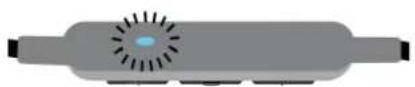
- Turn off the earphones. Press and hold the center button on the earphone remote until the LED flashes blue and red.
- From your audio source, select "Shure BT2."
- When successfully paired, the LED turns blue.
Note: If the pairing fails on the first attempt, repeat the process from the beginning.
For additional pairing methods, please visit http://www.shure.com/earphones (http://www.shure.com/earphones).
The best sound starts with a good fit
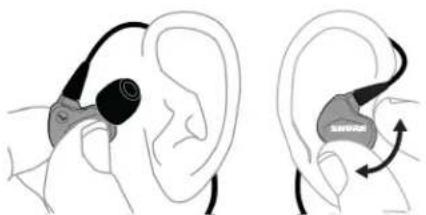
- Select the sleeve that provides a snug fit (like earplugs).
- Secure the cable behind the ear to maintain a tight seal.
To keep them sounding their best...
natural_image
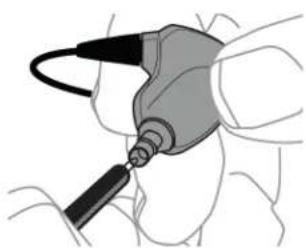
Medical illustration of a surgical instrument in use, showing a needle inserted into tissue (no text or labels)- Clean regularly to remove debris and deposits.
- Contact Shure Service and Repair to replace damaged product. Simply detach and return the broken earpiece for easy replacement.
Changing Sleeves
natural_image
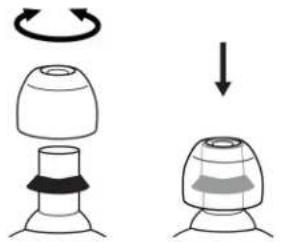
Diagram showing a mechanical component with a rotating arrow and a downward arrow, no text or symbols present.• Gently twist and pull to remove sleeve.
• Install the new sleeve so it completely covers the barb and nozzle.
Visit http://www.shure.com/earphones (http://www.shure.com/earphones) for replacement parts and important instructions on cleaning and maintenance.
Using the Remote
The Center Button
| Power on Press and hold | |
| Power off Press and hold, 5 seconds | |
| Pair Bluetooth Turn off the earphones. Press and hold, 7 seconds | |
| Play/Pause Click once | |
| Answer/End a call Click once | |
| Decline a call Press and hold, 3 seconds | |
| Activate voice assistant Phone on, press and hold, 3 seconds | |
| Factory Reset Turn off the earphones and plug into a charger. Press and hold, 15 seconds. Hold past pairing mode until earphones turn off again. | |
Up and Down Buttons

| Volume Up/Down Click + or - | |
| Next track Press and hold +, 3 seconds | |
| Previous track Press and hold -, 3 seconds | |
| Check battery status Press and hold + and - together, 3 seconds |
Your phone may not be compatible with some functions. Visit http://www.shure.com/earphones (http://www.shure.com/earphones) for more information.
Charging the Earphones
Red LED indicates low battery.
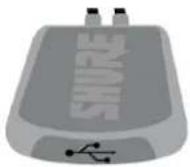
- Connect the earphones to a charging device using the supplied USB cable.
- The LED is red while charging.
- When fully charged, the LED turns off.
Warning: Before charging, make sure the product is at room temperature, between 10 to 45°C (50 to 113°F).
Note: Use this product only with an agency approved power supply which meets local regulatory requirements (e.g., UL, CSA, VDE, CCC, INMETRO).
Specifications
Antenna Information:
- Type = Chip
- Gain = +1.6 dBi
Bluetooth 5:
• Operating frequency = 2402MHz-2480MHz
• Modulation scheme = FHSS
• RF power = +7.45dBm (E.I.R.P.) (for EU)
Supported Codecs:
- aptX™
-
aptX HD
-
aptX Low Latency
• SBC - AAC
Safety Information
Visit http://www.shure.com/earphones (http://www.shure.com/earphones) for the latest regulatory and compliance information.
WARNING
- Follow instructions from manufacturer.
- Product battery may explode or release toxic materials. Risk of fire or burns. Do not open, crush, modify, disassemble, heat above 140^ (60°C), or incinerate.
- Attention should be drawn to the environmental aspects of battery disposal.
- Product shall not be exposed to excessive heat such as sunshine, fire, or the like.
- Do NOT make unauthorized alterations to this product.
Note: Battery replacement to be performed only by Shure authorized service personnel.
CAUTION: Follow applicable laws regarding mobile phone and headphone use while driving.
This product contains magnetic material. Consult your physician on whether this might affect your implantable medical device.

High sound pressure
Hearing damage risk
To prevent possible hearing damage, do not listen at high volume levels for long periods.
Information to the user
This equipment has been tested and found to comply with the limits for a Class B digital device, pursuant to Part 15 of the FCC Rules. These limits are designed to provide reasonable protection against harmful interference in a residential installation. This equipment generates uses and can radiate radio frequency energy and, if not installed and used in accordance with the instructions, may cause harmful interference to radio communications. However, there is no guarantee that interference will not occur in a particular installation. If this equipment does cause harmful interference to radio or television reception, which can be determined by turning the equipment off and on, the user is encouraged to try to correct the interference by one or more of the following measures:
- Reorient or relocate the receiving antenna.
- Increase the separation between the equipment and the receiver.
- Connect the equipment to an outlet on a circuit different from that to which the receiver is connected.
- Consult the dealer or an experienced radio/TV technician for help.
This device complies with Part 15 of the FCC Rules. Operation is subject to the following two conditions: (1) this device may not cause harmful interference, and (2) this device must accept any interference received, including interference that may cause undesired operation.
This equipment complies with IC RSS-102 radiation exposure limits set forth for an uncontrolled environment.
Changes or modifications not expressly approved by the party responsible for compliance could void the user's authority to operate the equipment.
Note: Testing is based on the use of supplied and recommended cable types. The use of other than shielded (screened) cable types may degrade EMC performance.
Japanese Radio Law and Japanese Telecommunications Business Law Compliance. This device is granted pursuant to the Japanese Radio Law (電波法) and the Japanese Telecommunications Business Law (電気通信事業法). This device should not be modified (otherwise the granted designation number will become invalid).

The Bluetooth word mark and logos are registered trademarks owned by the Bluetooth SIG, Inc. and any use of such marks by Shure Incorporated is under license. Other trademarks and trade names are those of their respective owners.
Environmentally friendly disposal

Old electrical appliances must not be disposed of together with the residual waste, but have to be disposed of separately. The disposal at the communal collecting point via private persons is for free. The owner of old appliances is responsible to bring the appliances to these collecting points or to similar collection points. With this little personal effort, you contribute to recycle valuable raw materials and the treatment of toxic substances.
Paraguay Distributor: Microsystems S.R.L., Senador Long 664 c/Dr. Lilio, Asunción, Paraguay
Qualcomm® aptX is a product of Qualcomm Technologies, Inc. and/or its subsidiaries.
Qualcomm is a trademark of Qualcomm Incorporated, registered in the United States and other countries. aptX is a trademark of Qualcomm Technologies International, Ltd., registered in the United States and other countries.
Certifications
This product meets the Essential Requirements of all relevant European directives and is eligible for CE marking.
Hereby, Shure Incorporated declares that the radio equipment is in compliance with Directive 2014/53/EU. The full text of the EU declaration of conformity is available at the following internet address: http://www.shure.com/europe/compliance (http://www.shure.com/europe/compliance)
Authorized European representative:
Shure Europe GmbH
Headquarters Europe, Middle East & Africa
Department: EMEA Approval
Jakob-Dieffenbacher-Str. 12
75031 Eppingen, Germany
Phone: +49-7262-92 49 0
Fax: +49-7262-92 49 11 4
Email: EMEAsupport@shure.de
- BT2 -- Shure Bluetooth® Earphones
- Bluetooth Pairing
- The best sound starts with a good fit
- To keep them sounding their best...
- Changing Sleeves
- Using the Remote
- The Center Button
- Up and Down Buttons
- Charging the Earphones
- Specifications
- Antenna Information:
- Bluetooth 5:
- Supported Codecs:
- Safety Information
- WARNING
- Information to the user
- Environmentally friendly disposal
- Certifications
Brand : SHURE
Model : RMCE-BT2
Category : Bluetooth Receiver