
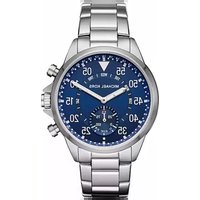
Access Grayson MKT5025 - Smartwatch Michael Kors - Free user manual and instructions
Find the device manual for free Access Grayson MKT5025 Michael Kors in PDF.


| Product Type | Smartwatch |
| Brand | Michael Kors |
| Model | Access Grayson MKT5025 |
| Case Material | Stainless steel |
| Case Diameter | 44 mm |
| Weight | Approx. 67 g |
| Display Type | AMOLED color touchscreen |
| Display Size | 1.2 inches |
| Operating System | Wear OS by Google |
| Processor | Qualcomm Snapdragon Wear 3100 |
| Storage | 4 GB |
| RAM | 512 MB |
| Connectivity | Bluetooth 4.2, Wi-Fi 802.11 b/g/n, NFC |
| GPS | Built-in GPS |
| Sensors | Heart rate, accelerometer, gyroscope, ambient light, barometer |
| Battery Capacity | 310 mAh |
| Battery Life | Up to 24 hours (typical use) |
| Water Resistance | IP67 (splash and dust resistant) |
| Compatibility | Android 4.4+ or iOS 9.3+ |
| Charging Method | Magnetic charging dock |
| Cleaning | Wipe with a soft, dry cloth |
| Maintenance | Keep away from extreme temperatures and magnetic fields |
| Safety | Contains a lithium-ion battery; do not disassemble |
| Repairability | Battery and screen replacement by authorized service only |
Frequently Asked Questions - Access Grayson MKT5025 Michael Kors
User questions about Access Grayson MKT5025 Michael Kors
0 question about this device. Answer the ones you know or ask your own.
Ask a new question about this device
Download the instructions for your Smartwatch in PDF format for free! Find your manual Access Grayson MKT5025 - Michael Kors and take your electronic device back in hand. On this page are published all the documents necessary for the use of your device. Access Grayson MKT5025 by Michael Kors.
USER MANUAL Access Grayson MKT5025 Michael Kors
- Pull the crown out to position 2.
- Turn the crown to set the hour and minute hands to the desired time.
- Return the crown to position 1.

DATE MODELS
Date Setting
- Pull the crown out to position 2.
- Turn the crown either clockwise or counter-clockwise and set the date for the previous day. The direction that moves the date varies on different watch models.

Time Setting
- Pull crown out to position 3.
- Turn counter-clockwise to advance the time and continue until the day changes to the present day.
- Set to the correct time.
- Push crown back to position 1.
AUTOMATIC WINDING MOVEMENTS
A timepiece with an automatic winding movement obtains the power to wind itself by the movement of your wrist, there is no battery. Therefore, not wearing the timepiece for several consecutive days could exhaust the power reserve. If your watch stops, it is recommended that you manually wind the movement by rotating the crown clockwise to achieve the necessary power reserve.
It is important that your timepiece is adjusted to match the size of your wrist. A loose fit may result in a loss in capacity of the timepiece to wind itself. When fully wound, your timepiece has a power reserve of approximately 38 hours.
OPEN HEART TY605
Time Setting
- Pull crown out to position 2.
- Turn crown clockwise to rotate hour and minute hands to desired time.
- Push crown back to position 1.

AUTOMATIC 2505
- To start time-keeping, rotate the crown clockwise 15-20 times in position 1 until power reserve hand moves from "-" low reserve to "+" full reserve. Pull crown out to position 2 and rotate clockwise to set time. Push crown back to position 1.
- Press A to set date. Each press of pusher A will advance the date by one increment. Hand in upper left indicates date and will automatically reset to "1" at the end of a 31-day month. NOTE: Do not set date and week between 10 p.m. and 2 a.m. (22 o'clock and 2 o'clock). Doing so could damage the movement's accuracy.

AUTOMATIC 2525
- To start time-keeping, rotate the crown clockwise 15-20 times in position 1.
- Pull crown out to position 2 and rotate clockwise to set time. Push crown back to position 1.
- Press A to set month.
- Press B to set date.
- Press C to set weekday.
NOTE: Each press of the pushers will advance the values by one increment.
NOTE: Do not set date and week between 10 p.m. and 2 a.m. (22 o'clock and 2 o'clock). Doing so could damage the movement's accuracy.
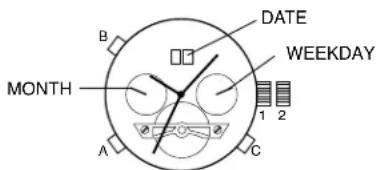
MULTIFUNCTION VX3J
Date Setting
- Pull crown out to position 2.
- Turn clockwise to advance the date hand.
- Push crown back to position 1.
Day and Time Setting
- Pull crown out to position 3.
- Turn clockwise to advance hour and minute hands.
The hand showing days of the week will also move with the hour and minute hands. Keep turning until you have reached the desired day.
24-Hour Sub-Dial Setting
The movement of the 24-hour hand corresponds to the hour and minute hands. When setting the time be sure to check that the 24-hour hand is set properly.

CHRONOGRAPH VD51B
Time/Date Setting
- Before setting the time, make sure the chronograph second and minute hands are at the 12:00 position and the chronograph is not running. See Chronograph Operation instructions below.
- Pull crown out to position 2.
- Rotate crown clockwise until the previous day's date is displayed in date window.
- Pull crown out to position 3 when the second hand is in the 12:00 position. Second hand will stop.
- Rotate crown clockwise to set time.
- Return crown to position 1.
NOTE: Make sure that AM/PM is set correctly. Do not set date between 9:00 p.m. and 1:00 a.m. or day may not change properly.
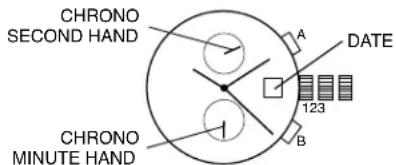
Chronograph Operation
- Press A to start/stop the chronograph.
- Press B to reset.
Split Time
- Press B while the chronograph is running
- Press B again to return to the chronograph.
- Press A to finalize timing.
- Press B to reset.
Chronograph Zero Reset
- Pull crown out to position 3.
- Press A to reset the chronograph second hand to 12:00 (zero) position. Each press advances the chronograph second hand one mark. If A is held down for over 2 seconds, the chronograph second hand advances continuously.
NOTE: Chronograph minute hand moves simultaneously with chronograph second hand.
- Press B to reset the chronograph minute hand. Repeat step 2 instructions.
- Return crown to position 1 when chronograph hands are reset to zero.
CHRONOGRAPH ISA 8172/220
Time/Day Setting
- Pull crown out to position 3.
- Rotate crown to set time.
- To adjust day, continue rotating crown 24 hours until day is correct.
- Return crown to position 1.
Date Setting
- Pull crown out to position 2.
- Rotate crown clockwise until the correct date is shown in the date window.
- Return crown to position 1.
Chronograph Operation
- Press A to start/stop the chronograph.
- Press B to reset.
NOTE: After 2 hours of continuous running, the chronograph will automatically stop and reset to save the battery.

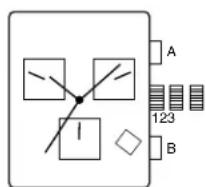
Split Time
- Press B while the chronograph is running.
- Press B again to return to the chronograph.
- Press A to finalize timing.
- Press B to reset.
CHRONOGRAPH STOPWATCH JS25, VD53
Setting the Time
- Pull the crown out to position 3.
- Turn the crown to set hour and minute hands.
- After the time has been set, push the crown back to position 1.
Setting the Date
- Pull the crown out to position 2.
- Turn the crown clockwise to set the date.
- If the date is set between the hours of around 9:00 PM and 1:00 AM, the date may not change on the following day.
- After the date has been set, push the crown back to position 1.
Using the Chronograph
- Press A to start/stop the chronograph.
- Press B to reset the chronograph to zero.
Chronograph Reset (including after replacing the battery)
This procedure should be performed when the stopwatch second or minute hand does not return to the zero position.
- Pull the crown out to position 3.
- Press A to set the chronograph second hand forward. Press B to set the chronograph second hand backward.
• The chronograph minute hand is synchronized with the chronograph second hand.
- The chronograph second hand can be advanced rapidly by continuously pressing A or B.
- Once both hands have been set to zero, reset the time and return the crown to position 1.
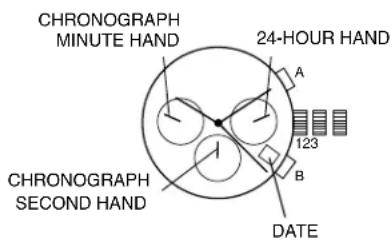
CHRONOGRAPH OS10 (without date: OS30)
Time Setting
- Pull crown out to position 3.
- Turn crown to set the desired time.
- Return crown to position 1.
Date Setting
- Pull crown out to position 2.
- Turn crown clockwise until the correct date is shown in the date window.
- Return crown to position 1.
Chronograph Operation
- Press A to start/stop the chronograph.
- Press B for reset.
Adjusting The Chronograph
- Pull crown to position 3.
- Press A to reset the second hand to "0."
- Press B to reset the chronograph minute and hour hands.
- Reset the watch to the current time and return crown to position 1.

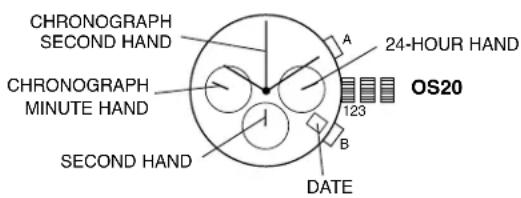
CHRONOGRAPH OS20 / OS21
Time Setting
- Pull crown out to position 3. Chronograph second hand will return to "0." Do not return the crown to position 1 while the hands are returning to "0," or else the position the hands are at when this is done will be recognized as the new "0" position.
- Turn crown to set the desired time.
- Return the crown to position 1.
Date Setting
- Pull crown out to position 2.
- Turn crown counter-clockwise until the correct date is shown in the date window.
- Return crown to position 1.
Chronograph Zero Reset
This procedure should be performed when the chronograph second hand does not return to the "0" position after the chronograph has been reset.
- Pull crown out to position 3.
- Press A to set the chronograph second hand to the "0" position.
NOTE: The hands move quickly if the pushers are kept pressed. - Once the hand has been zeroed, reset the time and return the crown to position 1.
Do not return the crown to position 1 while the hands are returning to "0." Doing so will cause the position of the hands to be recognized as the new "0" position.
Chronograph Operation
This chronograph is able to measure and display time in 1/1 second up to maximum of 1 hour.
- Press A to start/stop the chronograph.
- Press B to reset the chronograph.

CHRONOGRAPH VD57 (without date: VD55)
Time Setting
- Pull crown out to position 3.
- Set time by turning the crown clockwise.
- Push back to position 1 to start the watch.
Using the Stopwatch
- Press A to start/stop the stopwatch.
- Press B to control the split time and reset.
Stopwatch Hand Adjustment
- Pull crown out to position 3.
- Press A to reset the stopwatch 1/10 second hand to the "0" position.
- Press B to reset the second and minute hands. The hands only move clockwise.
- With each press of A or B, the hands move one position. They move quickly if the pushers are held down.
NOTE: If the stopwatch hands function improperly, pull out crown and press A and B at the same time for over 2 seconds. When the pushers are released, the stopwatch second and 1/10 second hands will spin around and return to "0." This will indicate that the internal circuit has been reset.
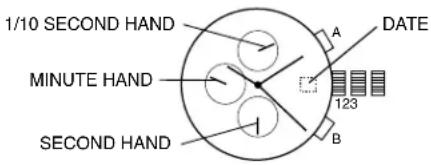
Date Setting (on some models only)
- Pull crown out to position 2.
- Turn clockwise until desired date appears in window.
- Push crown back to position 1.
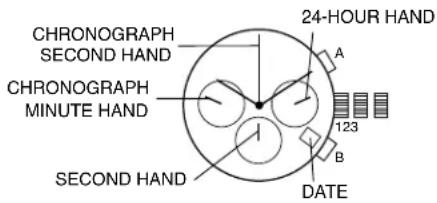
CHRONOGRAPH FS20
Time Setting
- Pull crown out to position 3. Chronograph second hand will return to zero position. Do not return the crown to its normal position while the hands are returning to zero, or else the position the hands are at when this is done will be recognized as the new zero position.
- Turn to set hour, minute and 24 hour hands.
- Return crown to position 1.
Date Setting
- Pull crown out to position 2.
- Turn clockwise to set the date.
- Return crown to position 1.
Chronograph Operation
- Push A to start/stop the chronograph.
- Push B to reset the chronograph.
Chronograph Zero Reset
- Pull crown out to position 3.
- Press A to set the chronograph second hand to 12:00 (zero) position. Each press advances the chronograph second hand one mark. If A is held down for over 2 seconds, the chronograph second hand advances continuously.
- Return crown to position 1.

WORLD TIME MODULE
Time / Date Setting
- Pull Crown B out to position 2 and turn clockwise to set date to the previous day.
- Pull Crown B out to position 3 and turn clockwise until the present date is displayed. Continue turning crown to set the correct a.m./p.m. time.
- Return Crown B to position 1.
NOTE: Do not change the date between 10 p.m. and 2 a.m. This is when the movement in position to carry out the automatic date change. Any interference may cause damage to the movement.
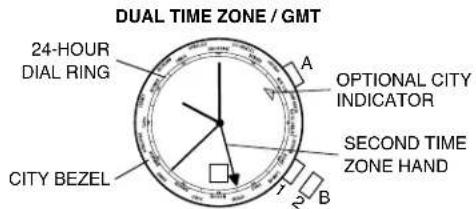
Dual Time Zone / GMT Setting
- Pull Crown B out to position 2 and turn counter-clockwise to set second time zone hand. Second time zone hand is read in military time, indicated on the 24-hour ring on the outer part of the dial. Second time zone hand can be set to indicate Greenwich Mean Time (GMT) or to a second time zone.
- Return Crown B to position 1.
- Optional: Turn Crown A to align the second time zone city on the bezel with the city indicator.
Reading Different World Time Zones
- Turn Crown A to position current city on bezel with current time on the 24-hour ring.
- To locate time elsewhere, read the hour marker on the 24-hour ring corresponding to another city. Time increases if following the ring clockwise; time decreases if following the ring counter-clockwise.
World Time Zone Table
NOTE: The time differences and use of daylight savings time in each city are subject to change according to the governments of the respective countries or regions.
| City Hour Difference | |
| Somoa, Midway Islands | -11 hours |
| Honolulu | -10 hours |
| Anchorage | -9 hours |
| Los Angeles, San Francisco | -8 hours |
| Denver, Edmonton | -7 hours |
| Chicago, Mexico City | -6 hours |
| New York, Washington D.C., Montreal | -5 hours |
| Saint Barth, Santiago | -4 hours |
| Rio de Janeiro | -3 hours |
| S. Georgia | -2 hours |
| Azores | -1 hour |
| London, Casablanca | 0 hour |
| Paris, Rome, Amsterdam | +1 hour |
| Athens, Cairo, Istanbul | +2 hours |
| Moscow, Jeddah, Mecca, Nairobi | +3 hours |
| Dubai | +4 hours |
| Karachi, Tashkent | +5 hours |
| Dhaka | +6 hours |
| Bangkok, Jakarta | +7 hours |
| Hong Kong, Manila, Beijing, Singapore | +8 hours |
| Tokyo, Seoul, Pyongyang | +9 hours |
| Sydney, Guam, Khabarovsk | +10 hours |
| Noumea, Solomon Islands | +11 hours |
| Auckland, Wellington, Fiji Islands | +12 hours |


ANA-DIGI
Normal Time Display
- In regular time display mode, press pusher A to toggle between 12/24-hour format.
- Press pusher B to view date mode.
Time and Calendar Setting
- Press and hold pusher A for 2 seconds to enter setting mode. Year will begin flashing.
- Press pusher A to select year, month, date, hour, minute, second, and then exit setting mode.
- Press pusher B to adjust digit.
- Press and hold pusher B to adjust digit automatically.
- If no pushers are operated for 30 seconds, setting will be returned to Normal Time Display.
Chronograph
- Press pusher B to select chronograph mode.
- Press pusher A to start/stop the chronograph.
- Press and hold pusher B for one second to reset.
Alarm Setting
- Press pusher B to enter alarm mode.
- Press pusher A for chime/alarm on/off.
- Press and hold pusher A for 2 seconds to enter setting mode. Hour will begin flashing.
- Press pusher A to select hour and minute.
- Press pusher B to adjust digit.
- Press and hold pusher B to adjust digit automatically.
- Any change in the alarm time will enable the alarm automatically.
- If no pushers are operated for 30 seconds, setting will be returned to Normal Time Display.
Off Mode
Press pusher B four times to display off mode from time mode.

10 HALF DIGIT ANA-DIGI CY2072 / CY2073 / CY2074
Time Mode
- Press pusher A to change from mode to mode.
- Press and release pusher B to activate EL.
- EL can remain on as long as pusher B is pressed down.
12/24 HR Mode
From Time Mode, press pusher C to toggle from 12 HR time to 24 HR time.

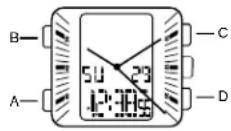
Time Setting
- From Time Mode, press pusher A three times, then press pusher D to enter Time Setting Mode. "Seconds" digit will begin to flash.
- Press pusher C to reset seconds to "00".
- Press pusher D to toggle to desired setting digit, and press pusher C to adjust hour, minute, date, and day.
- After setting, press pusher A to return to Time Mode.
Alarm Mode
- From Time Mode, press pusher A one time to enter Alarm Mode, then press pusher C to turn Alarm ON/OFF.
- From Alarm Mode, press pusher D to enter Alarm Setting Mode."Hour" digit will begin to flash.
- Press pusher D to toggle to the desired setting digit, and press pusher C to adjust hour and minute.
- After setting, press pusher A to return to Time Mode.
Alarm and Hourly Chime Mode
From Alarm Mode, press pusher C to choose Alarm ON, Chime ON, Alarm and Chime ON, or Alarm and Chime OFF.
Chronograph Mode
Elapsed Time Measurement
- From Time Mode, press pusher A two times to enter Chronograph Mode, then press pusher D to reset Chronograph.
- Press pusher C to Start/Stop Chronograph.
Split Time Measurement
- To measure a split time, press pusher D while Chronograph is timing.
- Press pusher D to return to return to Chronograph measurement display.
- Press pusher C to repeat Start/Stop of split time measurement.
- Press pusher D to finalize the split time display while the Chronograph is in Split Stop function.
- Press pusher D to reset Chronograph.
- Chronograph has resolution up to 23HR:59M:59S. Once this measurement is reached, the Chronograph will reset and continue timing from "00:00:00."
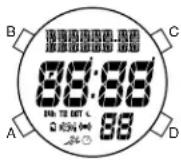
WORLD TIME MODULE
Normal Time Display
- Press pusher B for EL.
- Press pusher C for hourly chime on/off.
- Press pusher D for DST on/off for the selected city.
- In any mode or setting, if no pusher is operated for 60 seconds, setting will be returned to normal time display.
Time and Calendar Mode
- Press and hold pusher B for 2 seconds to enter setting mode. 12/24 hour time will begin flashing.
- Press pusher C to select 12/24 hour time.
- Press pusher A to select and change seconds, minute, hour, year, month, day and city.
- Press pusher C to increase the digit; press pusher D to decrease the digit.
- Press pusher B to exit setting mode.
World Time Mode
- Press pusher A to select world time mode.
- Press pusher C to select city.
- Press pusher D for DST on/off for the selected city.
| Words City Hour Difference | Words City Hour Difference | ||||
| MDY | Midway | -11 hours | PAR | Paris | +1 hour |
| HNL | Honolulu | -10 hours | CAI | Cairo | +2 hours |
| ANC | Anchorage | -9 hours | MOW | Moscow | +3 hours |
| LAX | Los Angeles | -8 hours | DXB | Dubai | +4 hours |
| DEN | Denver | -7 hours | KHI | Karachi | +5 hours |
| CHI | Chicago | -6 hours | DAC | Dacca | +6 hours |
| NYC | New York | -5 hours | BKK | Bangkok | +7 hours |
| CCS | Caracas | -4 hours | HKG | Hong Kong | +8 hours |
| RIO | Rio de Janeiro | -3 hours | TYO | Tokyo | +9 hours |
| -2H | -2H | -2 hours | SYD | Sydney | +10 hours |
| -1H | -1H | -1 hour | NOU | Noumea | +11 hours |
| LON | London | 0 hours | AKL | Auckland | +12 hours |


Alarm Setting (3 alarms)
- Press pusher A to select alarm mode.
- Press pusher C to scroll through alarms.
- Press pusher D for alarm on/off.
- Press and hold pusher B for 2 seconds to enter setting mode. Minutes will begin flashing.
- Press pusher A to select minutes and hour.
- Press pusher C to increase the digit; press pusher D to decrease the digit. Alarm is automatically turned on when setting is changed.
- Press pusher B to exit setting mode.
Chronograph Mode
- Press pusher A to select chronograph mode (STW).
- Press pusher C to start chronograph; press pusher D to stop chronograph.
- Press pusher D to reset chronograph when it is not running.
Lap Counting
- Press pusher C while chronograph is running (will record up to 20 laps).
- Press pusher D to finalize timing.
- Press pusher A to recall laps (TOT) when information is recorded in the chronograph (will recall up to 20 laps).
- Press pusher C to view next lap; press pusher D to view previous lap.
- Enter regular chronograph mode; press pusher D to reset to zero.
Countdown Timer
- Press pusher A to select timer mode.
- Press pusher C to start/stop the timer.
- Press pusher D to reset timer when it is not running. Timer will show all zero's before timer is started again.
- Press and hold pusher B for 2 seconds to enter setting mode. Seconds will begin flashing.
- Press pusher A to select seconds, minutes and hour.
- Press pusher C to increase digit; press pusher D to decrease digit.
- Press pusher B to exit setting mode.
DIGITAL X1
Normal Time Display
- Press A to change mode. Mode sequence is alarm, countdown timer, and chronograph.
- Press and hold A 3 seconds to toggle auto EL on/off.
- Press B for EL.
- Press C to toggle hourly chime on/off.
- Press D to flash time zone 2. Press and hold D 3 seconds to toggle normal time display/time zone 2.
NOTE: In any mode, press and hold C 3 seconds to change to chronograph mode.
NOTE: At any point in any setting mode, press B to exit setting mode.
NOTE: In any setting mode, if no pusher is operated for 30 seconds, all changes will be saved and the setting will automatically return to display mode.
Time and Calendar Setting
- In normal time display, press and hold B 3 seconds; hour will begin flashing.
- Press C to increase digit; press D to decrease digit. Press and hold C or D for fast increment/decrement.
- Press A to set and advance to next setting value.
- Repeat steps 2 and 3 through setting sequence. Setting sequence is: hour, minute, second, year, month, date, 12/24-hour format, month/date or date/month format.
- Press B to exit setting mode.
- To set Time Zone 2, press and hold D 3 seconds to change to Time Zone 2. Then use steps 1-5 to set.
NOTE: Weekday is automatically updated upon exiting setting mode.
Recall Mode
- Press A to change to recall mode.
NOTE: If no data is stored, display will show NO DATA. If data is saved, display will show the current set (1-9). - Press C to toggle through set data: total time, best time, average time, and each lap (up to 100 laps).
- Press D to display current set; press D again to scroll to next set.
- Press and hold D 3 seconds to delete all stored data in the current set.
NOTE: At any point in recall displays, press A to exit and change to alarm mode.
Alarm Mode
-
Press A to change to alarm mode.
-
Press C to toggle alarm on/off.
-
Press D to toggle alarm 1/alarm 2.
Alarm Setting
- In alarm mode, press and hold B 3 seconds; hour will begin flashing.
- Press C to increase digit; press D to decrease digit. Press and hold C or D for fast increment/decrement.
- Press A to set and advance to next setting value.
- Repeat steps 2 and 3 through setting sequence. Setting sequence is: hour, minute, time zone 1/time zone 2.
- Press B to exit setting mode.
NOTE: Alarm will sound for 20 seconds. Press any pusher to silence alarm.
Countdown Timer
- Press A to change to timer mode. Default setting is 5 minutes.
- Press C to start timer; press D to stop the timer.
- Press and hold D 3 seconds to clear the countdown and reset the timer.
NOTE: Alarm will sound for 20 seconds when countdown reaches zero. Press any pusher to silence alarm.
Timer Setting
- In timer mode, press and hold B 3 seconds to enter setting mode; hour will begin flashing.
- Press C to increase digit; press D to decrease digit. Press and hold C or D for fast increment/decrement.
- Press A to set and advance to next setting value.
- Repeat steps 2 and 3 through setting sequence. Setting sequence is: hour, minute, seconds.
- Press B to exit setting mode.
Chronograph Mode
- In any mode, press and hold C 3 seconds to change to chronograph mode.
- Press C to start the chronograph; press D to stop the chronograph.
- Press and hold D 3 seconds to reset to zero.
Lap Counting
- Press C while the chronograph is running for lap reading.
NOTE: If no other pusher is pressed after C is pressed, display will automatically show total chronograph time after 5 seconds, then next lap running time after another 5 seconds. - Press B to return to chronograph next lap (up to 100 laps).
- Press D to stop chronograph.
- Press and hold B 3 seconds to save set data, or press and hold D 3 seconds to reset to zero. NOTE: Upon saving, display will show next empty set available (1-9) or MEMORY FULL. Change to Recall Mode to scroll through saved data.
USE PRECAUTIONS - RESISTANCE TO WATER
| Water Resistance Water-Related Use | |||||
| Caseback Marking | Depth |  |  — — |  |  |
| Washing Hands Shower, Bathing Swimming, Snorkeling Scuba Diving | |||||
| — | — | X | X | X | X |
| WR | — | √ | X | X | X |
| 3 ATM | 3 Bar, 30 Meters | √ | X | X | X |
| 5 ATM | 5 Bar, 50 Meters | √ | √ | X | X |
| 10 ATM | 10 Bar, 100 Meters | √ | √ | √ | X |
| 20 ATM | 20 Bar, 200 Meters | √ | √ | √ | √ |
| 30 ATM | 30 Bar, 300 Meters | √ | √ | √ | √ |
| 50 ATM | 50 Bar, 500 Meters | √ | √ | √ | √ |
| Always set the crown in closed position (the normal position). Tighten screw-lock crown completely. | |||||
• To ensure water resistance, exposure to hot water is not recommended.
- Clean your watch with a soft cloth and water only. Do not submerge your watch under water unless it is water rated (see caseback).
• After salt water use, rinse watch under tap water and wipe dry with a soft cloth.
- Metal watch bands should be washed periodically to keep them looking beautiful. Clean with a soft brush dipped in mild, soapy water. Be sure to wipe dry thoroughly with a soft cloth.


- DATE MODELS
- DATE SETTING
- TIME SETTING
- AUTOMATIC WINDING MOVEMENTS
- OPEN HEART TY605
- AUTOMATIC 2505
- AUTOMATIC 2525
- MULTIFUNCTION VX3J
- DAY AND TIME SETTING
- 24-HOUR SUB-DIAL SETTING
- CHRONOGRAPH VD51B
- TIME/DATE SETTING
- CHRONOGRAPH OPERATION
- SPLIT TIME
- CHRONOGRAPH ZERO RESET
- CHRONOGRAPH ISA 8172/220
- TIME/DAY SETTING
- CHRONOGRAPH STOPWATCH JS25, VD53
- SETTING THE TIME
- SETTING THE DATE
- USING THE CHRONOGRAPH
- CHRONOGRAPH RESET (INCLUDING AFTER REPLACING THE BATTERY)
- CHRONOGRAPH OS10 (WITHOUT DATE: OS30)
- ADJUSTING THE CHRONOGRAPH
- CHRONOGRAPH OS20 / OS21
- CHRONOGRAPH VD57 (WITHOUT DATE: VD55)
- USING THE STOPWATCH
- STOPWATCH HAND ADJUSTMENT
- DATE SETTING (ON SOME MODELS ONLY)
- CHRONOGRAPH FS20
- WORLD TIME MODULE
- TIME / DATE SETTING
- DUAL TIME ZONE / GMT SETTING
- READING DIFFERENT WORLD TIME ZONES
- WORLD TIME ZONE TABLE
- ANA-DIGI
- NORMAL TIME DISPLAY
- TIME AND CALENDAR SETTING
- CHRONOGRAPH
- ALARM SETTING
- OFF MODE
- 10 HALF DIGIT ANA-DIGI CY2072 / CY2073 / CY2074
- TIME MODE
- 12/24 HR MODE
- ALARM MODE
- ALARM AND HOURLY CHIME MODE
- CHRONOGRAPH MODE
- SPLIT TIME MEASUREMENT
- TIME AND CALENDAR MODE
- WORLD TIME MODE
- ALARM SETTING (3 ALARMS)
- LAP COUNTING
- COUNTDOWN TIMER
- DIGITAL X1
- RECALL MODE
- TIMER SETTING
Brand : Michael Kors
Model : Access Grayson MKT5025
Category : Smartwatch