PVA 4210 - Loudspeaker Vogel's - Free user manual and instructions
Find the device manual for free PVA 4210 Vogel's in PDF.


| Product Type | Speaker |
| Brand | Vogel's |
| Model | PVA 4210 |
| Dimensions (W x H x D) | 200 x 150 x 120 mm |
| Weight | 1.5 kg |
| Color | Black |
| Power Output | 20 W RMS |
| Frequency Range | 80 Hz - 20 kHz |
| Impedance | 8 ohms |
| Connectivity | Bluetooth 5.0, Aux-in 3.5 mm |
| Battery Life | 10 hours |
| Charging | USB-C, 5V/1A |
| Material | ABS plastic with fabric grille |
| Included Accessories | USB-C cable, 3.5mm audio cable |
| Water Resistance | IPX4 |
| Warranty | 2 years |
| Compatible Devices | Smartphones, tablets, laptops |
| Controls | Touch buttons: volume, play/pause, skip |
| Package Contents | Speaker, USB-C cable, audio cable, manual |
Frequently Asked Questions - PVA 4210 Vogel's
User questions about PVA 4210 Vogel's
0 question about this device. Answer the ones you know or ask your own.
Ask a new question about this device
Download the instructions for your Loudspeaker in PDF format for free! Find your manual PVA 4210 - Vogel's and take your electronic device back in hand. On this page are published all the documents necessary for the use of your device. PVA 4210 by Vogel's.
USER MANUAL PVA 4210 Vogel's
D, Fr, NL, Es, It : www.vogels.com/professional
Manual PVA 4206, PVA 4210, PVA 4216 video conferencing loudspeaker Version 1.0
natural_image
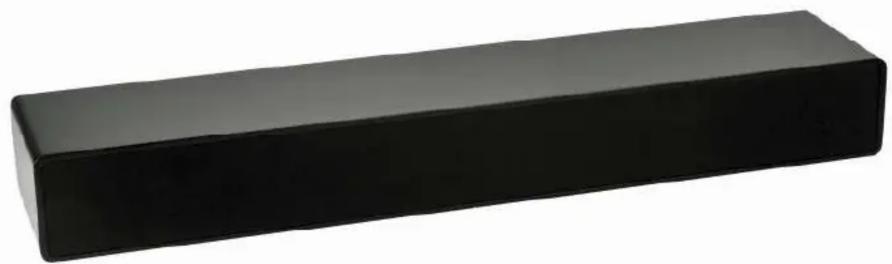
Black rectangular object with rounded ends, resembling a stylized tool or block (no text or symbols visible)PVA 4206, PVA 4210, PVA 4216 video conferencing loudspeaker with RS 232/485 communication
The PVA 4206, PVA 4210, PVA 4216 loudspeaker is especially designed for video conferencing. The built in amplifier has a RS 232/485 communication feature which makes remote control and operation possible. This can be in combination with other video conferencing equipment.
Made in The Netherlands
Vogel's Products BV
NL 5628DB Eindhoven
www.vogels.com
Vogel's Holding BV 2012 © all rights reserved.
Subject to printing errors and technical amendments.

Content
- 1x PVA 4206 OR PVA 4210 OR PVA 4216 loudspeaker
- 1x manual
- 1x 18V - 2,22A power supply unit
- 1x Stereo audio cable (cinch – jack3.5)
- 4x Anti skid pads
Connecting PVA 4206, PVA 4210, PVA 4216
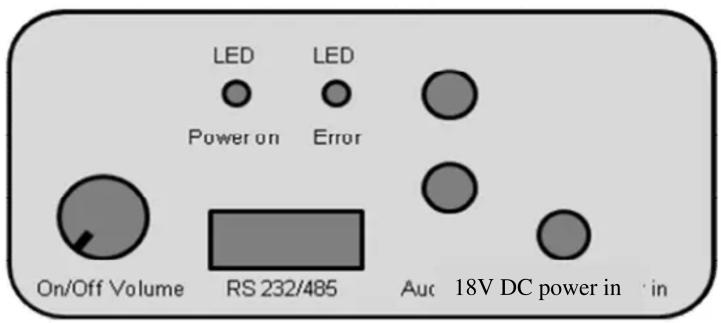
• Only use the supplied power supply.
- First connect the loudspeaker to the audio source with the supplied audio cable.
- Then connect the 18V plug from the power supply.
- Only then plug the power supply into a mains source.
Manualoperation:
- Switching on and volume up: turn volume knob right, clockwise.
- Switching off and volume down: turn volume knob left, counter clockwise.
- The amplifier will not switch on immediately after turning the volume knob, it will wait till the green LED has flashed once. This is part of the power saving function.
- When the amplifier is switched on the green and red LED will flash once. After that the green LED will stay on.
- When the amplifier is switched off, the green LED will flash every 3-4 seconds as stand-by indication. This is also the RS232/485 monitor moment.
RS232/RS485operation:
- When the amplifier is switched on (green LED on), it will scan the RS232 and RS485 ports on activity.
- When the amplifier detects activity on one of the ports it will switch to this port. The other port will be ignored as long as power is on.
- Scanning of the ports will be resumed only when the power is switched off and on again.
- When the amplifier is RS232 / RS485 operated, the position of the volume knob will be ignored.
- When the amplifier is switched off via the RS232 / RS485 ports is will scan these ports every 3-4 seconds on new activities.
RS232 / RS485 Protocol:
• The amplifier is operated by readable ascii commands.
• These commands can, as example, be send and viewed by a terminal emulation program.
○ Baudrate: 9600
○ 8 Bits (8n1)
• The operation is based on the Basic Control Structure (BCS) Protocol of AMX/Crestron/Extron/Neets.
Supporting BCS commands:
- BCS commands are used as much as possible, however for some functions there exist no BCS codes, for these functions dedicated * commandos are used.
| Command Command Response | Protocol | ||
| Volume control COVA ^^^^ T COVA ^^^^ T BCS | |||
| Volume status request SOVAT SOVAT( ^^^^ ) BCS | |||
| Switch off COVMT COVMT BCS | |||
| Switch on COVUT COVUT | BCS | ||
| Status request | SOST | SOST B15 | |
| Put amplifier in potentiometer mode | COPT | COPT | B15 |
• ^^^ Volume in dB (value -100 tot 0) 0 is maximum amplification.
- At -100 the amplifier will be switched in stand-by.
- When no value is set, value 0 will be used (attention this is max. volume)
Status replies:
| Answer | Meaning |
| Ok | Everythinh working okay |
| E | Amplifier IC is giving an error signal. |
| W | Amplifier IC is giving a Warning signal. |
| EW | Amplifier IC is giving both an Error and a Warning signal. |
Connections data connector:
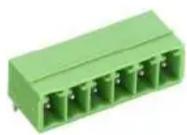
| Pin Number | Pin 1 (Left) | Pin2 | Pin3 | Pin4 | Pin5 (Right) |
| Amplifier function | GND | RS232 TX | RS232 RX | RS485 + Non inverting | RS485 – Inverting |
| Function Host (PC) | GND | Receive data | Tansmit Data | ||
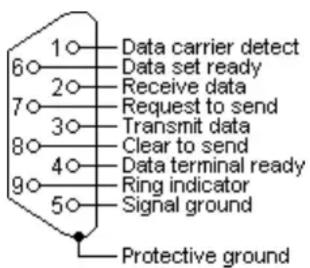
| SubD9 RS232 | Pin 5 | Pin 2 | Pin 3 | NVT | NVT |
| SubD9 RS485 | Pin 5 | NVT | NVT | Pin 1 | Pin 2 |
RS232 SubD 9 pinout (pin connector male/front view):
RS485 SubD 9 pinout:
Attention the RS485 pinout for SubD9 is not standardized. It is important to check documentation of the RS485 interface before connecting.
Recommended is an UT-850 USB-RS485 cable, this has SubD9 pinout connections as in the diagram:
RS-485/RS-422 output signal and pin assignment
| DB9 (PIN) | Output Signal | RS-422 All full-Duplex | RS-485 Half full-Duplex |
| 1 | T/R+ | Transmit (A+) | RS-485 (A+) |
| 2 | T/R- | Transmit (B-) | RS-485 (B-) |
| 3 | RXD+ | Receive (A+) | Empty |
| 4 | RXD- | Receive (B-) | Empty |
| 5 | GND | GND | GND |
| 6 | N/A | ||
| 7 | N/A | ||
| 8 | N/A | ||
| 9 | N/A |
Specifications PVA 4206:
Type of amplifier: Class D
Output power: 2 x 20 Watt
Frequency range: 40-20000 Hz
Filtersystem: acoustic (Patent)
Loudspeaker system: 1½ weg basreflex
Audio input: stereo cinch
Operating voltage:
Input: 100-240 Volt, 50/60 Hz, 1,0A
Output: 18V, 2.22A, 40W Max
Weight: 2.6 kg
Specifications PVA 4210:
Type of amplifier: Class D
Output power: 2 x 20 Watt
Frequency range: 40-20000 Hz
Filtersystem: acoustic (Patent)
Loudspeaker system: 1½ weg basreflex
Audio input: stereo cinch
Operating voltage:
Input: 100-240 Volt, 50/60 Hz, 1,0A
Output: 18V, 2.22A, 40W Max
Weight: 3.3 kg
Specifications PVA 4216:
Type of amplifier: Class D
Output power: 2 x 20 Watt
Frequency range: 40-20000 Hz
Filtersystem: acoustic (Patent)
Loudspeaker system: 1½ weg basreflex
Audio input: stereo cinch
Operating voltage:
Input: 100-240 Volt, 50/60 Hz, 1,0A
Output: 18V, 2.22A, 40W Max
Weight: 6 kg
- PVA 4206, PVA 4210, PVA 4216 video conferencing loudspeaker with RS 232/485 communication
- Content
- Connecting PVA 4206, PVA 4210, PVA 4216
- Manualoperation:
- RS232/RS485operation:
- RS232 / RS485 Protocol:
- Supporting BCS commands:
- Status replies:
- Connections data connector:
- RS232 SubD 9 pinout (pin connector male/front view):
- RS485 SubD 9 pinout:
- Specifications PVA 4206:
- Specifications PVA 4210:
- Specifications PVA 4216:
Brand : Vogel's
Model : PVA 4210
Category : Loudspeaker