
DualShock 4 Controller - Game controller SONY - Free user manual and instructions
Find the device manual for free DualShock 4 Controller SONY in PDF.


| Product Type | Wireless Controller for PlayStation 4 |
| Brand | Sony |
| Model | DualShock 4 Wireless Controller |
| Connectivity | Wireless (Bluetooth) and wired via USB |
| Input Power | DC 5V, 800 mA |
| Battery Type | Built-in rechargeable Lithium-Ion |
| Battery Voltage | DC 3.65 V |
| Battery Capacity | 1000 mAh |
| Operating Temperature | 5°C – 35°C |
| Mass | Approx. 210 g |
| Country of Production | China |
| Supplied Items | Wireless Controller (1), Instruction manual (1). USB cable not included. |
| Guarantee | 12 months from date of purchase |
| Vibration | Yes, can be turned off via settings |
| Light Bar | Yes, multi-colored, indicates player assignment |
| Touchpad | Yes, clickable touchpad |
| Motion Sensors | Six-axis (gyroscope and accelerometer) |
| Speaker | Built-in mono speaker |
| Headset Jack | 3.5 mm stereo headset jack |
| Charging | Via USB cable to PS4 system, computer, or USB charger |
| Pairing | Required with PS4 system using USB cable on first use |
| Maintenance | Clean with soft dry cloth; do not use solvents or chemical wipes |
| Storage Conditions | Keep away from high temperatures, humidity, and direct sunlight |
| Safety Warnings | Take breaks every hour; avoid high headphone volume; keep away from small children |
Frequently Asked Questions - DualShock 4 Controller SONY
User questions about DualShock 4 Controller SONY
0 question about this device. Answer the ones you know or ask your own.
Ask a new question about this device
Download the instructions for your Game controller in PDF format for free! Find your manual DualShock 4 Controller - SONY and take your electronic device back in hand. On this page are published all the documents necessary for the use of your device. DualShock 4 Controller by SONY.
USER MANUAL DualShock 4 Controller SONY
DUALSHOCK®4 Wireless Controller Instruction Manual
Before use
Carefully read this manual and any manuals for compatible hardware. Retain instructions for future reference.
Always update your system to the latest version of the system software.
Precautions
Safety
Avoid prolonged use of this product. Take a 15-minute break during each hour of play.
Stop using this product immediately if you begin to feel tired or if you experience discomfort or pain in your hands or arms during use. If the condition persists, consult a doctor.
If you experience any of the following health problems, discontinue use of the system immediately. If symptoms persist, consult a doctor.
Dizziness, nausea, fatigue or symptoms similar to motion sickness.
Discomfort or pain in a part of the body, such as eyes, ears, hands or arms.
The product is intended for use with the hands only. Do not bring it into close contact with your head, face, or the bones of any other part of the body.
The vibration function of this product can aggravate injuries. Do not use the vibration function if you have any ailment or injury to the bones, joints, or muscles of your hands or arms. You can turn on or turn off the vibration function from ⚙️(Settings) on the function screen.
Permanent hearing loss may occur if the headset or headphones are used at high volume. Set the volume to a safe level. Over time, increasingly loud audio may start to sound normal but can actually be damaging your hearing. If you experience ringing or any discomfort in your ears or muffled speech, stop listening and have your hearing checked. The louder the volume, the sooner your hearing could be affected. To protect your hearing:
Limit the amount of time you use the headset or headphones at high volume.
Avoid raising the volume to block out noisy surroundings.
Lower the volume if you can't hear people speaking near you.
Avoid looking into the light bar of the controller when it is flashing. Stop using the controller immediately if you experience any discomfort or pain in any body parts.
Keep the product out of the reach of small children. Young children might damage the product causing it to malfunction, swallow small parts, wrap the cables around themselves or accidentally injure themselves or others.
Use and handling
When using the controller, be aware of the following points.
Before use, make sure that there is plenty of space around you.
Firmly grip your controller to prevent it from slipping out of your grasp and causing damage or injury.
When using your controller with a USB cable, ensure that the cable cannot hit a person or any object, and do not pull the cable out of the PlayStation®4 system whilst playing.
Do not allow liquid or small particles to get into the product.
Do not touch the product with wet hands.
Do not throw or drop the product or subject it to strong physical shock.
Do not put heavy objects on the product.
Do not touch the inside of the USB connector or insert foreign objects.
Never disassemble or modify the product.
Exterior protection
Follow the instructions below to help prevent the product exterior from deteriorating or becoming discoloured.
Do not place any rubber or vinyl materials on the product exterior for an extended period of time.
Use a soft, dry cloth to clean the product. Do not use solvents or other chemicals. Do not wipe with a chemically-treated cleaning cloth.
Storage conditions
Do not expose the product to high temperatures, high humidity or direct sunlight.
Do not expose the product to dust, smoke or steam.
Pair your controller
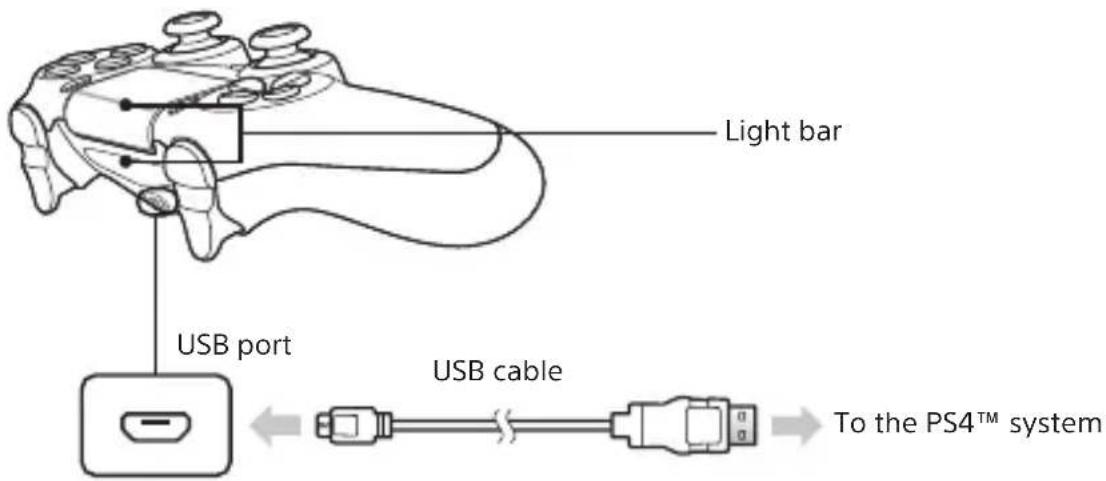
You'll need to pair your controller when you use it for the first time and when you use it with another PS4™ system. Turn on the PS4™ system and connect the controller with the USB cable to complete device pairing.
Hint
When you press the (PS) button, the controller turns on and the light bar glows in your assigned colour. The colour that is assigned depends on the order in which each user presses the PS button. The first controller to connect is blue, with subsequent controllers glowing red, green, and pink.
For details on using the controller, refer to the user's guide of the PS4™ system (http://manuals.playstation.net/document/).
Charging your controller
With the PS4 ^™ system turned on or in rest mode, connect your controller using the USB cable.
Hint
You can also charge your controller by connecting the USB cable to a computer or another USB device. Use a USB cable that complies with the USB standard. You might not be able to charge the controller on some devices.
Battery
Caution – using the built-in battery:
This product contains a lithium-ion rechargeable battery.
Before using this product, read all instructions for handling and charging the battery and follow them carefully.
Take extra care when handling the battery. Misuse can cause fire and burns.
Never attempt to open, crush, heat or set fire to the battery.
Do not leave the battery charging for a prolonged period of time when the product is not in use.
Always dispose of used batteries in accordance with local laws or requirements.
Do not handle the damaged or leaking battery.
If the internal battery fluid leaks, stop using the product immediately and contact technical support for assistance. If the fluid gets on to your clothes, skin or into your eyes, immediately rinse the affected area with clean water and consult your doctor. The battery fluid can cause blindness.
Battery life and duration
The battery has a limited lifespan. Battery charge duration gradually decreases with repeated usage and age. Battery life also varies depending on the storage method, usage state, environment and other factors.
Charge in an environment where the temperature range is between 10 °C - 30 °C. Charging may not be as effective when performed in other environments.
Battery duration may vary depending on the usage condition and environmental factors.
When not in use
When the controller is not used for an extended period of time, it is recommended that you fully charge it at least once a year in order to maintain its functionality.
Specifications
Input power rating DC 5 V, 800 mA
Battery type Built-in rechargeable Lithium-Ion battery
Voltage DC 3.65 V
Battery capacity 1,000 mAh
Operating temperature 5°C - 35°C
Mass Approx. 210 g
Country of Production China
Design and specifications are subject to change without notice.
Supplied items
DUALSHOCK®4 Wireless Controller (1), Instruction manual (this document) (1), A USB cable is not included. To connect or charge the controller, use the USB cable supplied with the PS4™ system.
GUARANTEE
This product is covered for 12 months from date of purchase by the manufacturer's guarantee. Please refer to the guarantee supplied in the PS4 ^TM package for full details.
This product has been manufactured by or on behalf of Sony Interactive Entertainment Inc., 1-7-1 Konan Minato-ku Tokyo, 108-0075 Japan.
Imported into Europe and Distributed by Sony Interactive Entertainment Europe Ltd, 10 Great Marlborough Street, London, W1F 7LP, United Kingdom.
The Authorised Representative for issuing and holding Declarations of Conformity is Sony Belgium, bijkantoor van Sony Europe Limited, Da Vincilaan 7-D1, 1935 Zaventem, Belgium.
For customers in Europe and Turkey.
R&TTE Directive "Informal DoC" statement
Hereby, Sony Interactive Entertainment Inc., declares that this product is in compliance with the essential requirements and other relevant provisions of Directive 1999/5/EC.
For details, please access the following URL: http://www.compliance.sony.de/
natural_image
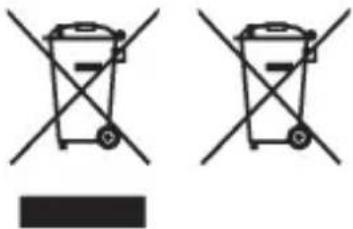
Two identical line-drawn trash bins with diagonal crossbars and a black rectangular base below (no text or symbols)Where you see either symbol on any of our electrical products, batteries or packaging, it indicates that the relevant electrical product or battery should not be disposed of as general household waste in Europe and Turkey. To ensure correct waste treatment, please dispose of them via an authorised collection facility, in accordance with any applicable laws or requirements. Waste electrical products and batteries may also be disposed of free of charge via retailers when buying a new product of the same type. Furthermore, within EU countries larger retailers may accept small waste electronic products free of charge. Please ask your local retailer if this service is available for the products you wish to dispose of. In so doing, you will help to conserve natural resources and improve standards of environmental protection in treatment and disposal of electrical waste.
This symbol may be used on batteries in combination with additional chemical symbols. The chemical symbols for mercury (Hg) or lead (Pb) will appear if the battery contains more than 0.0005% mercury or more than 0.004% lead.
This product contains a battery which is permanently built-in for safety, performance or data integrity reasons. The battery should not need to be replaced during the lifetime of the product and should only be removed by skilled service personnel. To ensure the correct waste treatment of the battery, please dispose of this product as electrical waste.
" ", "PlayStation", "PSA", "DUALSHOCK" and " " are registered trademarks or trademarks of Sony Interactive Entertainment Inc.
"SONY" and "Sony Resources International" are registered trademarks or trademarks of Sony Corporation.

Sony Interactive Entertainment
eu.playstation.com/ps4
- Before use
- Precautions
- Safety
- Use and handling
- Exterior protection
- Storage conditions
- Pair your controller
- Hint
- Charging your controller
- Battery
- Caution – using the built-in battery:
- Battery life and duration
- When not in use
- Specifications
- Supplied items
- GUARANTEE
- For customers in Europe and Turkey.
- R&TTE Directive "Informal DoC" statement
Brand : SONY
Model : DualShock 4 Controller
Category : Game controller