
ER6100 - Uncategorized SEIKO - Free user manual and instructions
Find the device manual for free ER6100 SEIKO in PDF.


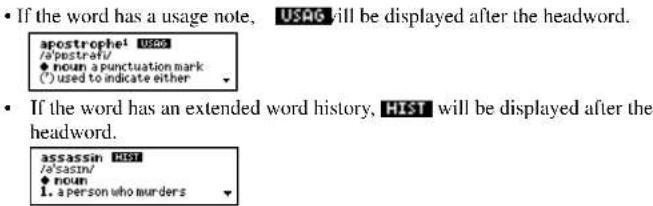
| Product Type | Electronic Dictionary & Thesaurus with Spellchecker |
| Brand | Seiko (Seiko Instruments Inc.) |
| Model | ER6100 |
| Dimensions | 120 mm (W) x 85 mm (H) x 15.8 mm (D) |
| Weight | Approx. 106 g (including batteries) |
| Display | 24 characters x 4 lines LCD |
| Power Source | 2 x CR2032 lithium batteries |
| Battery Life | Approx. 80 hours (continuous use) |
| Automatic Power Off | After approx. 3 minutes of inactivity |
| Main Functions | Dictionary (240,000+ words), Thesaurus (365,000+ synonyms), Spellchecker (130,000+ words), 9 Solvers, 9 Word Games, Easy Learn, Calculator, Converter (Currency, Metric/Imperial, Clothing), Help, Demo |
| Dictionary Source | Concise Oxford English Dictionary 11th Edition (2004) |
| Thesaurus Source | Concise Oxford Thesaurus 2nd Edition (2002) |
| Spellchecker Source | New British English Word List (2004) |
| Warranty | 1 year limited warranty |
| Operating Temperature | 0°C to +40°C (32°F to 104°F) |
Frequently Asked Questions - ER6100 SEIKO
User questions about ER6100 SEIKO
0 question about this device. Answer the ones you know or ask your own.
Ask a new question about this device
Download the instructions for your Uncategorized in PDF format for free! Find your manual ER6100 - SEIKO and take your electronic device back in hand. On this page are published all the documents necessary for the use of your device. ER6100 by SEIKO.
USER MANUAL ER6100 SEIKO
SII ● Seiko Instruments Inc.

natural_image
Abstract grayscale pattern with diagonal streaks and dot textures (no text or symbols)Thank you for purchasing the ER6100.
Please read this operation manual carefully before using the product.
This unit is an Electronic Concise Oxford Dictionary (Eleventh
Edition), with Thesaurus and Spellchecker,
using data from Oxford University Press.
The Concise Oxford Dictionary, the Thesaurus, the Spellchecker, the nine Solvers, nine Word Games and Easy Learn enable you to effortlessly enhance your knowledge of English vocabulary.
The Concise Oxford English Dictionary 11th Edition © Oxford University Press 2004.
The Concise Oxford Thesaurus 2nd Edition © Oxford University Press 2002.
New British English Word List © Oxford University Press 2004.
Additional material © Oxford University Press 2004.
SEIKO is a registered trademark of Seiko Corporation.
SII is a registered trademark of Seiko Instruments Inc.
© 2004 Seiko Instruments Inc.
CE ©N681
EC DECLARATION OF CONFORMITY
This is to certify that this equipment fully conforms to the protection requirements of the following EC Council Directives on the approximation of the laws of the member states relating to:-
Directives Title
89/336/EEC Electromagnetic Compatibility
Applicable Standards
EN55022: 1998 Electromagnetic Compatibility - Emissions (Radiated)
EN55024: 1998 Electromagnetic Compatibility - Immunity (Radiated Susceptibility, ESD)
SEIKO UK Limited SC House, Vanwall Road, Maidenhead, Berks. SL6 4UW U.K.
This equipment has been tested and found to comply with the limits for a Class B digital device, pursuant to Part 15 of the FCC Rules. These limits are designed to provide reasonable protection against harmful interference in a residential installation. This equipment generates, uses and can radiate radio frequency energy and, if not installed and used in accordance with the instructions, may cause harmful interference to radio communications. However, there is no guarantee that interference will not occur in a particular installation. If this equipment does cause harmful interference to radio or television reception, which can be determined by turning the equipment off and on, the user is encouraged to try to correct the interference by one or more of the following measures:
- Reorient or relocate the receiving antenna.
- Increase the separation between the equipment and receiver.
- Connect the equipment into an outlet on a circuit different from that to which the receiver is connected.
- Consult the dealer or an experienced radio/TV technician for help.

Note: this device should be disposed of through your local electronic product recycling system - do not throw away in your domestic rubbish.
CONTENTS
Functions and Features 2
The Keys and their Functions .... 8
Preparation for using the Unit 10
-
Installing Batteries 10
-
Contrast Adjustment ...... 12
-
Demo Function 13
Changing Batteries 14
Dictionary 16
Thesaurus 24
Spellchecker 30
Solvers 34
Crossword Solver 35
Anagram Solver 37
Word Maker 38
Abbreviations 39
Phrase Finder 40
Definition Search 42
Knowledge View 44
Knowledge Find 48
Letter Changer 53
Games 54
Hangman 56
User Hangman 59
Jumble 60
User Jumble 62
Word Building....63
Crossword Quiz 65
Time Bomb 67
Memory 69
Hidden 71
Easy Learn 74
Calculator 80
Converters 82
Setting function 88
Help function 95
Proper Use / Specification 98
ONE YEAR LIMITED WARRANTY 99
Functions and Features
1 Dictionary
High speed search of over 240,000 words, phrases and definitions covering current and historical English, as well as countless specialist and technical subjects.
Dictionary entry words, definitions, and grammatical information come from the Concise Oxford English Dictionary Eleventh Edition.
2 Thesaurus
You can find synonyms for the word you enter.
The unit offers a high speed search of over 4.0 million synonym links. This unit has over 365,000 alternative words and opposite words to make what you write and say more interesting.
The thesaurus entries, including examples, sense groupings, and all alternative and opposite words, are taken from the second edition of the Concise Oxford Thesaurus.
2
3 Spellchecker
Instant phonetic spelling correction for over 130,000 words ensures you will always have the answer at your fingertips.
You can search for a word using wildcards ("?" and "*") if you are uncertain of the spelling.
4 Solvers
Crossword Solver
Look for the right word by entering the letters you know along with “?” or “*” for any letters you don’t know.
Anagram Solver
Look for new words using the same letters as the word or letters you have entered.
Word Maker
Look for new words using some or all the letters you have entered.
3
Abbreviations
You can “decode” over 10,000 common abbreviations using lists from The Oxford Crossword Dictionary 2 ^nd Edition. Simply type an abbreviation and the solver will display as many matching meanings as possible.
Phrase Finder
The unit will help you to find phrases containing your entered word(s).
Definition Search
The unit will find the dictionary entries which contain the entered words in their definitions.
Knowledge View
The unit will allow users to scroll through the thematic lists in the general knowledge section in a similar manner to browsing through the lists in a book.
Knowledge Find
The unit will help you to find the entries across all the thematic lists in the general knowledge section.
4
Letter Changer
The unit will allow you to view possible alternative words by changing one letter at a time.
5 Word Games
You can take on the challenge of nine different word games set to any one of three levels of difficulty.
Hangman, User Hangman, Jumble, User Jumble, Word Building, Crossword Quiz, Time Bomb, Memory, Hidden
6 Easy Learn
The Easy Learn function allows you to create your own word list from the Dictionary, Thesaurus, Spellchecker and Solvers.
7 Calculator
A full function calculator with memory and % is included. 12 digits, 1 Memory
5
8 Converters
The conversion function enables you to convert foreign currencies and metric/imperial units of length, area, volume, weight, capacity, power, and temperature.
You can also convert foreign clothing sizes of shirts, shoes, hats etc. for men, women and children.
9 Setting function
You can customize the following operating conditions:
Demo Message, LCD Contrast, Text Size, Game Level, Game Scores, Easy Learn, Solver Level
10 Help function
An explanation of how to operate the various functions is simply explained on the screen at each operational stage in each mode.
6
11 Demo function
A demonstration display explains the contents of the unit.
- Unit will automatically TURN OFF when not used for approximately 3 minutes.
7
The Keys and their Functions
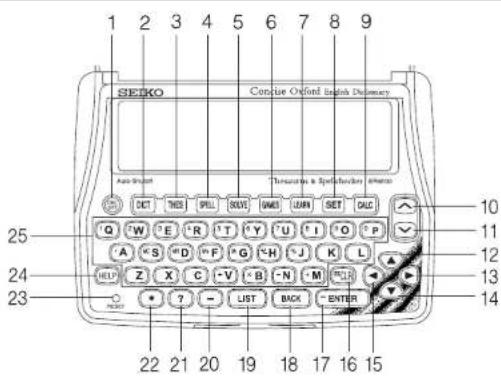
8
1 Turns the power ON and OFF.
2 Selects Dictionary mode.
3 Selects Thesaurus mode.
4 Selects Spellchecker mode.
5 Selects Solver mode.
6 Selects Game mode.
7 Selects Easy Learn mode.
8 Activates Setting function.
9 Selects Calculator mode, Currency, Metric/Imperial and Clothing Size Converters.
10 For scrolling back through the lists in memory.
11 For scrolling down through the lists in memory.
12 For scrolling back through the lists in memory. / Cursor key
13 Enters a single blank space when pressed once. / Cursor key / Pick key
14 For scrolling down through the lists in memory. / Cursor key
15 Cursor key / Pick key
16 Clears all the input characters.
17 Executes the functions.
18 For deleting the last input character. / Returns the display to the previous state/levels.
19 Displays headword list.
20 For entering hyphen.
21 Used instead of one letter if you don't know how to spell a word.
22 Used instead of one or more letters if you don't know how to spell a word.
23 RESET button
24 Activates Help function.
25 Letter, numeral and symbol input keys.
9
Preparation for using the Unit
1. Installing Batteries
The unit is powered by two (2) "CR2032" size batteries. Before using the unit, please install the batteries as the follows.
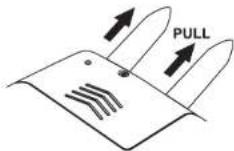
- Turn the unit over.
- Pull two tabs to remove and engage two batteries.
natural_image
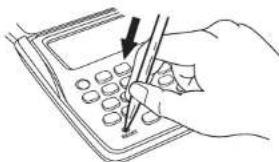
Line drawing of a hand using a pen to write on a calculator (no text or symbols visible)- Press the "RESET" button on the front of the unit. (See Resetting)
10
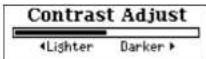
- The contrast adjustment display will appear. ( See page 12.)
- Resetting
If the unit does not operate properly after the battery has been replaced, or if at any time the unit fails to operate properly, gently press the "RESET" button on the front of the unit.
NOTE: Resetting product erases the EASY LEARN list in the memory.
11
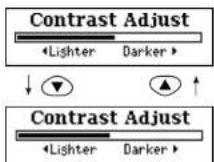
2. Contrast Adjustment
- After resetting, the contrast adjustment display will appear.
- You can use either ▼ or ▶ to adjust the contrast of the display Level 1 to Level 32.
(Initial setting = 16)
3 Press ENTER to finish.
A demonstration display will appear.
* If you want to adjust the contrast of the display again, press SET. Select "LCD Contrast" by using ▼ or ▲. ( See page 89. )
12
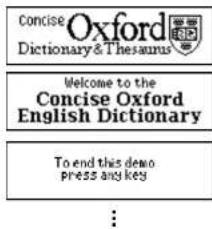
3. Demo Function
When you turn on the power, a demonstration display will begin to explain the contents of the unit.
* You can stop the demonstration by pressing any of the keys.
The unit will show the initial display of the mode used before the power was last turned off.
* If you want to turn off the demonstration display, press SET and select "Demo Message". Select "Disable" and press ENTER. (See page 88.)
13
● Changing Batteries
The unit is powered by two (2) "CR2032" size batteries.
The batteries need to be changed as soon as display becomes dim.
- Make sure the power is switched off before replacing the batteries.
- Do not use a previously used battery together with a new battery.
- Turn the unit over.
- Open the battery compartment by removing the screw and sliding the cover in the direction of the arrow.
- Remove and replace one battery only with the "+" side facing you. Then repeat for the other battery.
NOTE: Replace the batteries one at a time to retain the EASY LEARN list in the memory. If both batteries are removed together, become completely exhausted or the RESET button is pressed, any saved list in memory will be erased.
14
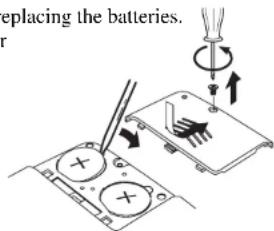
- Replace the battery cover and the retaining screw. (See Resetting)
- The contrast adjustment display will appear.
CAUTION
- The batteries may pose a choking hazard to small children.
- Keep the batteries and product away from small children.
- Do not expose the batteries to open flame or intense heat.
- Rechargeable batteries cannot be used.
- Do not try to recharge batteries.
- Never use batteries other than those specified.
- Remove the batteries from the unit if you do not intend to use it for a long duration.
15
Dictionary
● Basic Procedure
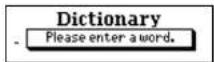
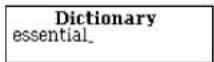
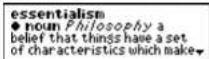
1 Press DICT.
2 Type a word.
Example: essential
3 Press ENTER
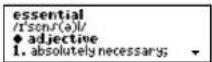
The unit shows headwords, phonetic symbols, parts of speech, inflected forms and definitions.
* Use BACK to return the display to the previous level.
* The ▼ mark will appear if there is insufficient space to display the whole entry.
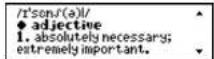
4 Press ▼ to see the rest of an entry.
Press ▲ to scroll up.
* Use ENTER to scroll a page down.
16

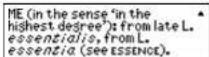
- When there are phrases, phrasal verbs, derivatives or origins, they will be recorded after the last headword definition.
5 To scroll alphabetically up or down through the Dictionary's headword list, press √ or △.
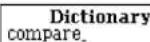
6 To clear the display and search for another word, simply enter your new word.
Example: compare
:

● Entering and Correcting Letters
- Up to 20 letters can be entered.
- Use ▶to enter a space.
- Corrections can be made by using BACK
• The entire display can be cleared by pressing CLR or DICT.
17
- Showing the Dictionary's headword list
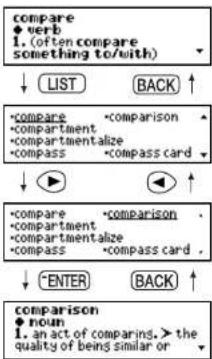
1 If you press LIST, the unit will show the Dictionary's headword list starting from the displayed word.
Example: compare
2 Select a word using the cursor keys.
Example: comparison
* Using ▼or ▲will scroll the screen one line at a time.
3 Press ENTER or DICT to find the definitions.
* Press THES to find the synonyms.
* Press LEARN to add the word to Easy Learn word list. (See page 74.)
18
● Same spelling headwords
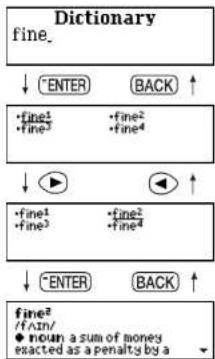
1 If the headwords are spelt the same or are related, they will be displayed in a list.
Example: fine
2 Select a word using the cursor keys.
Example: fine ^2
3 Press ENTER to find the definitions.
flowchart
graph TD
    A["Dictionary fine_"] --> B["ENTER"]
    A --> C["BACK"]
    B --> D["fine1\nfine2\nfine3\nfine4"]
    C --> E["fine2\nfine3\nfine4"]
    D --> F["↓"]
    E --> G["↓"]
    F --> H["↓"]
    G --> I["↓"]
    H --> J["fine1\nfine2\nfine3\nfine4"]
    I --> K["↓"]
    J --> L["↑"]
    K --> M["↑"]
    L --> N["↑"]
    M --> O["fine2\n/IFIN/<br>● noun a sum of money<br>● exacted as a penalty by a"]
19
● Derivatives
If the word entered is a derivative, the definitions of the base form will be displayed.
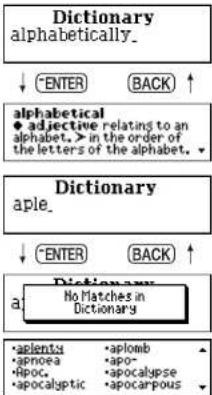
Example: alphabetically
● Misspelled words or words not in the Dictionary
If the word entered is not contained in the dictionary, pressing ENTER will display the headword list starting with the word whose spelling comes closest to that of the word originally entered.
Example: aple
20
flowchart
graph TD
    A["Dictionary alphabetically."] --> B["alphabetical"]
    B --> C["Dictionary aple."]
    C --> D["Dictionary No Matches in Dictionary"]
    A --> E["ENTER BACK ↑"]
    B --> F["ADJECTIVE RELATING TO AN ALPHABET, > IN THE ORDER OF THE LETTERS OF THE ALPHABET."]
    C --> G["ENTER BACK ↑"]
    D --> H["APLOMB"]
    D --> I["APLOMB"]
    D --> J["APLOMB"]
    D --> K["APLOMB"]
    D --> L["APLOMB"]
NOTE:
If you entered a word but the unit displayed the "No Matches in Dictionary" message, press BACK to return to your original search word and then press SPELL and ENTER to search for any more suggestions.
If one of the results is what you meant, you can then use the pick function to look it up in the dictionary. (See page 22.)
21
- Pick function
You can select a word in an entry and look up the definition in the Dictionary, or consult the Thesaurus to find the synonyms for that word.
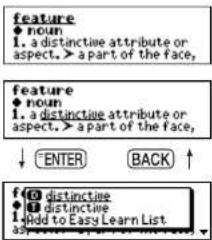
Example: feature
1 Press ▶ to select the first word you can pick. Selected word will begin to flash on and off. (Press ◀ to select the last word.)
2 Select another word using the cursor keys. Example: distinctive
3 Press ENTER.
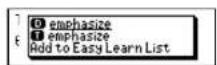
4 A word that can be jumped at Dictionary, Thesaurus, Abbreviation or added to Easy Learn List is displayed.
22
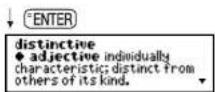
5 Select a word and press ENTER.
The icons in the pop-up window
D : The word in the dictionary.
T: The word in the thesaurus.
A : The word in the abbreviation list used in the solver function.
"Add to Easy Learn List": The selected word will be added into the Easy Learn List.
* All words in the pop-up window are listed by the order of D, T, A, and "Add to Easy Learn List." Please check by scrolling to find the appropriate entry heading from the pick list.
* After you've looked up the definition or synonyms, you can return to the previous display by pressing BACK.
23
Thesaurus
● Basic Procedure
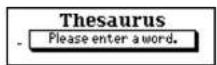
1 Press THES.
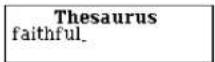
2 Type a word. Example: faithful
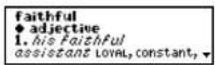
3 Press ENTER. The list of synonyms will be displayed, along with any example sentence.
* The synonyms in each set that are closest in meaning to the entry word are given first, usually starting with a 'core synonym' in SMALL CAPITALS.
* Use ENTER to scroll a page down.
24
4 Press ▼ to see other synonyms. Press ▲ to scroll up.
* When there are phrases or opposites, they will be recorded after the last headword synonyms.
* Y ou can pick a word using▶ or◀ . (See page 22.)
5 To scroll alphabetically up or down through the headword list, press √ or ∧.
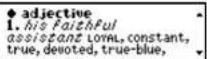
6 To clear the display and search for another word, simply enter your new word.
Example: passion

:
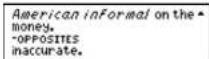

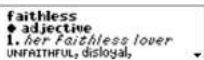
Thesaurus passion.
25
● Showing the headword list
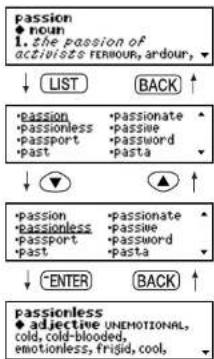
1 If you press LIST, the unit will show the headword list starting from the displayed word. Example: passion
2 Select a word using the cursor keys. Example: passionless
* Using √or ∧will scroll the screen one line at a time.
3 Press ENTER or THES to find the synonyms.
* Press to find the definitions.
* Press LEARN to add the word to Easy Learn word list. (See page 74.)
flowchart
graph TD
    A["passion\n♦ noun\n1. the passion of\nactivists FERIOUR, ardour, "] --> B["LIST"]
    B --> C["BACK"]
    D["*passion\n• passionless\n• passport\n• past"] --> E["passionate"]
    E --> F["passionate"]
    G["passion\n• passionless\n• passport\n• past"] --> H["passionate"]
    H --> I["passionate"]
    J["• ENTER"] --> K["BACK"]
    L["passionless\n♦ adjective UNEMOTIONAL,\ncold, cold-blooded,\nemotionless, frigid, cool, "] --> M["BACK"]
26
● Table lists
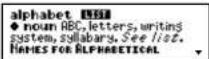
Thesaurus data includes the table lists in the Concise Oxford Thesaurus. Example: alphabet
Names for Alphabetical Letters
See also PHONETIC ALPHABET
| GREEK | HEBREW | ||||||||
| alpha | xi | aleph | nun | ||||||
| B | beta | O | o | omicron | beth | v | samekh | ||
| gamma | pi | gimel | v | 'ayin | |||||
| delta | P | rho | daleth | pe | |||||
| E | epsilon | , | sigma | he | x | sadhe | |||
| Z | zeta | T | tau | waw | P | qoph | |||
| H | eta | T | upsilon | zayin | resh | ||||
| theta | phi | heth | v | shin | |||||
| I | iota | X | chi | v | teth | sin | |||
| K | kappa | psi | yodh | taw | |||||
| lambda | omega | kaph | |||||||
| M | mu | lamedh | |||||||
| N | nu | mem | |||||||
27
- If the word has a table list, LIST will be displayed after the headword.
● Misspelled words or words not in memory
If the word entered is not contained in the unit's list of entries, pressing ENTER will display the headword list starting with the word whose spelling comes closest to that of the word originally entered.
Example: emotionally
(See page 20.)
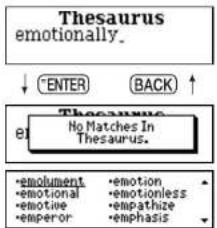
flowchart
graph TD
    A["Thesaurus emotionally."] --> B["ENTER"]
    A --> C["BACK"]
    D["Thesaurus el"] --> E["No Matches In Thesaurus."]
    F["•emolument"] --> G["•emotion"]
    H["•emotional"] --> I["•emotionless"]
    J["•emotive"] --> K["•empathize"]
    L["•emperor"] --> M["•emphasis"]
28
● Continued data for long entry
Some long entries are split up in the unit. If you find "See
Example: take
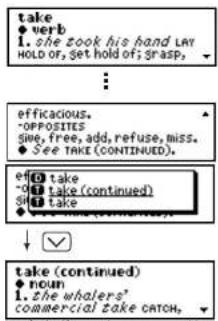
* If you didn't see the "
29
Spellchecker
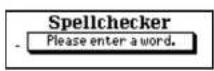
● If the spelling of a word you enter is correct :
1 Press SPELL.
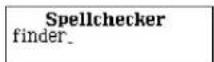
2 Type a word to be checked.
Example: finder
3 Press ENTER.
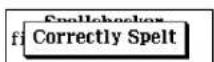
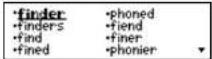
After the display "Correctly Spelt", the entered word will be displayed in bold. Phonetically similar words may also be displayed.
* T o clear the display and spellcheck another word, simply enter your new word. Pressing ^a CLR will also clear the display.
* T o scroll alphabetically up or down through the unit's word list, starting from the selected word, press LIST.
30
4 Select a word using the cursor keys. Example: finder
5 Press ENTER
6 Select a word and press ENTER

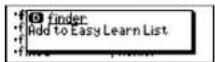
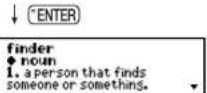
* Press DICT, THES or LEARN to skip the pop-up menu.
* After you've looked up the definition or synonyms, you can return to the previous display by pressing BACK.
31
- If the spelling of a word you enter is incorrect :
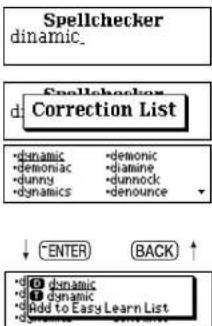
1 Type a word to be checked. Example: dinamic
2 Press ENTER. After the display "Correction List", a list of words that are phonetically similar to the entered word will be displayed.
3 Select a word using the cursor keys. Example: dynamic
* Use the pick function as described on Page 22. * Please note that not every word returned by the Spellchecker is included in the dictionary or thesaurus.
32
● Using the Wildcard function
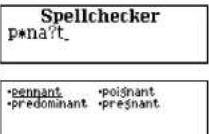
If you are unsure of part of the spelling of a word, enter the word using “?” or “★” for the letter(s) of which you are unsure.
Use ☐ to enter “?”. This is used in place of a single character. Use ☐ to enter “★”. This is used in place of one or more characters.
1 Type a word. Example: p *na?t
2 Press ENTER. The corresponding word list will be displayed.
* Use the pick function as described on Page 22. * Please note that not every word returned by the Spellchecker is included in the dictionary or thesaurus.
33
Solvers
The unit provides nine solvers that can help you to solve word games.
- Selecting the solver
1 Press SOLV.
The unit selects the last solver used each time you select the solver mode.
2 Select the solver you wish to use by pressing ▼ or ▲.
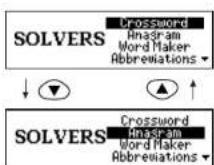
The nine solvers are: Crossword, Anagram, Word Maker, Abbreviations, Phrase Finder, Definition, Knowledge View, Knowledge Find, Letter Changer
- By pressing the first letter of a solver, you can select directly the desired solver.
3 Press ENTER.
34
■ Crossword Solver
Look for the right word by entering the letters you know along with “?” or “★” for any letters you don’t know.
Use ☐ to enter “?”.
This is used in place of a single character.
Use * to enter " *".
This is used in place of one or more characters.
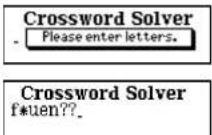
1 Select "Crossword" and then press ENTER.
2 Enter letters.
Example: f*uen??
35
3 Press ENTER.
The corresponding word list will be displayed.
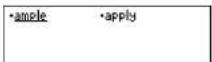
•fluence •fluency •frequency •fundamental frequency
* The corresponding word list includes words with spaces or hyphens.
* Use the pick function as described on Page 31.
* Please note that not every word returned by the Solvers is included in the dictionary or thesaurus.
* If the letters entered do not have any corresponding words, the message "No words found." will be displayed.
36
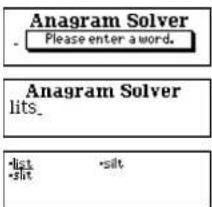
■ Anagram Solver
Look for anagrams using the same letters or words that you entered. You can enter actual words, or jumbled letters.
1 Select "Anagram" and then press ENTER.
2 Enter letters.
Example: lits
3 Press ENTER.
The corresponding word list will be displayed.
* Use the pick function as described on Page 31.
* Please note that not every word returned by the Solvers is included in the dictionary or thesaurus.
37
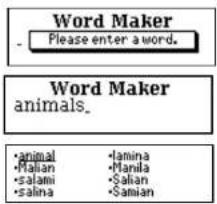
Word Maker
Look for anagrams using some or all of the letters entered. You can enter actual words, or jumbled letters.
1 Select "Word Maker" and press ENTER.
2 Enter letters. Example: animals
3 Press ENTER The corresponding word list will be displayed.
* Use the pick function as described on Page 31. * Please note that not every word returned by the Solvers is included in the dictionary or thesaurus.
38
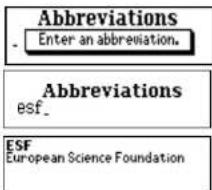
■ Abbreviations
The abbreviations allows you to search the abbreviation database to "decode" over 10,000 common abbreviations.
1 Select "Abbreviations" and then press ENTER.
2 Type an abbreviation. Example: esf
3 Press ENTER. If the abbreviation is contained in the abbreviation list, it will be displayed with the definition.
* If entered letters are not contained in the abbreviation list, the unit will find and display the abbreviation which most closely matches your entered letters.
39
■ Phrase Finder
Look for the phrases in the Dictionary including the word(s) using the word you have entered.
1 Select "Phrase Finder" and then press ENTER.
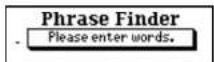
2 Type word(s).
* Y ou can enter up to five words with spaces. This method will search for phrases which include all words. A space can be entered by using ▶. Example: on take
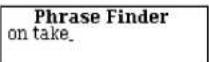
3 Press ENTER.
The corresponding phrase list will be displayed.
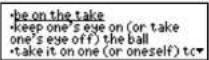
4 Select a phrase using the cursor keys.
Example: be on the take
5 Press ENTER.
The selected phrase and its definition will be displayed.
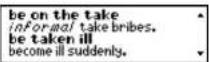
Note that the selected phrase is displayed within its full dictionary entry, not on its own.
* Return to the phrase list by pressing BACK
40
41
■ Definition Search
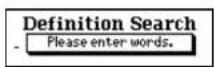
The unit will find the entries which contain the entered words in their definitions.
1 Select "Definition" and then press ENTER.
2 Type word(s).
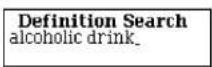
* Y ou can enter up to five words with spaces. This method will find the entries which contain the entered words in their definitions. A space can be entered by using ▶.
Example: alcoholic drink
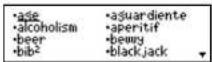
3 Press ENTER
The corresponding headword list will be displayed.
42
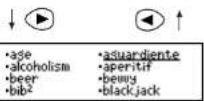
4 Select a headword using the cursor keys.
Example: aguardiente
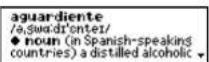
5 Press ENTER or DICT.
The definition for the headword "aguardiente" will be displayed.
43
■ Knowledge View
This solver enables you to scroll through the thematic lists in the general knowledge section in a similar manner to browsing through the lists in a book. These lists have been compiled by Oxford University Press to help provide answers to crossword clues and other quiz questions.
1 Select "Knowledge View" and then press ENTER.
The unit returns to the last category used each time you select the Knowledge Viewer mode.
2 Select the topic you wish to find by pressing ▼ ▲ or √ ∧.
Example: History, Politics, and War
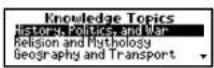
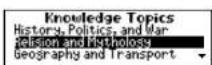
3 Press "ENTER".
The unit shows the category. Press BACK to return.
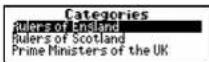
4 Select the category by pressing
▼ ▲ or √ ∧ and then press ENTER . The first entries will be listed.
* If the unit shows the lower sub category, repeat step 4.
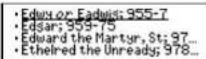
5 You may scroll through the list by using
▼ ▲ or √ △ .
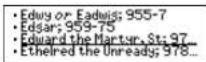
44
45
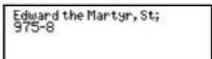
6 Press ENTER
Some entries are abbreviated in the list. You can check the full text for these by pressing ENTER.
First Character Search
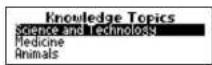
By pressing the first letter of the topics or the categories, you can jump directly to the desired topic or category.
Further items starting with the same letter can be displayed by pressing the same letter again. Example: s
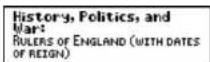
7 To check the category of an entry in the list, press ENTER.
46
* Some topics and categories are abbreviated in the list. You can check the full text for these by pressing ENTER at the entry display. Press ENTER or BACK. It goes back to the original entry.
* Data in the Knowledge Viewer is displayed in the same order as the printed version of the Oxford Crossword Dictionary (2 ^nd edition).
* Any notes relevant to a particular list may be found at the end of the sub category.
E.g. * Indicates joint region (in the case of “Rulers of England”)
* In the context of The Bible, OT stands for Old Testament and NT stands for New Testament.
List of main topics in order they appear
History, Politics, and War / Religion and Mythology / Geography and Transport / Science and Technology / Medicine / Animals / Art, Music, and Entertainment / Literature / Sport and Games / Food and Drink / Miscellaneous / Names
47
Knowledge Find
The solver is a powerful tool to enable you to perform searches across all the thematic lists in the general knowledge section. It's a bit like using a search engine on the Internet. You can use wildcard characters (? or *) and keywords from your clue to help you find answers by searching across all the lists at the same time.
These lists have been compiled by Oxford University Press to help provide answers to crossword clues and other quiz questions.
1 Select "Knowledge Find" and then press ENTER.
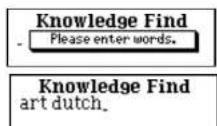
2 Type in your keywords. They can be a category or related word with the entry which you want to find.
48
E.g. art and dutch:
This means that result should be related to art and Dutch.
- You can add one target word with wildcard letters (? or *), if you know some letters of the target word.
In this example, the target word is "Gogh."
In case you know that the target word is four letters and it starts "g." It will be "g???."
* If you don't have any hint for the word (any length and letters), you can omit this word and you can search by scrolling all data that has words related to your keywords.
* Y ou can only have one target word containing wildcards.
* Y ou need to enter at least one keyword.
* Y ou can enter keywords in any order.
49
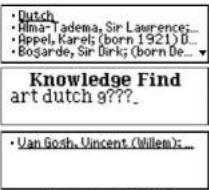
3 Press ENTER
Results that meet the conditions will be displayed.
4 Press "ENTER"
Full text of a selected answer will be displayed.
5 You can check the category of the answer by pressing ENTER
Press "ENTER" or BACK.
It goes back to the original entry.
- The entered word is spellchecked first against the thematic data. If the entered word was spelt incorrectly, it will be ignored from the input automatically.
In this example "zzz" and "xxx" are ignored from input and the correct answer is displayed.
Knowledge Find zzz prince xxx.
If the entered word is not in the thematic data, a message "No matches found" is displayed and it goes back to the input display.
* This solver searches only the Thematic data and does not search words in the dictionary and the thesaurus.
50
Here are some further examples of how you can use Knowledge Finder: (Entry) (Result)
fish s???? A list of fish with 5 letter words in their names
starting with "s"
harry webb Finds: Sir Cliff Richard jet engine Finds: Sir Frank Whittle, inventor phobias spiders a* arachnophobia
NOTE
Because you can search across all categories at the same time, you may get results from different categories in the same list. E.g.-fish ?????= 1) Piscis (CONSTELLATIONS)
2) Salmon (FISH)
This is intended to give you all possible solutions which match your criteria, because you may not always know from your clue, exactly which of the 256 categories you should be looking under. If you want to check the category of a result, press ENTER as described above.
Please take a little time to learn how to use this solver, as it has been designed to provide you with lots of different ways to search Oxford's wealth of general knowledge information.
51
- Y ou can enter numbers by pressing a number key followed by where numbers are on the letter keys.
E.g. +,+,+,+=1769
This can be very useful for finding entries related to people.
[e.g. 1st Duke of Wellington (1769 - 1852)]
ENTER
x4
- Castlereash, Robert Stewa... - Humboldt, Friedrich Heinrich... - Muhammad Ali; (1769-1849... - Napoleon I; (known as Napol...
• Humboldt, Friedrich Heinrich... • Muhammad Ali; (1769-1849... • Napoleon I; (known as Hapol... • Wellington, 1st Duke of: (ti...
ENTER
Wellington, 1st Duke of; (title of Arthur Wellesley; also known as 'the Iron Duke') (1769-1852) British soldier
52
■ Letter Changer
The unit will allow you to view possible alternative words by changing one letter at a time.
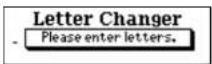
1 Select "Letter Changer" and then press ENTER.
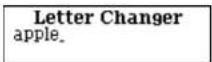
2 Type a word. Example: apple
3 Press ENTER The corresponding headword list will be displayed.
* Use the pick function as described on Page 22. * Please note that not every word returned by the Solvers is included in the dictionary or thesaurus.
53
Games
There are nine great word games that will help you to improve your spelling and vocabulary.
- Selecting a game
1 Press GAMES.
The unit selects the last game used each time you select the game mode.
2 Select the game you wish to play by pressing ▼ or ▲.
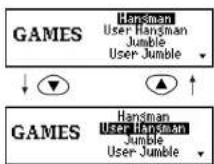
The nine word games are:
Hangman, User Hangman, Jumble, User Jumble, Word Building, Crossword Quiz, Time Bomb, Memory, Hidden
54
- By pressing the first letter of a game, you can directly select the desired game. Further games starting with the same letter can be selected by pressing the same letter again.
(NOTE)
* The Game Levels can be changed from the SET menu. (See page 91.)
* T o display the next mystery word, press any alphabet key at the answer display.
* Not all words valid for the games are contained in Dictionary, Thesaurus or Abbreviation database.
55
Hangman
This is a game in which you have to find a mystery word whose spelling is unknown to you with a limited number of allowed tries.
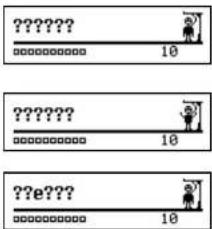
1 Select "Hangman" and then press ENTER. The number of letters in the mystery word is indicated by question marks.
The number of times you can try is shown at the right of the screen.
2 When you enter one of the letters used in the mystery word, the question mark will be replaced by the letter.
Example: Enter "e".
56
* In some cases, the same letter is used two or more times in the same word:
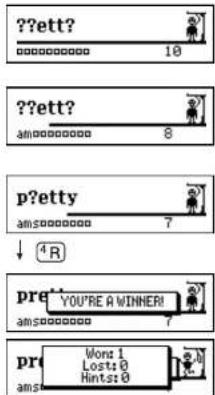
When you enter the letter, all the corresponding question marks will be replaced by the letter simultaneously.
Example: Enter "t".
* The number of tries you are allowed will decrease progressively every time you enter an incorrect letter.
3 If all the letters in the word are displayed before you have used up all the tries, a congratulatory message will be displayed and counted in the "Won" column.
The answer will then be displayed.
57
* One letter will be displayed in turn as a "Tip" every time you press ?
* All the letters will be displayed if you press ENTER.
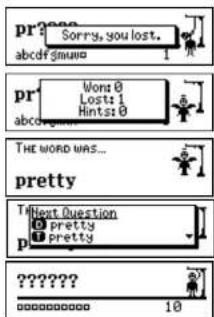
* If you fail to find the word before you have used up all the tries you are allowed, or if you press ENTER half way through a game, "Sorry, you lost." will be displayed and counted in the "Lost" column.
The answer will then be displayed.
4 Press ENTER You can go to the next game word by selecting "Next Question," or you can check the definition or synonyms by selecting the word, or you can add the answer word to the Easy Learn List.
58
■ User Hangman
This is the Hangman game for 2 players using words that you can select.
1 Select "User Hangman" and then press
ENTER
2 Select a questioner by using ▼ ▲ or √ △
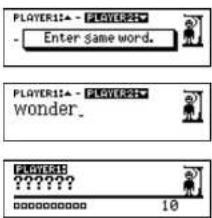
3 Player 2 enters a word.
You can use up to 12 letters.
Example: wonder
4 Press "ENTER."
5 Player 1 has to guess the mystery word.
* The ensuing procedure is the same as that used in the Hangman Game.
*** Tip for Parents ***
This game is a fun way for you to help your children to learn new words from a list or as part of their homework. Select a suitable level, secretly enter your chosen word and then work with them to spell the mystery word correctly.
59
Jumble
Using letters displayed at random, you attempt to find a specified number of words.
1 Select "Jumble" and then press ENTER.
The selected letters and the number of answers will be displayed, to the right of the “/”.
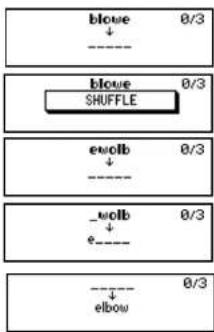
Example: blowe
* T o shuffle the letters, pressENTER .
2 Enter a try using all the selected letters.
* If your answer is incorrect, the message "Please try again." will appear and the selected letters will be displayed again.
flowchart
graph TD
    A["blowe"] --> B["0/3"]
    C["SHUFFLE"] --> D["0/3"]
    E["ewolb"] --> F["0/3"]
    G["e"] --> H["0/3"]
    I["elbow"] --> J["0/3"]
60
3 Press ENTER
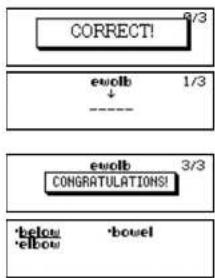
If your answer is correct, the selected letters will be displayed again.
Enter the next word and press ENTER
* The answered words can be seen again by using LIST. Press BACK to return.
4 If you enter all the answers, a congratulatory message will be displayed and counted in the "Won" column.
* T o give up entering letters, press? . * Use the pick function as described on Page 31.
flowchart
graph TD
    A["CORRECT!"] --> B["euvolb 1/3"]
    B --> C["----"]
    D["euvolb"] --> E["CONGRATULATIONS! 3/3"]
    E --> F["'below' 'bowel'<br>'elbow'"]
61
■ User Jumble
This is a Jumble game using words that you can select.
1 Select "User Jumble" and then press ENTER.
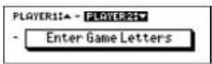
2 Select a questioner by using ▼ ▲ or √ △
3 Enter a word. You can use up to 12 letters. Example: lead
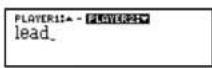
4 Press ENTER The selected word and the number of other words will be displayed.
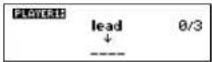
* The ensuing procedure is the same as that used in the Jumble.
\*\*\* Tip for Parents \*\*\*
This game is a fun way for you to help your children to learn new words. Simply enter your chosen word and then work with them to find the correct anagrams.
62
Word Building
Use some or all of the letters displayed to make new words.
You'll win if you create the same number of words as the remaining number of floors in the building on the screen.
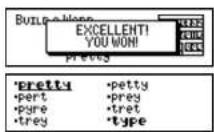
1 Select "Word Building" and then press ENTER.
* T o shuffle the letters, press ENTER.
2 Enter a word using 3 letters or more.
Press BACK to return.
3 Press ENTER If your answer is correct, you can enter the next word.
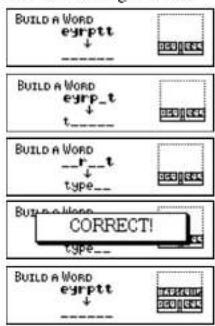
63
* Y ou can use LIST to re-display correct words already accepted. Press BACK to return.
* T o give up entering letters, press?
* If your answer is incorrect, the message “ Try again” will appear and the selected letters will be displayed again.
4 If you enter the answers and press ENTER, a congratulatory message will be displayed and counted in the "Won" column. The list of possible answers will then automatically be displayed.
* Use the pick function as described on Page 31.
64
Crossword Quiz
Enter a letter or letters to replace the question marks.
1 Select "Crossword Quiz" and then press ENTER.
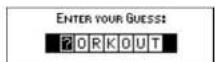
The question will be displayed.
Example: ?orkout
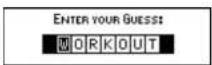
2 Enter letters to replace the question marks. Example: w
* The entered letter can be changed. Press to select the letter and then enter the new letter.
65
3 Press ENTER
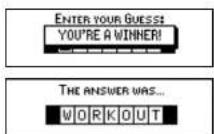
If your answer is correct, a congratulatory message will be displayed and counted in the "Won" column. The answer will then be displayed.
* One letter will be displayed in turn as a "Tip" every time you press ? .
* T o give up entering letters, presENTER. * If your answer is incorrect, or if you press ENTER, "Sorry, you lost." will be displayed and counted in the "Lost" column.
* The first correct solution will then be displayed, you can check any alternative solutions by pressing LIST.
* Use the pick function as described on Page 31.
66
■ Time Bomb
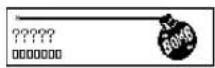
This is a game in which you have to find a mystery word with a limited number of tries, in a limited time.
1 Select "Time Bomb" and then press ENTER. The number of letters in the mystery word is indicated by question marks.
The number of times you can try is indicated by boxes.
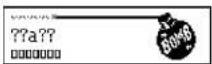
2 When you enter one of the letters used in the mystery word, the question mark will be replaced by the letter.
Example: Enter "a". The fuse will also begin to burn down.
67
3 If you complete the spelling of the mystery word before you have used up all the tries or the fuse burns out, a congratulatory message will be displayed and counted in the "Won" column. The answer will then be displayed.
* One letter will be displayed in turn as a "Tip" every time you press ?
* All the letters will be displayed if you press ENTER
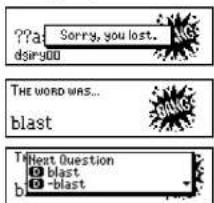
* If you fail to find the word before you have used up all the tries you are allowed, if the fuse burns out, or if you press ENTER half way through a game, "Sorry, you lost." will be displayed and counted in the "Lost" column. The answer will then be displayed.
4 Press ENTER You can go to the next game word by selecting "Next Question," or you can check the definition or synonyms by selecting the word, or you can add the answer word to the Easy Learn List.
68
■ Memory
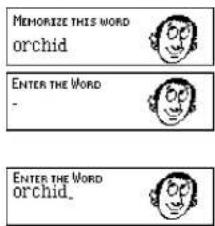
Correctly enter the spelling of the word momentarily displayed.
1 Select "Memory" and then press ENTER The word will be displayed for about one second.
Example: orchid
2 Enter the spelling of the word which has just disappeared from the screen.
69
3 Press ENTER.
If your answer is correct, a congratulatory message will be displayed and counted in the "Won" column.
The answer will then be displayed.
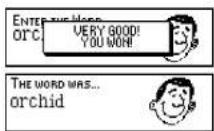
* If your answer is incorrect, “Sorry, you lost.” will be displayed and counted in the “Lost” column. And the answer will then be displayed.
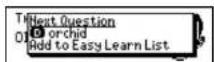
4 Press ENTER
You can go to the next game word by selecting "Next Question," or you can check the definition or synonyms by selecting the word, or you can add the answer word to the Easy Learn List.
70
Hidden
Find the non-synonym word from the displayed words.
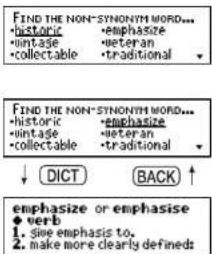
1 Select "Hidden" and then press ENTER. A list of synonyms is displayed with one random word added that does not belong.
2 Select the non-synonym word by using ▶ or ▼ ▲.
* Press DICT(THES) to find the definitions (synonyms) for the selected word.
* Press ☐ to see a hint.
71
3 Press ENTER.
When the correct word is selected, a congratulatory message will be displayed and counted in the "Won" column.
The answer will then be displayed.
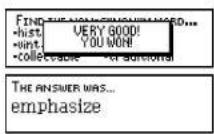
* T o give up selecting a word, presENTER.
* If your answer is incorrect, "Sorry, you lost." will be displayed and counted in the "Lost" column.
The correct word will then appear.
4 Press ENTER
You can go to the next game word by selecting "Next Question," or you can check the definition or synonyms by selecting the word, or you can add the answer word to the Easy Learn List.
72
MEMO
73
Easy Learn
The Easy Learn function allows you to create your own word list from the Dictionary, Thesaurus, Spellchecker, Solvers and Games, which can then be used in the games.
● Building your word list :
The underlined word will be added to your word list by pressing LEARN. (See page 18.)
| •compare | •comparison |
| •compartment | |
| •compartmentalize | |
| •compass | •compassion |
| LEARN | |
| •COMPASS | •compassion |
| •COI | •compassion |
| •COI | •compassion |
| •COMPASS | •compassion |
The unit can store words between 3 and 12 letters
* I f the word to be added is already contained in memory, the messageThe word was already added." will appear.
* The unit's memory can store 100 words. When you try to add the 101st word, the message "Sorry, Memory is full" will appear.
* Note that not all words from the Dictionary, Thesaurus, Slovers and Games can be added to Easy Learn List.
* Y ou can only add single words of 3-12 letters which do not contain any accented or capitalized lettres.
74
● Finding a word
1 Press LEARN.
2 Press ENTER to select "List". The word list will be displayed.
3 Press ▼ or ▲ to select a word.
4 Press ENTER
5 Select a word that can be jumped to dictionary, thesaurus abbreviation list, or delete from the Easy Learn List. "Delete this word": Delete the selected word from the Easy Learn List
75
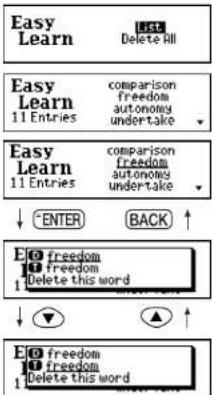
6 Press ENTER
ENTER
freedom ♦ noun 1. a desperate bid for freedom LIBERTY, liberation,
* After you've looked up the definition or synonyms, you can return to the Easy Learn List by pressing BACK.
* Please note that not every word returned by Spellchecker or Solvers, or used in the Games, is included in the dictionary or thesaurus.
\*\*\* Tip for Parents \*\*\*
This is a fun way to help your children learn new words from a list as part of their homework. Enter the words into the list as described above, then set the frequency of use in the SET menu. The words will then appear in the games.
76
- Deleting a word
1 Press LEARN.
2 Press "ENTER" to select "List". The word list will be displayed.
3 Press ▼ or ▲ to select the word you wish to delete.
4 Press CLR.
5 Select "Yes" and press ENTER The selected word will be deleted from the word list.
* If you decide not to delete the word, select "No" then press ENTER.
Easy Learn List Delete All
Easy Learn 11 Entries comparison freedom autonomy undertake
Easy Learn 11 Entries comparison freedom autonomy undertake
Eat your companion Are you sure? Yes No 4 Enches under take
77
- Deleting all words
1 Press LEARN.
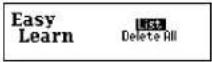
2 Press ▼ to select "Delete All".
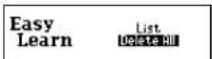
3 Press "ENTER".
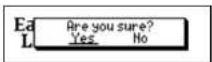
4 Select "Yes" and press ENTER.
* If you decide not to delete the word, select "No" then press ENTER.
MEMO
78
79
Calculator
● Keys and their Functions
-
SeCALG Calculator and Unit Converters.
-
Clears last entry with one press, clears all with two presses.
-
1\~0 Number input keys.
-
+,-,x, | Mathematical function keys.
-
MC Clears memory.
-
MR Recalls number from memory.
-
M+ Enters number into memory.
-
M- Subtracts number from memory.
-
+/- Changes sign of number.
-
% Percentage key.
* The number stored in the memory is held when the calculation is changed, the mode is switched or the power is turned off.
80
● Correcting and Clearing Entries
If you enter an incorrect number, press CLR to clear the entire displayed number, then reenter the correct number.
If you press an incorrect mathematical function key, simply press the correct function key afterwards.
If "E" appears in display:
• The answer to a calculation is more than 12 digits.
• The memory is full.
• 0 has been used as a divisor.
Press CLR to remove the "E" and continue.
81
Converters
● Entering or Changing a Conversion Rate
1 Press CALC.
2 Press ▼ or ▲ to display the conversion menu.
3 Press "ENTER to select "Money".
4 Press ▼ to select "Exchange Rate".
5 Press ENTER
6 Enter the new rate and then press ENTER.
Example: £1=\$1.8
Converter
Poney
Metric Clothing
clothing
Converter → Home Curr.
Money → Local Curr. Exchange Rate
Exchange have
Exchange Rate
£1=1.
(五) 2017年1月1日
[Non-Text]
Exchange Rate
£1=1.8
● Currency Conversion
Example: 540 US Dollar to £ (£1=\$1.8)
1 Press CALC.
2 Press ▼ or ▲ to display the conversion menu.
3 Press "ENTER" to select "Money".
4 Press ▶ to select “ → Home Curr.”
5 Press ENTER.
6 Enter the amount you wish to convert and then press ENTER. (\$540=£300)
* You can convert a new amount by entering the new number and pressing ENTER.
Converter
Money
Metric Clothin®
Converter + Home Curr.
Money Exchange Rate
Local Curr. → Home Curr.
0.
Local Curr. → Home Curr.
540.
300.
● Metric / Imperial Conversion
Example: Kilometres to Miles
1 Press CALC.
2 Press ▼ or ▲ to display the conversion menu. 3 Press ▼ to select "Metric" and then "ENTE
4 Press ▼ to select "Length".
5 Press ENTER.
6 Select "Kilometre" by using ▼ ▲ or ▶ ▶. 7 Press ENTER.
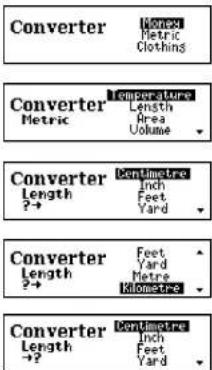
84
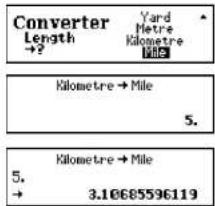
8 Select "Mile" by using ▼ ▲ or ▶ ▶.
9 Press ENTER. Enter the number you wish to convert.
10 Press ENTER. (5 Kilometres = 3.10685596119 miles.)
Categories of Metric Conversion
Temperature:°C,°F
Length: Centimetre, Inch, Feet, Yard, Metre, Kilometre, Mile
Area: Centimetre ^2 , Inch ^2 , Feet ^2 , Yard ^2 , Metre ^2 , Acre, Kilometre ^2 , Mile ^2 Volume: Centimetre ^3 , Inch ^3 , Feet ^3 , Yard ^3 , Metre ^3
Weight: Gram, Ounce, Pound, Kilogram
Capacity: Millilitre, Ounce(AM), Ounce(BR), Litre, Quart(AM), Quart(BR), Gallon(AM), Gallon(BR)
Power: Kilowatt, Horsepower
85
● Clothing Size Chart
You can easily check foreign clothing sizes: shirts, shoes, hats etc. for men, women and children.
1 Press CALC.
2 Press ▼ or ▲ to display the conversion menu.
3 Press ▼ to select "Clothing" and then ENTER.
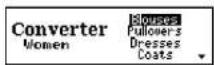
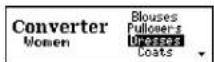
4 Press ▼ to select "Women".
5 Press ENTER.
6 Select "Dresses" by using ▼ ▲ or ▶ ▶.
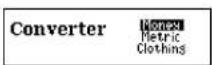

86
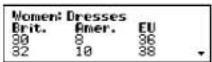
7 Press ENTER.
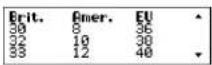
8 Press ▼ to see more sizes.
Categories of Clothing Size Chart
Men: Suits, Trousers, Overcoats, Pullovers, Socks, Shoes, Shirts, Hats
Women: Blouses, Pullovers, Dresses, Coats, Suits, Skirts, Trousers, Shoes, Stockings
Children: Dresses, Coats, Suits, Skirts, Trousers - Girls and Boys Shoes - Girls and Boys, Other Items - Girls and Boys
87
Setting function
You can customize the operating conditions.
Press SET and then press ▼ or ▶ to select an item, when you want to change the default settings.
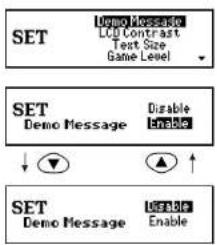
● Changing the Demo mode
1 Press

Press ▼ ▲ or ▶ ▶ to select "Demo Message".
2 Press

3 Press
or to select "Disable" unable".
4 Press ENTER to set it. (See page 13.)
88
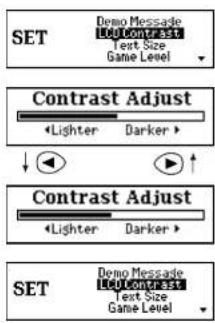
● Setting the LCD Contrast
1 Press SET. Press ▼ ▲ or ▶ ▶ to select "LCD Contrast".
2 Press ENTER.
3 Press ▼ ▲ or ▶ ▶ to adjust the contrast of the LCD display.
4 Press ENTER to set it. (See page 12.)
89
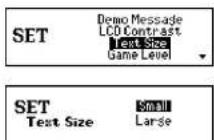
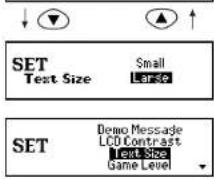
- Setting the Text Size
1 Press SET.
Press ▼ ▲ or ▶ ▶ to select "Text Size".
2 Press "ENTER."
3 Press ▼ ▲ or ▶ ▶ to select " Small" or " Large".
4 Press ENTER to set it.
90
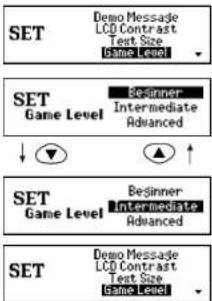
● Setting the Game Level
The unit provides three skill levels for playing games (Beginner, Intermediate and Advanced). The level can be changed as required.
1 Press SET.
Press ▼ ▲ or ▶ ▶ to select "Game Level".
2 Press ENTER.
3 Press ▼ ▲ or ▶ ▶ to select one of the levels.
4 Press ENTER to set it.
91
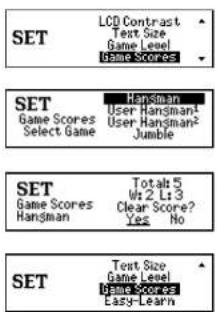
● Game Scores
The unit can display the score of the games.
1 Press SET. Press ▼ or ▶ to select "Game Scores".
2 Press ENTER. Press ▼ ▲ or ▶ ▶ to select one of the games.
3 Press ENTER to display the score of the selected game.
4 Press ENTER. "Clear Score?" will be displayed. Press ▼ ▲ or ▶ ▶ to select "Yes" or "No" and then press ENTER.
* The Won and Lost score can be memorized up to a maximum of 255. You should clear the game score if you exceed the 255 limit.
92
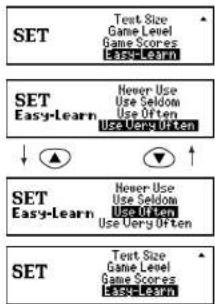
● Setting the frequency for the Easy Learn list
The unit provides four frequency levels to use your user word list for playing
1 Press SET.
Press ▼ ▲ or ▶ ▶ to select "Easy Learn".
2 Press ENTER.
3 Press ▼ ▲ or ▶ to select one of the frequency levels.
4 Press ENTER to set it.
93
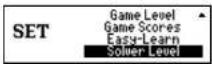
● Solver Level
The word list for Crossword Solver, Anagram Solver, Word Maker and Letter Changer can be selected between "Dictionary" and "+Encyclopedic."
1 Press

Press▼ ▲ or ▶ ◀ to select "Solver Level."
2 Press

3 Press


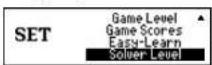
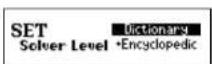
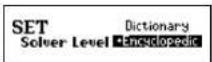
Dictionary: 160,000 words from the dictionary, including headwords, derivatives, and inflected forms.
+Encyclopedic:Full 200,000 words database, including encyclopedic as well as dictionary words.
4 Press

Help function
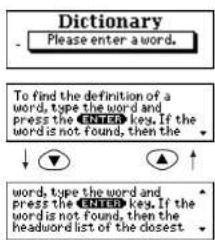
An explanation of how to operate the various functions is simply explained on the screen at each operational stage in each mode.
Example:
1 Press

2 Press

3 Press

Press ▲ to scroll up.
4 Press

BACK to return to the previous display.
:

MEMO
96
MEMO
97
Proper Use
To ensure a long and useful life from this precision electronic instrument, do not expose the unit to extreme heat or cold, water or other liquids including spray cleaners or extreme pressure (such as carrying in a back pocket).
Doing any or all of these things may render the unit inoperable and invalidate the warranty.
Specification
Display: 24 characters x 4 lines
Temperature range: 0^ C to +40^ C ( 32^ F to 104^ F)
Batteries: Lithium CR2032 x 2 pcs.
Battery life: approx. 80 hours (continuous use)
Automatic power off: approx. 3 minutes
Size: 120 (W) x 85 (H) x 15.8 (D) mm
Weight: approx. 106g (including batteries)
* Specifications may change without notice due to our policy of continual product improvement. / The life of the batteries will vary depending on how the unit is used.
98
ONE YEAR LIMITED WARRANTY
- This product is warranted to be free from defects in material or workmanship for one year from date of purchase.
- Repair (or at our option, replacement) will be made on any unit which proves to be defective during this period. Carefully pack the unit along with proof of purchase and a completed copy of the Warranty Record you will find in this manual. Postage, insurance and shipping costs incurred in returning the product for warranty service are your responsibility.
- This warranty does not extend to units which have been subjected to misuse, abuse, neglect, accidents or to units that have been used in violation of the operation instructions. If in our judgement, the unit shows evidence of having been altered, modified or serviced without our authorization, it will be ineligible for service under this warranty.
- In Europe, this warranty does not affect your statutory rights.
- Battery replacement and broken Liquid Crystal Displays are not covered under this warranty.
Seiko Instruments Inc. shall not be liable for any direct, consequential or incidental damages arising out of use of this product. Seiko Instruments Inc. shall not be responsible for damages to this unit as a result of a natural or unnatural disaster, except to the extent prohibited by applicable law. Any implied warranty of merchantability or fitness for a particular purpose on this product is limited in duration to the duration of the warranty.
99
- CE ©N681
- CONTENTS
- Functions and Features
- Dictionary
- Thesaurus
- Spellchecker
- Solvers
- Abbreviations
- Phrase Finder
- Definition Search
- Knowledge View
- Knowledge Find
- Letter Changer
- Word Games
- Easy Learn
- Calculator
- Converters
- Setting function
- Help function
- Demo function
- The Keys and their Functions
- Preparation for using the Unit
- Installing Batteries
- - Resetting
- Contrast Adjustment
- Demo Function
- ● Changing Batteries
- CAUTION
- Dictionary
- ● Basic Procedure
- ● Entering and Correcting Letters
- - Showing the Dictionary's headword list
- ● Same spelling headwords
- ● Derivatives
- ● Misspelled words or words not in the Dictionary
- NOTE:
- - Pick function
- Thesaurus
- ● Showing the headword list
- ● Table lists
- ● Misspelled words or words not in memory
- ● Continued data for long entry
- Spellchecker
- - If the spelling of a word you enter is incorrect :
- ● Using the Wildcard function
- Solvers
- - Selecting the solver
- ■ Crossword Solver
- Press ENTER.
- ■ Anagram Solver
- Word Maker
- ■ Abbreviations
- ■ Phrase Finder
- ■ Definition Search
- ■ Knowledge View
- First Character Search
- ■ Letter Changer
- Games
- - Selecting a game
- (NOTE)
- Hangman
- ■ User Hangman
- Jumble
- ■ User Jumble
- \*\*\* Tip for Parents \*\*\*
- Word Building
- Crossword Quiz
- Press ENTER
- ■ Time Bomb
- ■ Memory
- Press ENTER
- Hidden
- MEMO
- Easy Learn
- ● Building your word list :
- ● Finding a word
- - Deleting a word
- - Deleting all words
- Calculator
- ● Keys and their Functions
- ● Correcting and Clearing Entries
- Converters
- ● Entering or Changing a Conversion Rate
- ● Currency Conversion
- ● Metric / Imperial Conversion
- Categories of Metric Conversion
- ● Clothing Size Chart
- Categories of Clothing Size Chart
- Setting function
- ● Changing the Demo mode
- ● Setting the LCD Contrast
- - Setting the Text Size
- ● Setting the Game Level
- ● Game Scores
- ● Setting the frequency for the Easy Learn list
- ● Solver Level
- Help function
- Proper Use
- Specification
- ONE YEAR LIMITED WARRANTY
Brand : SEIKO
Model : ER6100
Category : Uncategorized