
GMP-270CMK2 - Console DENVER - Free user manual and instructions
Find the device manual for free GMP-270CMK2 DENVER in PDF.


| Product Type | Mobile Game Console |
| Brand | Denver |
| Model | GMP-270CMK2 |
| Display Size | 2.7 inches LCD TFT |
| Display Resolution | 960 x 240 pixels |
| Number of Built-in Games | 200 |
| Processor Architecture | 16-bit |
| Operating System | Linux |
| Power Supply | 3 x AAA batteries (not included) or USB power |
| Audio Output | Built-in speaker and earphone jack (3.5mm) |
| TV Output | AV cable (cable not included) |
| Controls | D-pad, A/B buttons, Start, Volume, Power, Reset |
| Dimensions | 137 x 76 x 27 mm |
| Weight | Approx. 115 g (without batteries) |
| Connection Ports | AV out, earphone, USB power |
| Additional Features | Neck band hole, indicator light |
| Battery Installation | Use a coin to open battery cover; insert AAA batteries with correct polarity |
| Cleaning | Wipe with a dry soft cloth; do not use liquids or cleaners |
| Safety Precautions | Do not mix old/new batteries; remove if not used for long time; avoid short-circuit |
| Repairability | No user-serviceable parts; contact Denver support |
Frequently Asked Questions - GMP-270CMK2 DENVER
User questions about GMP-270CMK2 DENVER
0 question about this device. Answer the ones you know or ask your own.
Ask a new question about this device
Download the instructions for your Console in PDF format for free! Find your manual GMP-270CMK2 - DENVER and take your electronic device back in hand. On this page are published all the documents necessary for the use of your device. GMP-270CMK2 by DENVER.
USER MANUAL GMP-270CMK2 DENVER
1.1: Features:
* 16bit Mobile Game Console
* Built-in 200 Mini Games
* 2.7" LCD TFT screen
* Resolution 960x240 pixels
* Operated by 3x AAA-batteries (Batteries not included)
* Operating system: Linux
* Earphone jack built-in
* TV output by AV cable (cable not included)
* Product Dimension: 137mm × 76mm × 27mm
1.3: Battery Installation
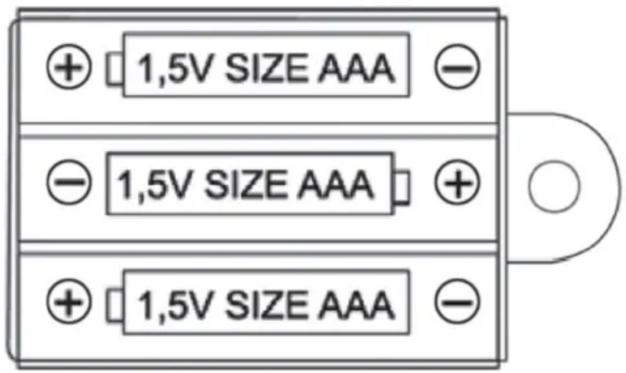
Please use a coin to open the battery cover on the back side of device, Insert three pieces of AAA batteries into it. When installing, pay attention to the “+” & “-” markings of the battery as of following.
Caution:
- Always follow the instructions carefully. Use only batteries specified and be sure to insert them correctly by matching the “+” and “-” polarity markings.
- Do not mix old batteries and new batteries, or standard with alkaline batteries.
- Remove exhausted or dead batteries from the product.
- Remove batteries if product has not being used for a long time.
- Do not short-circuit the supply terminals.
- Should this product cause or be affected by local electrical interference, move away from other electrical equipment. Reset (switching off and
back on again or removing and re-inserting batteries) if necessary.
1.4: Buttons
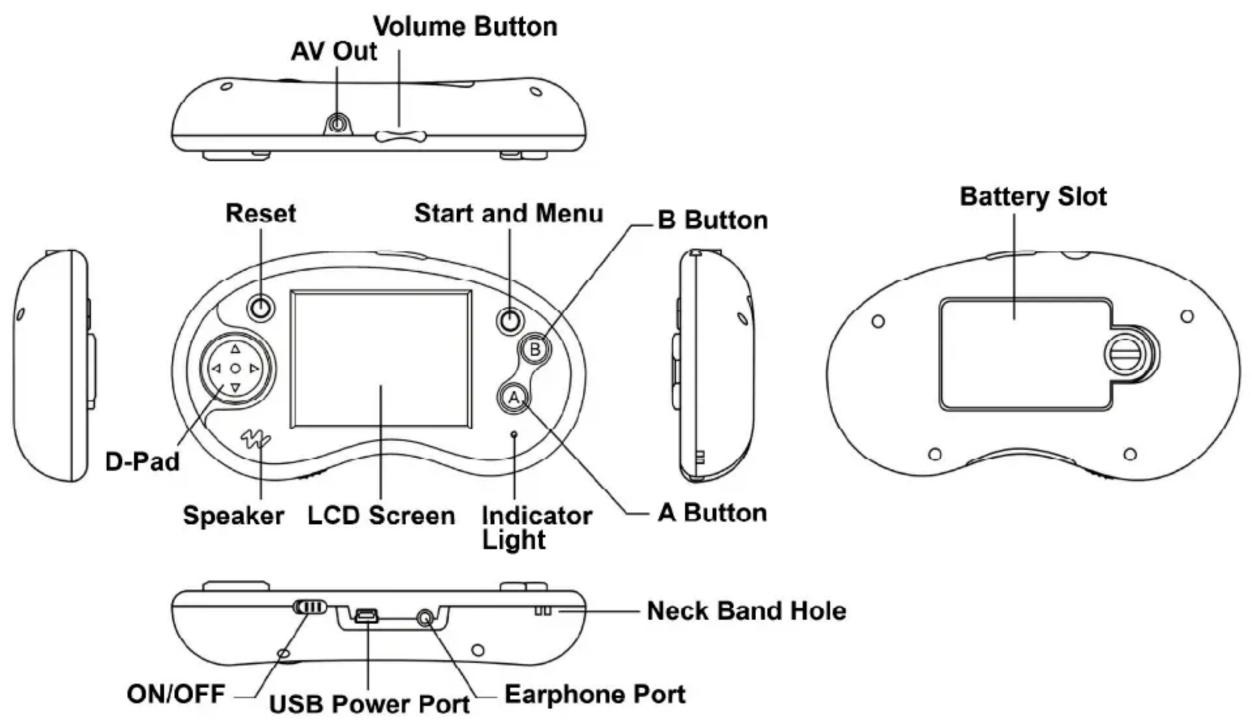
| D-pad | Direction arrows to navigate |
| A-button | Select/Confirm button/Main Function button |
| B-button | Special Function button |
| Start button | Pause or Exit from game |
| AV Out | Connect with TV set via AV cable |
| Earphone Port | Connect with the earphone |
| Volume Button | Adjust the Volume Up (+) or Down (-) |
| USB Power Port | Power the device by a USB port connection or a USB AC/DC Adapter (not included) |
DENVER®
www.denver-electronics.com



Electric and electronic equipment contains materials, components and substances that can be hazardous to your health and the environment, if the waste material (discarded electric and electronic equipment) is not handled correctly.
Electric and electronic equipment is marked with the crossed out trash can symbol, seen above. This symbol signifies that electric and electronic equipment should not be disposed of with other household waste, but should be disposed of separately.
All cities have established collection points, where electric and electronic equipment can either be submitted free of charge at recycling stations and other collection sites, or be collected from the households. Additional information is available at the technical department of your city.
Importer:
DENVER ELECTRONICS A/S
Stavneagervej 22
DK-8250 Egaa
Denmark
www.facebook.com/denverelectronics
Brand : DENVER
Model : GMP-270CMK2
Category : Console