
DAB-33 MK2 - Radio DENVER - Free user manual and instructions
Find the device manual for free DAB-33 MK2 DENVER in PDF.


| Product Type | DAB/DAB+ Radio with FM Tuner |
| Dimensions (W x H x D) | 180 x 120 x 70 mm (approx.) |
| Weight | 0.5 kg (approx.) |
| Power Supply | AC 230V 50Hz or 3 x AA batteries (not included) |
| Power Consumption | 5W (max) |
| Frequency Bands | DAB/DAB+ (Band III), FM 87.5-108 MHz |
| Preset Stations | 20 (10 DAB, 10 FM) |
| Display | LCD with backlight (scrolling text) |
| Audio Output | Built-in speaker (mono) and headphone jack (3.5 mm) |
| Volume Control | Rotary knob |
| Tuning Controls | Auto scan, manual tune, preset recall |
| Additional Functions | Alarm clock, sleep timer, snooze |
| Battery Life (approx.) | Up to 10 hours (depending on volume) |
| Cleaning Instructions | Wipe with a soft, dry cloth. Do not use liquids or solvents. |
| Safety Precautions | Keep away from water and moisture. Do not open the device. Use only supplied power adapter. |
| Spare Parts & Repairability | Contact Denver support for spare parts. No user-serviceable parts inside. |
| General Information | Manufacturer: DENVER; Model: DAB-33 MK2; Category: Radio |
Frequently Asked Questions - DAB-33 MK2 DENVER
User questions about DAB-33 MK2 DENVER
0 question about this device. Answer the ones you know or ask your own.
Ask a new question about this device
Download the instructions for your Radio in PDF format for free! Find your manual DAB-33 MK2 - DENVER and take your electronic device back in hand. On this page are published all the documents necessary for the use of your device. DAB-33 MK2 by DENVER.
USER MANUAL DAB-33 MK2 DENVER
To achieve the utmost in enjoyment and performance, and in order to become familiar with its features, please read this manual carefully before attempting to operate the unit
Important Notes
This safety and operating instruction should be retained for future reference.
The apparatus shall not be exposed to dripping or splashing and no objects filled with liquids, such as vases, shall be placed on apparatus. Avoid installing the unit in locations described below:
* - Places exposed to direct sunlight or close to heat radiating appliances such as electric heaters, on top of other stereo equipment that radiate too much heat.
* - Places blocking ventilation or dusty places.
* - Places subject to constant vibration, humid or moist places.
No naked flame sources such as lighted candles should be placed on the unit.
Attention should be drawn to the environmental aspects of battery disposal.
Make sure not to obstruct the ventilation openings, a minimum of 10cm should be kept around the apparatus for ventilation.
The ventilation should not be impeded by covering the ventilation openings with items such as newspaper, table-cloths, curtains, etc. Use apparatus in moderate climates only.
Operate tuning controls and switches as instructed in the manual.
The AC/DC adaptor is used as the disconnect device. It shall remain readily operable and should not be obstructed during intended us
To be completely disconnected the apparatus from supply mains, the AC/DC adaptor of the apparatus shall be disconnected from the mains socket outlet completely.
The normal function of the product may be disturbed by Strong Electro Magnetic Interference. If so, simply reset the product to resume normal operation by following the instruction manual. In case the function could not resume, please use the product in other location.
Do not attempt to remove any screws, or open the casing of the unit; there are no user serviceable parts inside, refer all servicing to qualified service personnel

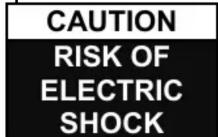

CAUTION: TO REDUCE THE RISK OF ELECTRIC SHOCK DO NOT REMOVE COVER (OR BACK), NO USER SERVICEABLE PARTS INSIDE, REFER SERVICING TO QUALIFIED SERVICE PERSONNEL.
DANGEROUS VOLTAGE

Conductor dangerous voltage, that may be of sufficient magnitude to constitute a risk of electric shock to persons is present within this product's enclosure.
ATTENTION

The owner's manual contains important operating and maintenance instructions, for your safety, it is necessary to refer to the manual.
WARNING: TO PREVENT FIRE OR SHOCK HAZARD, DO NOT EXPOSE THIS APPLIANCE TO DRIPPING OR SPLASHING.
Note: This unit will become warm when used for a long period of time. This is normal and does not indicate a problem with the unit. This unit includes micro-processors which may malfunction as a result of external electrical interference/ noise or electrostatic discharge. If the unit is not working properly, disconnect the power source and then reconnect it.
Front view

- SPEAKER
- STANDBY BUTTON
- TUN/CH △ BUTTON
- LCD DISPLAY
- VOL+ BUTTON
- MENU/INFO BUTTON
Side view
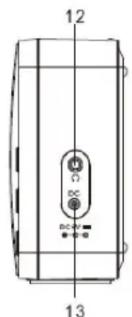
- PRESET BUTTON
- SELECT BUTTON
- TUN/CH ▽ BUTTON
- MODE BUTTON
- VOL- BUTTON
Rear view

- HEADPHONE JACK
- DC INPUT SOCKET
- ANTENNA
- BATTERY DOOR
SWITCHING YOUR RADIO ON FOR THE FIRST TIME
AC Operation
- Insert the DC power jack of AC/DC adaptor to the DC input socket located at the right of the radio.
- Plug the AC/DC Adaptor to the AC mains outlet.
- Press the STANDBY to turn the radio on.
Remarks: If the AC Adaptor voltage is over than 6V, it will possible make the line damage.
DC (battery) operation
- Ensure the AC/DC adaptor is disconnected from the radio and AC mains.
- Installed the batteries (4×1.5V UM3/AA battery) into the battery compartment.
- Press the STANDBY to turn the radio on.
Remarks: To obtain the best performance in DC operation, the use of alkaline batteries is highly recommended.
Display backlight
When the radio is in AC mode, the display backlight will be full brightness all the time. When the radio is in DC battery operation, the display backlight will be turned on to full brightness for around 10 seconds and then go to dim, it will then be turned on to full brightness again for 10 seconds on every key press. In STANDY mode, the radio and display backlight will be turn off.
DAB mode
Press the STANDY button to turn the unit on, it will automatically enter into the DAB mode and perform auto scan function. During the scan the display show "Scanning..." together with a slide bar that indicates the progress of the scan and the amount of stations that have been found so far.(F.1) (F.2) Once the scan has finished, the radio will select the first alphanumerically found station. You can now press the TUN/CH△ or TUN/CH△ button to explore the found stations followed by pressing the SELECT button to select listening to the stations.
Note: If there is no stations found after auto scan, the radio will then enter into the Tune Select Menu, you can now press the TUN/CH△ or TUN/CH▽ button to select "Manual tune" or "Full scan" for stations.
F.1
Welcome! Digital Radio
F.2

DAB Auto Scan
The auto scan will search for the entire DAB Band III channels, after the scan has finished, the first alphanumerically found stations will be automatically selected.
- To activate auto scan, press and hold the MENU/INFO button for longer than 2 seconds to enter into the Menu and then press the TUN/CH△ or TUN/CH▽ button to select "Full scan", finally press the
ENG
SELECT button to confirm, the display will show "Scanning..." and a pressing slide bar.(F.3)
- All the stations that have been found will be stored automatically, to explore the stations that have been found, press the TUN/CH△ or TUN/CH▽ button and when you find a station that you would like to listen to, press the SELECT button.
FM radio
- To select FM, press the MODE button, the display will show FM and the frequency.
- To activate auto search, press SELECT or press and hold the TUN/CH△ or TUN/CH▽ button until it stars to scan up or down the frequency band. The display will show "Scanning...", and it will stop automatically once a station has been found.(F.6) (F.7).
F.6
92.75MHz Scanning....
F.7
92.75MHz Scanning....
- To search manually, press the TUN/CH△ or TUN/CH▽ button to increment the frequency by 0.05MHz.
Scan setting
- To activate Scan setting, press and hold the MENU/INFO button for longer than 2 seconds to enter into the Menu and then press the TUN/CH△ or TUN/CH▽ button to select “scan setting”, finally press the SELECT button to confirm, Press the TUN/CH△ or TUN/CH▽ button to select “All stations/strong stations”. Press the SELECT button to confirm the setting.
STORING AND RECALLING STORED STATIONS
This function allows up to 10 stations to be programmed into the memory and stored in both DAB and FM mode
- To store a preset, first tune to your desired station, then press and hold the PRESET for longer than 2 seconds, the display will show the flashing "Preset Store number" (F8).
- Press the TUN/CH△ or TUN/CH▽ button to select your desired station preset number.
- Press the SELECT to confirm your selection, the station now broadcasting has now been stored in the selected location (F9).
: Preset Store
<1: Empty >
F9 Preset 1 Stored
- To listen to the preset stations, first press the PRESET button once and then then press the TUN/CH△ or TUN/CH▽ button to scroll up or down the presets that you have stored, and press the SELECT button to confirm. The station name or frequency and preset location number will be displayed in the lower half of the display (F10). If the preset has not been allocated 'Preset Recall #: (Empty)', "Preset empty" will be shown in the display.
Preset Recall <6: BBC Radio 6>#10
FACTORY RESET
If moving the radio to another location in the country the pre-tuned and stored DAB stations may no longer be available and it will be necessary to reset the radio back to the factory settings.
- Connect the radio to AC mains (via AC/DC adaptor), then press STANDBY to turn the radio on
- Press and hold the MENU/INFO button for longer than 2 seconds, then press MENU/INFO button, press the TUN/CH△ or TUN/CH▽ button to until the display show "system", then press the SELECT button
- Continue press the TUN/CH△ or TUN/CH▽ button until the display shows "
" and then press the SELECT button to confirm. - The display is now showing "Factory Reset
Yes' and Rotate press the TUN/CH△ or TUN/CH▽ button to confirm " " and press the SELECT button again.
System
Factory reset?
ENG
- The radio will display “Restarting....” and will then go into standby mode.
Note: All stored programmed stations will be lost during reset.
ALL RIGHTS RESERVED, COPYRIGHT DENVER ELECTRONICS A/S
DENVER®
www.denver-electronics.com



Electric and electronic equipment contains materials, components and substances that can be hazardous to your health and the environment, if the waste material (discarded electric and electronic equipment) is not handled correctly.
Electric and electronic equipment is marked with the crossed out trash can symbol, seen below. This symbol signifies that electric and electronic equipment should not be disposed of with other household waste, but should be disposed of separately.
All cities have established collection points, where electric and electronic equipment can either be submitted free of charge at recycling stations and other collection sites, or be collected from the households. Additional information is available at the technical department of your city.
Imported by:
DENVER ELECTRONICS A/S
Stavneagervej 22
DK-8250 Egaa
Denmark
www.facebook.com/denverelectronics
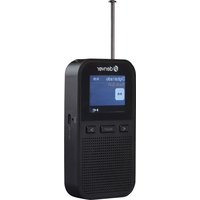


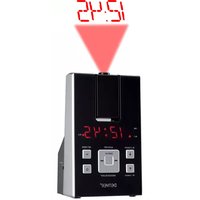
Brand : DENVER
Model : DAB-33 MK2
Category : Radio