
OpenScape ComAssistant V2.0 - Business Telephony SIEMENS - Free user manual and instructions
Find the device manual for free OpenScape ComAssistant V2.0 SIEMENS in PDF.


| Product Type | Unified Communications Software |
| Brand | Siemens |
| Model | OpenScape ComAssistant V2.0 |
| Max Users | Up to 50,000 |
| Supported Browsers | Microsoft Internet Explorer 6.0 or higher, Firefox 1.5 or later |
| Server Operating Systems | Microsoft Windows 2003 (up to 2,000 users), SUSE Linux Enterprise Server 9 or 10 |
| Databases | MySQL 4.18 (up to 2,000 users) or SolidTech 4.5 |
| Supported Communication Platforms | HiPath 2000 V1.0+, HiPath 3000 V5.0+, HiPath 4000 V1.0+, HiPath 8000 V2.2+ |
| Languages | German, English, French, Italian, Spanish, Portuguese, Brazilian Portuguese |
| Telephony Functions | Click & Dial, conference, consultation call, call transfer, hotkey |
| Call Journal | Logs incoming and outgoing calls with filter options, direct callback |
| Directories | Personal, shared, global (LDAP), Microsoft Outlook integration |
| Voicemail | Display and retrieve messages via phone or PC, save as WAV |
| Team Features | Flexible call answering, availability display, call forwarding within team |
| One Number Service | Yes, for using the solution at any device |
| Rules Interpreter | Filter calls by caller number, call type, forwarded calls, date and time |
| Business Group Support | Yes, for large corporations or managed services |
| Time Zone Support | Static home time zone and mobile time zone for travelers |
| Portal Integration | IBM Sametime, IBM Websphere, SAP Portal |
| Frontend Server Capacity | Up to 8 frontend servers, each supporting up to 6,500 users |
| Load Balancing | Required for systems with more than 3,000 users |
Frequently Asked Questions - OpenScape ComAssistant V2.0 SIEMENS
User questions about OpenScape ComAssistant V2.0 SIEMENS
0 question about this device. Answer the ones you know or ask your own.
Ask a new question about this device
Download the instructions for your Business Telephony in PDF format for free! Find your manual OpenScape ComAssistant V2.0 - SIEMENS and take your electronic device back in hand. On this page are published all the documents necessary for the use of your device. OpenScape ComAssistant V2.0 by SIEMENS.
USER MANUAL OpenScape ComAssistant V2.0 SIEMENS
Today's enterprise is faced with an overwhelming array of communications possibilities that often hinders internal productivity and irritates customers. Despite this fact, employees are expected to be responsive, sales-oriented and productive, regardless of whether they are working remotely, traveling or visiting customers. Change is critical and it's about employing technology in order to optimize results – bringing the surge of communication under control, resulting in better use of company time, human resources, and revenue opportunities. A key component in facing the communication challenge is enabling employees to manage communications efficiently and effectively.
Siemens has the answer: OpenScape ComAssistant.
Communication for the open minded
Siemens Enterprise Communications
www.siemens.com/open
SIEMENS
OpenScape ComAssistant is an innovative solution that ensures the optimum availability of employees with the benefits of computer-assisted telephony. It enables employees to set up and customize their communications in accordance with their special needs.
All incoming and outgoing calls are logged transparently in a journal. Users can also view all calls that have not reached them and then respond to them immediately, e.g., by initiating a callback. In addition, incoming calls can be filtered and forwarded to any other phone or directly to a voicemail system. OpenScape ComAssistant thus supports employees in maintaining a balance between constant accessibility and undisturbed time for working on important business activities.
OpenScape ComAssistant provides two different web-based user interfaces: a WebClient and a WebPortal. Users can choose their preferred user interface to access a wide range of CTI functions and also customize the appearance of the interface, e.g., by defining how the window is subdivided and the contents of the subdivided areas.
The main features offered by OpenScape ComAssistant include:
- Initiating simple phone calls using Click & Dial as well as more intricate telephony functions such as setting up conferences, consultation calls and call transfers.
- Call journal of incoming and outgoing calls with filter options. Direct callbacks from the journal.
- Access to global directories (using LDAP) and integration of private directories and contacts from Microsoft Outlook.
- Search function across multiple directories and selection from the hit list with a mouse click
- Optional synchronization of personal directories with the global directory.
●Activation of the One Number Service, e.g., to make calls via the office telephone easily and cost-effectively
OpenScape ComAssistant helps company professionals:
●to focus on revenue-generating opportunities, without being distracted by routine activities
●to always be available for real-time communication requests and respond to them flexibly
●to ensure that critical communications are correctly received, regardless of the medium or location
●to filter out low-priority information and concentrate on activities with higher priorities
●to manage calls and messages without problems, even if they are not at home or at their workplaces
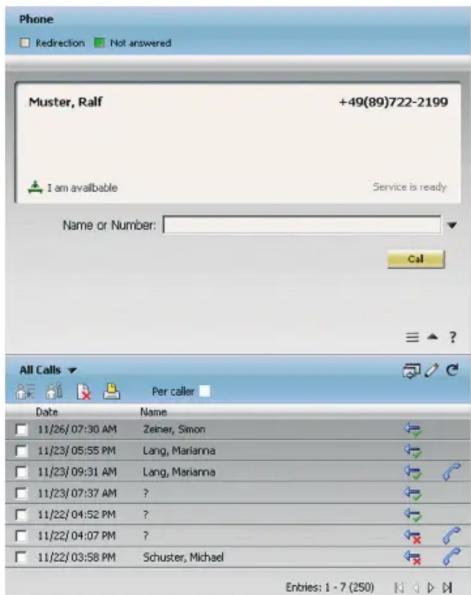
OpenScape ComAssistant WebClient
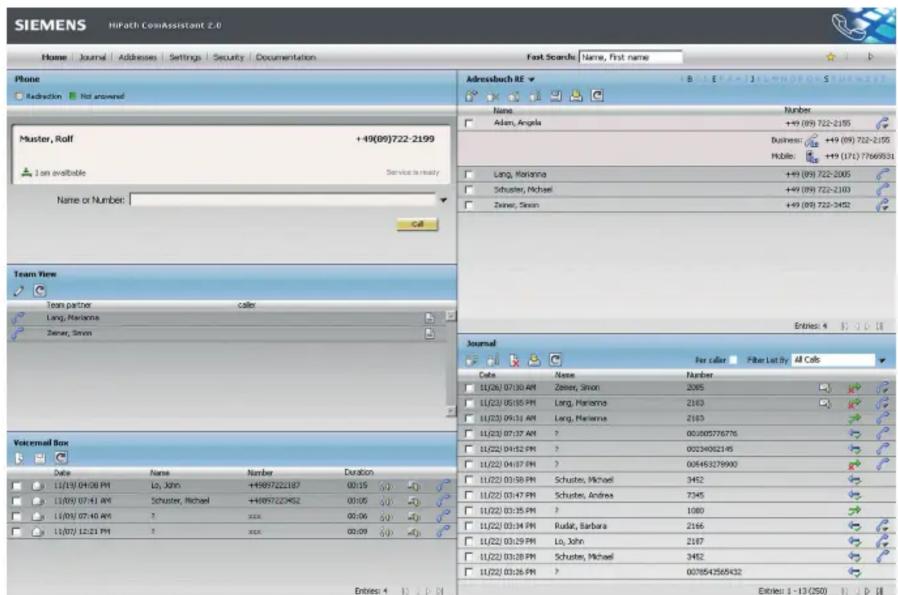
OpenScape ComAssistant WebPortal
Overview of Functions
Telephony Functions
Employees can call a phone number or subscriber by clicking on the appropriate entry in the speed-dial list, a shared directory, the journal or the search results.
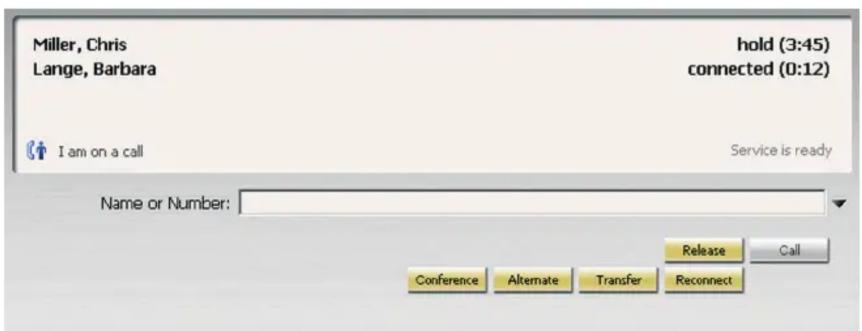
Once a connection has been set up, additional features such as alternate, consultation and conference calls are available.
Hotkey functionality enables a number to be called from any application (only under Microsoft Windows).
Call Forwarding (redirection)
The appropriate settings for forwarding calls can be easily defined by the employees themselves via the user interface.
A distinction can be made here to specify whether all calls are to be forwarded unconditionally, to differentiate between internal or external calls or to forward calls only after a timeout.
Directories (Address Books)
All employees are provided with their own personal directories in which they can manage their own contacts.
Shared directories can be created to support collaborative work on projects and in teams.
Global directories are linked using LDAP.
Call Journal
Incoming and outgoing calls are logged in a personal call journal, which can be accessed via a web browser in the office or any PC connected to the intranet.
When working in a team, the journal can also be made available to other team members.
Voicemail Box
Received voicemail messages are displayed and can be retrieved via the phone or PC.
In addition, users can optionally save their messages as WAV files.
OpenScape ComAssistant also supports direct callbacks to callers.
Working in Teams
OpenScape ComAssistant offers several features to simplify communications within a team.
The individual employees within a team have more flexibility when answering other team members' calls or forwarding incoming calls to other members in the team. The availability of individual team members is displayed to the other employees in the team.
One Number Service
This function enables employees to use OpenScape ComAssistant at any workplace (device). The phone number of the device for outgoing calls is defined for this purpose.
Rules Interpreter
The OpenScape ComAssistant rules interpreter can be used to filter calls in accordance with defined criteria and then execute some specific action.
The following filtering criteria, which may be combined, are available: caller's number, call type (internal/external), forwarded calls, and date and time.
Support for Multiple Business Groups
This feature enables large corporations to treat in-house companies separately, e.g. with their own directory access, or to sell managed services to these companies.
Support for Multiple Time Zones
OpenScape ComAssistant supports two time zones for an employee:
A static home time zone and a mobile time zone.
The mobile time zone can be defined by employees who are away on business trips.
The time zones are taken into account in the journal and in the rules.
Integration in Business Portals
Integration in IBM Sametime, IBM Web-sphere or SAP Portal is possible.
Technical Data
OpenScape ComAssistant supports Microsoft Internet Explorer 6.0 (or higher) and Firefox 1.5 (or later).
Supported Server Operating Systems and Databases
●Microsoft Windows 2003 (up to max. 2,000 users)
●SUSE Linux Enterprise Server 9 or 10
●MySQL 4.18 (up to max. 2,000 users) or SolidTech 4.5
For more than 3,000 users, appropriate frontend servers and possibly load balancers are needed for load distribution. Up to 6,500 users can be supported per frontend server.
Supported Communication Platforms
●HiPath 2000 V1.0 and later
●HiPath 3000 V5.0 and later
●HiPath 4000 ab V1.0 and later
●HiPath 8000 V2.2 and later
Maximum number of users
Max. 50,000 users
Supported Languages
German, English, French, Italian, Spanish, Portuguese, Brazilian Portuguese
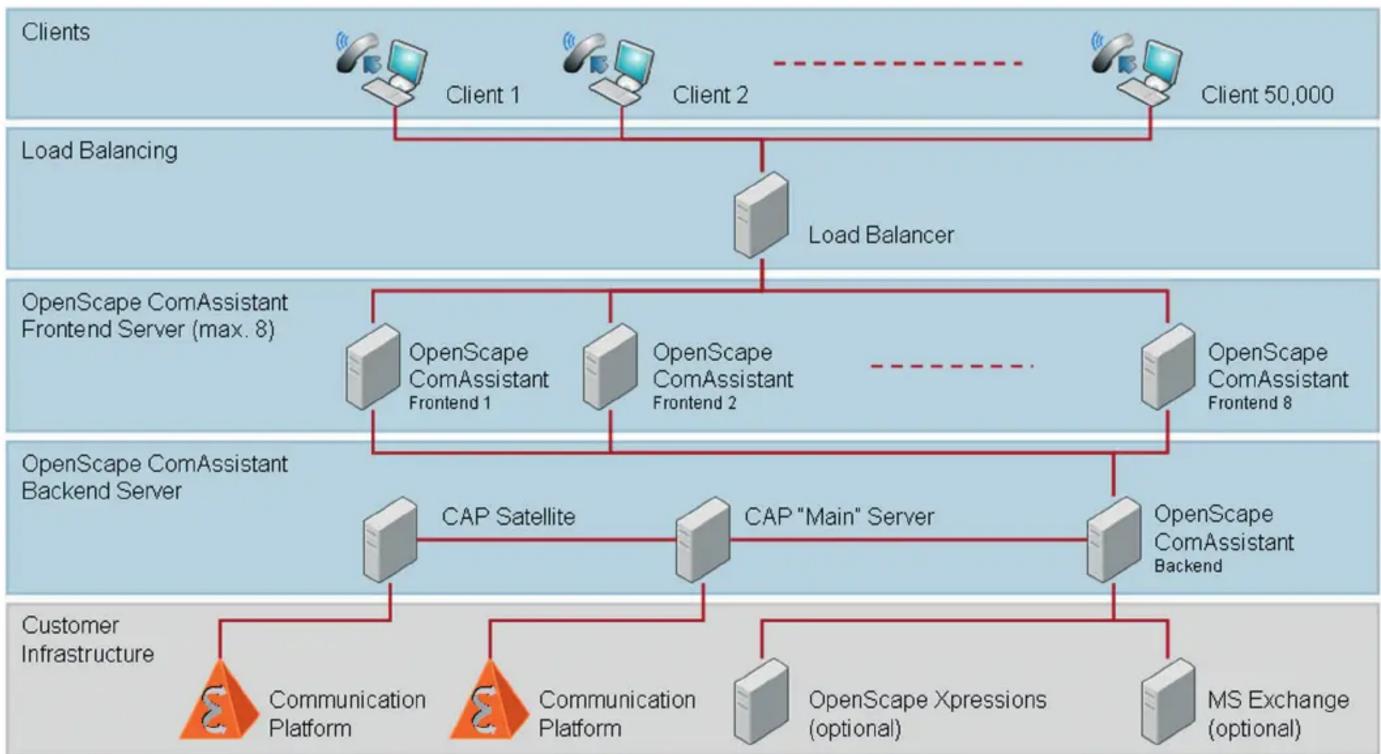
flowchart
graph TD
    A["Clients"] --> B["Client 1"]
    A --> C["Client 2"]
    A --> D["Client 50,000"]
    B --> E["Load Balancing"]
    C --> E
    D --> E
    E --> F["Load Balancer"]
    F --> G["OpenScape ComAssistant Frontend Server (max. 8)"]
    G --> H["OpenScape ComAssistant Frontend 1"]
    G --> I["OpenScape ComAssistant Frontend 2"]
    G --> J["OpenScape ComAssistant Frontend 8"]
    H --> K["CAP Satellite"]
    I --> K
    J --> K
    K --> L["CAP "Main" Server"]
    L --> M["OpenScape ComAssistant Backend"]
    M --> N["Customer Infrastructure"]
    N --> O["Communication Platform"]
    N --> P["Communication Platform"]
    N --> Q["OpenScape Xpressions (optional)"]
    N --> R["MS Exchange (optional)"]
Example for medium to large enterprises, headquarter with satellites and load balancer, more than one communication system
Communication for the open minded
Siemens Enterprise Communications www.siemens.com/open
Copyright © Siemens Enterprise
Communications GmbH & Co. KG 01/2008
Hofmannstr. 51, D-80200 Munich
Reference No.: A31002-S2620-D100-3-7629
The information provided in this document contains merely general descriptions or characteristics of performance which in case of actual use do not always apply as described or which may change as a result of further development of the products. An obligation to provide the respective characteristics shall only exist if expressly agreed in the terms of contract. Availability and technical specifications are subject to change without notice. The trademarks used are owned by Siemens Enterprise Communications GmbH & Co. KG or their respective owners.
- Overview of Functions
- Telephony Functions
- Call Forwarding (redirection)
- Directories (Address Books)
- Call Journal
- Voicemail Box
- Working in Teams
- One Number Service
- Rules Interpreter
- Support for Multiple Business Groups
- Support for Multiple Time Zones
- Integration in Business Portals
- Technical Data
- Supported Server Operating Systems and Databases
- Supported Communication Platforms
- Maximum number of users
- Supported Languages
- Communication for the open minded
Brand : SIEMENS
Model : OpenScape ComAssistant V2.0
Category : Business Telephony