W240 - UR PULSAR - Free user manual and instructions
Find the device manual for free W240 PULSAR in PDF.


| Product Type | Universal Remote Control |
| Brand | Pulsar |
| Model | W240 UR |
| Dimensions (W x H x D) | 1.8 x 7.5 x 1.2 inches (45 x 190 x 30 mm) |
| Weight | 0.2 lbs (90 g) with batteries |
| Power Source | 2 x AAA alkaline batteries (not included) |
| Battery Life | Approximately 6 months with normal use |
| Number of Keys | 28 |
| Control Range | Up to 30 feet (10 meters) |
| Infrared Frequency | 38 kHz |
| Compatible Devices | TV, DVD, Blu-ray, Streaming devices, Sound systems |
| Programming Method | Auto code search or direct code entry |
| Code Database | Pre-loaded with codes for over 500 brands |
| Backlit Keys | No |
| Learning Function | No |
| Macro Support | No |
| Operating Temperature | 32°F to 104°F (0°C to 40°C) |
| Maintenance | Clean with a soft, dry cloth. Do not use liquids or cleaners. |
| Safety | Keep away from water and excessive heat. Do not expose to direct sunlight for long periods. |
| Spare Parts | Batteries only; no other user-replaceable parts |
| Warranty | 1 year limited warranty |
| Manual Pages | 20 |
| Included in Box | Remote control, user manual |
Frequently Asked Questions - W240 PULSAR
User questions about W240 PULSAR
0 question about this device. Answer the ones you know or ask your own.
Ask a new question about this device
Download the instructions for your UR in PDF format for free! Find your manual W240 - PULSAR and take your electronic device back in hand. On this page are published all the documents necessary for the use of your device. W240 by PULSAR.
USER MANUAL W240 PULSAR
CAL. W240, W620, W650 DIGITAL QUARTZ
- Time/calendar
- Stopwatch with 8 lap memory
- Countdown timer with preset and adjustable timer functions
- Daily alarm
- Stroke function (Cal. W240, W620)
• Auto illumination function (Cal. W650)
• Electroluminescent panel
MODE CHANGE
Cal. W240, W620

Cal. W650

![graph TD A["ALARM"] --> B["TIMER"] B --> C["STOPWATCH"] C --> D["STROKE"] D --> A E["TIME/CALENDAR"] --> A](/content/2026/05/864045/images/ff266aa45b55281be4e5098acbc293a0912ba6e19292897daf67c1a938327110.jpg)
![graph TD A["TIME/CALENDAR"] --> B["STOPWATCH"] B --> C["TIMER"] C --> D["ALARM"] D --> A](/content/2026/05/864045/images/7c3d5c8c241a2cc51820f707f08b32e1553e3c7dfacde9c9cf5f6b58b295c874.jpg)
TIME/CALENDAR MODE

TIME/CALENDAR SETTING
B Press for 2 to 3 seconds. C Select the digits to be adjusted. D Set the flashing digits. B Return to TIME/CALENDAR mode.
Selection of the digits
Cal. W240, W620 Cal. W650
Seconds ⇒ Minutes ⇒ Hour ⇒ Date 12-/24-hour indication ⇐ Year ⇐ Month
AUTO ILLUMINATION on/off ⇒ Seconds ⇒ Minutes Hour Date
12-/24-hour indication ⇐ Year ⇐ Month ⇐
AUTO ILLUMINATION FUNCTION (only for Cal. W650)

When the function is turned on:
- The display is illuminated with each press of a button to operate the watch.
- While the stopwatch or timer is counting, the display is illuminated every minute to signal the lapse of time: For the first 19 minutes in the stopwatch function and for the last 19 minutes in the timer function.
B Press for 2 to 3 seconds.
D Turn on/off the AUTO ILLUMINATION FUNCTION.
▼ B Return to TIME/CALENDAR mode.
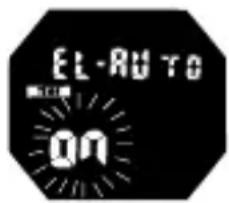
The function is on.
STOPWATCH MODE

C Start / Stop / Restart
D Reset / Measure lap time
Lap time measurement

MEMORY RECALL FUNCTION
- The stored data can be recalled either during or after the measurement.

B Press to activate the memory
▼ recall function. **
D With each press, stored data are recalled from the oldest to the newest.
B Return to STOPWATCH mode.
STROKE MODE
(For Cal. W240 and W620)
- The number of strokes per minute is automatically calculated by measuring the time required to make three strokes.

C Press to start measurement.

C Press to stop measurement when the third stroke is made.
* The number of strokes per minute will be displayed.
TIMER MODE
- Two types of timer are available: preset timer and adjustable timer.

PRESET TIMER SETTING
D Select the preset time.
* For Cal. W240 and W620, 9 different lengths of time have been preset for the timer.
For Cal. W650, 4 different lengths of time have been preset for the timer.
Selection of the preset time/adjustable timer
Cal. W240, W620 Cal. W650
D Select the adjustable timer. (only for Cal. W650)
▼ B Press for 2 to 3 seconds.
C Select the digits to be adjusted (hour/minutes).
D Set the flashing digits.
B Return to TIMER mode.
TIMER OPERATION
Time measured
B

C Start / Stop / Restart
D Reset
No. of times the countdown is repeated
ALARM MODE

ALARM SETTING
B Press for 2 to 3 seconds.

C Select the digits to be adjusted (hour/minutes).
D Set the flashing digits.

B Return to ALARM mode.
* The alarm is automatically engaged.
Alarm engagement/disengagement
Alarm mark

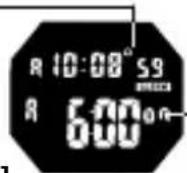
C Engage/disengage the alarm
"on" mark
[ Alarm engaged ]
Turning on/off of hourly time signal and button operation confirmation sound
Hourly time signal mark ( )

C
With each press in TIME/CALENDAR mode, hourly time signal and confirmation sound are turned on and off alternately.
ILLUMINATING LIGHT

E Turn on the illuminating light.
* The display panel is
illuminated for 3 seconds.
NOTES ON USING THE WATCH
MODE CHANGE
• Note for Cal. W240 and W620:
If the stopwatch is not reset to "00" and button A is pressed to change the mode from the STOPWATCH, the TIMER mode appears, skipping the STROKE mode.
TIME/CALENDAR MODE
- In second setting, when the seconds count any number from "30" to "59" and button D is pressed, one minute is added and the seconds are reset to "00".
- Note on unusual display:
While setting the time/calendar, all the segments of the display will light up if both buttons C and D are pressed at the same time. This is not a malfunction. Press any one of the buttons to return to the TIME/CALENDAR mode, and then set the time/calendar again.
STOPWATCH MODE
- The lap number counts up to "99". After that, it is displayed in 2 digits such as "00" for 100, "01" for 101, and so on.
- The first 8 lap times are automatically stored in memory.
- Even if the digits are reset to "00" in the stopwatch measurement, stored data is not erased and can be recalled unless a new measurement is started.
- Even if the STOPWATCH mode is changed to another while the measurement is in progress, it continues counting properly and the flashing STOPWATCH mode mark indicates that the stopwatch is in use.

STROKE MODE
- The time required to make each stroke is measured up to 9 seconds and 99 in 1/100 second increments.
- The measurable number of strokes per minute is between 18 and 240.
- The stroke and stopwatch functions cannot be used simultaneously.
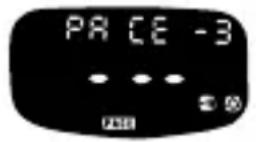
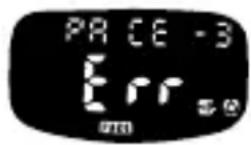
- If the measurement is stopped within 0.75 seconds after it is started, “---” is displayed. If the measurement is not stopped after more than 10 seconds have elapsed, “Err” will automatically appear. Even if “---” or “Err” is shown, the measurement can be started by pressing button C.
TIMER MODE
- The adjustable timer can be set up to 9 hours and 59 minutes in minute increments.
• Note for Cal. W240 and W620:
If button D is pressed while the time set for the adjustable timer is displayed, the set time will be canceled and the preset time of 3 minutes will be shown. - Restart and stop of the timer can be repeated by pressing button C.
- After the countdown is repeated 99 times, the number of times the countdown is repeated is displayed in 2 digits such as "00" for 100, "01" for 101, and so on.
ALARM MODE
- At the designated time the alarm rings for 20 seconds, and the display is illuminated as the alarm rings. To stop it manually, press any one of the buttons.
- Alarm test: The alarm can be tested by keeping buttons C and D pressed in the TIME/CALENDAR mode.
- When the hourly time signal mark is displayed, the hourly time signal rings every hour on the hour and the confirmation sound beeps with each press of the buttons.
ILLUMINATING LIGHT (electroluminescent panel)
- The electroluminescent panel loses its luminance as the battery voltage gets lowered. Also, its luminance level decreases gradually with use.
BATTERY CHANGE

Battery life : Approx. 2 years
Battery : SEIKO CR1620 (Cal. W240)
SEIKO CR2025 (Cal. W620, W650)
- The battery life may be less than 2 years if the alarm is used for more than 10 seconds (Cal. W240) / 20 seconds (Cal. W620, W650) a day and/or the illuminating light more than 2 times (Cal. W240) / 3 times (Cal. W620, W650) a day.
- As the battery is inserted at the factory to check the function and performance of the watch, its actual life once in your possession may be less than the specified period.
- When the battery expires, be sure to replace it as soon as possible to prevent any malfunction.
- We recommend that you contact an AUTHORIZED PULSAR DEALER for battery replacement.
- Battery life indicator
When all the digits start flashing, have the battery replaced with a new one as soon as possible.
- Necessary procedure after battery change
After the battery is replaced with a new one, or if an abnormal display (broken digits, etc.) appears, follow the procedure below to reset the IC.
Press and hold buttons A, B, C and D at the same time for 2 to 3 seconds. The display shown below appears.
* Before using the watch, set the time/calendar and alarm.
[Cal. W240, W620]

[Cal. W650]


WARNING
- Do not remove the battery from the watch.
- If it is necessary to take out the battery, keep it out of the reach of children. If a child swallows it, consult a doctor immediately.
- Never short-circuit, tamper with or heat the battery, and never expose it to fire. The battery may burst, become very hot or catch fire.

CAUTION
- The battery is not rechargeable. Never attempt to recharge it, as this may cause battery leakage or damage to the battery.
TO PRESERVE THE QUALITY OF YOUR WATCH
WATER RESISTANCE
• Non-water resistant

- If the watch becomes wet, have it checked by an AUTHORIZED PULSAR DEALER or SERVICE CENTER.
• Water resistant 5/10/15/20 bar

- Do not operate the buttons when the watch is wet or in water.
If used in sea water, rinse the watch in fresh water and dry it completely.
- When taking a shower with the water resistant 5 bar watch, or taking a bath with the water resistant 10, 15 or 20 bar watch, be sure to observe the following:
* Do not operate the buttons when the watch is wet with soapy water or shampoo.
* If the watch is left in warm water, a slight time loss or gain may be caused. This condition, however, will be corrected when the watch returns to normal temperature.

* Pressure in bar is a test pressure and should not be considered as corresponding to actual diving depth since swimming movement tends to increase the pressure at a given depth. Care should also be taken on diving into water.
** We recommend that you wear a PULSAR Diver's Watch for scuba diving.
TEMPERATURES

Your watch works with stable accuracy within a temperature range of 5°C and 35°C (41°F and 95°F).
Temperatures over 50° C ( 122° F) or below -5° C ( +23° F) may cause a slight time loss or gain or battery leakage or shorten the battery life.
However, the above conditions will be corrected when the watch returns to normal temperature.
MAGNETISM

Your watch will not be affected by magnetism.
CARE OF CASE AND BRACELET

To prevent possible rusting of the case and bracelet caused by dust, moisture and perspiration, wipe them periodically with a soft dry cloth.
SHOCKS & VIBRATION

Light activities will not affect your watch, but be careful not to drop your watch or hit it against hard surfaces, as this may cause damage.
CHEMICALS

Be careful not to expose the watch to solvents, mercury, cosmetic spray, detergents, adhesives or paints. Otherwise, the case, bracelet, etc. may become discolored, deteriorated or damaged.
PERIODIC CHECK

It is recommended that the watch be checked once every 2 to 3 years. Have your watch checked by an AUTHORIZED PULSAR DEALER or SERVICE CENTER to ensure that the case, buttons, gasket and crystal seal remain intact.
PRECAUTION REGARDING CASE BACK PROTECTIVE FILM

If your watch has a protective film and/or a sticker on the case back, be sure to peel them off before using your watch.
STATIC ELECTRICITY

The IC (Integrated Circuit) used in your watch will be affected by static electricity which may disturb the display. Keep the watch away from close contact with objects such as TV screens which emit strong static electricity.
LIQUID CRYSTAL PANEL

The normal life expectancy for the liquid crystal panel of the watch is approximately 5 years. After that it may decrease in contrast, becoming difficult to read. Please contact your AUTHORIZED PULSAR DEALER or SERVICE CENTER if you wish to have a new panel fitted (guaranteed one year).
- CAL. W240, W620, W650 DIGITAL QUARTZ
- MODE CHANGE
- TIME/CALENDAR MODE
- TIME/CALENDAR SETTING
- SELECTION OF THE DIGITS
- AUTO ILLUMINATION FUNCTION (ONLY FOR CAL. W650)
- WHEN THE FUNCTION IS TURNED ON
- STOPWATCH MODE
- LAP TIME MEASUREMENT
- MEMORY RECALL FUNCTION
- STROKE MODE
- (FOR CAL. W240 AND W620)
- TIMER MODE
- PRESET TIMER SETTING
- SELECTION OF THE PRESET TIME/ADJUSTABLE TIMER
- TIMER OPERATION
- ALARM MODE
- ALARM SETTING
- ALARM ENGAGEMENT/DISENGAGEMENT
- TURNING ON/OFF OF HOURLY TIME SIGNAL AND BUTTON OPERATION CONFIRMATION SOUND
- ILLUMINATING LIGHT
- NOTES ON USING THE WATCH
- NOTE FOR CAL. W240 AND W620
- NOTE ON UNUSUAL DISPLAY
- ILLUMINATING LIGHT (ELECTROLUMINESCENT PANEL)
- BATTERY CHANGE
- WARNING
- CAUTION
- TO PRESERVE THE QUALITY OF YOUR WATCH
- WATER RESISTANCE
- NON-WATER RESISTANT
- WATER RESISTANT 5/10/15/20 BAR
- TEMPERATURES
- MAGNETISM
- CARE OF CASE AND BRACELET
- SHOCKS & VIBRATION
- CHEMICALS
- PERIODIC CHECK
- PRECAUTION REGARDING CASE BACK PROTECTIVE FILM
- STATIC ELECTRICITY
- LIQUID CRYSTAL PANEL
Brand : PULSAR
Model : W240
Category : UR