
WS10R - Weather Station JUNG - Free user manual and instructions
Find the device manual for free WS10R JUNG in PDF.


| Product Type | Weather Station |
| Brand | JUNG |
| Model | WS10R |
| Display Type | LCD |
| Dimensions (approx.) | 150 x 100 x 30 mm |
| Weight (approx.) | 200 g |
| Power Supply | 2 x AAA batteries (main unit) + AC adapter (optional) |
| Wireless Range | Up to 100 m (open field) |
| Indoor Temperature Range | 0°C to 50°C |
| Indoor Humidity Range | 20% to 95% RH |
| Outdoor Temperature Range | -20°C to 60°C |
| Outdoor Humidity Range | 10% to 99% RH |
| Barometric Pressure Range | 700 to 1100 hPa |
| Weather Forecast | Sunny, partly cloudy, cloudy, rainy, stormy |
| Clock & Calendar | Yes, with alarm |
| Moon Phase Display | Yes |
| Outdoor Sensor Included | Yes (wireless) |
| Mounting Options | Table stand, wall mount |
| Maintenance | Clean with soft dry cloth; do not use solvents |
| Safety | Keep away from children; remove batteries if not used for long periods |
| Spare Parts Available | Outdoor sensor, power adapter (contact JUNG service) |
| Repairability | Batteries user-replaceable; other repairs by authorized service |
| General Information | JUNG WS10R is a wireless weather station providing accurate indoor/outdoor readings and weather forecasts. |
Frequently Asked Questions - WS10R JUNG
User questions about WS10R JUNG
0 question about this device. Answer the ones you know or ask your own.
Ask a new question about this device
Download the instructions for your Weather Station in PDF format for free! Find your manual WS10R - JUNG and take your electronic device back in hand. On this page are published all the documents necessary for the use of your device. WS10R by JUNG.
USER MANUAL WS10R JUNG
1 Safety instructions
Electrical equipment may only be installed and fitted by electrically skilled persons.
Failure to observe the instructions may cause damage to the device and result in fire and other hazards.
Do not operate in the vicinity of chimneys or other exhaust or ventilation systems. Doing so will compromise function.
Do not operate in the vicinity of radio transmitter systems. Doing so will compromise function.
Select the mounting place so that the device will still be accessible for maintenance purposes.
Do not lay sensor cables parallel to mains- or load-transmitting cables. Doing so will compromise function.
These instructions are an integral part of the product, and must remain with the end customer.
2 Function
Intended use
- Sensors for measuring weather data
- Power is supplied to the sensors and the sensor signals are evaluated via additional electronics, e.g. a weather station
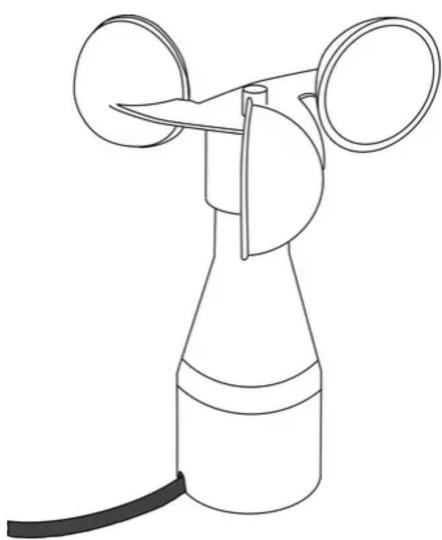
Wind sensor (picture 1):
- Detection of the horizontal wind speed
- Vertical installation in outdoor areas, e.g. on walls of buildings, using the supplied mounting bracket
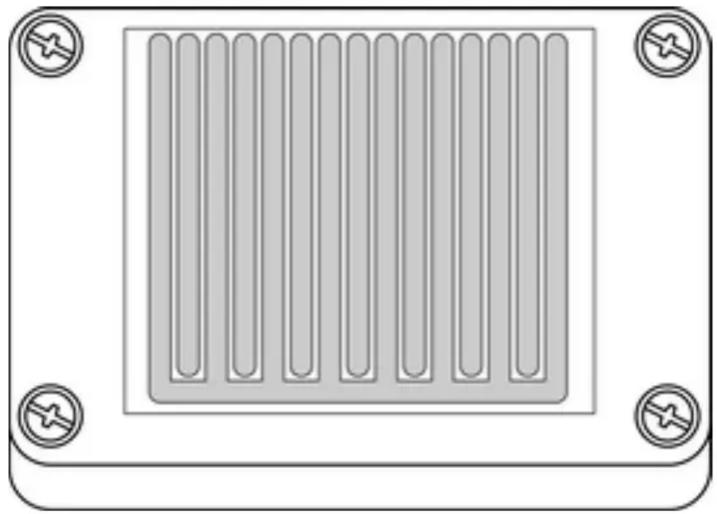
Rain sensor (picture 2):
- Detection of precipitation
- Installation in outdoor areas, e.g. on walls of buildings, using the supplied 110° mounting bracket
natural_image
Line drawing of a mechanical device with two circular components and a connecting rod (no text or symbols)picture 1: Wind sensor – View
Product characteristics
Wind sensor
- Measurement of the rotational speed of the anemometer
- Output with analogue output signal 0...10 V
- Maintenance-free
- Operation without additional power supply possible
Recommendation: To avoid dew and condensation, use a separate 24 V AC/DC power supply for heating (see chapter 4.2. Accessories).
For proper function, the anemometer must be able to rotate freely. Heavy fouling, icing or frozen precipitation can jam the anemometer.
Rain sensor
- Measurement of the electrical conductivity on the sensor surface
- Output by means of analogue output signal: 0= dry, 10 V = rain
- Heating of the sensor surface with separate 24 V AC/DC power supply (see chapter 4.2. Accessories)
The sensor signal is reset when the sensor surface has dried out and a run-on time of 4 minutes has elapsed. The heater speeds up the drying and melts snow and ice.
For proper function, clean the rain sensor regularly with a mild cleaning agent.
natural_image
Diagram of a rectangular panel with vertical slots and four corner mounting holes (no text or symbols)picture 2: Rain sensor – view
3 Information for electrically skilled persons
3.1 Fitting and electrical connection

DANGER!
Electrical shock on contact with live parts in the installation environment.
Electrical shocks can be fatal.
Before working on the device, disconnect the power supply and cover up live parts in the working environment.
Mounting and connecting the wind sensor
Selecting a suitable installation location. Do not install in wind shadows or locations with strong turbulence, updrafts, etc.
■ Mount wind sensor vertically on the building wall using the enclosed mounting bracket.
■ Connect wind sensor to an evaluation device, e.g. a weather station.
| brown Operating voltage 24 V DC | |
| white Operating voltage earth, GND | |
| green Sensor signal 0...10 V output | |
| yellow Sensor signal earth, GND output | |
| grey, pink Heating connection | |
| green-yellow Shield, earth connection |
Installing and connecting the rain sensor
Select a suitable installation location: rain must be able to reach the sensor in an unobstructed manner. Do not install under projecting roofs.
■ Mount rain sensor on wall of building using enclosed 110° mounting bracket.
■ Connect rain sensor to an evaluation device, e.g. a weather station.
| brown Operating voltage 24 V DC | |
| green Sensor signal 0...10 V output | |
| white Common earth operating voltage/sensor | signal, GND |
| yellow, grey Heating connection |
4 Appendix
4.1 Technical data
Wind sensor, Art.-No.: WS 10 W
Supply
Rated voltage DC 18 ... 32 V SELV
Current consumption 6 ... 12 mA
Heating
Rated voltage AC/DC 24 V
Switch-on current max. 1 A
Ambient conditions
Ambient temperature -25 ... +60 °C
Safety class III
Protection rating IP 65 (in position for use)
Output signal
Measuring range 0.9 ... 40 m/s
Load max. 60 m/s (for short periods)
Output voltage
Load
Connection cable
Cable type
Cable length
Can be extended up to
Dimensions ∅×H
Weight
Rain sensor, Art.-No.: WS 10 R
Supply
Rated voltage
Current consumption
Heating
Rated voltage AC/DC 24 V
Power consumption
DC 0 ... 10 V
min. 1.5 kΩ
LiYY 6x0.25 mm²
approx. 3 m
max. 100 m
134×160 mm
approx. 300 g
max. 4.5 W
Ambient conditions
Ambient temperature -30 ... +70 °C
Safety class III
Protection rating IP 65
Output signal
Output voltage DC 0 / 10 V
Load min. 1 kΩ
Reaction time max. 4 min
Connection cable
Cable type LiYY 5x0.25 mm²
Cable length approx. 3 m
Can be extended up to max. 100 m
Dimensions L×W×H 58×83×17 mm
Weight approx. 300 g
4.2 Accessories
Power supply AC 24 V \~ Art.-No.: WSSV10
4.3 Warranty
We reserve the right to make technical and formal changes to the product in the interest of technical progress.
We provide a warranty as provided for by law.
Please send the unit postage-free with a description of the defect to our central customer service office:
ALBRECHT JUNG GMBH & CO. KG
Service Center
Kupferstr. 17-19
D-44532 Lünen
Service-Line: +49 (0) 23 55 . 80 65 51
Telefax: +49 (0) 23 55 . 80 61 89
mail.vka@jung.de
General equipment
Service-Line: +49 (0) 23 55 . 80 65 55
Telefax: +49 (0) 23 55 . 80 62 55
mail.vkm@jung.de
KNX equipment
Service-Line: +49 (0) 23 55 . 80 65 56
Telefax: +49 (0) 23 55 . 80 62 55
mail.vkm@jung.de
The C€ symbol is a free trade symbol, which is solely intended for the authorities and does not guarantee any properties.
ALBRECHT JUNG GMBH & CO. KG
Volmestraße 1
- Safety instructions
- Function
- Intended use
- Product characteristics
- Wind sensor
- Rain sensor
- Information for electrically skilled persons
- Fitting and electrical connection
- DANGER!
- Mounting and connecting the wind sensor
- Installing and connecting the rain sensor
- Appendix
- Technical data
- Accessories
- Warranty
- ALBRECHT JUNG GMBH & CO. KG
- General equipment
- KNX equipment
Brand : JUNG
Model : WS10R
Category : Weather Station