Xentia 72 M 72 400 DOLBY - Television GRUNDIG - Free user manual and instructions
Find the device manual for free Xentia 72 M 72 400 DOLBY GRUNDIG in PDF.


| Product Type | CRT Television |
| Model | Xentia 72 M 72 400 DOLBY |
| Brand | Grundig |
| Screen Size | 72 cm (28 inches) |
| Display Technology | CRT (Cathode Ray Tube) |
| Dimensions (W x H x D) | 700 mm x 550 mm x 500 mm (estimated) |
| Weight | Approximately 30 kg |
| Power Supply | 100-240 V AC, 50/60 Hz |
| Power Consumption | 120 W (typical) |
| Audio System | Dolby Surround, Stereo |
| Input Connectors | SCART, RF Antenna, Audio/Video RCA |
| Output Connectors | Headphone jack, Audio Out (RCA) |
| Remote Control | Infrared (included) |
| On-Screen Display (OSD) | Yes |
| Teletext | Yes |
| Energy Efficiency | Class D (estimated for CRT era) |
| Cleaning Instructions | Unplug before cleaning; wipe with dry soft cloth; do not use liquids or abrasives |
| Safety Features | Auto shut-off after prolonged standby; ventilation slots; anti-tip stability |
| Repairability | Spare parts available; serviceable by qualified technician |
| General Information | Supports PAL/SECAM systems; uses analog TV broadcast |
Frequently Asked Questions - Xentia 72 M 72 400 DOLBY GRUNDIG
User questions about Xentia 72 M 72 400 DOLBY GRUNDIG
0 question about this device. Answer the ones you know or ask your own.
Ask a new question about this device
Download the instructions for your Television in PDF format for free! Find your manual Xentia 72 M 72 400 DOLBY - GRUNDIG and take your electronic device back in hand. On this page are published all the documents necessary for the use of your device. Xentia 72 M 72 400 DOLBY by GRUNDIG.
USER MANUAL Xentia 72 M 72 400 DOLBY GRUNDIG
4 XENTIA 72 M 72-400 DOLBY
Special features of your TV set
Scope of delivery
6 Installation and Safety
8 At a Glance
The front of the TV set
The back of the TV set
The remote control
13 Connection and Preparation
Sample connection with video recorder, satellite receiver and decoder
Connecting a hifi system or active loudspeakers
Putting batteries into the remote control
15 Settings
Switching the television on/ off
Programming TV channels
Setting the Dolby level
17 Easy Dialog System
The Easy Dialog System
The Dialog Center
Operating the Easy Dialog System
CONTENTS
19 Customer Information
Technical data
Service information for the specialized dealer
Contact assignment for the EURO-AV socket
22 Correcting Problems Yourself
XENTIA 72 M 72-400 DOLBY
Special features of your TV set
Technology
Super flat 72 cm colour picture tube (visible picture: 68 cm)
100 Hertz technology
GRUNDIG Megalogic
Megalogic possibilities:
- Perfect compatibility with the Megalogic video recorder. No troublesome programming of channel positions.
- By starting playpack on the video recorder, the video programme position on the TV set will be automatically selected.
Equipment
Dolby Surround *
Megatext, level 2.5, 512-page memory
Easy Dialog System
Retrofit options
VGA interface for connecting a PC
PIP - Picture in picture
Satellite receiver
Removable decorative frame
* Under license from Dolby Laboratories Licensing Corporation."DOLBY" and the double-D symbol ij are trademarks of Dolby Laboratories Licensing Corporation.
XENTIA 72 M 72-400 DOLBY
Scope of delivery
1 TV set XENTIA 72 M 72-400 DOLBY
2 Remote control
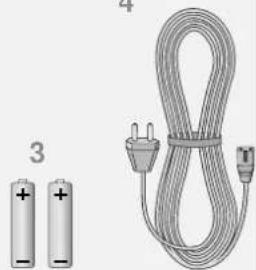
3 2 batteries, 1.5 V-, Mignon (AA)
4 User manual
5 Mains cable
natural_image
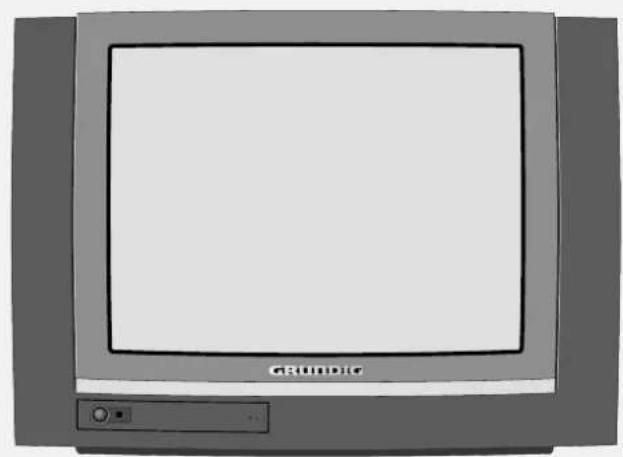
Illustration of a vintage CRT television with 'GRÜNDIG' label and control panel (no additional text or symbols)1
2
4
natural_image
Illustration of two batteries and a coiled cable with a power plug (no text or symbols)5
INSTALLATION AND SAFETY
natural_image
Illustration of a vintage television with a lamp and a plant, marked with 'X' symbols (no text or labels)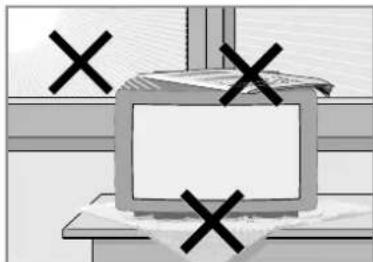
natural_image
Simple line drawing of a computer monitor with four black X marks on top, placed on a shelf (no text or symbols)In order to assure that this high-quality and easy-to-use TV set will be able to provide you with good service and pleasure for a long time to come, it is important that you observe the following points when installing the set.
This set has been designed for the reception and reproduction of picture and sound signals.
Any other use is explicitly forbidden.
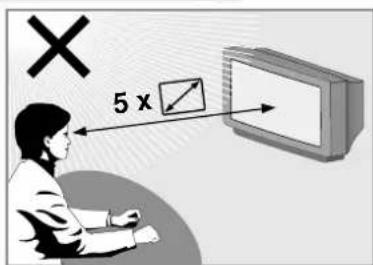
The ideal viewing distance from the screen is 5 times the diagonal width of the screen.
External light shining on the screen adversely affects picture quality.
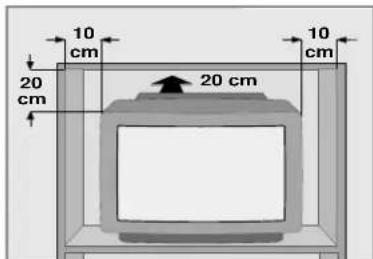
Assure that there is enough space inside a cabinet.
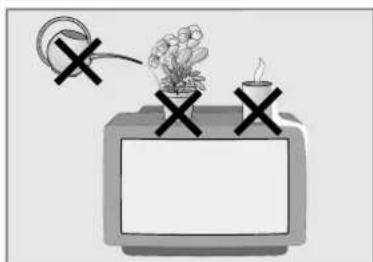
The TV set is designated for operation in dry rooms. Should you nevertheless operate it outside, make absolutely sure that it is protected against dampness (rain, water splashes). Never expose the TV set to any sort of moisture.
Do not place vessels filled with fluid (vases or similar things) on the TV set. The vessel may tip over and the fluid may adversely affect electrical safety.
Put the TV set on an even and hard surface. Do not place objects (for example, newspapers) on the TV set or place the set on a cloth cover, etc.
Do not place the TV set close to the heating or in direct sunshine as it could overheat.
Heat build-up can be dangerous and is detrimental to the service life of the equipment. From time to time, have a technician come to clean the inside of the set.
Keep the TV set away from magnetic fields (for example stereo speakers).
INSTALLATION AND SAFETY
natural_image
Illustration of an electric shock absorber with antenna and power cord (no text or symbols)
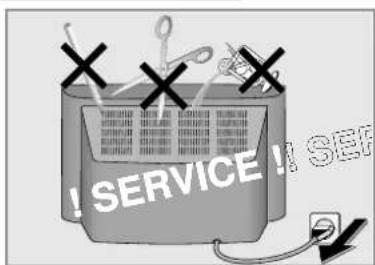
Do not open the TV set under any circumstance. The manufacturer will offer no liability for damage resulting from unauthorized tampering.
Be sure that the mains cable is not damaged at any time.
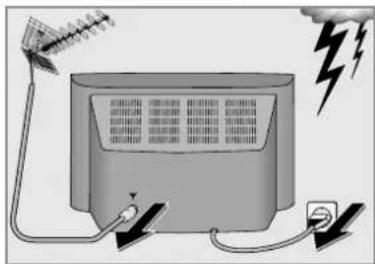
Storms represent a danger for every type of electrical device. Even if the set is switched off, it could be damaged by a lightning strike hitting the mains and/or the aerial lead. Therefore, always disconnect the mains plug and aerial plug when there is a storm.
When cleaning the screen, use only a soft, damp cloth. Use only clean water.
This TV set combines technology and ecology in a well thought-out overall concept. Only ecologically high-quality materials are used. The packaging is made almost entirely of 100% recycled paper, and the portion of plastic has been reduced to a minimum. The batteries supplied have no mercury or cadmium. The number of plastic types has been reduced in order to ensure high-quality recycling when the set is put out of use – all larger plastic parts are marked. To facilitate maintenance work and recycling, this TV set is easy to disassemble.
AT A GLANCE
The front of the TV set
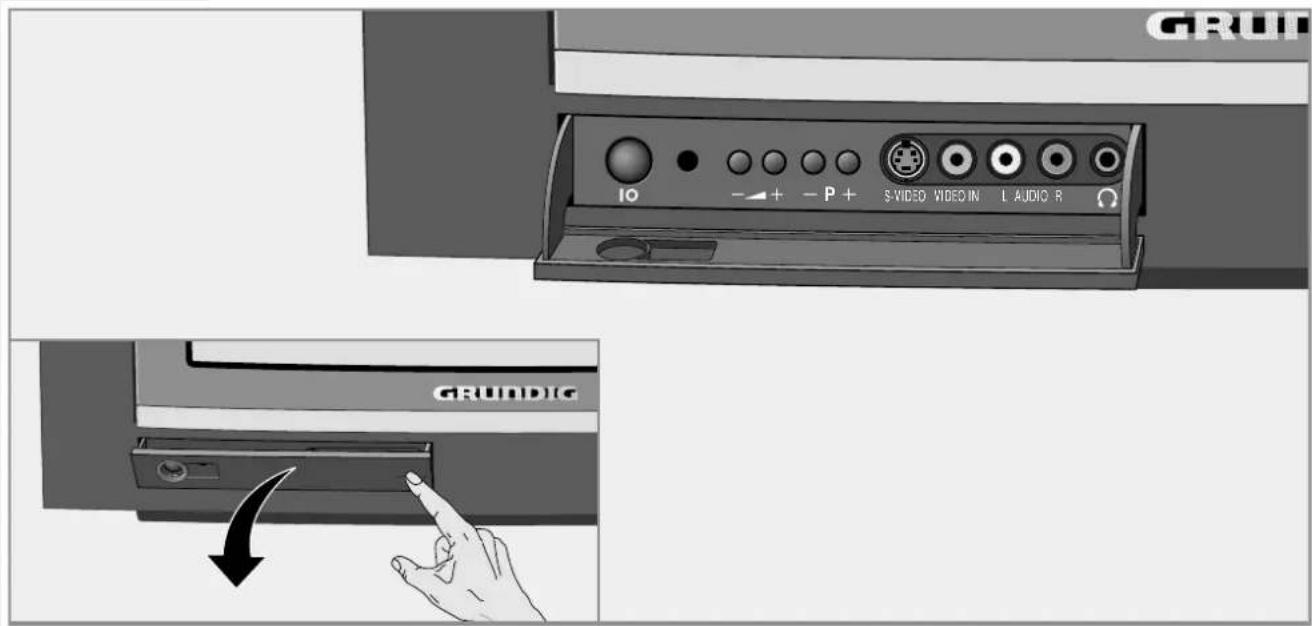
10
Switches the TV set on/off.
- + Volume
- P +
Select channel up/ down.
S-VIDEO SVHS video input for camcorder.
VIDEO IN Video input for camcorder.
L AUDIO R Audio input for camcorder.
The image contains no text.
Headphones connector
AT A GLANCE
The back of the TV set
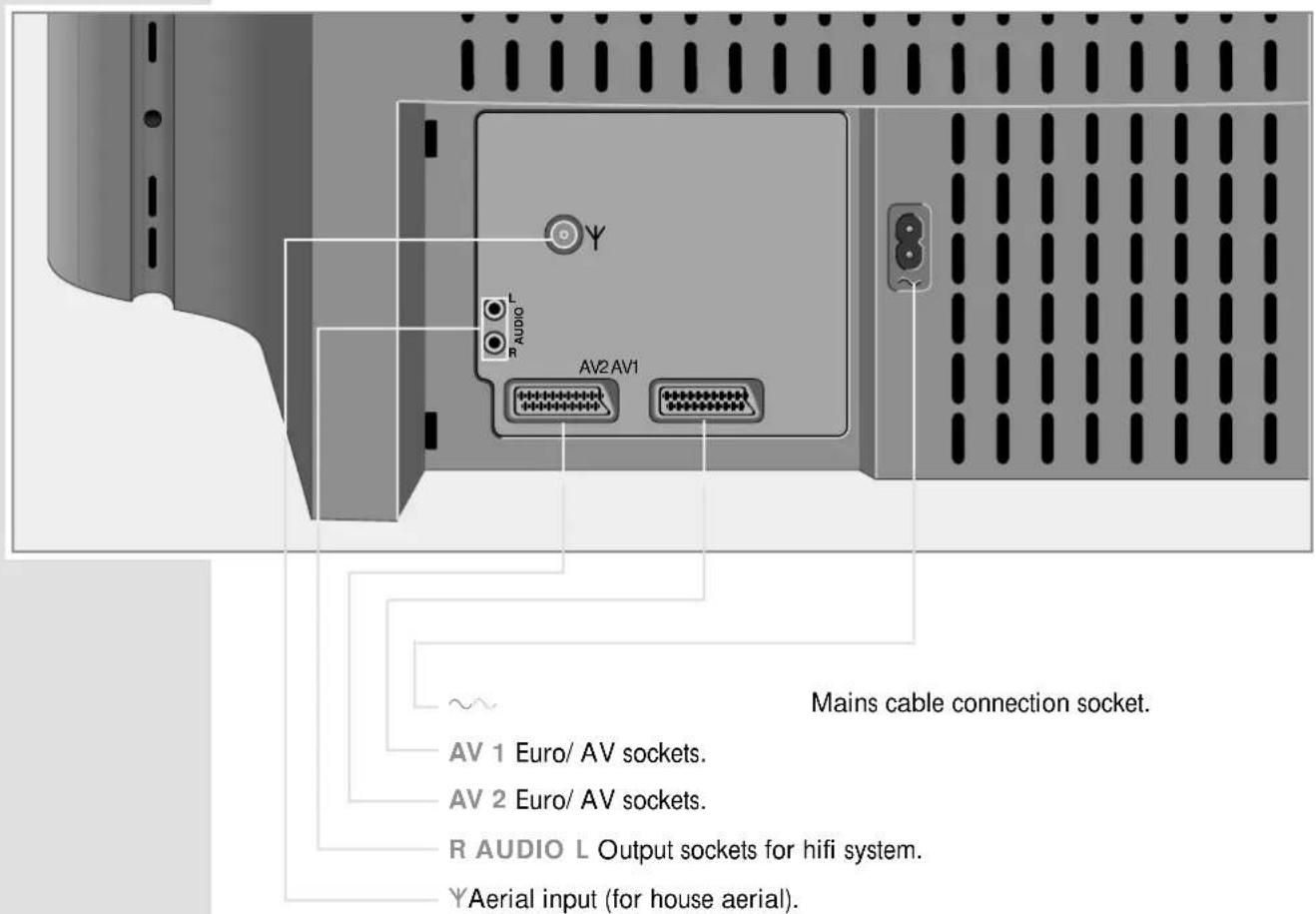
AT A GLANCE
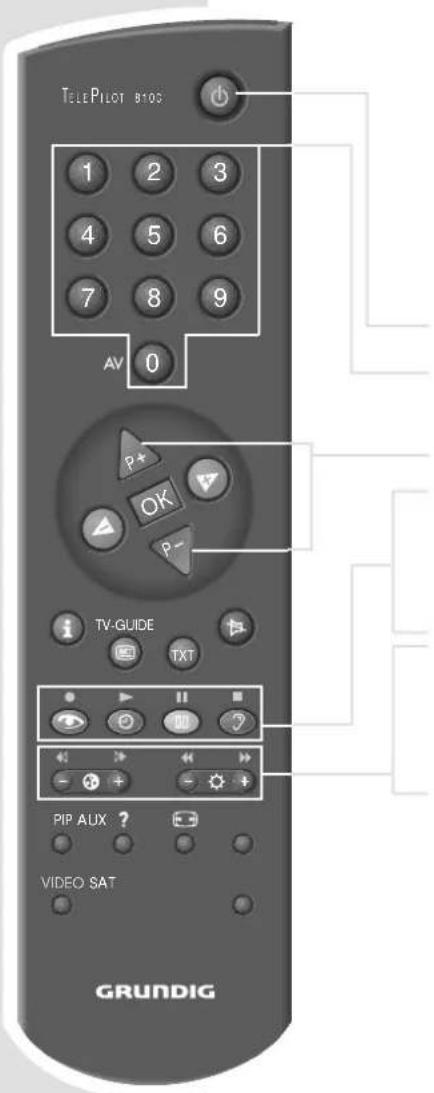
The remote control
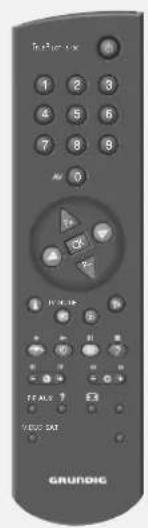
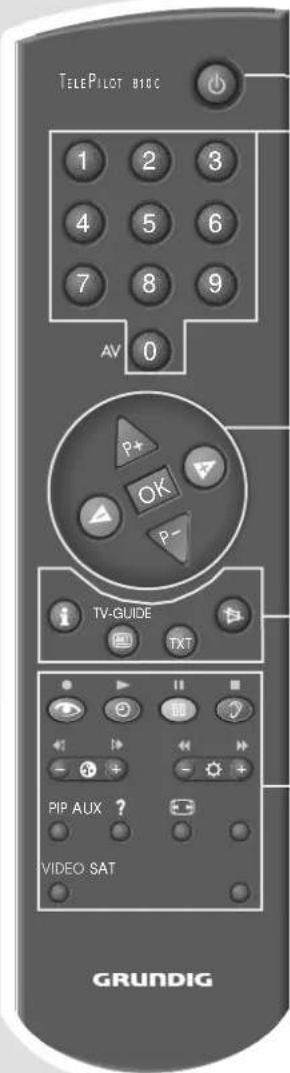
You can use the TP 810 C remote control supplied not only with the TV set, but also with a video recorder a satellite receiver.
Operating the TV set

Switches the TV set to standby.
1 ... 9 Channel selection and switch on the TV set from standby, 0 AV select AV position, enter teletext page numbers.

Switching on the TV set from standby (only »), select channels step by step, cursor up/ down.

Volume, cursor left/right.
OK Changes and activates various functions.
i Call up DIALOG CENTER (with »i« and »OK«). AKT TV-Guide, info about current broadcast.
TXT Teletext mode / TV mode switch-over.

Sound on/ off (mute).
see next page
AT A GLANCE
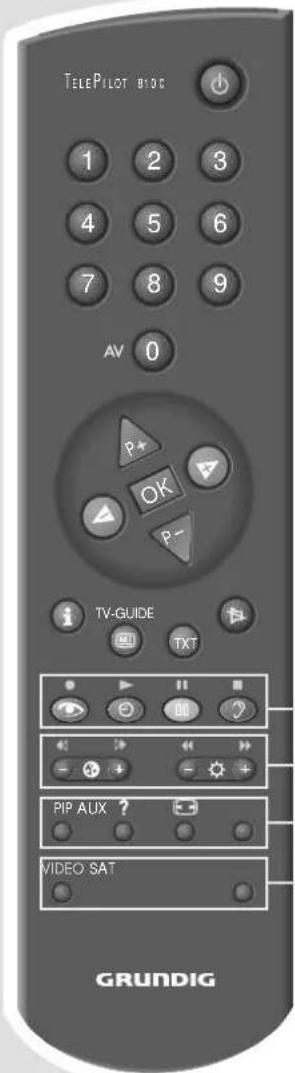
Picture settings, calls up the »PICTURE SETTINGS« menu. Clock time on/ off. Still picture. Sound settings, calls up the »SOUND SETTINGS« menu. Colour contrast. Brightness.
PIP TV picture in teletext. ? Brief instructions Picture format switch-over AUX Preselection button for various functions.
Operating a video recorder/ satellite receiver (see next page)
AT A GLANCE
Operating a video recorder/ satellite receiver
To operate a GRUNDIG video recorder press the »VIDEO« button and hold it down. Then press the desired button.
To operate a GRUNDIG satellite receiver press the »SAT« button and hold it down. Then press the desired button.

Switches to standby.
1 ... 0 Select channel positions and switch on from standby.
Select channels step by step.
- Recording
▶Playback
II Pause
■ Stop
Reverse picture search.
Forward picture search.
Fast reverse.
Fast forward.
Note:
Just try out which functions of your GRUNDIG device can be controlled.
CONNECTION AND PREPARATION
Sample connection with video recorder, satellite receiver and decoder
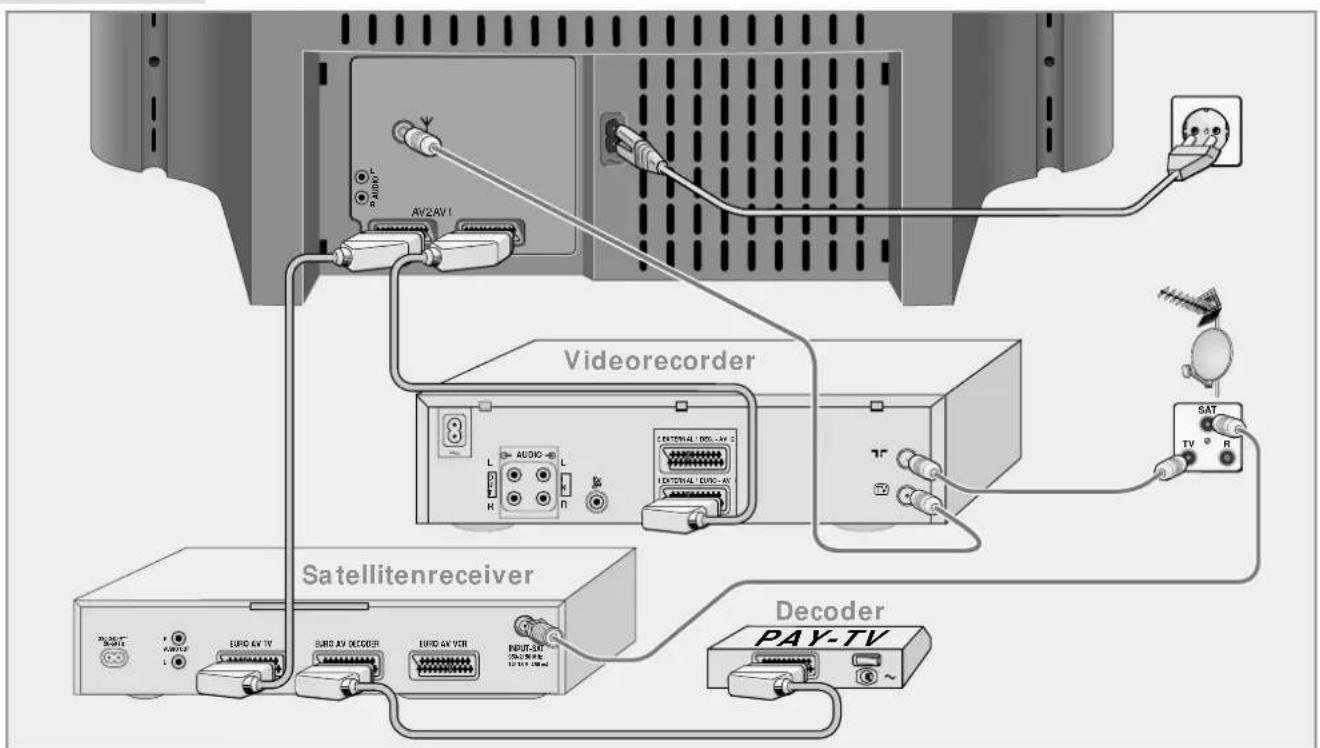
Note:
To see what possibilities your television has for connecting external devices, see the Easy Dialog System in the Audio/Video connections menu. Consult page 17 and onwards to see how to use the Easy Dialog System.
If your video recorder is equipped with Megalogic functions, the video recorder and the TV set must be connected with the AV-EURO cable which was included with the video recorder.
CONNECTION AND PREPARATION
natural_image
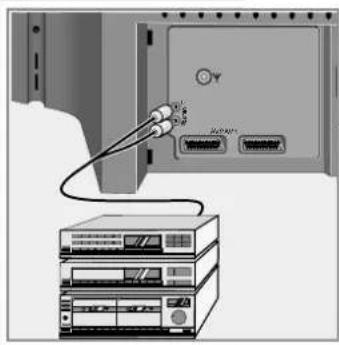
Diagram showing a server rack connected to an external device with ports and cables (no text or symbols visible)Connecting a hifi system or active loudspeakers
Instead of using the television speakers as front speakers, you can use the loud-speakers of your hifi system or active front speakers.
1 Connect the hifi system or the active left/right speakers to the »L AUDIO R« Cinch sockets.
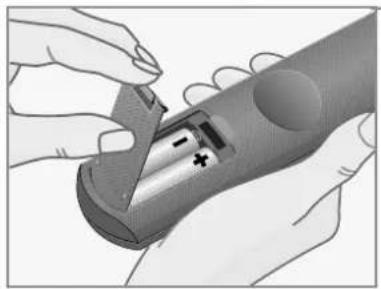
Putting batteries into the remote control
natural_image
Illustration of hands holding a cylindrical device with internal components (no text or symbols visible)1 Open the battery compartment by pulling off the cover.
2 Insert the batteries (Mignon, i.e. UM-3 or AA, 2 x1.5 V). Observe the polarity when inserting the batteries.
Note:
If your television does not react to the remote control commands correctly, then the batteries could be used up. Remove empty batteries. There is no liability for damage caused by leaking batteries.
Environmental note:
The batteries – even those free of heavy metal – cannot be disposed of in normal household rubbish. Used batteries must be disposed of in used battery collection containers in businesses or be taken to public waste disposal facilities.
SETTINGS
Switching the TV set on/off
An LED next to the mains switch indicates the current operating mode by a corresponding colour.
Green = Operation.
Yellow = Standby (TV-GUIDE mode, copy mode).
Red = Standby (energy saving mode, timer programmed).
Switching the TV set on
1 Press »IO« on the TV set.
The TV picture appears on the screen.
Switching the TV set to standby
1 Press » 🔊 on the remote control once.
Switching the TV set off definitely
1 Press »IO« on the TV set, or
press »◀◀ on the remote control twice.
Condition:
The ecologic switch must be activated (Dialog Centre, »Special Functions« menu).
Note:
The ecologic switch is not activated if a timer is programmed or the copy mode activated.
Switching on again is only possible with »IO« on the TV set.
Programming TV channels
The TV set is equipped with the automatic tuning system “ATS euro plus” which carries out channel position assignment for you.
1 After switching on the TV set, select he »English« dialog language and confirm with »OK«.
Note:
If the »Select dialog language« page does not appear, press »I« and then »OK« to display the Dialog Centre menu.
2 Confirm your country with »OK«.
The automatic tuning system is started. Depending on the number of channels which can be received, the search can take one minute and more.
3 When the automatic allocation of the channel positions is completed, a table with information about the installation menu is displayed.
4 Press »TXT« to exit this table.
The »INSTALLATION« menu is displayed.
5 Make desired settings and end setting with »TXT« or, if you want to watch television immediately, switch off menu with »TXT«. A menu with information on the Easy Dialog System appears.
6 Press »TXT« to switch to TV operation.
Note:
It is possible to call up all functions of the »INSTALLATION« menu also later in the Easy Dialog Centre under »INSTALLATION«.
EASY DIALOG SYSTEM
The Easy Dialog System
Your TV set is equipped with the Easy Dialog System.
That means that operating instructions are not, as is usual, in a printed manual, but rather appear on the screen as dialog fields.
The Dialog Centre
The Dialog Centre is the control centre for your TV set.
Here you can make a variety of settings, call up information, and get specific help for operating your television (e.g. info about the remote control, a list of key words, tips and tricks).
Just try it out. You can't do anything wrong.
1 Call up the Dialog Centre witht »i« and then »OK«.
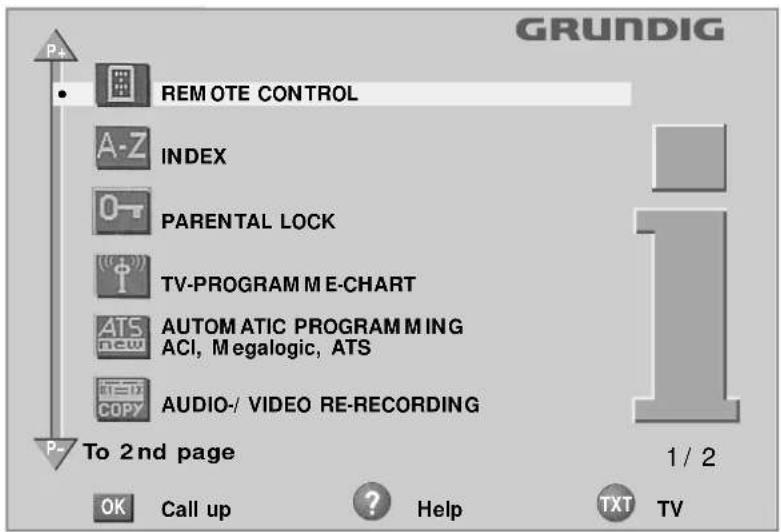
- At every step of operation, the dialog symbols show which buttons can be used to carry out particular functions.
EASY DIALOG SYSTEM
Operating the Easy Dialog System
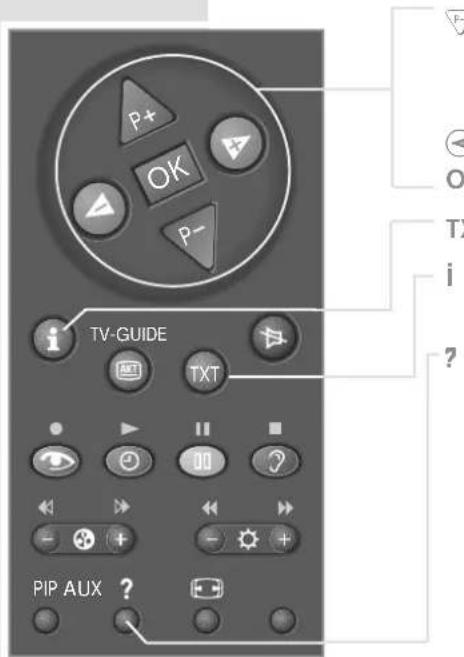
Move the yellow bar up/ down.
With two-paged menus, the second page will be turned to.

Change settings.
OK Calls up or confirms selected functions.
TXT Back to TV picture.
Acces to the Dialog Centre (with »i« and »OK«), one page back.
Calls up brief instructions.
CUSTOMER INFORMATION
Technical data
Power supply voltage:
220 - 240 V, 50/60 Hz (control range of the power supply unit 190 ... 264 V)
Power consumption:
in operation, 125 W, in standby 5 W
Sound output stage:
2 x 20 Watt music (2 x 10 Watt sine)
Reception ranges:
C01 ... C99, special channels S01 ... S41
CUSTOMER INFORMATION
Service information for the specialized dealer:
The TV set may be operated only using the mains cable set supplied. It prevents mains interference and is an integral part of the appliance approval. For replacement purposes, please order only the mains cable set with the designation "GWN 9.22/ part number 8290.991-316" from an approved after-sales service.
CE The product meets the requirements of the following EU guidelines: 73/23/EEC guideline on electrical equipment for use with certain voltage limits.
89/ 336/ EEC guideline on electromagnetic compatibility.
The appliance complies with the standards:
EN 60065, EN 55013, EN 55020
CUSTOMER INFORMATION
Contact assignment for the EURO-AV socket
If you want to connect an other appliance to the TV set (e.g. computer, amplifier), your specialist dealer can establish a proper connection using the following connection table:
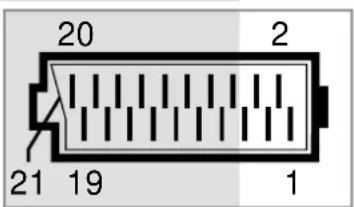
pin signal
1 = audio output right
2 = audio input right
3 = audio output left
4 = audio ground
5 = blue ground
6 = audio input left
7 = RGB blue input
8 = switching voltage
9 = green ground
10 = data line (MEGALOGIC)
11 = RGB green input
12 = -
13 = red ground
14 = ground
15 = RGB red input (S Video = Chroma)
16 = RGB switching voltage
17 = video ground
18 = RGB switching voltage ground
19 = video output
20 = video input, (S Video = luminance)
21 = shielding/ ground
CORRECTING PROBLEMS YOURSELF
If the remedies below do not lead to a good result, contact an authorised GRUNDIG dealer.
Please consider that problems can also be caused by external appliances, such as video recorders and satellite receivers.
| Problem Possible cause Remedy | ||
| no picture, no audio no mains voltage | mains cable connected? | mains switch on? |
| TV set in standby switch on with remote control | ||
| TV set is not on a switch to another occupied AV channel position channel position | ||
| picture is bright (grainy or blue) aerial cable aerial cable connected? but no programme can be seen check aerial system? | ||
| picture contrast incorrect picture settings change brightness, contrast, or color settings | ||
| poor picture and/ or sound interference from other appliances change the (household appliances, mobile telephones etc.) | position of the appliances | |
| double image, reflection | channel setting | automatic or manual channel setting/ fine tuning |
| aerial | have aerial cable or device checked | |
| no color | color intensity is on minimum | adjust color upward |
| TV standard setting select proper color (if setting possibility is available) | or standards | |
| problem is with the broadcaster test | another channel | |
CORRECTING PROBLEMS YOURSELF
| Problem Possible cause Remedy | ||
| colors wrong, color spots strong magnetic field from increase distance of speakers (or other) to TV set | weaker with permanent color spots, switch off the TV set with the mains switch and switch back on after after 10 minutes | |
| picture is there, no sound volume at minimum or increase/ switch on volume speakers switched off | ||
| volume regulation activated select sound output via audio cinch socket via speaker (if this possibility is available) | ||
| problem is with the broadcaster test | another channel | |
| SAT mode check AV cable between | TV set and receiver | |
| sound unclear | sound setting | correct sound setting |
| poor or no Teletext | TV channel (has no Teletext) or check aerial system possibly double image or reflection or fine tuning | check with another channel, |
| transmission signal too weak (picture grainy) | check aerial system | |
| remote control does not work | no optical connection | point remote control at the TV set |
| remote control batteries check or replace the batteries pay attention to polarity | ||
| undefinable operating mode | switch off TV set with the main power button for about 2 minutes | |
| After switching on, “child lock” appears on the menu | child lock is activated | enter secret number or number combination 7038580. |
- XENTIA 72 M 72-400 DOLBY
- Installation and Safety
- At a Glance
- Connection and Preparation
- Settings
- Easy Dialog System
- CONTENTS
- Customer Information
- Correcting Problems Yourself
- XENTIA 72 M 72-400 DOLBY
- Special features of your TV set
- Technology
- GRUNDIG Megalogic
- Equipment
- Retrofit options
- Scope of delivery
- INSTALLATION AND SAFETY
- AT A GLANCE
- The remote control
- Operating the TV set
- Operating a video recorder/ satellite receiver
- Note:
- CONNECTION AND PREPARATION
- Connecting a hifi system or active loudspeakers
- Putting batteries into the remote control
- Environmental note:
- SETTINGS
- Switching the TV set on/off
- Switching the TV set on
- Switching the TV set to standby
- Switching the TV set off definitely
- Programming TV channels
- EASY DIALOG SYSTEM
- The Easy Dialog System
- The Dialog Centre
- Operating the Easy Dialog System
- CUSTOMER INFORMATION
- Technical data
- Service information for the specialized dealer:
- Contact assignment for the EURO-AV socket
- CORRECTING PROBLEMS YOURSELF
Brand : GRUNDIG
Model : Xentia 72 M 72 400 DOLBY
Category : Television