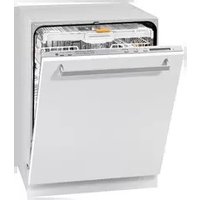
USER MANUAL G 5585 SCVi XXL MIELE
Operating instructions
for dishwashers
To avoid the risk of accidents or damage to the appliance, it is essential to read these instructions as well as the installation plan before it is installed and used for the first time.
en-GB
M.-Nr. 09 255 950
Guide to the appliance 5
Appliance overview 5
Control panel 6
Warning and Safety instructions 7
Caring for our environment 17
Disposal of the packing material 17
Disposal of your old appliance 17
Energy saving dishwashing....18
Before using for the first time....19
To open the door 19
To close the door....19
Display 20
Basic settings 21
Language 21
Water hardness. 21
Before using the appliance for the first time, you require:....22
Filling the salt reservoir 22
"Replenish salt" message....24
Rinse aid 25
Adding rinse aid 25
Replenish rinse aid message 26
Loading the dishwasher 27
Items not suitable for dishwashers: 28
Upper basket 29
Hinged spikes. 29
Hinged cup rack....29
Jumbo cup rack (depending on model)....30
Glass rail 30
Adjusting the upper basket 31
Lower basket 32
MultiComfort area 33
Hinged spikes (depending on model) 33
Cutlery 34
3D cutlery tray (depending on model) 34
Cutlery basket (depending on model) 35
Operation 36
Detergent 36
Adding detergent. 37
Switching on 38
Selecting a programme 38
Starting the programme....38
Display 39
Standby 39
At the end of the programme. 40
Switching off 40
Unloading the dishwasher 40
Interrupting a programme 41
Changing a programme 41
Additional functions 42
Intensive lower basket 42
Turbo 42
Delay start 43
DetergentAgent 44
Cleaning and care 45
Cleaning the wash cabinet 45
Cleaning the door and the door seal 45
Cleaning the reflector panel 45
Cleaning the control panel and door front 46
Checking the filters in the wash cabinet 47
Cleaning the filters 47
Cleaning the spray arms 49
Problem solving guide 50
Technical problems 50
Water inlet/drain fault 52
General problems 54
Noises 56
Unsatisfactory washing result 57
Maintenance 60
Cleaning the water inlet filter 60
Cleaning the drain pump and non-return valve 61
Programme chart 62
After sales service 66
Repairs 66
Guarantee 66
Future updates....66
For testing institutes....66
Optional accessories....67
Electrical connection....68
Plumbing 69
The Miele waterproof anti-leak system 69
Connection to the water supply 69
Drainage 71
Technical data 72
To open the Settings menu 73
Language 73
Water hardness 74
Rinse aid 75
Buzzer 75
Sensor wash 76
Memory 76
Optimise standby 76
Replenish salt and rinse aid reminders 77
Soak 77
Pre-wash 77
Longer drying 77
Brightness 77
Contrast 78
Check filters 78
Showroom programme 78
Factory default 78
To close the Settings menu 78
Appliance overview
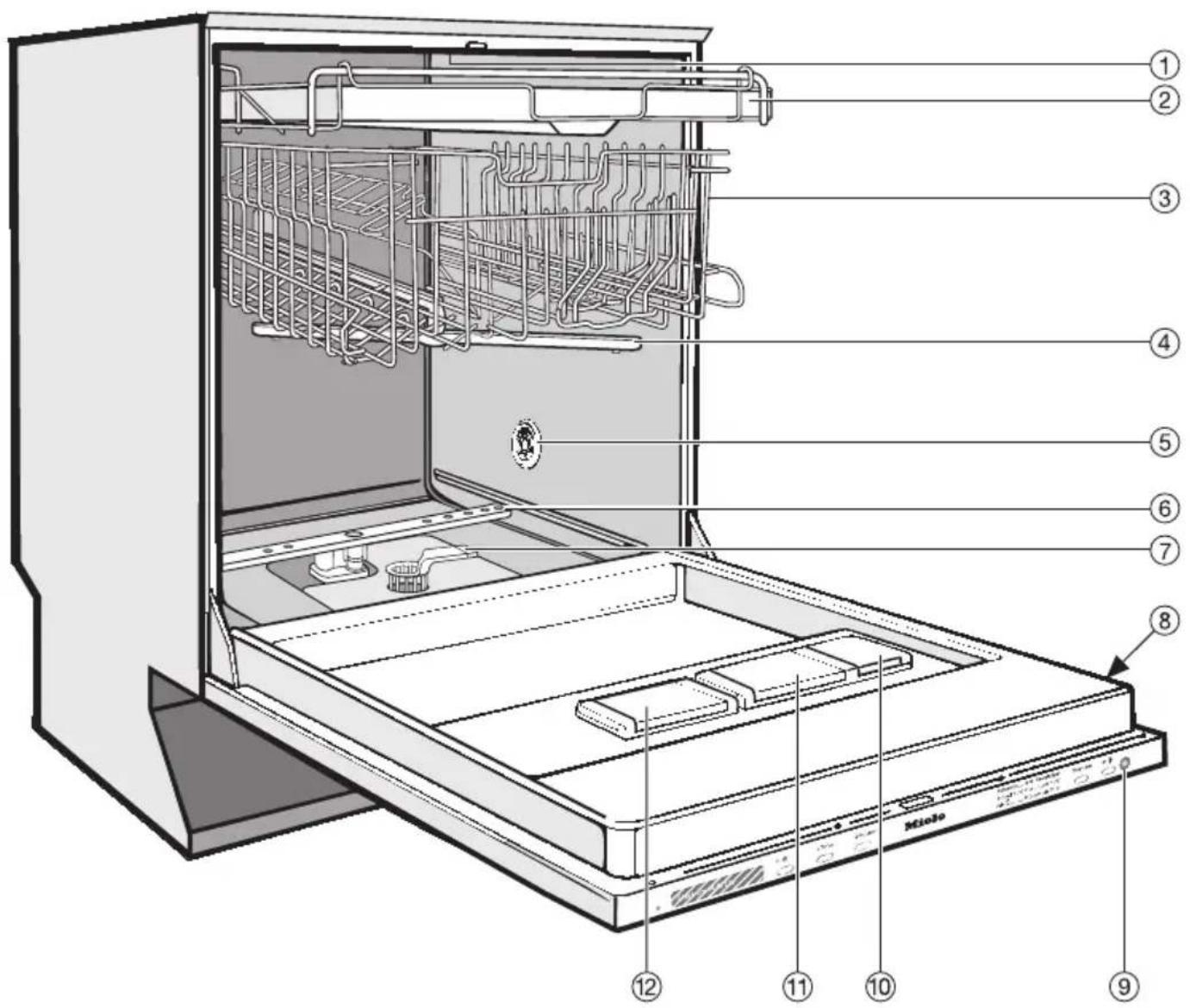
① Upper spray arm (not visible) ② Cutlery tray (depending on model) ③ Upper basket ④ Middle spray arm ⑤ Air inlet for drying (depending on model) ⑥ Lower spray arm
⑦ Filter combination ⑧ Data plate ⑨ In-operation indicator light ⑩ Rinse aid reservoir ⑪ Dual compartment detergent dispenser ⑫ Salt reservoir
Control panel

① Display ② Delay start button ◆ with indicator light ③ Turbo button with indicator light ④ Intensive lower basket button with indicator light
⑤ Programmes ⑥ Programme selector button ⑦ On/Off button ① with indicator light ⑧ In-operation indicator light
This instruction book applies to several different dishwasher models.
The specific dishwasher models are referred to as follows:
Standard = 80.5 cm high dishwashers (integrated)
and 84.5 cm high dishwashers (freestanding)
XXL = 84.5 cm high dishwashers
This appliance conforms to current safety requirements. Inappropriate use can, however, lead to personal injury and damage to property.
To avoid the risk of accidents and damage to the appliance, please read these instructions carefully before using it for the first time. They contain important information on its safety, use and maintenance.
Keep these instructions in a safe place and pass them on to any future owner.
Correct application
This dishwasher is not designed for commercial use. It is intended for use in domestic households and in similar working and residential environments. The dishwasher is not intended for outdoor use. It must only be used as a domestic appliance as specified in these operating instructions, for cleaning domestic crockery and cutlery.
Any other usage is not supported by the manufacturer and could be dangerous. Miele cannot be held liable for damage resulting from incorrect or improper use or operation.
The appliance can only be used by people with reduced physical, sensory or mental capabilities, or lack of experience and knowledge, if they are supervised whilst using it, or have been shown how to use it in a safe way and understand the hazards involved.
Safety with children
Children under 8 years of age must be kept away from the appliance unless they are constantly supervised.
Children 8 years and older may only use the dishwasher if they have been shown how to use it in a safe way and understand the hazards involved.
Children must not be allowed to clean or maintain the appliance unsupervised.
Keep very young children away from it at all times and supervise them whilst you are using it. To prevent the risk of injury, do not allow them to play with it or use the controls. There is a danger that children playing might shut themselves in the dishwasher.
Keep children away from detergents. Dishwasher detergents contain irritant and corrosive ingredients which can cause burning in the mouth, nose and throat if swallowed, or inhibit breathing. Keep children away from the dishwasher when the door is open. There could still be detergent residues in the cabinet.
Seek medical attention immediately if your child has swallowed or inhaled detergent.
Technical safety
Before setting up the appliance, check it for any externally visible damage. Under no circumstances should you use a damaged appliance. It could be dangerous. The dishwasher must only be plugged into the electricity supply via a suitable switched socket. The electrical socket must be easily accessible after the dishwasher is installed so that it can be disconnected from the electricity supply at any time. (See "Electrical connection"). There must be no electrical sockets behind the dishwasher. Danger of overheating and fire risk if the dishwasher were to be pushed up against a plug. The dishwasher must not be installed under a hob. The high radiant temperatures which are sometimes generated by a hob could damage the dishwasher. For the same reason it should not be installed next to open fires or other appliances which give off heat, such as heaters etc. Do not connect the dishwasher to the mains supply until it has been fully installed and any adjustment has been made to the door springs.
Before connecting the appliance, check that the connection data on the data plate (voltage and frequency) match the mains electricity supply. If in any doubt, consult a qualified electrician. The electrical safety of this appliance can only be guaranteed if correctly earthed. It is most important that this basic safety requirement is observed and regularly tested and where there is any doubt the electrical system in the house should be checked by a qualified electrician.
The manufacturer cannot be held liable for the consequences of an inadequate earthing system (e.g. electric shock).
Do not connect the appliance to the mains electricity supply by a multi-socket adapter or an extension lead. These do not guarantee the required safety of the appliance (e.g. danger of overheating).
The appliance must not be used in a non-stationary location (e.g. on a ship).
Do not install the dishwasher in a room where there is a risk of frost. Frozen hoses may burst or split. The reliability of the electronic control unit may be impaired at temperatures below freezing point.
The plastic housing of the water connection contains an electrical component. The housing must not be dipped in water. There are electrical wires in the water inlet hose. Do not cut the water inlet hose, even if it is too long. The integrated Waterproof System offers protection from water damage, provided the following conditions are met:
- The dishwasher is correctly installed and plumbed in.
- The dishwasher is properly maintained and parts are replaced where it can be seen that this is necessary.
- The stopcock has been turned off when the appliance is not used for a longer period of time (e.g. during holidays).
The Waterproof system will work even if the appliance is switched off. However, the appliance must remain connected to the electricity supply.
A damaged dishwasher could be dangerous. If the dishwasher gets damaged, switch it off at the mains and call your Miele Dealer or the Miele Service Department.
Unauthorised repairs could result in unforeseen dangers for the user, for which Miele cannot accept liability. Repairs should only be undertaken by a Miele approved service technician, otherwise any subsequent damage will not be covered by the guarantee. Faulty components must only be replaced by genuine Miele original spare parts. Only when these parts are fitted can Miele guarantee the safety standards of the appliance. Always disconnect the dishwasher from the electrical supply for maintenance work (switch off at the wall socket and remove the plug). If the connection cable is damaged it must be replaced with a special cable available from Miele. For safety reasons this must only be fitted by Miele Service or a Miele approved service technician. In areas which may be subject to infestation by cockroaches or other vermin, pay particular attention to keeping the appliance and its surroundings in a clean condition at all times. Any damage which may be caused by cockroaches or other vermin will not be covered by the guarantee.
Correct installation
The dishwasher must be installed and connected in compliance with the diagram supplied.

Take care, both before and during installation of the dishwasher, not to cut yourself on the metal parts. Danger of injury. Wear protective gloves.
The dishwasher must be correctly aligned to ensure problem-free operation.
In order to ensure stability, built-under and integrated dishwashers must only be installed under a continuous worktop which is secured to adjacent cabinetry.
If you want to convert your freestanding dishwasher to a built-under ("U") model, you will need to order the appropriate conversion kit. If you remove the existing plinth, you must replace it with a U-model plinth. This is necessary to avoid the risk of injury caused by protruding metal parts.
The door springs must be adjusted equally on both sides. They are correctly adjusted when the door remains stationary when left open at 45°. It is important that the door is held in place by the springs and cannot fall open.
Correct use
Do not use solvents in the dishwasher. Danger of explosion. Do not inhale or ingest dishwasher detergent. Dishwasher detergents contain irritant or corrosive ingredients which can cause burning in the nose, mouth and throat if swallowed, or inhibit breathing. Seek medical attention immediately if detergent has been swallowed or inhaled. Avoid leaving the door open unnecessarily, as you could trip over it. Dishes can be very hot at the end of the programme. Allow them to cool until they are comfortable enough to handle before unloading. Do not sit or lean on the opened door. This could cause the dishwasher to tip and be damaged, and you could get injured. Only use detergent and rinse aid formulated for domestic dishwashers. Do not use washing-up liquid. Do not use commercial or industrial detergents as these may cause damage, and there is a risk of severe chemical reaction.
Do not fill the rinse aid reservoir with powder or liquid detergent. This will cause serious damage to the reservoir.
Do not fill the salt reservoir with powder or liquid dishwasher detergent. This will damage the water softener. Make sure you have picked up the correct packet of dishwasher salt before filling the salt reservoir!
Only use special coarse grained dishwasher salt for reactivation, as other salts may contain insoluble additives which can impair the functioning of the water softener.
In an appliance with a cutlery basket (depending on model) cutlery is cleaned and dried more efficiently if placed in the basket with the handles downwards. However, to avoid the risk of injury, place knives and forks etc. with the handles upwards.
Plastic items which cannot withstand being washed in hot water, such as disposable plastic containers, or plastic cutlery and crockery should not be cleaned in the dishwasher. The high temperatures in the dishwasher may cause them to melt or lose shape.
On models with "Delay start", make sure that the dispenser is dry before adding detergent. Wipe dry if necessary. Detergent will clog if poured into a damp dispenser and may not be thoroughly dispersed.
Accessories
Only use genuine Miele original spare parts and accessories with this dishwasher. Using spare parts or accessories from other manufacturers will invalidate the guarantee, and Miele cannot accept liability.
Disposal of your old dishwasher
Make the door lock inoperative so that children cannot accidentally shut themselves in. Make appropriate arrangements for the disposal of the appliance.
The manufacturer cannot be held liable for damage caused by non-compliance with these Warning and Safety instructions.
Disposal of the packing material
The transport and protective packing has been selected from materials which are environmentally friendly for disposal and should be recycled.
Ensure that any plastic wrappings, bags, etc. are disposed of safely and kept out of the reach of babies and young children. Danger of suffocation.
The packaging consists of the following materials:
Outer packaging:
- Corrugated cardboard made from up to 100% recyclable material; or: Polyethylene (PE) shrink wrap – Polypropylene (PP) strapping
Inner packaging:
- Chlorine and fluorine free expanded polystyrene (EPS)
- Base, lid frame and support battens made from untreated natural wood from renewable forests – Polyethylene (PE) protective wrap
Disposal of your old appliance
Electrical and electronic appliances often contain materials which, if handled or disposed of incorrectly, could be potentially hazardous to human health and to the environment. They are, however, essential for the correct functioning of your appliance. Please do not therefore dispose of it with your household waste.
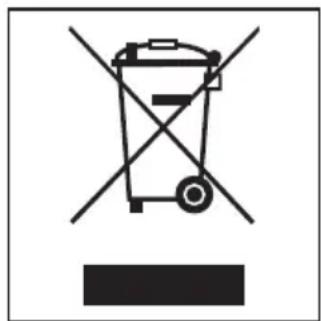
Please dispose of it at your local community waste collection / recycling centre or contact your dealer for advice.
Ensure that it presents no danger to children while being stored for disposal.
To enable sorting by type of plastic for recycling, all plastic parts of the appliance are labelled with international standard symbols.
Energy saving dishwashing
This dishwasher is exceptionally economical in its use of water and electricity. You can make the most of your appliance by following these tips:
■ If your water supply is suitable, this dishwasher can be connected to a hot water supply for further economies. If the water is heated by solar panels, for example, this would be energy efficient. However, if your water is heated by electricity we would recommend connection to cold water.
■ For most economical dishwashing make full use of the baskets without overloading the dishwasher.
- Choose the programme to suit the type of crockery being washed and the degree of soiling.
■ Select the ECO programme for energy-saving dishwashing. This programme is the most efficient in terms of its combined energy and water consumption at cleaning normally soiled crockery.
■ Follow the detergent manufacturer's recommendations on detergent dosage.
■ When using powder or liquid detergent you can use 1/3 less detergent if baskets are only half full.
To open the door
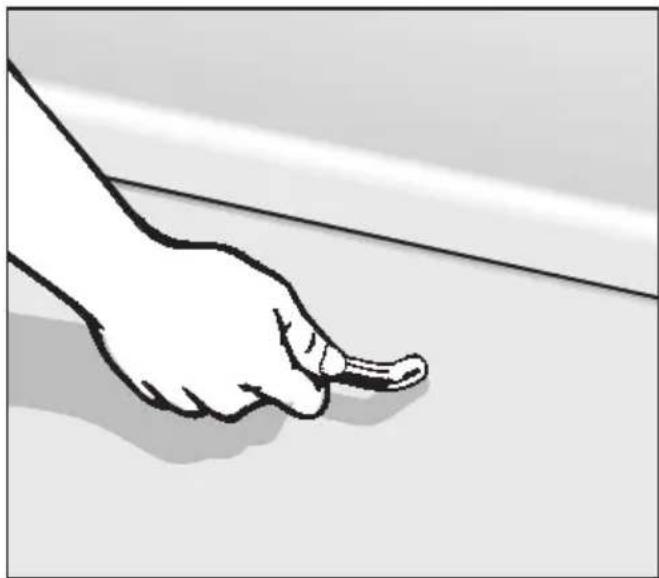
■ Pull the handle.
If the door is opened during operation all functions are automatically interrupted.
To close the door
■ Push the baskets right in.
■ Then lift the door upwards and push until it clicks into position.
Display

OK
General
The display is used to select or set the following:
- the programme
- extras
- the delay start time
- settings
During a programme, the display shows the following:
– the stage the programme is at – the estimated time left for the programme to run – any relevant fault messages and notes
To save energy, the dishwasher switches off after a few minutes if you do not press any buttons during this time (see "Operation, Standby"). Press the Ⓐ button to switch the dishwasher back on again.
The Settings menu is used to alter the dishwasher's electronics to suit different requirements.
You access the settings menu by pressing a specific button combination. See "Settings menu" for more details.
In the Settings menu, the normal functions of the buttons next to the display are switched off so that these buttons can be used to select and confirm Setting options.
The arrows on the left and right of the display, indicate further options. You can use the left or right of the three buttons next to the display, as appropriate, to select these further options.
The middle of the three buttons next to the display is used to confirm a message or setting and also to move to the next menu or to another menu level.

A tick will appear beside the option which is currently selected.
Basic settings
■ Switch the dishwasher on with the On/Off button ①.
If the dishwasher is being switched on for the first time, the welcome screen will appear.
Language
The display will then change automatically to the screen for setting the language.
See "Display" for more information about the display.
Select the language you want, and confirm your selection with the middle button.
A tick √ will appear next to the language that has been set.
Water hardness
The display will then change to the screen for setting the water hardness.
- The dishwasher must be programmed for the water hardness in your area.
- Your local water authority will be able to advise you of the water hardness level in your area.
- Where the water hardness fluctuates e.g. between 6.7 - 9.0 mmol/l (37 - 50 °d - German scale) always programme the dishwasher to the higher value (9.0 mmol/l in this example).
In the event of a fault, it will help the service technician if you know the hardness of your local water supply.
Enter the water hardness below:
mmol/l or °d
The dishwasher is programmed at the factory for a water hardness level of 2.7 mmol/l (15 °d - German scale).
Select the water hardness you want, and confirm your selection with the middle button.
See "Settings, Water hardness" for further information.
Finally, two messages will appear in the display.
After confirming these, the prompts:
i Replenish rinse aid and i Replenish salt may also appear.
Press any button to confirm these. The display will change to show the main menu.
These basic settings will be saved in memory after the dishwasher has been through one complete programme.
Before using the appliance for the first time, you require:
- approx. 1 kg dishwasher salt*, – domestic dishwasher detergent*,
- rinse aid* formulated for domestic dishwashers.
*See "Optional accessories"
Every dishwasher is tested at the factory.
There will be residual water in the appliance from this test. It is not an indication that it has been used previously.
Filling the salt reservoir
In order to achieve good cleaning results, the dishwasher needs to operate with soft water. Hard water results in the build-up of calcium deposits on crockery and in the dishwasher.
Mains water with a hardness level higher than 0.7 mmol/l (4 °d – German scale) needs to be softened. This takes place automatically in the integrated water softener. The water softener in this dishwasher is suitable for a water hardness level of up to 12.6 mmol/l (70 °d - German scale).
The water softener requires dishwasher salt.
Depending on the water hardness level (≤ 3.8 mmol/l, or 21 °d - German scale), dishwasher salt is not required if combination tablets are being used (see "Detergent").
If the water in your area is very soft and constantly lower than
you do not need to add dishwasher salt. The water softener must, however, still be programmed to correspond to the water hardness level in your area.
△ Inadvertently filling the salt reservoir with powder or liquid dishwasher detergent will damage the water softener. Make sure you have picked up the correct packet of dishwasher salt before filling the salt reservoir!
△ Only use special coarse grained dishwasher salt for reactivation, as other salts may contain insoluble additives which can impair the functioning of the water softener.
■ When filling the salt reservoir only open the door halfway to ensure that all the salt gets into the reservoir.
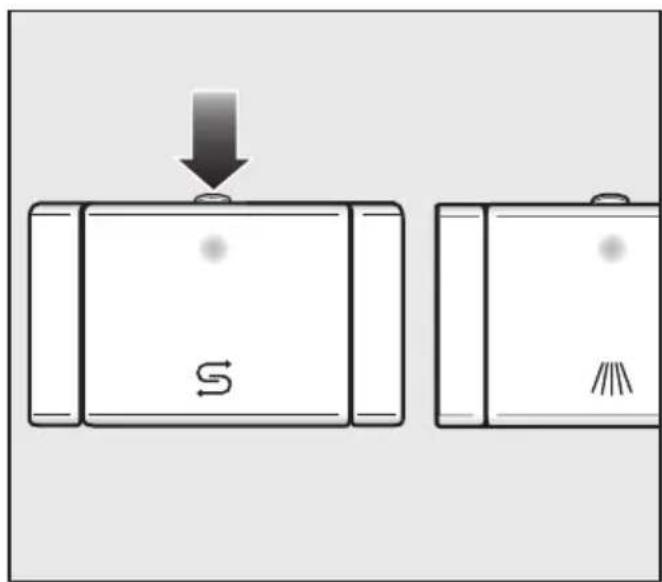
■ Press the button on the lid of the salt reservoir in the direction of the arrow until the flap springs open.
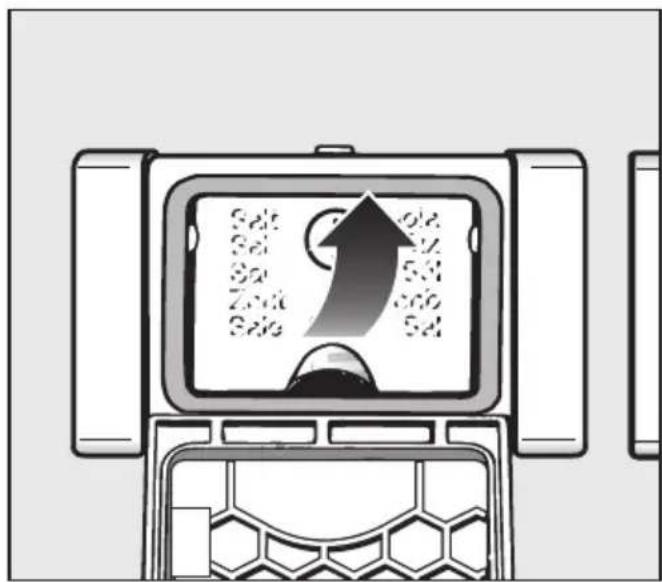
■ Lift up the funnel.
Do not fill the salt reservoir with water.
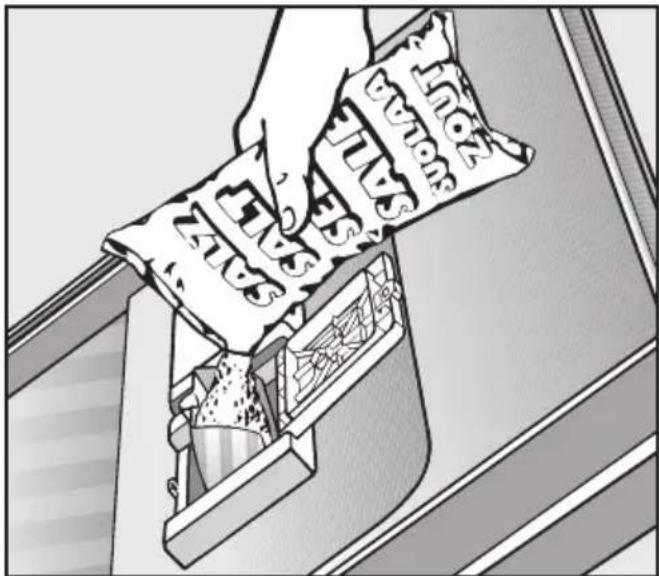
■ Add salt only until the reservoir is full or until water runs out of the opening. The salt reservoir holds approx. 1 kg of salt, depending on the brand used.
Do not add any more than 1 kg of salt.
As the salt reservoir is filled, displaced water may overflow.
■ Clean any excess salt from around the reservoir opening, and then close the flap.
■ Run the Quick wash programme immediately without any crockery in the dishwasher to remove any traces of salt from the cabinet (do not use the Turbo function if your dishwasher has this feature).
"Replenish salt" message
■ Fill the salt reservoir with dishwasher salt for reactivation when the "Replenish salt" message appears. (If it appears during a programme, wait until the end of the programme). ■ Confirm by pressing the middle button.
The "Replenish salt" message will go out.
After the salt reservoir has been filled, the "Replenish salt" message may still appear in the display if the salt concentration has not yet reached the correct level.
If this is the case, press the middle button again.
The replenish salt message will not appear if the dishwasher has been programmed for a water hardness level of less than 0.7 mmol/l (4 °d German scale).
After filling the salt reservoir, run the Quick wash programme immediately (without any crockery in the dishwasher, and without selecting the Turbo function) to remove any traces of salt from the cabinet.
If you only ever use combination products containing salt and rinse aid in your dishwasher, you can switch the reminders off if you wish (see "Settings menu - Replenish salt and rinse aid reminders").
If you switch to using detergent that does not contain salt or rinse aid, it is important to remember to replenish the salt and rinse aid and to switch the reminders back on.
Rinse aid
Rinse aid is necessary to ensure water does not cling and leave marks on crockery during the drying phase and helps crockery dry faster after it has been washed.
Rinse aid is poured into the storage reservoir and the amount set is dispensed automatically.
△ Inadvertently filling the rinse aid reservoir with powder or liquid detergent will always cause serious damage to the reservoir.
Alternatively, it is possible to use
- Household vinegar with a max. 5% acid content
or
- Liquid citric acid with up to 10% acid content.
The resulting rinsing and drying quality will not, however, be as good as when rinse aid is used.
⚠️ Do not use vinegar with a higher acid content (e.g. vinegar essence containing 25% acid). This would damage the dishwasher.
If you only ever use combination products containing rinse aid in your dishwasher, you do not need to add rinse aid.
Adding rinse aid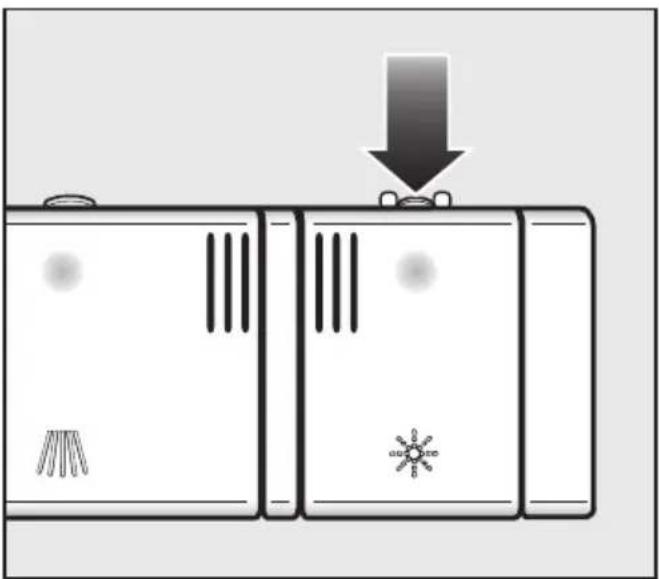
Press the button on the lid of the rinse aid reservoir in the direction of the arrow until the flap springs open.
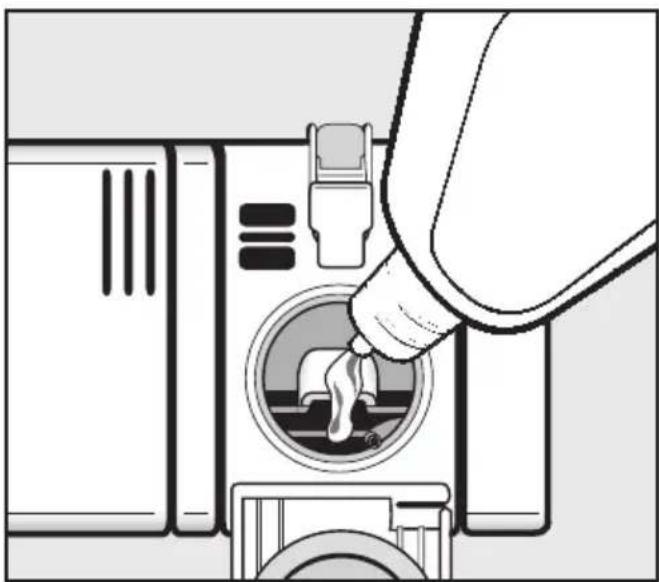
Add rinse aid only until it is visible in the opening.
The rinse aid reservoir holds approx. 110 ml.
Close the flap firmly so that it clicks into place. Otherwise water can enter the rinse aid reservoir during a programme. Wipe up any spilled rinse aid. This prevents over-foaming occurring during the next programme.
You can adjust the rinse aid dosage for best results (see Settings menu, Rinse aid).
Replenish rinse aid message
When the ✦ Replenish rinse aid message appears, the reservoir contains sufficient rinse aid for 2 - 3 programmes only.
Add rinse aid in plenty of time. Confirm by pressing the middle button.
The "Replenish rinse aid" message will go out.
If you only ever use combination products containing salt and rinse aid in your dishwasher, you can switch the reminders off if you wish (see "Settings menu - Replenish salt and rinse aid reminders").
If you switch to using detergent that does not contain salt or rinse aid, it is important to remember to replenish the salt and rinse aid and to switch the reminders back on.
Note
Remove coarse food residues from crockery.
There is no need to rinse items under running water.
⚠️ Do not wash items soiled with ash, sand, wax, lubricating grease or paint in the dishwasher.
These substances will damage the dishwasher.
Crockery can be loaded anywhere in the baskets, but the following notes should be observed:
- Do not place crockery and cutlery inside other pieces where they may be concealed.
- Load the crockery so that water can access all surfaces. This ensures that they get properly cleaned.
- Make sure that all items are securely positioned.
- Hollow items such as cups, glasses, pans, etc. must be inverted in the basket.
- Tall, narrow, hollow items, e.g. champagne glasses, should be placed in the centre of the basket to ensure better water coverage.
- Wide based items should be placed at an angle so that water can run off them freely.
- The spray arms must not be blocked by items which are too tall or hang through the baskets.
If in doubt, test for free movement by manually rotating the spray arms.
- Make sure that small items cannot fall through the holders in the baskets. Small items, e.g. lids, should therefore be placed in the cutlery tray or cutlery basket (depending on model).
Some foodstuffs may contain natural dyes, e.g. carrots, tomatoes or ketchup. Plastic items in the dishwasher may discolour if large quantities of these foodstuffs find their way into the appliance on the crockery. The stability of plastic items is not affected by this discolouration.
Items not suitable for dishwashers:
- Wooden cutlery and crockery or items with wooden parts: these may discolour and fade. The glue used in these items is not dishwasher-proof and wooden handles may come loose after being washed in a dishwasher.
- Craft items, antiques, valuable vases and decorative glassware are also not suitable for dishwashers.
- Plastic items which are not heat resistant: the high temperatures in the dishwasher may cause them to melt or lose shape.
- Copper, brass, tin and aluminium items may discolour or become matt.
- Colours painted over a glaze may fade after a number of washes.
- Clouding may occur on glasses after frequent washing. Do not wash delicate glassware, or glassware containing lead crystal in a dishwasher.
We recommend:
- When purchasing new crockery and cutlery, make sure they are dishwasher-proof.
- If delicate glassware is washed in the dishwasher ensure that only very low temperatures are used (see programme chart), or a special glass-care programme is used (depending on model). This will reduce the risk of clouding.
- If in doubt, wash delicate glassware by hand.
Please note
Silverware previously cleaned with a silver polish may still be damp or spotted at the end of a programme, where water has not run off smoothly. It may need to be rubbed dry with a soft cloth.
Silver which has been in contact with foods containing sulphur can discolour. These include egg yolk, onions, mayonnaise, mustard, pulses, fish, fish brine and marinades.
Aluminium components (e.g. grease filters) must not be cleaned with caustic alkaline commercial or industrial cleaning agents. These may damage the material, or in extreme cases, cause a severe chemical reaction. See section "Adding detergent" for information on suitable detergents.
Upper basket
⚠ For safety reasons, do not operate the dishwasher without the upper and lower baskets in place (except when running the Tall items 65 °C programme, if available).
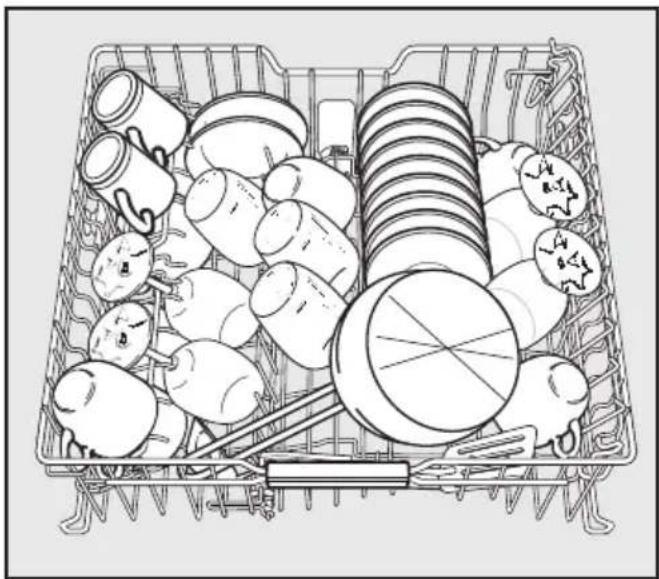
■ Use the upper basket for small, lightweight and delicate items such as cups, saucers, glasses, dessert bowls, etc. Shallow pans or casserole dishes can also be placed in the upper basket. ■ Long items such as soup ladles, mixing spoons and long knives should be placed lying down across the front of the upper basket.
Hinged spikes
The rows of spikes can be lowered to make more room for larger items such as casserole dishes.
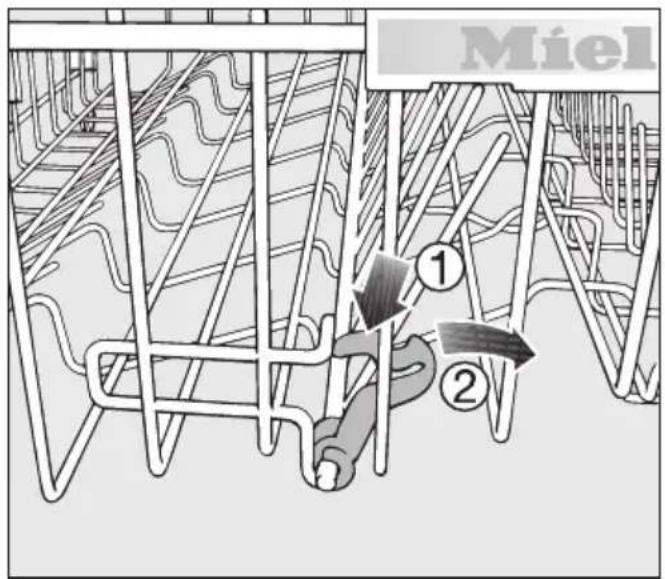
■ Press the yellow lever downwards ①, and then lower the spikes ②.
Hinged cup rack
■ To make room for tall items, raise the rack upwards.
Glasses can be arranged along the cup rack to give them some support during the programme.
■ Lower the cup rack and lean the glasses against it.
Loading the dishwasher
Jumbo cup rack (depending on model)
The cup rack can be set at two different widths so that it can also accommodate large cups.
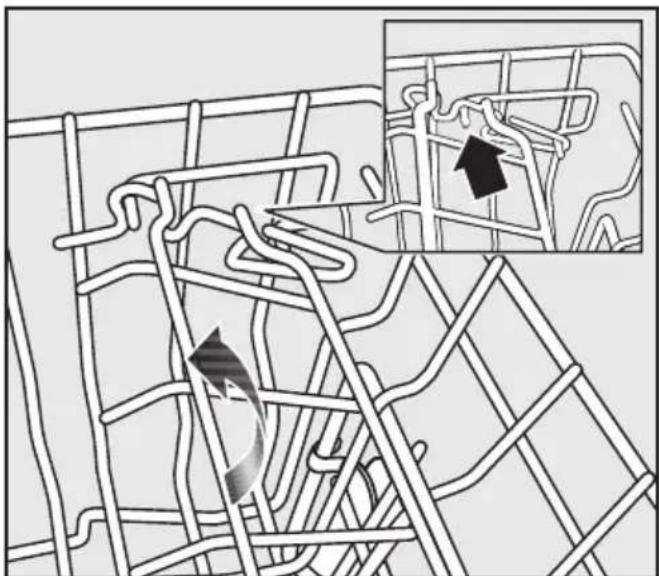
■ Pull the cup rack upwards and click it back into position at the required width.
Glass rail
This rail is designed to hold tall glasses and glasses with stems securely.
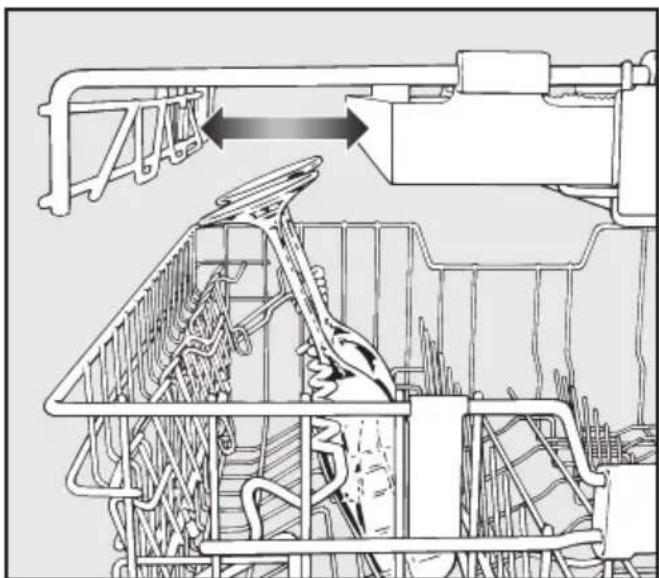
■ Lower the rail and lean tall glasses against it.
■ You can also move one of the side inserts of the cutlery tray to make more room for tall glasses.
Adjusting the height
You can set the glass rail at two different heights.
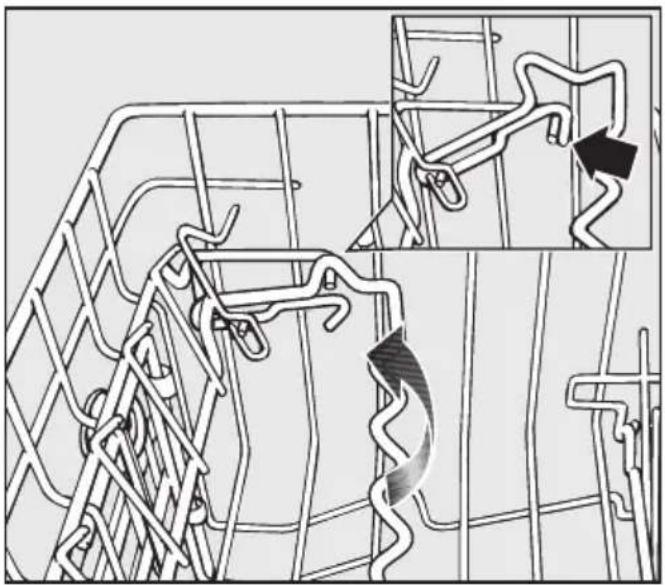
■ Pull the rail upwards and click it back into position at the required height.
Use the low setting for small glasses and tumblers.
Use the high setting for tall glasses and glasses with stems.
Adjusting the upper basket
In order to gain more space for taller pieces of crockery in the lower or upper basket, the upper basket can be adjusted on three levels with 2 cm between each level.
The upper basket can also be set at an angle with one side high and the other side low. This can be useful to help prevent water being left in deep dishes etc. Ensure, however, that the basket can slide smoothly in and out of the cabinet. It is better to adjust the basket before loading it.
■ Pull out the upper basket.
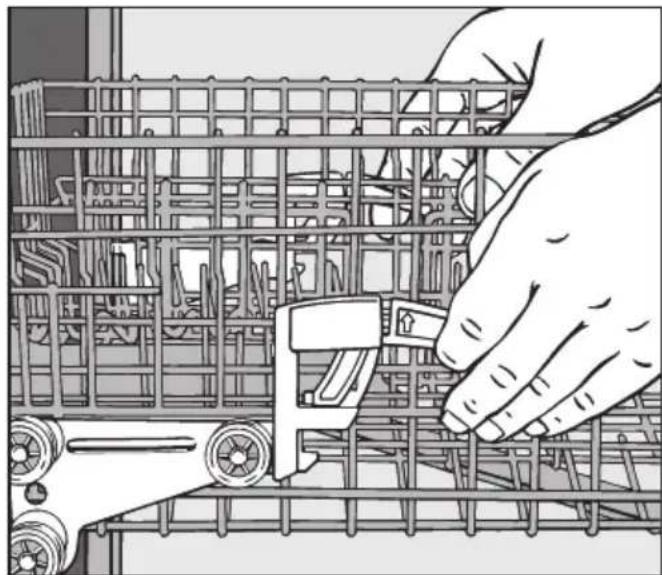
To raise the upper basket:
Lift the basket up until it clicks into place.
To lower the upper basket:
Pull upwards on the levers at either side of the upper basket.
Adjust the basket to the desired height and then push the levers securely back down into position.
Depending on the setting of the upper basket, the following plate dimensions can be accommodated.
Dishwasher with cutlery tray
(see data plate for model number)
| Upper basket level | Plate ∅ in cm |
| Upper basket Lower basket |
| Standard | XXL | |
| Top 15 | 19 31 | | |
| Middle 1 | 7 21 29 | | |
| Bottom 1 | 9 23 27 | | |
Dishwasher with cutlery basket
(see data plate for model number)
| Upper basket level | Plate ∅ in cm |
| Upper basket Lower basket |
| Standard | XXL | |
| Top 20 | 24 31 | | |
| Middle 22 | 26 29 | | |
| Bottom 24 | 28 27 | | |
Loading the dishwasher
Lower basket
For larger and heavier items such as plates, serving platters, saucepans, bowls, etc.
Glasses, cups and small items such as saucers can also be placed in the lower basket.
Do not place thin, delicate glassware in the lower basket.
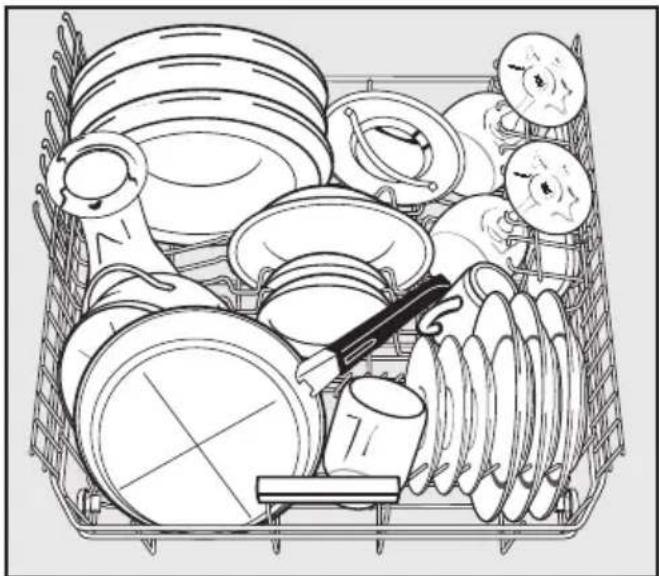
Dishwashers with cutlery tray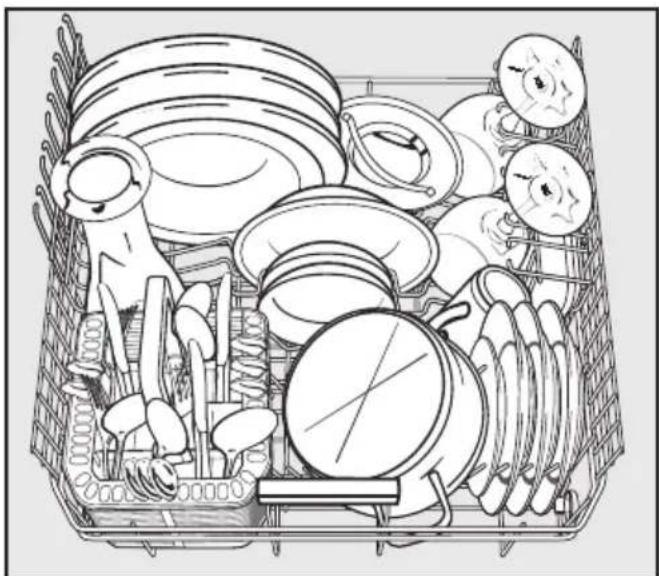
Dishwashers with cutlery basket
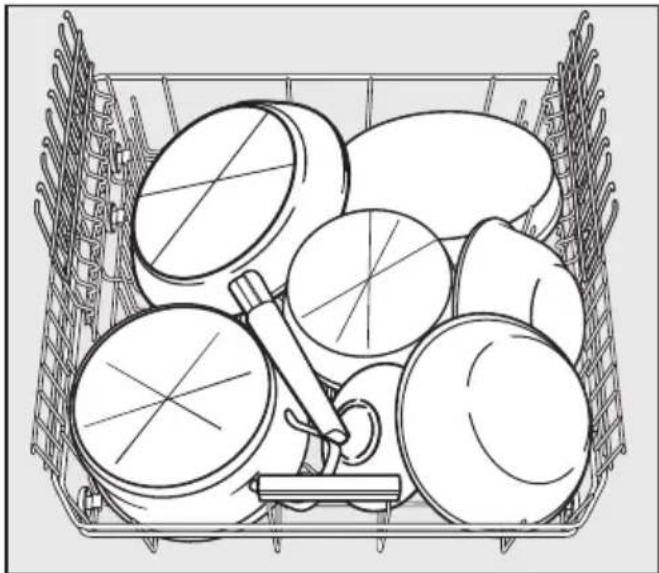
Heavily soiled items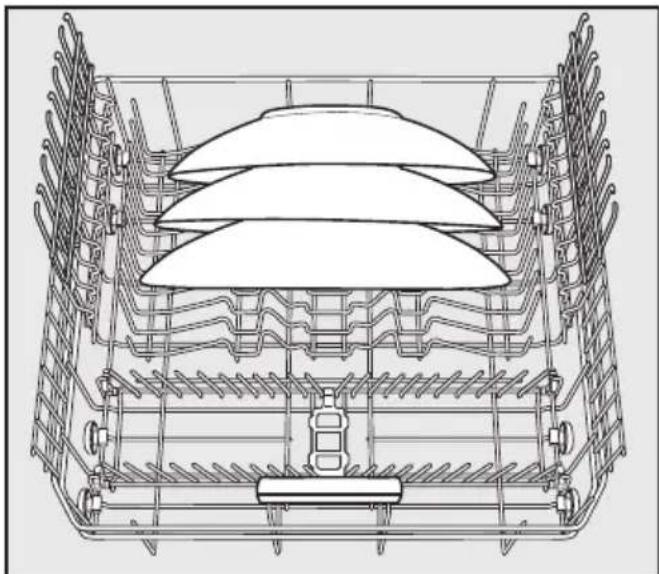
Place large platters and dishes in the centre of the lower basket.
When tilted, plates up to 35 cm in diameter can be accommodated.
MultiComfort area
The rear section of the lower basket is used for washing cups, glasses, plates, pots and pans.
The glass rack can be raised to make more room for tall items. Stem glassware, e.g. wine glasses or champagne flutes, can be leaned against the glass rack or suspended from it.
The height of the glass rack is adjustable.
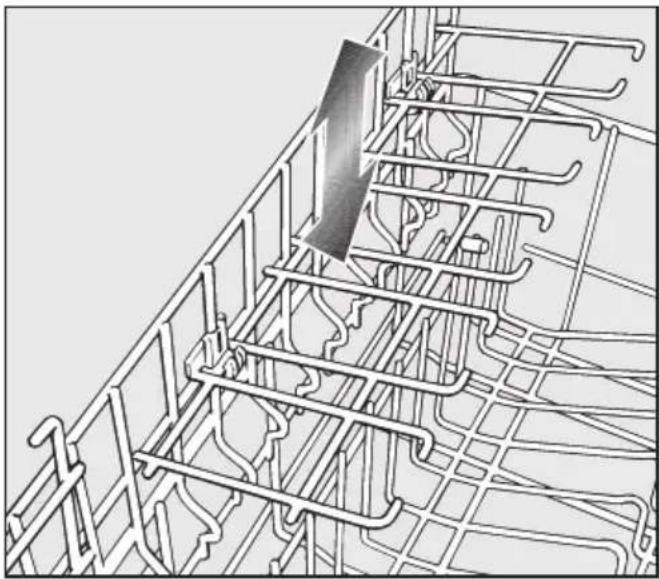
Slide the glass rack to the desired height until the catches click into place at the top.
Hinged spikes (depending on model)
The spikes at the front are used for washing plates, soup bowls, platters, dessert bowls and saucers.
Both rows of spikes can be lowered to make more room for large items, e.g. pots, pans and dishes.
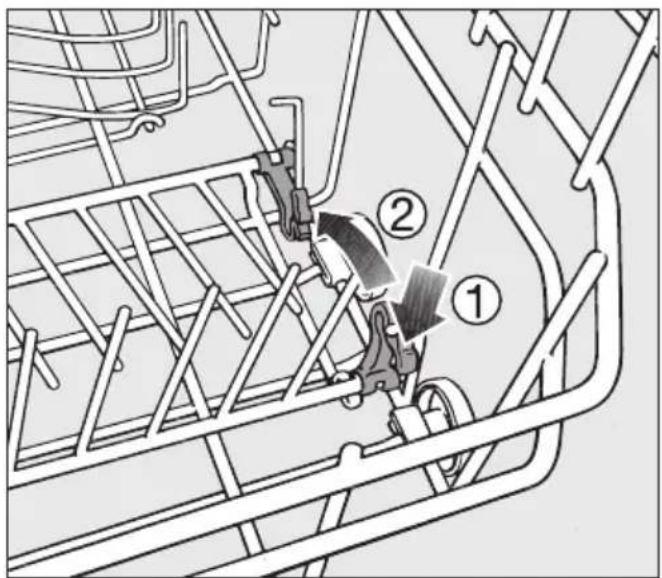
Press the yellow lever downwards ①, and then lower the spikes ②.
Cutlery
3D cutlery tray (depending on model)
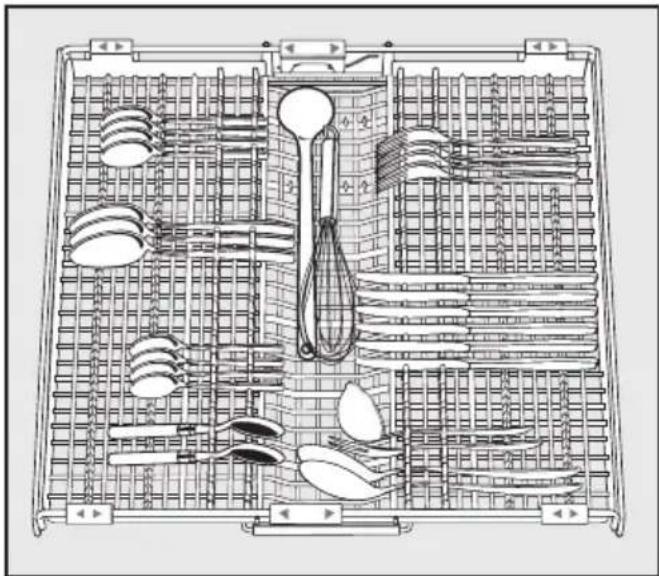
Arrange the cutlery in the tray as shown.
To make unloading much easier, cutlery should be grouped in zones: one for knives, one for forks, one for spoons, etc.
Spoon heads should be placed in contact with at least one of the serrated retainers on the base of the cutlery tray to ensure that water runs off them freely.
The upper spray arm must not be blocked by items which are too big (e.g., cake slices).
The side sections of the tray can be moved into the middle to accommodate tall items of crockery in the upper basket.
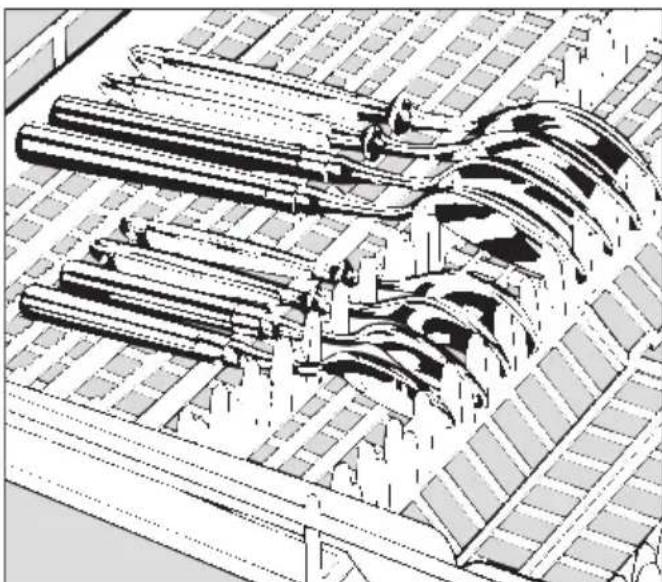
If spoon handles do not fit between the holders, then lay them the other way round.
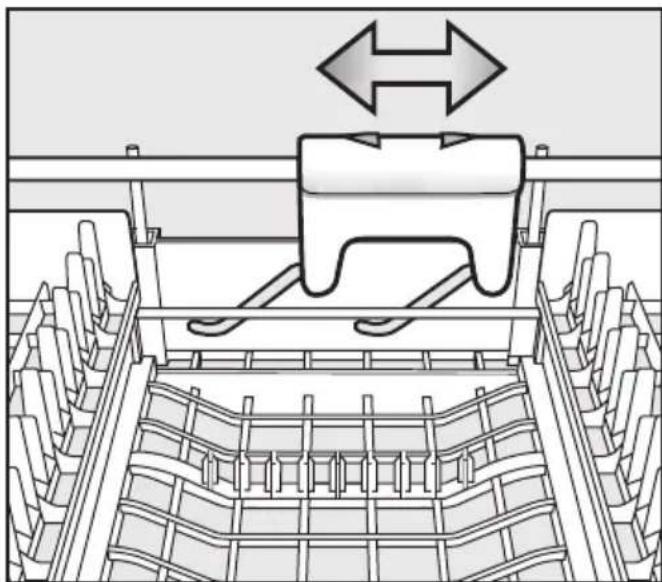
You can use the yellow slide to adjust the height of the middle section of the cutlery tray to make more room for large items of cutlery, such as serving spoons and ladles.
Cutlery basket (depending on model)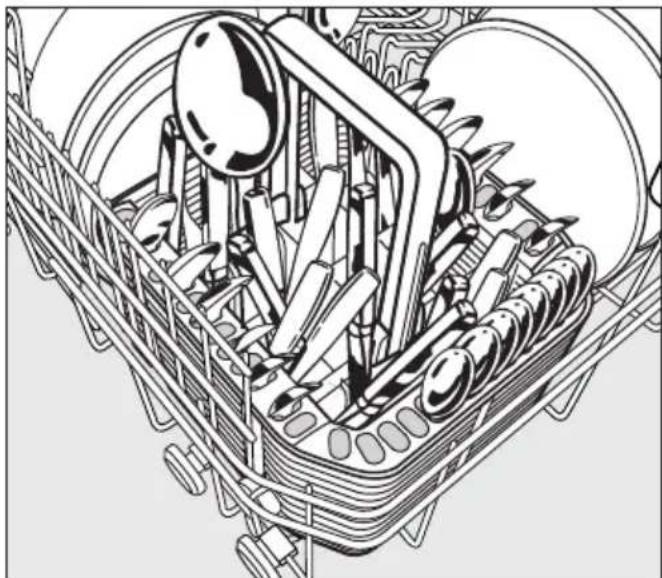
The cutlery basket can be placed anywhere on the front rows of spikes in the lower basket.
To avoid the risk of injury, knives and forks should be placed with the handles upwards in the basket. However, cutlery placed handle down in the basket will come out cleaner and drier. Place small items of cutlery in the individual slots on three sides of the cutlery basket.
Cutlery insert for the cutlery basket
Use the insert supplied for heavily soiled items of cutlery.
The insert separates the items so that they can be more easily accessed by water.
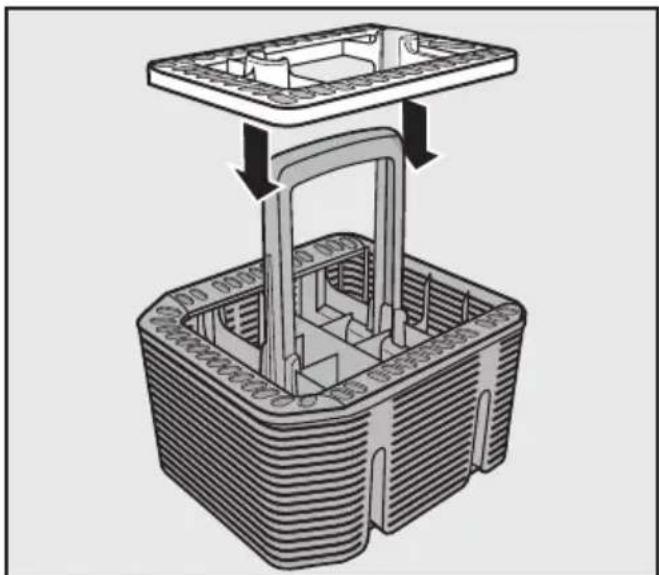
Fit it onto the cutlery basket if required.
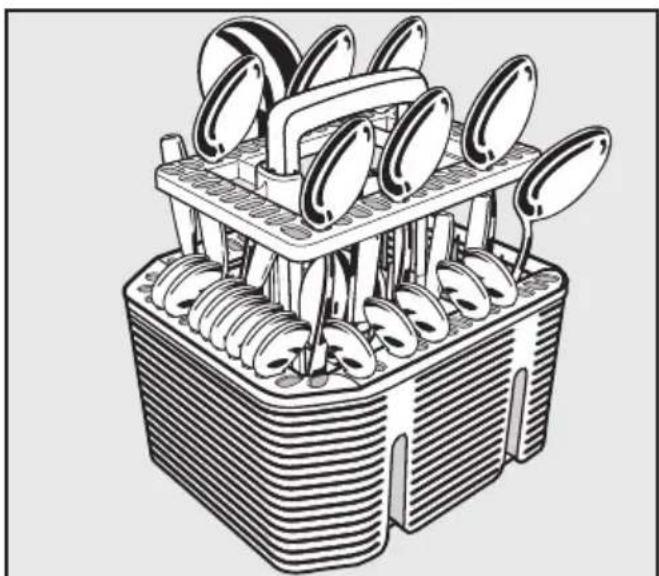
Insert cutlery with the handles facing downwards, and distribute them evenly along the insert.
Detergent
△ Only use detergents formulated for domestic dishwashers. Do not use washing-up liquid.
Active ingredients
Modern detergents contain various active ingredients, the most important of which are:
– Phosphates to prevent calcification. - Alkalis to aid removal of dried on soiling. - Enzymes to break down starch and loosen protein. - Oxygen based bleaching agents to remove coloured stains (e.g. tea, coffee, tomato sauce).
Most dishwasher detergents contain phosphates and are mildly alkaline with enzymes and oxygen based bleaching agents. Phosphate free products are rare.
Types of detergent:
- Powder and liquid gel detergents. These detergents allow you to adjust the amount dispensed according to the amount of load and level of soiling.
- Tab detergents. These are suitable for most levels of soiling.
You can also buy combination products. In addition to detergent, these products contain rinse aid and salt substitutes. They are available as "3 in 1" or when they also contain other components such as glass and stainless steel protective additives and enhanced cleaning power, as "5 in 1", "7 in 1", "All in 1", etc.
Refer to the manufacturer's packaging as to whether combination products are suitable for the water hardness level in your area.
Please note that the cleaning and drying results of combination detergents can vary greatly.
For optimum cleaning and drying results, use Miele dishwasher detergent and add Miele salt and Miele rinse aid separately. See "Optional accessories".
Dispensing
■ Follow the dosage recommended by the manufacturer on the packaging. ■ Unless directed otherwise, use one detergent tab or add 20 to 30 ml detergent to compartment II, depending on the level of soiling. With very heavy soiling you can also add a small amount of detergent to compartment I (see "Programme chart"). - Tabs may not dissolve completely when the Quick wash 40°C programme is used.
Failure to dispense the recommended amount of detergent may impair cleaning results.
Avoid inhalation of powder detergents and do not ingest dishwasher detergent. Dishwasher detergents contain irritant or corrosive ingredients which can cause burning in the nose, mouth and throat if swallowed, or inhibit breathing. Consult a doctor immediately if detergent has been swallowed or inhaled.
Keep detergent and other household agents out of the reach of children at all times. Keep children away from the dishwasher when the door is open. There could still be detergent residues in the cabinet. To avoid the danger of children coming into contact with the dishwasher detergent, only add detergent just before starting the programme and close the door, activating the child safety lock (if your dishwasher is fitted with one).
Adding detergent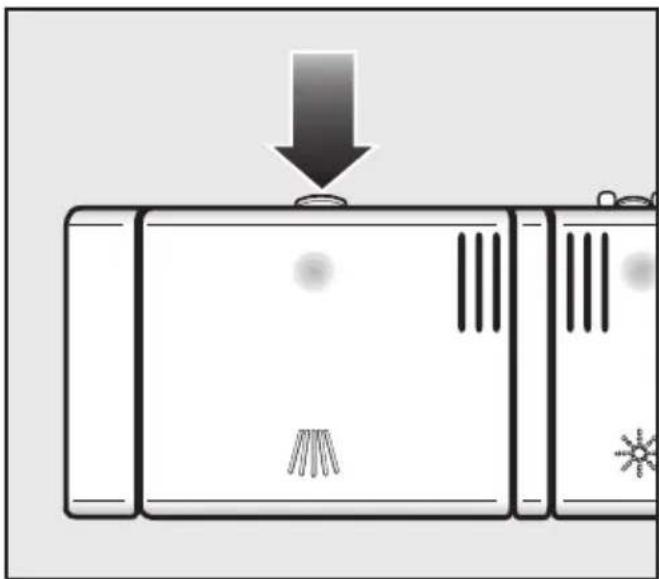
■ Press the opening catch on the detergent dispenser. The flap will spring open.
The flap is always open at the end of a programme.
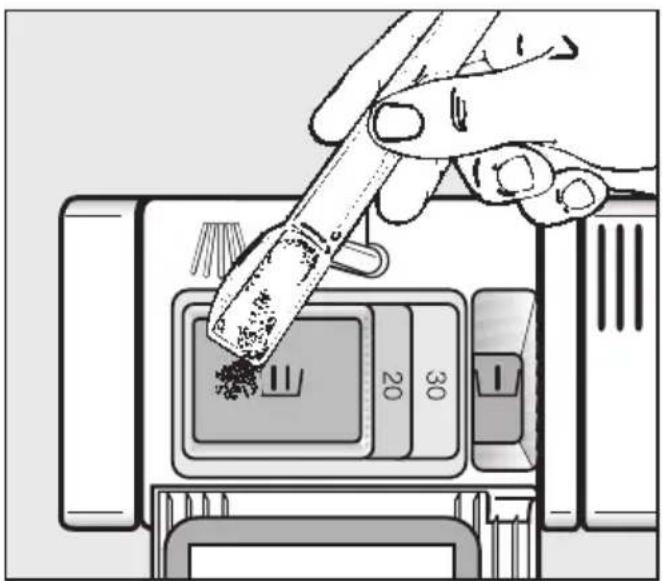
■ Add the required amount of detergent and close the flap. ■ Make sure that the detergent packaging is properly closed after use to avoid it getting damp and becoming lumpy.
Compartment I holds max. 10 ml, Compartment II holds max. 50 ml.
There are markings in compartment II to assist with dispensing: 20, 30. The marks indicate a level of approx. 20 or 30 ml when the door is open in a horizontal position.
Switching on
■ Open the stopcock, if it is closed. ■ Open the door. ■ Make sure the spray arms are not obstructed. ■ Switch the dishwasher on with the On/Off button ①.
One of the programmes will appear in the display and the appropriate indicator light will come on.
After a short while, the estimated programme duration for the programme selected will appear in the display.
Selecting a programme
Choose your programme according to the type of load and how dirty it is.
The different programmes and their uses are described in the Programme chart later on in this booklet.
■ Select the programme required with the programme selector button.
The indicator light next to the selected programme will come on.
You can now select additional functions (see "Additional functions").
Starting the programme
■ Start the programme by closing the door.
The In-operation indicator light comes on to show that a programme has started.
If any additional functions are selected, the appropriate indicators will also light up.
A programme can only be cancelled in the first few minutes. Otherwise the programme must continue to the end so that important programme stages (e.g. reactivating the water softener) are not omitted.
Display
The duration of the programme selected appears in hours and minutes in the display before the programme begins. During the programme, the time left until the end of the programme is displayed.
Symbols appear to indicate which stage the programme is at:

Pre-wash / Soak

Main wash

Interim rinse

Final rinse

Drying

Finished
The time displayed may vary with the same programme. This can be due, among other factors, to the water temperature at each intake, the reactivation process, the type of detergent, the amount of crockery and how dirty it is.
When a programme is selected for the first time, the display shows an average time for a cold water intake.
The times shown in the Programme chart refer to standard test loads and temperatures.
Each time a programme is run, the electronic unit takes the new conditions into account, and calculates the time required.
Standby
To save energy, the dishwasher will switch to Standby mode a few minutes after the last time a button has been pressed or a few minutes after the end of the programme. The display and the indicator lights will go out and only the On/Off indicator light Ⓘ will flash slowly.
Press the On/Off button Ⓐ to switch the display and indicators back on again.
If the dishwasher is not switched off at the end of the programme, it will switch off completely after a few minutes in Standby mode (see "Settings menu, Optimise standby").
The dishwasher will not switch into Standby mode whilst a programme is running, if salt or rinse aid needs to be replenished or there is a fault.
If you only use combination products containing salt and rinse aid in your dishwasher, you can switch off the reminders to replenish salt and rinse aid so that the dishwasher will go into Standby despite a lack of salt or rinse aid (see "Before using for the first time"). You cannot switch off fault messages.
At the end of the programme
At the end of a programme, the In-operation indicator light will be visible flashing slowly with the door shut.
After the door is opened, ⏻ Finished will appear in the display.
The drying fan will continue to run for a few minutes at the end of the Quick wash programme.
You can now empty the dishwasher.
The In-operation indicator light will go out 10 minutes after the end of the programme.
⚠️ To prevent the risk of steam damage to the worktop edging above the dishwasher, it is advisable to leave the door closed until you are ready to unload the crockery. Alternatively you can open the door fully until the crockery is cool enough to unload. Do not leave the door only partially open.
Switching off
At the end of a programme:
■ Open the door.
■ Switch the dishwasher off using the On/Off button ①.
The dishwasher will continue to use electricity until it is switched off with the On/Off button ①.
If the dishwasher is not going to be used for a longer period of time, e. g. whilst on holiday, the stopcock should be closed.
Unloading the dishwasher
Dishes tend to break and chip more easily when they are hot.
Allow the dishes to cool until they are comfortable enough to handle before unloading them.
If you open the door fully after switching off, the dishes will cool much faster.
First unload the lower basket, then the upper basket, and finally the cutlery tray (depending on model).
This will prevent water drops from the upper basket and cutlery tray from falling onto the dishes in the lower basket.
Interrupting a programme
A programme is interrupted as soon as the door is opened.
If the door is closed again, the programme will continue from the point it was at before the door was opened.
⚠️ Water in the dishwasher may be hot. Danger of scalding.
Only open the door if absolutely necessary and exercise extreme caution when doing so. Before closing the door again, leave it ajar for approx. 20 seconds. This will enable the temperature in the wash cabinet to settle. Then close the door firmly making sure that it clicks into place.
Changing a programme
If the detergent dispenser flap has already opened, do not change the programme.
If a programme has already started and you wish to change it, proceed as follows:
■ Open the door. ■ Switch the dishwasher off using the On/Off button ①. ■ Switch the dishwasher on again with the On/Off button ①. ■ Select the programme required with the programme selector button. ■ Start the programme by closing the door.
The In-operation indicator light comes on to show that a programme has been started.
Intensive lower basket
The Intensive lower basket additional function allows you to wash heavily soiled items in the lower basket while washing more delicate items in the upper basket.
Cleaning performance in the lower basket is intensified in programmes where this function is available. Depending on the programme, this can mean that the running time varies slightly.
■ Open the door. ■ Switch the dishwasher on with the On/Off button ①.
The On/Off indicator light ① comes on.
■ Select a programme. ■ Press the Intensive lower basket button.
The Intensive lower basket indicator light will come on if the function is available for the programme which has been selected.
■ Start the programme by closing the door.
Once set, the function will remain active for the programme selected until the setting is changed.
Turbo
The Turbo function is used to reduce the duration of programmes in which this function is available.
In order to achieve optimum cleaning results, consumption rates are increased when Turbo has been selected.
If a full programme is not yet required the Turbo function can be used in conjunction with the Quick wash programme to rinse dirty crockery, using cold water only and without a drying cycle.
■ Open the door.
■ Switch the dishwasher on with the On/Off button ①.
The On/Off indicator light ① comes on.
■ Select a programme.
■ Press the Turbo button.
The Turbo indicator light will come on if the function is available for the selected programme.
■ Start the programme by closing the door.
Once selected, the function will remain active for all programmes until the setting is changed.
Delay start
The start time of a programme can be delayed, e.g. to benefit from economy rates of electricity. A delay start time of between 30 minutes and 24 hours can be selected. The delay start time is set in 30 minute steps.
When using the Delay start function, make sure that the detergent compartment is dry before adding detergent. Wipe dry with a cloth if necessary. If the compartment is wet, powder detergent can become lumpy and stick to the dispenser, with the result that it is not fully dispensed.
Do not use liquid detergent when selecting Delay start, as it can run into the dishwasher before it is required.
■ Open the door. ■ Switch the dishwasher on using the On/Off button ①.
The On/Off indicator light ① comes on.
■ Select the programme required with the programme selector button.
■ Press the ◆ button.
The last delay start time used will appear in the display. The ◆ indicator lights up.
■ Set the required time using the 🔊 button.
If the ◆ button is kept pressed in, the time will increase automatically up to 24:00 h. To start at 30 minutes again, press the ◆ button twice.
■ Close the door.
If, after you have set the delay start time, you do not close the door within a few seconds, the display will revert to showing the programme duration. You will have to enter the delay start time again.
The delay start time then counts down to the start time selected in minute stages.
At the end of the delay period, the programme selected begins automatically. The time left for a programme to run then shows in the display, the ◆ indicator light goes out, and the indicator light for the programme selected comes on.
Starting a programme before the Delay start period has elapsed:
A programme can be started before the Delay start period has elapsed.
Proceed as follows:
■ Open the door. ■ Switch the dishwasher off using the On/Off button ①. ■ Switch the dishwasher on again with the On/Off button ①. ■ Start the programme by closing the door.
The In-operation indicator light comes on to show that a programme has been started.
DetergentAgent
For optimum cleaning results, the dishwasher automatically adjusts the programme sequence to the type of detergent being used. Depending on the programme, this can mean that the running time and energy consumption vary slightly.
Follow the detergent manufacturer's instructions on dosage.
The cleaning and drying performance of different types of detergent can vary greatly.
If you only ever use combination products containing salt and rinse aid in your dishwasher, you can switch the reminders off if you wish (see "Settings menu - Replenish salt and rinse aid reminders"). The DetergentAgent function will not be affected by this.
Please make sure that if you start using dishwasher salt and rinse aid again, you switch the reminders back on.
Check your dishwasher regularly (approx. every 4 - 6 months). This way faults and problems can be avoided.
The external surfaces of the dishwasher are susceptible to scratching.
Contact with unsuitable cleaning agents can alter or discolour the external surfaces.
Cleaning the wash cabinet
The wash cabinet is largely self-cleaning, provided that the correct amount of detergent is always used.
If, however, there are limescale or grease deposits in the cabinet, these can be removed with a proprietary dishwasher cleaner* or conditioner*. Follow the instructions on the packaging.
If you mainly use low temperature programmes (below 50 °C), bacteria and unpleasant odours can build in the wash cabinet. To clean the wash cabinet and prevent unpleasant odours building up, run the Pots & Pans 75°C programme once month.
Make sure that you also clean the filters in the wash cabinet regularly.
Cleaning the door and the door seal
■ Wipe the door seals regularly with a damp cloth to remove food deposits.
■ Wipe off any food or drink residues which may have dripped onto the sides of dishwasher door before closing it.
If this is not done, mould could build up on these surfaces as they are outside the wash cabinet and so not accessed and cleaned by the spray arm jets.
Cleaning the reflector panel
The reflector panel for the In-operation indicator light is situated in the coverplate underneath the worktop.
■ The reflector panel and its plastic holder should only be wiped with a damp cloth or a suitable cleaning agent designed for use on plastic.
Cleaning the control panel and door front
Remove any soiling immediately.
If this is not done, it might become impossible to remove and could cause the external surfaces to alter or discolour.
The control panel should only be wiped with a damp cloth. Clean the front using a damp Miele microfibre E-cloth*, or with a clean sponge and a solution of hot water and washing-up liquid. Then dry with a soft cloth.
To avoid damaging the external surfaces, do not use:
- cleaning agents containing soda, ammonia, acids or chlorides,
- cleaning agents containing descaling agents,
- abrasive cleaning agents, e.g. powder cleaners and cream cleaners, solvent-based cleaning agents,
- stainless steel cleaning agents,
- dishwasher cleaner,
- oven sprays,
- glass cleaning agents, hard abrasive sponges and brushes, e.g. pot scourers, melamine eraser blocks, sharp metal scrapers,
- steam cleaning appliances. * See "Optional accessories"
Checking the filters in the wash cabinet
The filter combination in the base of the wash cabinet retains coarse soil from the suds solution, preventing it accessing the circulation system and re-entering the cabinet through the spray arms.
This dishwasher must not be used without all the filters in place.
Collection of coarse soil may cause the filters to clog. The level of soiling and time it takes before the filters need cleaning will vary depending on use.
The message Check filters will appear in the display after every 50 programme cycles (factory default setting).
You can set the interval for this message to appear to between 30 and 60 programme cycles (see "Settings menu, Check filters").
■ Check the filter combination. ■ Clean it, if necessary. ■ Confirm the message with the middle button.
The display will change to show the main menu.
Cleaning the filters
■ Switch the dishwasher off.
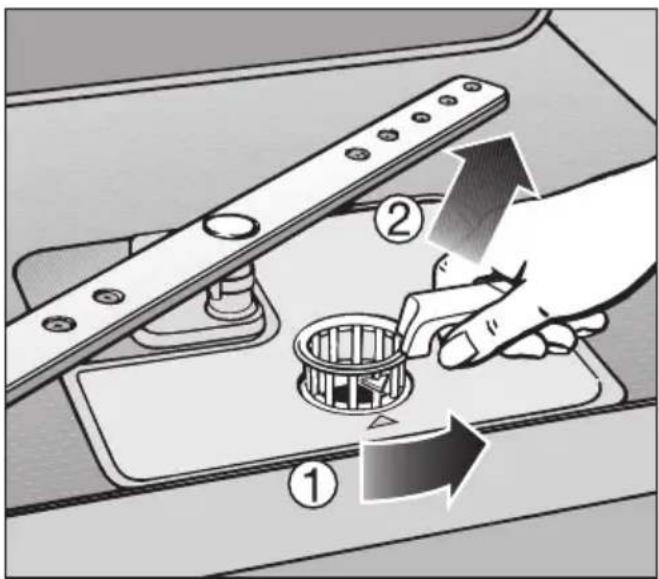
■ Turn the handle anti-clockwise to release the filter combination ①.
■ Lift the filter combination out of the dishwasher ②. Remove any coarse particles and rinse the filter well under running water. Use a nylon brush if necessary.
⚠️ Make sure that when cleaning the filters, no coarse soil falls into the circulation system, causing a blockage.
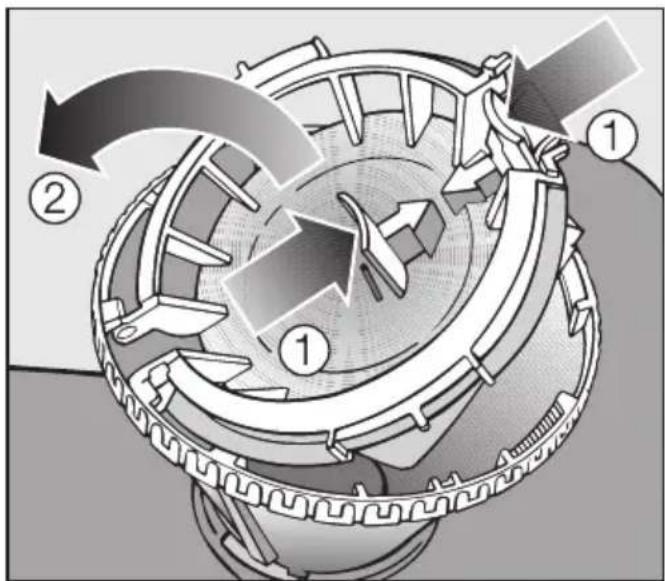
To clean the inside of the filter, the flap must be opened:
■ Press catches ① together in the direction of the arrows as shown, and open the filter ②.
■ Rinse all the filters under running water.
■ Then close the flap so that the catch engages.
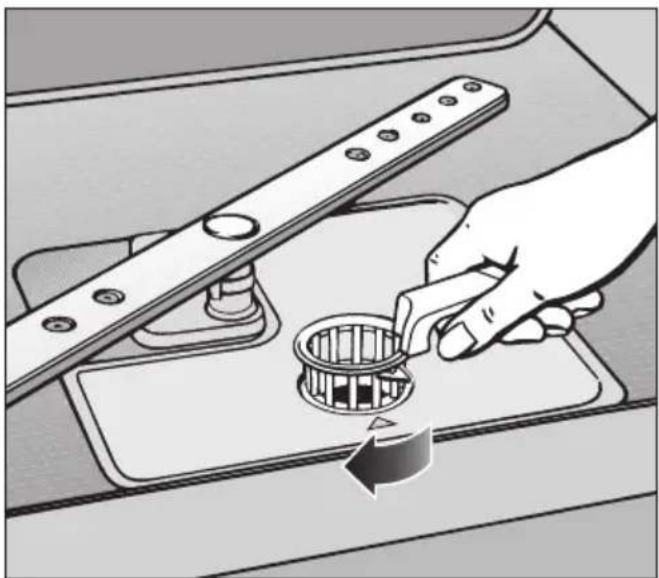
■ Replace the filter combination so that it lies flat in the base of the wash cabinet.
■ Then turn the handle clockwise to lock the filter combination in place.
⚠️ Take care when fitting the filter combination that it is secured in position correctly. Otherwise coarse soil could get into the circulation system and cause a blockage.
Cleaning the spray arms
Particles of food can get stuck in the spray arm jets and bearings. The spray arms should therefore be inspected and cleaned regularly (approx. every 4 - 6 months).
■ Switch the dishwasher off.
Remove the spray arms as follows:
■ Take out the cutlery tray (if your dishwasher is fitted with one). ■ Push the top spray arm upwards to engage the inner ratchet. Then unscrew the spray arm.
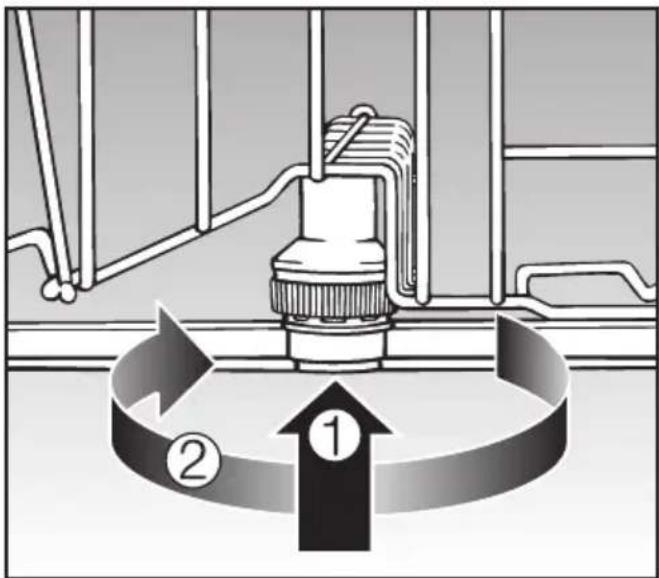
■ Push the middle spray arm upwards ① to engage the ratchet. Then unscrew the spray arm ②.
■ Remove the lower basket.
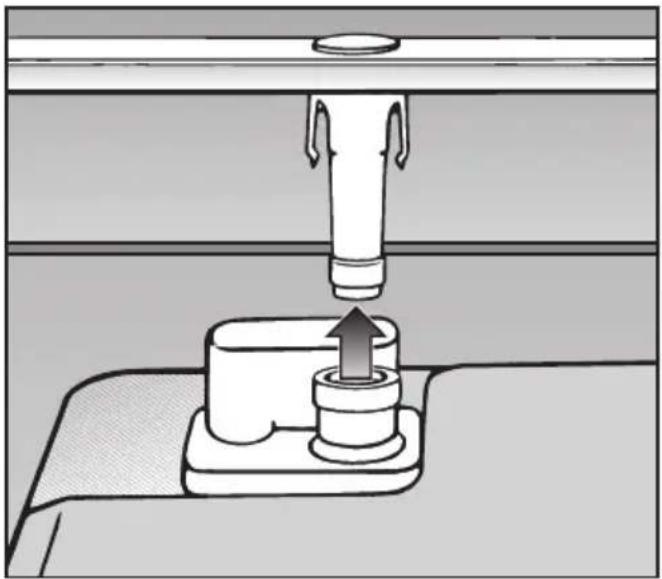
■ Pull the lower spray arm firmly upwards to remove it.
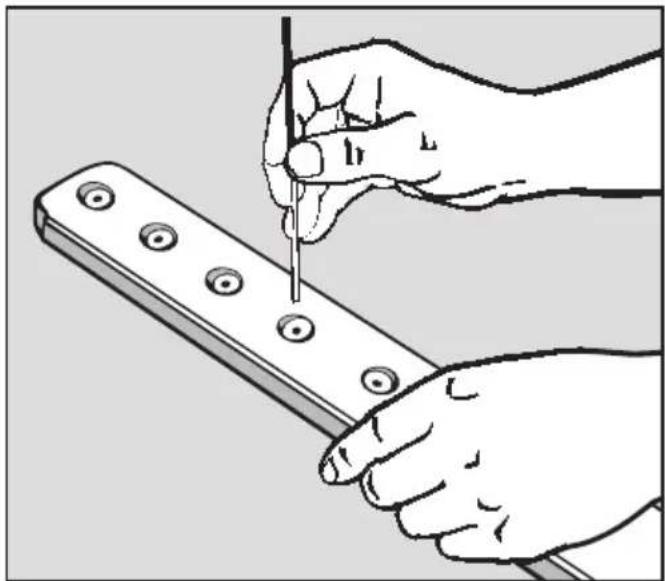
■ Use a pointed object to push food particles into the spray arm jets. ■ Rinse thoroughly under running water. ■ Replace the spray arms and check that they rotate freely.
With the help of the following guide, minor faults in the performance of the appliance, some of which may result from incorrect operation, can be put right without contacting the Service Department.
⚠️ Repairs should only be carried out by a suitably qualified and trained person in strict accordance with current local and national safety regulations. Unauthorised or incorrect repairs could cause personal injury or damage to property.
| Technical problems |
| Problem Possible cause | Remedy | |
| The dishwasher does not start. | The door is not properly closed. | Push the door firmly shut. |
| The appliance is not plugged in. | Insert the plug and switch on at the socket. |
| The mains fuse has tripped. | Reset the trip switch or replace the fuse in the plug. (Minimum fuse rating - see data plate). |
| The appliance is not switched on. | Press the On/Off button 1 and select a programme. |
| The dishwasher stops during a programme. | The mains fuse has tripped. | - Reset the trip switch or replace the fuse in the plug (minimum fuse rating - see data plate).- If the mains fuse trips again, call the Miele Service Department. |
| After the programme has started, the In-operation indicator light is not visible. | The reflector panel was not correctly fitted. | Re-fit the reflector panel correctly (see Installation diagram). |
| Problem Possible cause | Remedy | |
| The In-operation indicator is flashing quickly.The buzzer is sounding.One of the following messages appears in the display: | | Before rectifying the problem:- Switch the dishwasher off using the On/Off button1. |
| Fault FXX | There may be a technical fault. | After a few seconds:- Switch the dishwasher back on.- Select the programme you want.- Close the door.If the fault message appears again, there is a technical fault.- Call the Service Department. |
| Waterproof | The Waterproof system has reacted. | - Close the stopcock.- Call the Service Department. |
Problem solving guide
| Water inlet/drain fault |
| Problem Possible cause | Remedy | |
| The In-operation indicator is flashing quickly.The buzzer is sounding.One of the following messages appears in the display: | | |
| Open stopcock | The stopcock is closed. | Open the stopcock fully. |
| Inlet | | Before rectifying the problem:- Switch the dishwasher off using the On/Off button Ⓓ. |
| Water intake is restricted. | - Open the stopcock fully.- Check the water inlet filter and clean it if necessary (see "Maintenance").- The water pressure at the intake is lower than 30 kPa (0.3 bar).Seek professional advice. |
| Problem Possible cause | Remedy | |
| The In-operation indicator is flashing quickly.The buzzer is sounding.The following message appears in the display:Drain | | Before rectifying the problem:- Switch the dishwasher off using the On/Off button ➊. |
| The water outlet is restricted, water remains in the wash cabinet at the end of a programme. | - Clean the filter combination. See "Cleaning and care".- Clean the drain pump. See "Maintenance".- Clean the non-return valve. See "Maintenance".- Remove any kink in the drain hose. |
Problem solving guide
| General problems |
| Problem Possible cause | Remedy | |
| The indicators and display are dark. Only the On/Off indicator 1 is flashing slowly. | The indicators and display have switched off automatically to save energy (Standby mode). | Press the On/Off button 1.This switches Standby off. |
| The following fault message appears in the display: Salt reservoir lid The buzzer sounds during the programme and the In-operation indicator light flashes. | The salt reservoir lid has not been closed properly. | - Close the salt reservoir lid properly.If the salt reservoir lid has sprung open during a programme:- Switch the dishwasher off and then on again with the On/Off button 1.- Start the programme again. |
| Problem Possible cause | Remedy | |
| Detergent residue is left in the dispenser at the end of a programme. | The dispenser was still damp when detergent was added. | Make sure the dispenser is dry before adding detergent. |
| The detergent dispenser lid cannot be closed properly. | Clogged detergent residue is blocking the catch. | Clean the detergent from the catch. |
| At the end of a programme there is a film of moisture on the inside of the door and the interior walls. | This is caused by the drying system and does not indicate a fault. | The moisture will dissipate after a while. |
| Water remains in the wash cabinet at the end of a programme. | | Before rectifying the problem:– Switch the dishwasher off using the On/Off button ➊. |
| The filter combination in the wash cabinet is clogged. | Clean the filter combination. See "Cleaning and care". |
| The drain pump or non-return valve may be blocked. | Clean the drain pump or the non-return valve. See "Maintenance". |
| The drain hose is kinked. | Remove any kink from the drain hose. |
Problem solving guide
| Noises |
| Problem Possible cause | Remedy | |
| Knocking noise in the wash cabinet. | A spray arm is knocking against an item in a basket. | Interrupt the programme, and rearrange the items which are obstructing the spray arm. |
| Rattling noise in the wash cabinet. | Items of crockery are insecure in the wash cabinet. | Interrupt the programme, and rearrange the items of crockery. |
| A foreign object (e.g. a cherry stone) has become lodged in the drain pump. | Remove the foreign object from the drain pump (see "Maintenance: Cleaning the drain pump and non-return valve"). |
| Knocking noise in the water pipes. | This may be caused by the on-site installation or the cross-section of the piping. | This has no influence on dishwasher function. If in doubt, contact a suitably qualified plumber. |
| Unsatisfactory washing result |
| Problem Possible cause Remedy | |
| The dishes are not clean. | The dishes were not loaded correctly. | See notes in "Loading the dishwasher". |
| The programme was not powerful enough. | Select a more intensive programme. See Programme chart. |
| There is some stubborn soiling although most of the crockery is only lightly soiled (e.g. with tea stains). | Use the Sensor wash function (see "Settings menu, Sensor wash"). |
| Not enough detergent was dispensed. | Use more detergent, or change your detergent. |
| Items are blocking the path of the spray arms. | Rearrange the items so that the spray arms can rotate freely. |
| The filter combination in the base of the wash cabinet is not clean or is not correctly fitted.This may cause the spray arm jets to get blocked. | Clean and/or fit the filter combination correctly. Clean the spray arm jets. See "Cleaning and care". |
| The non-return valve is open and blocked. Dirty water has flowed back into the wash cabinet. | Clean the drain pump and the non-return valve. See "Maintenance - Cleaning the drain pump and non-return valve". |
| Smearing appears on glassware and cutlery, there is a bluish sheen on the surface of glassware; film can be wiped off. | The rinse aid dosage is set too high. | Reduce the dosage (see "Settings menu, Rinse aid"). |
Problem solving guide
| Problem Possible cause Remedy | | |
| Dishes, cutlery and glasses are not dry or are flecked. | The amount of rinse aid may be insufficient, or the rinse aid reservoir empty. | Replenish the reservoir, increase the dosage or change the brand of rinse aid (see "Before using for the first time: Rinse aid"). |
| Crockery was taken out of the cabinet too soon. | Leave it in for longer. See "Operation". |
| Combination products have been used which have impaired drying performance. | Change your detergent, or replenish the rinse aid (see "Before using for the first time - Rinse aid"). |
| White residue is visible on cutlery and crockery, clouding occurs on glassware; film can be wiped off. | Not enough rinse aid was used. | Increase the dosage (see "Settings menu, Rinse aid"). |
| There is no salt in the salt reservoir. | Fill the salt reservoir (see "Before using for the first time - Filling the salt reservoir"). |
| An unsuitable combination detergent has been used. | Change your detergent. Use a standard liquid, tablet or powder detergent, and fill the salt and rinse aid reservoirs in the dishwasher. |
| The water softener is programmed to a setting which is too low. | Select a higher water softener setting (see "Water softener"). |
| Problem Possible cause | Remedy | |
| Glassware has a brown or blue tinge, and film cannot be wiped off. | This may be caused by the detergent. | Change your detergent. |
| Glassware is dull and discoloured; film cannot be wiped off. | The glasses are not dishwasher-proof. The surfaces are affected. | There is no remedy. Purchase glassware which is dishwasher-proof. |
| Tea or lipstick stains have not been completely removed. | The wash temperature of the selected programme was too low. | Select a programme with a higher wash temperature. |
| The bleaching effect of the detergent used is too low. | Change your detergent. |
| Plastic items are discoloured. | Natural dyes e.g. from carrots, tomatoes or ketchup may be the cause. The amount of detergent used or its bleaching effect was not sufficient to deal with natural dyes. | Use more detergent (see "Operation - Detergent"). Discolouration is irreversible. |
| There are rust stains on cutlery. | The affected items are not corrosion resistant. | There is no remedy. Purchase cutlery which is dishwasher-proof. |
| A programme was not run after dishwasher salt was added. Traces of salt have got into the wash cycle. | Always run the Quick wash programme, without any crockery in the dishwasher and without selecting the Turbo function, after adding dishwasher salt. |
Cleaning the water inlet filter
A filter is incorporated in the screw connection of the valve on the water inlet hose. The filter must be cleaned when dirty, otherwise insufficient water flows into the wash cabinet.
⚠ The plastic housing of the water connection contains an electrical component. It must not be dipped in water.
Recommendation
If the mains water contains a large amount of insoluble substances, we recommend fitting a large-area filter in the connection between the stopcock and the water inlet hose threaded union. This filter is available from the Miele Spares Parts dept.
Cleaning the filter:
■ Disconnect the dishwasher from the mains supply. Switch off at the mains socket and withdraw the plug. ■ Close the stopcock. ■ Unscrew the inlet hose.
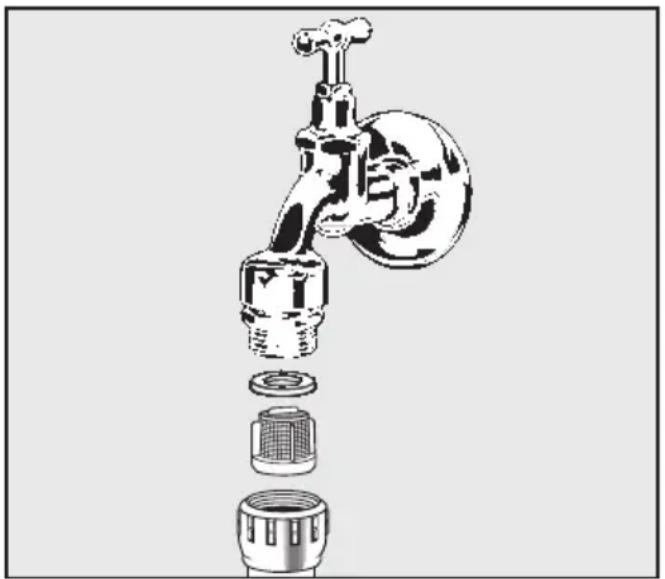
■ Carefully remove the seal. ■ Withdraw the filter using pointed pliers and rinse clean under running water. ■ Replace the filter and seal, making sure they are sitting correctly. ■ Reconnect the inlet hose to the stopcock, making sure it goes on correctly and is not cross-threaded. ■ Turn on the stopcock gradually to test for leaks. If there is a leak, the inlet hose might not be on securely, or it may have been screwed on at an angle. Unscrew and reconnect the water inlet valve correctly.
Cleaning the drain pump and non-return valve
If the water has not been pumped away at the end of a programme the drain pump or the non-return valve might be blocked. They are, however, easy to clean.
■ Disconnect the dishwasher from the mains supply. Switch off at the mains socket and withdraw the plug. ■ Take the filter combination out of the wash cabinet (see "Cleaning and care - Checking the filters in the wash cabinet"). ■ Scoop the water out of the cabinet using a suitable container or utensil.
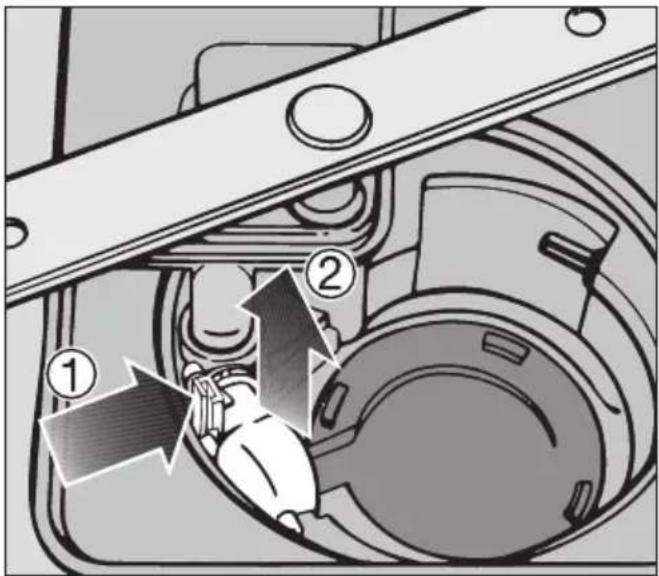
■ Press the catch for the non-return valve inwards ①. ■ Lift out the non-return valve ②, and rinse well under running water. ■ Remove all foreign objects from the non-return valve.
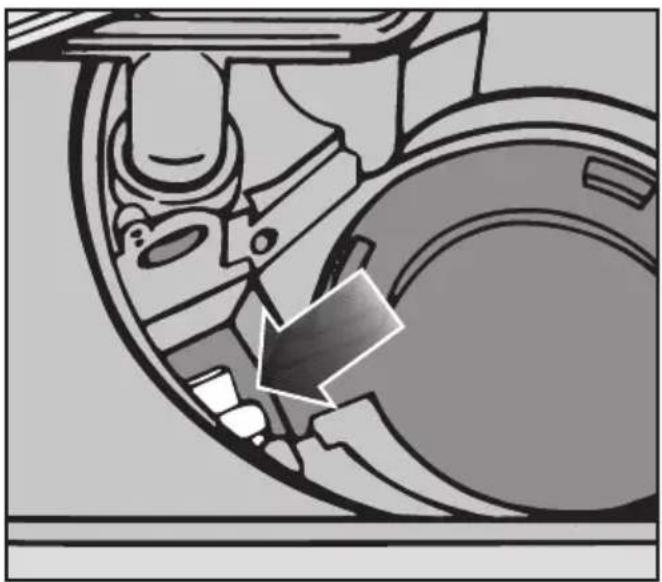
The drain pump is situated under the non-return valve (see arrow).
Remove all foreign objects from the drain pump (watch out for glass or bone splinters which are particularly difficult to detect and could cause injury). Turn the drain pump impeller by hand to check that there are no more obstructions. You will feel a little resistance when you turn the impeller. Carefully replace the non-return valve and secure it with the catch.
Ensure that the catch engages correctly.
Be very careful not to damage sensitive components when cleaning the drain pump and the non-return valve.
Crockery Food deposits Action required![graph LR A["Mixed, everyday crockery"] --> B["All normal food deposits"] B --> C["This needs an adaptable programme... Shorter duration..."] D["Heat-sensitive glasses and plastic"] --> E["Fresh, easily removed food deposits"] E --> F["This needs a short programme..."] G["Mixed crockery"] --> H["Norm…](/content/2026/05/861868/images/7e6102896f6f367256265c1a014eba96a18f537fb82ea8f43811686d4fc354d8.jpg)
1) Food such as potatoes, pasta, rice or casseroles can leave starchy deposits. Deposits containing protein can be left by food such as fried meat, fish or eggs and bakes.
Programme Detergent
| Compartment I2) | Compartment II2) |
| Sensor wash+ Turbo option | - | 25 mlor1 tab |
| Quick wash 40°C | - | 25 mlor1 tab3) |
| Sensor wash gentle | - | 25 mlor1 tab |
| Light soiling 50°C+ Turbo option | - | 25 mlor1 tab3) |
| ECO | - | 25 mlor1 tab |
| Pots & pans 75°C+ Turbo option | 10 ml | 25 mlor1 tab |
| Quick wash 40°C+ Turbo option | - | - |
2) see "Detergent" 3) In some cases, tabs may not dissolve completely.
| Programme Pro | Programme sequence |
| Pre-wash Main wash°C | Interim rinse Final rinse | °C | Drying |
| 1 | 2 |
| Sensor wash Variable | programme sequence,sensor controlled adjustment according to the amount of crockeryand level of food deposits |
| If required 45-65 If required | 68 X | | |
| Quick wash 40 °C 40 X 45 X | | | | | |
| Sensor wash gentle Ψ | Variable programme sequence with glass care,sensor controlled adjustment according to theamount of crockery and level of food deposits |
| If required 40-48 If required | 55 X | | |
| ECO 1) | | 45 X 60 X | | | |
| Light soiling 50 °C 50 X 68 X | | | | | |
| Pots & pans 75 °C | X | 75 | X | | 68 | X |
1) Standard programme for cleaning normally soiled crockery. This programme is the most efficient in terms of its combined energy and water consumption at cleaning normally soiled crockery.
| Consumption 2) | Duration 2) |
| Electricity Water | |
| Cold water connection (15 °C) kWh | Hot water connection (55 °C) kWh | Litres Cold water connection (15 °C) h:min | Hot water connection (55 °C) h:min | |
| 0.95 3)-1.35 4) | 0.70 3)-1.00 4) | 10.0 3)-17.0 4) | 1:36-2:38 1:23-2:21 | |
| 0.60 0.25 10.0 0:38 0:27 | | | |
| 0.70 3)-0.95 4) | 0.40 3)-0.50 4) | 10.0 3)-17.0 4) | 1:26-2:02 1:17-1:43 | |
| 0.94 5)/0.93 6) | 0.59 5)/0.58 6) | 10.0 2:52 2:43 | | |
| 1.20 0.90 10.0 1:42 1:33 | | | |
| 1.55 1.15 13.0 2:40 2:29 | | | |
2) Values quoted are in accordance with EN 50242. The durations given will vary depending on individual conditions and on data recorded by the sensors.
Selecting the "Turbo" function (according to model) can shorten a programme by up to 50 minutes with an increase in electricity consumption of up to 0.2 kWh.
3) Half load with light soiling 4) Full load with heavy soiling 5) Dishwashers with cutlery tray 6) Dishwashers with cutlery basket
Repairs
In the event of any faults that you cannot remedy yourself, please contact:
- Your Miele dealer, or – the Miele Service Department (see back cover for address).
Please note that telephone calls may be monitored and recorded to improve our service.
When contacting your Dealer or the Service Department, please quote the model type and number of your appliance, both of which are shown on the data plate on the right hand side of the door.
N.B. A call-out charge will be applied for service visits where the problem could have been resolved as described in these instructions.
Guarantee
For information on the appliance guarantee specific to your country please contact Miele. See back cover for contact details.
In the U.K. your appliance is guaranteed for 2 years from the date of purchase. However, you must activate your cover by calling 0845 365 6640 or registering online at www.miele.co.uk.
Future updates
The programme update function is designed to enable a service technician to update your appliance's electronics in keeping with advances in technology.
Information regarding programme updates will be made known by the Miele Company as and when such developments become available.
For testing institutes
All information required regarding comparison testing and measuring noise levels is given in the
"Comparison tests" leaflet.
The latest version of this leaflet can be ordered by email from:
- testinfo@miele.de
■ Please give your postal address, as well as the model type and number of your dishwasher (see data plate).
To make the most of your dishwasher
Optional accessories for particular purposes are available from your Miele dealer, from the Miele Spare Parts Department or via the Internet at www.miele-shop.com (some may be supplied as standard, depending on model).
| If you would like to ... | you will need to order ... |
| ... wash a Miele Cappuccinatore | ... a Cappuccinatore insert for the upper basket |
| ... wash additional items of cutlery | ... a cutlery basket for the lower basket |
| ... wash long-stemmed glassware | ... a glass rack for the lower basket |
Miele CareCollection
Miele branded cleaning and care products, including dishwasher salt, detergent and rinse aid, are available to order from the Miele Spare Parts Department or via the Internet at www.miele-shop.com.
Electrical connection U.K.
All electrical work must be carried out by a suitably qualified and competent person, in accordance with current local and national safety regulations (BS 7671 in the UK).
Ensure power is not supplied to the appliance until after installation work has been carried out.
The appliance is supplied with a mains cable with moulded plug ready for connection to a 230-240V mains supply. Please ensure the connection data quoted on the data plate match the household mains supply.
Connection should be made via a suitable switched socket which is easily accessible after installation.
For extra safety it is advisable to protect the appliance with a suitable residual current device (RCD). Contact a qualified electrician for advice.
Do not connect via an extension lead. Extension leads do not guarantee the required safety of the appliance (e.g. danger of overheating).
This appliance must not be connected to the inverter of an autonomous power supply, e.g. a solar power system. When switching the appliance on, a surge in power could trigger the safety cut-out mechanism.
This appliance must not be used with so-called energy saving devices. These reduce the energy supply to the appliance which could then become too warm. Using such devices could alter the specification of the product.
Non-rewireable plugs BS 1363
The fuse cover must be refitted when changing the fuse, and if the fuse cover is lost, the plug must not be used until a suitable replacement is obtained. The colour of the correct replacement cover is that of the coloured insert in the base of the plug, or the colour that is embossed in words on the base of the plug (as applicable to the design of plug fitted).
Replacement fuses should be ASTA approved to BS 1362 and have the correct rating. Replacement fuses and fuse covers may be purchased from your local electrical supplier.
WARNING: THIS APPLIANCE MUST BE EARTHED
The Miele waterproof anti-leak system
Providing your dishwasher has been installed correctly, the Miele waterproof anti-leak system will protect you from water damage throughout its lifetime.
Connection to the water supply
⚠️ Water in the dishwasher must not be used as drinking water.
- The dishwasher may be connected to a cold or hot water supply, max. 60 °C. We would only recommend connection to a hot water supply if it is economical, e.g. a solar powered supply. When connected to a hot water supply all programme stages which would otherwise be carried out with cold water will be carried out with hot water.
- The Without heater programme (if available) requires a hot water supply of between 45 °C (minimum) and 60 °C (maximum). The higher the water intake temperature, the better the cleaning and drying results.
- The inlet hose is approx. 1.5 m long. A 1.5 metre long flexible metal extension hose, pressure tested to 14,000 kPa/ 140 bar, is available as an optional accessory if required.
- A stopcock with a 3/4" male thread must be provided on site.
- This appliance is constructed to comply with IEC/EN/DIN 61770 // VDE 0700 Section 600, and may be connected to a suitable supply without an extra non-return valve if national regulations permit.
Plumbing
- The water pressure (flow pressure at the take-off point) must be between 30 and 1000 kPa (0.3 and 10 bar). If the water pressure is lower than this, the fault message Water inlet fault will appear in the display (see Problem solving guide). If the water pressure is too high, a pressure reducer valve must be fitted.
After connecting the dishwasher to the water supply, check that all plumbing connections are watertight.
⚠️ To avoid any damage to the appliance, the dishwasher must only be connected to a fully vented plumbing system.
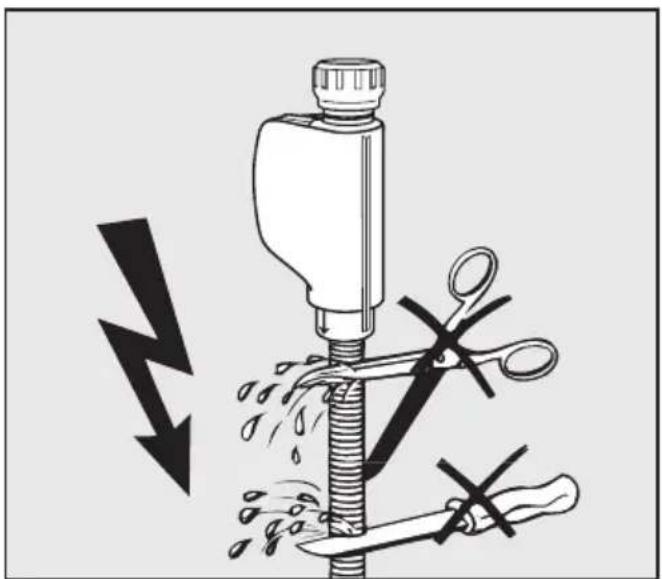
The inlet hose must not be shortened or damaged in any way as it contains electrical components (see illustration).
Drainage
- The appliance drainage system is fitted with a non-return valve, which prevents dirty water from flowing back into the dishwasher via the drain hose.
- The dishwasher is supplied with approx. 1.5 m of flexible drain hose with an internal diameter of 22 mm.
- The drain hose can be extended using a connection piece to attach a further length of hose.
The drainage length must not be longer than 4 m, and the delivery head must not exceed 1 m.
- If the hose is to be directly fitted to the drainage outlet on site, use the hose clip supplied (see installation diagram).
- The hose can be directed to the left or the right of the appliance.
- The on-site connector for the drain hose can be adapted to different widths of hose. If the connector protrudes too far into the drain hose, it will need to be shortened.
Otherwise the drain hose may become blocked.
- The drain hose must not be shortened.
⚠️ Make sure that there are no kinks in the hose, and that it is not squashed or stretched.
After connecting the dishwasher to the drainage system, check that all plumbing connections are watertight.
Venting the drainage system
If the on-site drain connection is situated lower than the guide path for the bottom basket rollers in the open door, the drainage system must be vented. Otherwise a siphoning effect during a programme can cause the appliance to empty itself of water.
To vent it:
Open the dishwasher door fully.
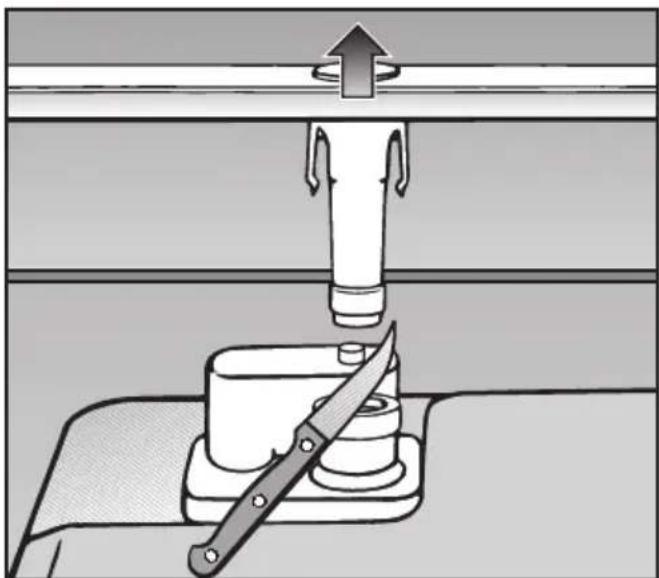
Pull the lower spray arm firmly upwards to remove it. Cut off the top of the vent valve in the wash cabinet.
Dishwasher model Standard XXL
| Height 80.5 cm | (adjustable + 6.5 cm) | 84.5 cm (adjustable + 6.5 cm) |
| Height of building-in recess | Min. 80.5 cm (+ 6.5 cm) | Min. 84.5 cm (+ 6.5 cm) |
| Width 59.8 cm 59.8 cm | | |
| Width of building-in recess | 60 cm | 60 cm |
| Depth 57 cm 57 cm | | |
| Weight Max. 56 kg Max. 62 kg | | |
| Voltage 230 V 230 V | | |
| Connected load 2200 W 2200 W | | |
| Fuse rating | 10 A | 10 A |
| Power consumption when switched off | 0.20 W | 0.20 W |
| Power consumption when not switched off | 2.00 W | 2.00 W |
| Test certificates awarded | KEMA, VDE, radio and television suppressed | KEMA, VDE, radio and television suppressed |
| Water pressure (flow rate) | 30 - 1000 kPa (0.3 - 10 bar) | 30 - 1000 kPa (0.3 - 10 bar) |
| Hot water connection | Max. 60 °C | Max. 60 °C |
| Delivery head | Max. 1 m | Max. 1 m |
| Drainage length | Max. 4 m | Max. 4 m |
| Mains cable | Approx. 1.7 m | Approx. 1.7 m |
| Capacity | 13/14 place settings* | 13/14 place settings* |
* depending on model
Settings menu for changing standard settings
Switch the dishwasher off with the On/Off button ①, if it is switched on. Press and hold the Programme selector button in. Switch on the dishwasher with the On/Off button ① and keep the Programme selector button pressed in for at least 4 seconds.
The first option of the Settings menu will appear in the display and all the indicator lights will come on.
See "Display" for more information about the display and controls.
Select the option you want to change.
Sub-menu options which have already been set will have a tick √ beside them.
Language
The display can be set to appear in one of several different languages.
You can select one of the languages displayed via the Languages sub-menu.
Select the language you want, and confirm your selection with the middle button.
The flag after the word "Language" acts as a guide if a language which you do not understand has already been set. If this is the case, keep selecting the option which has a flag after it until you reach the Language ▶ sub-menu.
Water hardness
Your dishwasher is fitted with a water softener which you need to programme to the water hardness level in your area.
- Your local water authority will be able to advise you of the water hardness level in your area.
- Where the water hardness fluctuates e.g. between 6.7 - 9.0 mmol/l (37 - 50 °d - German scale) always programme the dishwasher to the higher value (9.0 mmol/l in this example).
A tick √ will appear beside the water hardness which has been set.
■ Select the water hardness you want, and confirm your selection with the middle button.
| °dGerman scale | mmol/l °f | | Value displayed |
| 1 | 0.2 | 2 | 1 |
| 2 | 0.4 | 4 | 2 |
| 3 | 0.5 | 5 | 3 |
| 4 | 0.7 | 7 | 4 |
| 5 | 0.9 | 9 | 5 |
| 6 | 1.1 | 11 | 6 |
| 7 | 1.3 | 13 | 7 |
| 8 | 1.4 | 14 | 8 |
| 9 | 1.6 | 16 | 9 |
| 10 | 1.8 | 18 | 10 |
| 11 | 2.0 | 20 | 11 |
| 12 | 2.2 | 22 | 12 |
| 13 | 2.3 | 23 | 13 |
| 14 | 2.5 | 25 | 14 |
| 15 | 2.7 | 27 | 15 |
| 16 | 2.9 | 29 | 16 |
| 17 | 3.1 | 31 | 17 |
| 18 | 3.2 | 32 | 18 |
| 19 | 3.4 | 34 | 19 |
| 20 | 3.6 | 36 | 20 |
| 21 | 3.8 | 38 | 21 |
| 22 | 4.0 | 40 | 22 |
| 23 | 4.1 | 41 | 23 |
| 24 | 4.3 | 43 | 24 |
| 25 | 4.5 | 45 | 25 |
| 26 | 4.7 | 47 | 26 |
| 27 | 4.9 | 49 | 27 |
| 28 | 5.0 | 50 | 28 |
| 29 | 5.2 | 52 | 29 |
| 30 | 5.4 | 54 | 30 |
| 31 | 5.6 | 56 | 31 |
| 32 | 5.8 | 58 | 32 |
| 33 | 5.9 | 59 | 33 |
| 34 | 6.1 | 61 | 34 |
| 35 | 6.3 | 63 | 35 |
| 36 | 6.5 | 65 | 36 |
| 37-50 | 6.7-9.0 | 67-89 | 37-50 |
| 51-60 | 9.2-10.8 | 91-108 | 51-60 |
| 61-70 | 11.0-12.6 | 110-126 | 61-70 |
Rinse aid
You can adjust the rinse aid dosage for best results.
The rinse aid dosage can be set from approx. 0-6 ml.
The factory default setting is 3 ml.
If the function to adjust the Sensor wash programme has been activated, the amount of rinse aid dispensed in the Sensor wash programme can be higher than that set.
If spots appear on crockery and glassware:
- Increase the rinse aid dosage.
If clouding or smearing appears on crockery and glassware:
Decrease the rinse aid dosage.
Select the rinse aid dosage you want, and confirm your selection with the middle button.
Buzzer
When the buzzer is activated, an audible tone sounds at the end of a programme and when there is a fault.
The buzzer is activated as standard at the factory.
Buzzer at the end of a programme
You will hear the buzzer at the end of a programme. It will sound four times in bursts of three beeps with a noticeable pause (approx. 15 seconds) in between. Switching the dishwasher off will switch the buzzer off.
Buzzer when there is a fault
In the event of a fault, the buzzer will sound four times in bursts of three beeps with only a very short pause in between.
The buzzer which sounds if there is a fault cannot be deactivated.
Setting the buzzer volume
There are seven different volume settings. If no volume is selected, the buzzer is deactivated.
Select the volume you want, and confirm your selection with the middle button.
Sensor wash
You can adjust the Sensor wash programme so that it will remove stubborn soiling in a lightly soiled load.
Select the setting you want, and confirm your selection with the middle button.
Memory
You can use the Memory function to save the last programme selected. Instead of the ECO programme, the last programme selected will be indicated when the dishwasher is switched off and back on again at the end of a programme.
The dishwasher is delivered with the Memory function deactivated.
Select the setting you want, and confirm your selection with the middle button.
Optimise standby
To save energy, the dishwasher will switch to Standby mode a few minutes after the last time a button has been pressed or a few minutes after the end of the programme. The display and indicator lights will go out and only the ① indicator light will flash slowly. If the dishwasher is not switched off at the end of the programme, it will switch off completely after a few minutes in Standby mode.
The Optimise standby function can be deactivated if wished. The display and the indicator lights will not go out, and the time lapse before the dishwasher switches off will increase to approx. 6 hours, resulting in higher energy consumption.
Select the setting you want, and confirm your selection with the middle button.
The dishwasher will not switch into Standby mode whilst a programme is running, if salt or rinse aid needs to be replenished or there is a fault.
If you only use combination products containing salt and rinse aid in your dishwasher, you can switch the refill indicators off so that the dishwasher will go into Standby despite a lack of salt or rinse aid (see "Before using for the first time"). You cannot switch off fault indicators.
Replenish salt and rinse aid reminders
If you only ever use combination products containing salt and rinse aid in your dishwasher, you can switch both of these reminders off if you wish. The DetergentAgent function will not be affected by this.
Select the setting you want, and confirm your selection with the middle button.
If you switch to using detergent that does not contain salt or rinse aid, it is important to remember to replenish the salt and rinse aid and to switch the reminders back on.
Soak
You can use the Soak function in the selected programme to loosen very stubborn food residues from pots, pans, and casserole dishes. It is not available for every programme.
If you are using powder dishwasher detergent, add approximately 5 g to compartment I.
Select the setting you want, and confirm your selection with the middle button.
Once set, the function will remain active for the programmes for which it is available, until the setting is changed.
Pre-wash
You can use the Pre-wash function in the selected programme to remove easily loosened food residues. It is not available for every programme.
Select the setting you want, and confirm your selection with the middle button.
Once set, the function will remain active for the programmes for which it is available, until the setting is changed.
Longer drying
The fan runs for longer at the end of a programme to improve the drying result. The Longer drying function is not available for every programme.
Select the setting you want, and confirm your selection with the middle button.
Once set, the function will remain active for the programmes for which it is available, until the setting is changed.
Brightness
There are seven different display brightness settings.
Select the brightness setting you want, and confirm your selection with the middle button.
Contrast
There are seven different display contrast settings.
Select the contrast setting you want and confirm your selection with the middle button.
Check filters
You can adjust the interval at which the reminder to check the filters appears. You can set an interval of between 30 and 60 programme cycles.
The "Check filters" message is set at the factory to appear after every 50 programme cycles.
Select the interval you want and confirm with the middle button.
Showroom programme
This programme is for demonstration use only.
- Demo with sound:
The pumps are activated to demonstrate the sound of the dishwasher.
To switch Demo mode on
Select the option you want. Select On and confirm with the middle button. Close the door.
Demo mode will begin.
To switch Demo mode off
Demo mode will switch off automatically when it reaches the end of the cycle.
Factory default
If you have altered any settings from the factory default, you can reset them back to the factory default settings.
■ Select Reset to default and confirm your selection with the middle button.
Use Close to come out of the Settings menu.
■ Select Close and confirm your selection with the middle button.
The display will then show the last programme selected and the indicator light for the programme selected will come on.
United Kingdom
Miele Co. Ltd.
Fairacres, Marcham Road
Abingdon, Oxon, OX14 1TW
Tel: 0845 365 0555
Fax: 0845 365 0777
Customer Contact Centre Tel: 0845 365 6600
E-mail: info@miele.co.uk
Internet: www.miele.co.uk
Australia
Miele Australia Pty. Ltd.
ABN 96 005 635 398
1 Gilbert Park Drive, Knoxfield, VIC 3180
Tel: 1300 464 353, Fax: (03) 9764 7149
Internet: www.miele.com.au
China
Miele (Shanghai) Trading Ltd.
1-3 Floor, No. 82 Shi Men Yi Road
Jing' an District
200040 Shanghai, PRC
Tel: +86 21 6157 3500
Fax: +86 21 6157 3511
E-mail: mieleshanghai@cn.miele.com
Miele (Hong Kong) Limited
41/F - 4101, Manhattan Place
23 Wang Tai Road
Kowloon Bay
Hong Kong
Tel: (852) 2610 1331
Fax: (852) 2610 1013
Email: mielehk@miele.com.hk
India
Miele India Pvt. Ltd.
Ground Floor, Copia Corporate Suites
Plot No. 9, Jasola
New Delhi - 110025
Tel: 011-46 900 000, Fax: 011-46 900 001
E-mail: customercare@miele.in
Internet: www.miele.in
Manufacturer: Miele & Cie. KG
Citywest Business Campus, Dublin 24
Tel: (01) 461 07 10, Fax: (01) 461 07 97
E-Mail: info@miele.ie, Internet: www.miele.ie
New Zealand
Miele New Zealand Limited
Unit L, 10-20 Sylvia Park Road
Mt. Wellington, 1060, Auckland, NZ
Tel: 0800 264 353, Fax: 0800 463 453
Internet: www.miele.co.nz
Singapore
Miele Southeast Asia
Miele Pte. Ltd.
163 Penang Road
# 04 - 02/03 Winsland House II
Singapore 238463
Tel: +65 6735 1191, Fax: +65 6735 1161
E-Mail: infosea@miele.com.sg
Internet: www.miele.sg
South Africa
Miele (Pty) Ltd
63 Peter Place, Bryanston 2194
P.O. Box 69434, Bryanston 2021
Tel: (011) 875 9000
Fax: (011) 875 9035
E-mail: info@miele.co.za
Internet: www.miele.co.za
United Arab Emirates
Miele Appliances Ltd.
P.O. Box 11 47 82
Gold & Diamond Park
Sheikh Zayed Road
Building 6 / Offices Nos. 6-214 to 6-220
Dubai
Tel: +971-4-341 84 44
Fax: +971-4-341 88 52