
V-9970 - Telephone Valcom - Free user manual and instructions
Find the device manual for free V-9970 Valcom in PDF.


| Product Type | Single Zone One-way Station Level Page Control |
| Dimensions | 8.25" H x 4.50" W x 2.35" D (20.96 cm x 11.43 cm x 5.97 cm) |
| Weight | 1.5 lbs (0.68 kg) |
| Power Supply | -12VDC or -24VDC @ 165 mA; uses VP-412A power supply (Class 2) |
| Fusing | 1/2 Amp resettable polyswitch |
| Automatic Gain Control | Yes, makes quiet pages louder and loud pages quieter |
| Paging Source | Standard analog PABX station, C.O. line, or analog Centrex line |
| Background Music Input | Yes, with volume control (R13) |
| Relay Output | 1 Amp internal relay for page notification |
| Disconnect Options | Loop detect, dial tone disconnect, silence timeout (1-31 sec), absolute timeout (4-124 sec) |
| Voice Response | 150 - 5000 Hz |
| Music Response | 20 - 20,000 Hz |
| Operating Temperature | 0 to +50°C |
| Storage Temperature | -40 to +85°C |
| Humidity | 10 - 90% (non-condensing) |
| FCC Compliance | Part 68, Class A digital device |
| UL Listing | UL Listed |
| Installation Requirements | Restricted access areas per National Electrical Code |
| Repairability | Not field repairable; fuses not user replaceable; send to Valcom for repairs |
| Warranty | One year limited warranty from date of shipment |
Frequently Asked Questions - V-9970 Valcom
User questions about V-9970 Valcom
0 question about this device. Answer the ones you know or ask your own.
Ask a new question about this device
Download the instructions for your Telephone in PDF format for free! Find your manual V-9970 - Valcom and take your electronic device back in hand. On this page are published all the documents necessary for the use of your device. V-9970 by Valcom.
USER MANUAL V-9970 Valcom
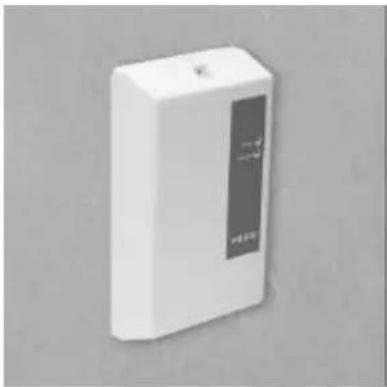
The V-9970 is a Single Zone One-way Station Level Page Control designed to provide ring trip and page access circuitry for use on standard telephone lines (PABX, Centrex or C. O. line connections). These instructions contain the specifications and information necessary to install, operate and maintain the Single Zone One-way Station Level Page Control.
Regulatory Information
This equipment has been tested and found to comply with the limits for a Class A digital device pursuant to Part 15 of FCC Rules. These limits are designed to provide reasonable protection against harmful interference when this equipment is operated in a commercial environment. This equipment generates, uses and can radiate radio frequency energy and if not installed and used in accordance with the instruction manual, may cause harmful interference to radio communications. Operation of this equipment in a residential area is likely to cause harmful interference in which case the user will be required to correct the interference at his/her own expense.
• FCC Registration #: BAFUSA-21973-PA-N
• Ringer Equivalence #: AC 0.6B/DC 0.1B
This equipment is to be installed only in restricted access areas (Such as dedicated equipment rooms or equipment closets) in accordance with Articles 110-16, 110-17 and 110-18 of the National Electrical Code, ANSI/NFPA 70.
natural_image
White rectangular electronic device with a black panel and indicator lights, no visible text or symbols on the body.SPECIFICATIONS
Features
• Automatic Gain Control
• Paging from standard phone lines
• Suppression of unwanted sounds (Pops and tones)
• Page tone verification
• Page disconnect on tones or C.O. open loop
- Feedback reduction
- Power on LED
• Page in progress LED
- User contacts provided
- -12VDC or -24VDC operation
• Background music input
• VOX silence disconnect, user selectable
• Absolute timeout, user selectable
- Connects to telephone line via standard RJ11C jack
- CMOS DSP power efficient green technology (Uses only 1 Watt average @ 12 Volts when utilizing a VP-412A - 2 Watts during page)
• FCC Part 68 Compliant
- UL Listed
Nominal Specifications
Technical
DC Voltage Input: -12VDC or -24VDC @ 165mA
Fusing: 1/2 Amp resettable polyswitch
Voice Paging
Ringing Detection: 38 - 130 Volts AC
Tip/Ring Input Level: -20dBm - 0dBm
S/N Ratio: 55dBm
Tip/Ring Tone Out: -6dBm (1.09Vp-p)
Noise Rejection: 1.5Vp-p common mode tip/ring
60Hz Rejection: 2.0Vp-p common mode tip/ring
Paging Voice Out: -10dBm (0.693Vp-p)
Voice Response: 150 - 5000Hz
Tip/Ring Impedance: 600 Ohms
with loop current 20 - 80mA
REN: 0.2A
Silence Timeout: Adjustable from 1 - 31 seconds
Absolute Timeout: Adjustable 4 - 124 seconds
Dial Tone Disconnect Frequencies: 350/440,
440/480, 440/620, 480/620, 525/660Hz
Background Music
| Music Response: | 20 - 20kHz |
| Music Input Level: | -23 - 0dBm (0.15 - 2.2Vp-p) |
| S/N Ratio: 75dBm | |
| PS Rejection: | 52dBm |
| Music Out: | -17dBm (0.311Vp-p) nominal(User adjustable) |
| Music Adjustment: | 0.1 - 1.1X |
Environmental
| Dimensions: | 8.25" H x 4.50" W x 2.35" D(20.96cm H x 11.43cm W x 5.97cm D) |
| Weight: | 1.5 lbs. (.68 kg) |
| Operating Temperature: | 0 to +50°C |
| Storage Temperature: | -40 to +85°C |
| Cooling: | Free Air Convection |
| Humidity: | 10 - 90% (Non-condensing) |
| Shock: | 10G |
DESIGN
The Valcom V-9970 is designed to provide paging access from a standard analog PABX station number, a C. O. line or analog Centrex line. The Page Control incorporates the latest technology Digital Signal Processor (DSP) to recognize and transfer speech only, thus eliminating unwanted noises such as pops and tones. A discriminating Automatic Gain Control (AGC) is provided to make quiet pages louder and loud pages quieter.
The Single Zone One-way Station Level Page Control provides a music input with volume control for background music and an additional 1 Amp internal relay output (This input closes during a page to provide user page notification if desired).
INSTALLATION
The V-9970 Page Control must be powered by a Class 2 Listed, -12VDC output transformer or by -24VDC NEC Class 2 power source.
When using this equipment, basic safety precautions should be followed to reduce the risk of fire, electric shock and injury to persons:
- Never install telephone wiring during a lightning storm.
- Never install telephone jacks in wet locations unless the jack is specifically designed for wet locations.
- Never touch uninsulated telephone wires or terminals unless the telephone line has been disconnected at the network.
- Use caution when installing or modifying telephone lines.
Mounting/Connections
- Remove the metal mounting plate from the rear of the V-9970 enclosure. Using two #6 3/4" wood screws, mount the plate in a vacant space on the backboard with the telephone system common equipment. Both mounting holes must be utilized to insure secure mounting of the unit.
- Open the V-9970 enclosure to allow access to connections and option switches. Slide the rear of the unit (Contains the board) onto the mounting plate.
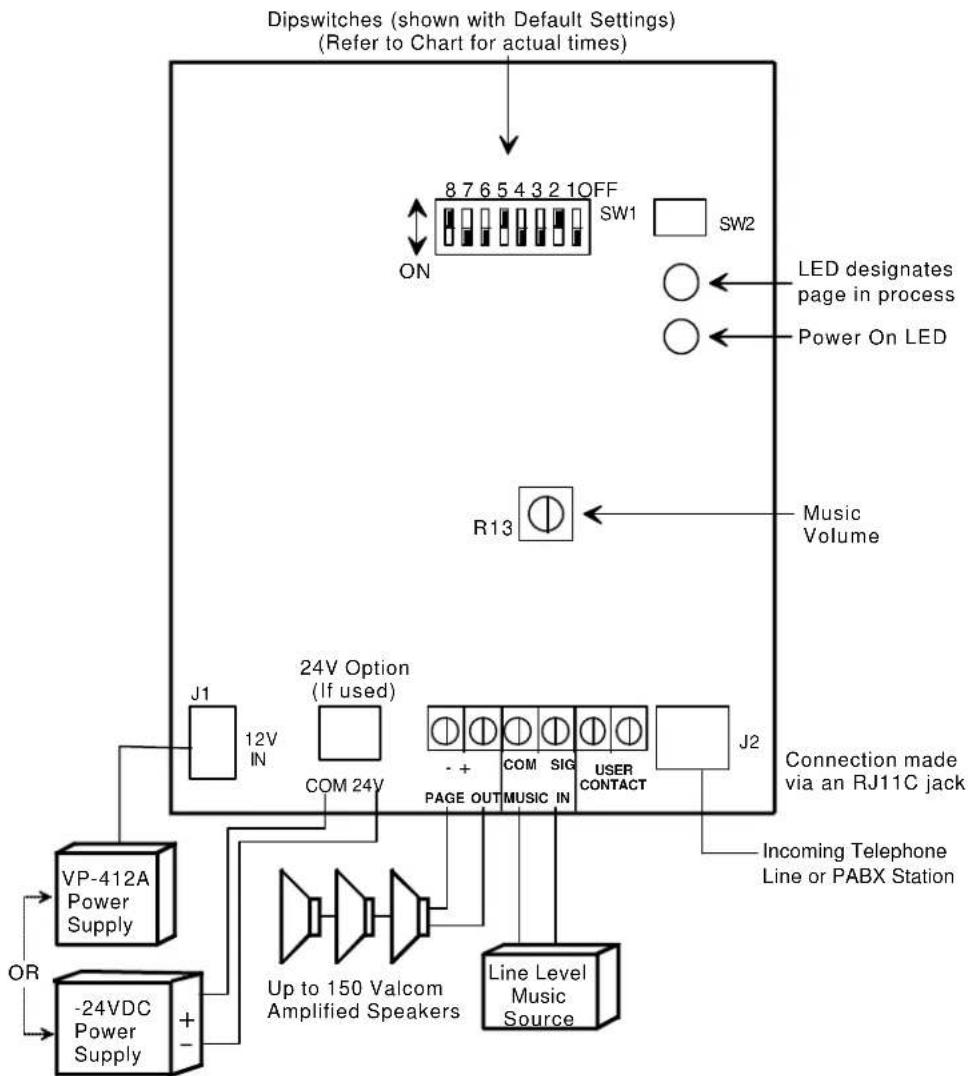
- Using a 1/8" blade screwdriver, connect Tip and Ring from the Valcom amplified speakers to PAGE OUT on the V-9970 screw terminals.
- Attach two wires from a music source output to the terminal screws labeled SIG MUSIC and COM IN. Volume is adjusted by rotating R13 clockwise.
- A 1 Amp internal relay input is supplied to provide user page notification. Attach two wires from the notification equipment to the V-9970 if this feature is to be used.
- Plug the RJ11C jack from a single line phone to connector J2 on the V-9970.
- Connect 12V power supply (VP-412A) to connector J1 (If using the 24V option, connect the power supply to the terminals marked COM and 24V).
- Set dip switches for desired options. (See chart following for settings).
Note: Dip switches for user options should be set for desired functions prior to replacing the enclosure cover and plugging in the power supply.
- Replace cover and plug in power supply.
OPERATION
To make a page from a remote location, dial the phone number the page adapter is connected to and issue page. The background music will fade and the page will be heard through the amplified speakers. When the page ends, the music will resume.
Note: For most efficient operation, use Valcom VP-412A, 120VAC plug-in power supply.
TECHNICAL ASSISTANCE
When trouble is reported, verify the unit is properly connected and there are no broken connections leading to this unit.
Assistance in troubleshooting is available from the factory. When calling, you should have a VOM and a test set and be calling from the job site. Call (540)
767-1555 for Valcom 24-hour Faxback System or visit our website at http://www.valcom.com.
Valcom equipment is not field repairable and fuses are not user replaceable. Valcom, Inc. maintains service facilities in Roanoke, VA. Should repairs be necessary, attach a tag to the unit clearly stating company name, address, phone number, contact person and the nature of the problem. Send the unit to:
Repair and Return Dept.
Valcom, Inc.
5614 Hollins Road
Roanoke, VA 24019-5056
563-2000 and ask for Technical Support or call (540)
VALCOM LIMITED WARRANTY
Valcom, Inc. warrants its products to be free from defects in materials and workmanship under conditions of normal use and service for a period of one year from the date of shipment. The obligation under this warranty shall be limited to the replacement, repair or refund of any such defective device within the warranty period, provided that:
- inspection by Valcom, Inc. indicates the validity of the claim;
- the defect is not the result of damage, misuse or negligence after the original shipment;
- the product has not been altered in any way or repaired by others and that factory sealed units are unopened (A service charge plus parts and labor will be applied to units defaced or physically damaged);
- freight charges for the return of products to Valcom are prepaid;
- all units 'out of warranty' are subject to a service charge. The service charge will cover minor repairs (Major repairs will be subject to additional charges for parts and labor).
This warranty is in lieu of and excludes all other warranties, expressed or implied, and in no event shall Valcom, Inc. be liable for any anticipated profits, consequential damages, loss of time or other losses incurred by the buyer in connection with the purchase, operation or use of the product.
This warranty specifically excludes damage incurred in shipment. In the event a product is received in damaged condition, the carrier should be notified immediately. Claims for such damage should be filed with the carrier involved in accordance with the F.O.B. point.
Headquarters: In Canada
Valcom, Inc. CMX Corporation
5614 Hollins Road 35 Van Kirk Drive #11 and 12
Roanoke, VA 24019-5056
Phone: (540) 563-2000
FAX: (540) 362-9800
Brampton, Ontario L7A 1A5
Phone: (905) 456-1072
FAX: (905) 456-2269
DIP SWITCH SETTINGS
| SW OFF ON | ||
| 1 | Silence Timeout Enable, Default | Absolute Timeout Enable |
| 2 | No Disconnect on Dial Tone | Disconnect on Dial Tone*, Default |
| TIMING OPTIONS | ||
| Silence Timeout or [Absolute Timeout] | Silence Timeout or [Absolute Timeout] | |
| 3 Off, Default 16 [64] Seconds | ||
| 4 | Off, Default | 8 [32] Seconds |
| 5 | Off | 4 [16] Seconds, Default |
| 6 Off, Default 2 [8] Seconds | ||
| 7 Off, Default 1 [4] Seconds | ||
| (Selected timing options will be added to determine total time) | ||
| 8 | Loop Detect Disable | Loop Detect Enable, Default |
Changes in dip switch settings will take effect when an idle unit first senses ringing.
* Frequencies of Disconnect Tones:
350 / 440Hz
440 / 480Hz
440 / 620Hz
480 / 620Hz
525 / 660Hz
DIP SWITCH TERMINOLOGY
The word "default" refers to the factory dip switch setting. Dip switches 2, 5 and 8 are set "ON" at the factory enabling silence timeout, dial tone disconnect and loop detect enable. The pager will "disconnect" after a page is made when the caller places the receiver on-hook thus dropping the current loop (Loop detect) OR by dial tone if the current loop detect is not passed through the telephone switching system (Dial tone disconnect) OR if silence is detected on the line for 4 seconds (Silence timeout).
Dip switch 1 OFF, "Silence Timeout Enable" means the Page Adapter will hang up when the caller does not speak for a period of time as selected by dip switches 3 through 7 (Dip switch 5 is default set to 4 seconds). Note the times can be added on the dip
switch settings. If dip switches 3 through 7 are set to OFF for no timeout, dip switch 1 has no effect and the timeout option does not occur. Dip switch 1 is default set to "OFF".
Dip switch 1 ON, "Absolute Timeout Enable" means the Page Adapter will hang up after a period of time as set by dip switches 3 through 7 regardless of silence from the person paging.
Loop Detect is factory set to the default setting of ON or enable which causes the V-9970 to "hang-up" when loop current is no longer detected signifying that the caller has hung-up. Sometimes the local telephone switch internal to the building does not pass this signal and then it becomes necessary to utilize other disconnect options.
flowchart
graph TD
    A["VP-412A Power Supply"] --> B["OP"]
    C["-24VDC Power Supply"] --> D["+"]
    B --> E["24V Option (If used)"]
    D --> E
    E --> F["COM 24V"]
    F --> G["8 7 6 5 4 3 2 1 OFF"]
    G --> H["SW1"]
    H --> I["SW2"]
    I --> J["LED designates page in process"]
    I --> K["Power On LED"]
    L["Line Level Music Source"] --> M["Com SIG"]
    M --> N["USER CONTACT"]
    N --> O["J2"]
    P["OR"] --> Q["Up to 150 Valcom Amplified Speakers"]
    Q --> R["PAGE OUT MUSIC IN"]
    R --> S["Connection made via an RJ11C jack"]
    T["R13"] --> U["Music Volume"]
FIGURE 1 - ONE ZONE CONNECTIONS LOCATION OF SCREW TERMINALS, OPTION SWITCHES AND MUSIC VOLUME CONTROL
flowchart
graph TD
    A["24V Option (If used)"] --> B["J1"]
    A --> C["COM 24V"]
    A --> D["Page OUT"]
    A --> E["MUSIC IN"]
    A --> F["USER CONTACT"]
    A --> G["J2"]
    H["VP-412A Power Supply"] --> I["OR"]
    J["-24VDC Power Supply*"] --> K["+"]
    L["W-BL BL-W W-O O-W"] --> M["V-2003A SW2 Must be OFF"]
    N["Connection made via an RJ11C jack"] --> O["J2"]
    P["Incoming Telephone Line or PABX Station"] --> Q["W-BL BL-W W-O O-W"]
    R["^ May be provided by V-2003A"] --> S["+"]
    T["OR"] --> U["+"]
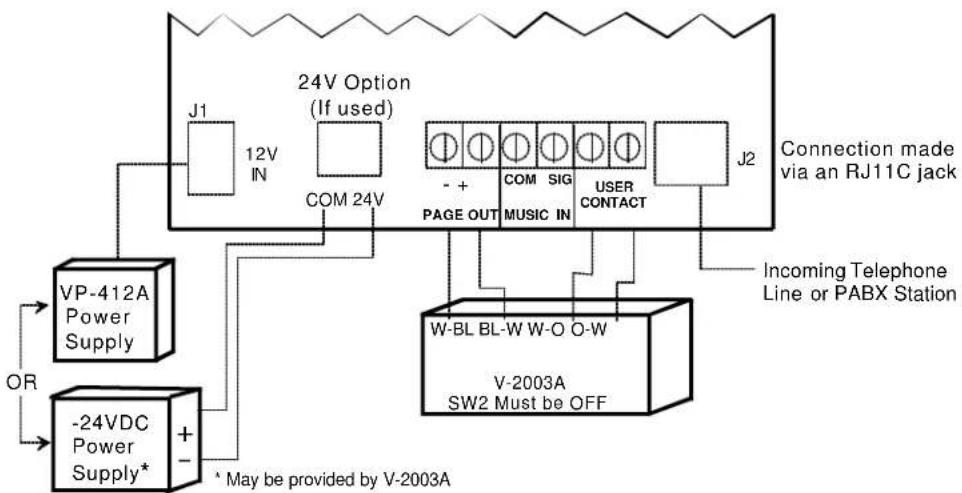
FIGURE 2 CONNECTIONS TO A V-2003A FOR 3 ZONES
flowchart
graph TD
    A["VP-412A Power Supply"] --> B["OR"]
    C["-24VDC Power Supply*"] --> D["+"]
    E["24V Option (If used)"] --> F["J1 12V IN"]
    F --> G["COM 24V"]
    G --> H["PAGE OUT MUSIC IN"]
    H --> I["COM SIG"]
    I --> J["USER CONTACT"]
    J --> K["J2 Connection made via an RJ11C jack"]
    L["W-BL BL-W W-BR O-W V-2006A SW6 Must be OFF"] --> M["Incoming Telephone Line or PABX Station"]
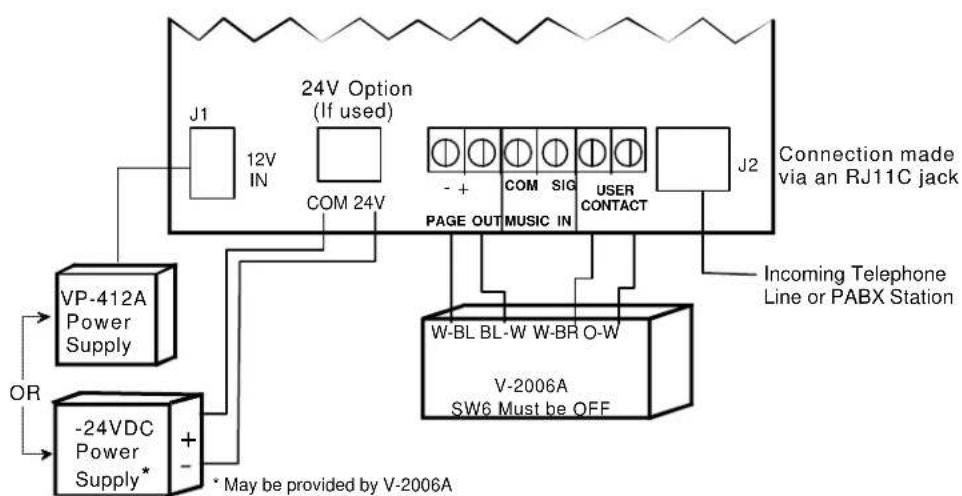
FIGURE 3 CONNECTIONS TO A V-2006A FOR 6 ZONES
Brand : Valcom
Model : V-9970
Category : Telephone