
HiPath AP 3610 - Access Point SIEMENS - Free user manual and instructions
Find the device manual for free HiPath AP 3610 SIEMENS in PDF.


| Product Type | Access Point (Enterprise-class) |
| Model | HiPath AP 3610 |
| Wireless Standards | 802.11a/b/g/n (dual-band concurrent) |
| MIMO Configuration | 3x3 MIMO with 2 spatial streams |
| Maximum Data Rates | Up to 300 Mbps (HT40, 2 streams) |
| Frequency Bands | 2.4 GHz (802.11b/g/n) and 5 GHz (802.11a/n) |
| Antenna | Internal integrated antenna array (gain 2.4/5 GHz: 3/6 dBi) |
| Ethernet Interface | 10/100/1000Base-T auto-sensing |
| Power Supply | 802.3af PoE (Class 0, max 12.95W); typical 11W; optional DC 48V |
| Dimensions (W x D x H) | 214.6 mm x 180.8 mm x 55 mm (8.4" x 7.1" x 2.2") |
| Weight | 628.4 g (22.2 oz) |
| Operating Temperature | 0°C to 50°C (32°F to 122°F) |
| Humidity | 0% to 95% (non-condensing) |
| Security Standards | WEP, WPA/WPA2 (TKIP/AES), 802.1X, 802.11i |
| Management | Plug-and-Play, automatic controller discovery, central configuration |
| Quality of Service | WMM, 802.11e, CAC, per-SSID prioritization |
| Virtual APs | Up to 16 SSIDs (8 per radio) with independent policies |
| Voice Support | Optimized for VoWLAN, fast secure roaming, up to 12 simultaneous calls |
| Compliance | UL 60950-1, FCC Part 15, ICES-003, R&TTE, EN 301 893 |
| Mounting | Wall, ceiling, or plenum (above suspended ceiling) |
| Spare Parts / Repairability | No user-serviceable parts; contact Siemens support for repairs |
| Cleaning and Maintenance | Wipe with a dry, soft cloth; do not use liquids or sprays |
Frequently Asked Questions - HiPath AP 3610 SIEMENS
User questions about HiPath AP 3610 SIEMENS
0 question about this device. Answer the ones you know or ask your own.
Ask a new question about this device
Download the instructions for your Access Point in PDF format for free! Find your manual HiPath AP 3610 - SIEMENS and take your electronic device back in hand. On this page are published all the documents necessary for the use of your device. HiPath AP 3610 by SIEMENS.
USER MANUAL HiPath AP 3610 SIEMENS
HiPath Wireless 802.11n Access Points
HiPath Wireless 802.11n Access Points are enterprise-class dual-band 802.11a/n and 802.11b/g/n capable, providing coverage anywhere that wireless LAN (WLAN) service is required. Unique Plug-and-Play and Power over Ethernet technologies dramatically simplify network deployment.
Siemens Virtual Network Services Architecture optimizes traffic flow and user policies between the Access Points and Controller, balancing high performance, security and manageability.
Communication for the open minded
Siemens Enterprise Communications
www.siemens.com/open
SIEMENS
The HiPath Wireless solution optimizes the distribution of the processing load between the Access Point and Controller to deliver exceptional performance while remaining easy to manage. Complex, time-sensitive functions such as QoS, encryption and, dynamic frequency selection are handled by the AP, while global functions like configuration, roaming, security management, and policy control are centralized at the Controller. Furthermore, Siemens innovative VNS Architecture is able to determine how to forward traffic for the highest performance and reliability. The result is a WLAN infrastructure that can easily be expanded to support new high-performance technologies and solutions such as VoWLAN and high-bandwidth data applications.
Ease of Deployment & Management Control
Deploy WLAN anywhere
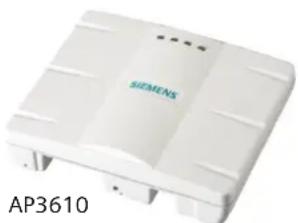
HiPath Wireless Access Points are designed to provide optimal RF coverage in almost any environment. The AP3610 uses a discrete internal antenna array, while the AP3620 features external antennae to allow extended coverage and minimal interference in hard to reach areas. Access points can be mounted on walls or ceilings, or kept out of sight by mounting them above suspended ceilings (plenum mounted).
Wireless Distribution System (WDS) enables deployment of APs without Ethernet cabling and instead uses RF to bridge wireless traffic to the network. This makes it possible to extend wireless coverage beyond the reach of conventional WLANs and wires.
Dual-band 3x3 MIMO functionality
Each HiPath Wireless 802.11n Access Point houses dual concurrent independently manageable radios: one operating in the 2.4 GHz band for 802.11b/g/n service, and the other operating in the 5 GHz band for 802.11a/n service. Each of these radios utilizes a set of three transmitter/receivers for 3x3 MIMO functionality. 3x3 MIMO ensures higher bandwidth, greater signal range and better performance than a 2x2 or 2x3 MIMO configuration.
Multi-SSID flexibility
Each radio supports up to eight separate SSIDs, each with its own configuration, security, and policy settings. As a result, there are sixteen "virtual APs" for every physical unit that can be configured independently. This is in addition to the more flexible and granular Virtual Network Services logical segmentation supported by the HiPath Wireless Controller.
Power over Ethernet (PoE)
HiPath Wireless 802.11n Access Points are exceptionally power-efficient, ensuring that they can run on industry standard 802.3af PoE infrastructure. Many 802.11n access points exceed the power consumption limits of the 802.3af standard specification for PoE when configured for 3x3 MIMO. These solutions demand the use of AC power adaptors or costly upgrades to pre-standard or proprietary PoE infrastructure to achieve optimal RF performance.
HiPath Wireless 802.11n Access Points are able to avoid all of this, and fully integrate with existing network infrastructure while providing complete 802.11n functionality. The Access Points' advanced power management also minimizes the heat that is generated. As a result, the APs are housed in sleek enclosures with minimal vents, making them especially resistant to tampering or dust ingress.
"Plug and Play" network installation
HiPath Wireless Access Points will securely and automatically register with an available Controller and download their configurations. APs can immediately provide service to users without having to be manually configured.
Central configuration and monitoring
All APs associated with a Controller are monitored and managed centrally for greater administrative control. When needed, each AP can be separately configured, enabled, or disabled. APs can be managed through the Controller, which provides alarms, traps and reporting statistics for network managers. APs also provide data on performance, security, and usage to the Controller for consolidation into detailed reports.
Authentication and encryption
HiPath Wireless Access Points use the most sophisticated standards to ensure sufficient security and client compatibility. Based on the 802.11i (WPA2) industry standards for wireless security, implementations can utilize 802.1x or PSK authentication and AES, TKIP or WEP encryption. These options ensure secure authentication and seamless integration of the APs with the wired network infrastructure.
Dynamic RF Management
HiPath Wireless APs work together to deliver interference prevention and RF sharing. Each AP is able to intelligently and dynamically adjust
its transmit power and channel selection based on information from nearby APs. This ensures optimal performance for associated clients. If an AP fails, neighbouring APs will increase power to maintain coverage in the affected area. The APs also support RF channel plan selection with the option of supporting 3-channel, 4-channel, or a fully custom configuration.
Voice and Solutions Capabilities
Unique VNS Architecture
With Siemens Virtual Network Services (VNS) Architecture, encryption, QoS, and RF management functions are performed at the Access Point. This minimizes the load on the central Controller, and enables the AP to intelligently forward different types of traffic locally or back through the Controller, depending on the network topology and application requirements. Siemens VNS Architecture delivers optimal performance and traffic flow on a per-application basis, and ensures that existing Controller hardware is able to support high-bandwidth 802.11n applications.
End-to-end VoWLAN
HiPath Wireless Access Points are optimized for the industry's leading VoWLAN devices to ensure peak call quality and reliability. The APs have been power-optimized to help maximize phone battery life.
QoS for real-time voice & multi-media
Wireless Quality of Service (QoS) is supported through WMM interoperability certification and compliance with the 802.11e industry standard. Priorities can also be set according to SSID, allowing critical real-time traffic to be assigned to a distinct high-priority queue. Interoperability with prioritization mechanisms on the wired network is also available to ensure end-to-end QoS. Call Access Control (CAC) ensures that high-quality voice traffic is maintained for existing calls before admitting new traffic onto the Access Point.
natural_image
White Siemens AP3610 electronic device casing (no visible text or symbols on body)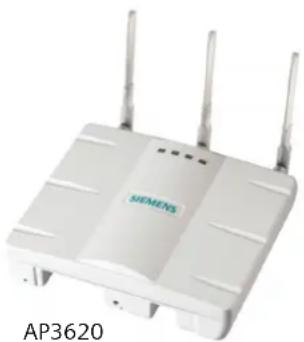
natural_image
White Siemens Wi-Fi router with three antennas and ventilation slots (no visible text or symbols on the device body)HiPath Wireless 802.11n Access Point Supported Features
| Feature Benefit | ||
| Management | Plug 'n Play Installation:– Automatic Controller Discovery– Centrally-deployed Configurations and Upgrades | No on-site configuration needed, dramatically reducing deployment time and costs. |
| Secure Remote Management APs can be easily configured and monitored from a central location. | ||
| Up to 16 SSIDs (8 per radio) Segment networks based on distinct user access, application, performance, and security needs. | ||
| Security | Security via WEP, WPA, (TKIP), WPA2, (AES), 802.11i, 802.1x | Latest authentication and encryption standards ensure that network traffic has the best protection. |
| VPN Support: IPSec, PPTP, L2TP VPN interoperability provides added security. | ||
| Performance | Intelligent AP | Encryption, blacklisting, QoS, and RF management done by the AP, resulting in high performance, resilience and optimum traffic distribution. |
| Controller Fast Failover & Session Availability | APs continuously maintain a configuration profile for a secondary Controller, so that if a primary Controller failure occurs the APs can immediately communicate with the secondary Controller to ensure continuity of service. This allows VNS's configured for Session Availability to maintain communication sessions even in the event of a failover. | |
| Dual concurrent, Dual-band 802.11a/n (5 GHz) and 802.11b/g/n (2.4 GHz) connectivity | Greater client interoperability, backward compatibility, and performance. | |
| DFS2 compliance Greater range of frequencies available for use in the 5 GHz band and avoidance of interference from radar installations. | ||
| Voice | Quality of Service (WMM, 802.11e) Optimal performance for media and voice applications. | |
| Fast, Secure Roaming and Handover (pre authentication, OKC) | Voice call integrity is preserved in a secure manner, even when users move across APs. | |
| Capacity | Simultaneous Voice Calls: 12 (802.11b, G.711, R>80) | APs meet the quality and capacity demands of today's VoIP applications. |
| Simultaneous Users: 127 per radio APs can handle concentrated user environments like board rooms and cafeterias. | ||
The All Wireless Enterprise and Mobile UC
HiPath Wireless is the key enabler of Siemens All Wireless Enterprise Solution and part of Siemens OpenScape Mobility family of products. HiPath Wireless delivers unsurpassed speed, security and scalability enabling ubiquitous enterprise wireless access at the industry's lowest total cost of deployment. OpenScape Mobility – delivering Mobile UC to the enterprise.
HiPath Wireless Portfolio
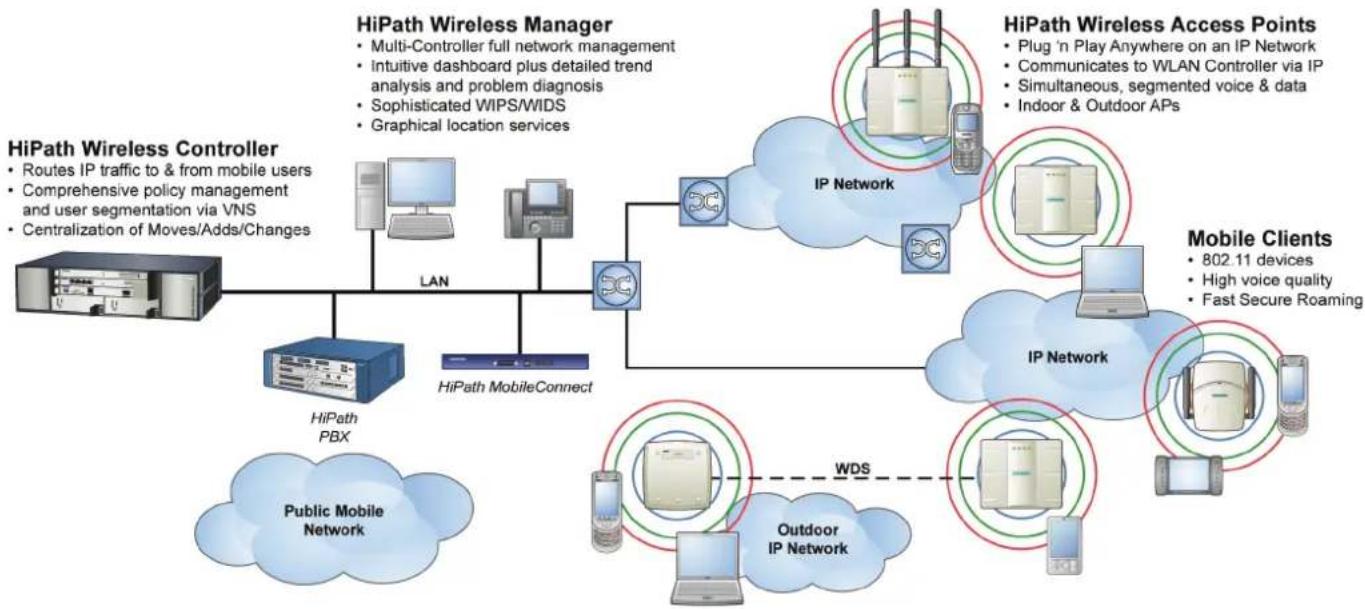
flowchart
graph TD
    A["HiPath Wireless Controller"] --> B["WiPath MobileConnect"]
    B --> C["LAN"]
    C --> D["IP Network"]
    D --> E["Mobile Clients"]
    E --> F["Outdoor IP Network"]
    F --> G["Public Mobile Network"]
    H["HiPath Wireless Manager"] --> I["Multi-Controller full network management"]
    I --> J["Intuitive dashboard plus detailed trend analysis and problem diagnosis"]
    J --> K["Sophisticated WIPS/WIDS"]
    K --> L["Graphical location services"]
    M["HiPath Wireless Access Points"] --> N["Plug 'n Play Anywhere on an IP Network"]
    N --> O["Communicates to WLAN Controller via IP"]
    O --> P["Simultaneous, segmented voice & data"]
    P --> Q["Indoor & Outdoor APs"]
    R["WiPath Mobile Network"] --> S["Cloud with Public Mobile Network"]
    T["Outdoor IP Network"] --> U["WDS"]
    U -.-> F
    V["Mobile Clients"] --> W["802.11 devices"]
    V --> X["High voice quality"]
    V --> Y["Fast Secure Roaming"]
HiPath Wireless Access Point Specifications - AP3610 / AP3620
| Data rates | ● 802.11a: 6, 9, 12, 18, 24, 36, 48, 54 Mbps●802.11b: 1, 2, 5.5, 11 Mbps●802.11g: 1, 2, 5.5, 6, 9, 11, 12, 18, 24, 36, 48, 54 Mbps●MIMO Mode HT20 (1 data stream): 6.5, 13, 19.5, 26, 39, 52, 58.5, 65●MIMO Mode HT20 (2 data streams): 13, 26, 39, 52, 78, 104, 117, 130● MIMO Mode HT40 Normal GI (1 data stream): 13.5, 27, 40.5, 54, 81, 108, 121.5, 135●MIMO Mode HT40 Normal GI (2 data stream): 27, 54, 81, 108, 162, 216, 243, 270●MIMO Mode HT40 Short GI (1 data stream): 15, 30, 45, 60, 90, 120, 135, 150● MIMO Mode HT40 Short GI (2 data stream): 30, 60, 90, 120, 150, 180, 240, 270, 300 | |
| Frequency bands* 802.11 | a/n:●5.15 to 5.25 GHz (FCC / IC / ETSI)●5.25 to 5.35 GHz (FCC / IC / ETSI)●5.47 to 5.725 GHz (FCC / IC / ETSI)●5.725 to 5.825 GHz (FCC / IC / ETSI) | 802.11b/g/n:●2.400 to 2.4835 GHz (FCC / IC / ETSI) |
| Dynamic channel control | DFS & TPC support (ETSI) | |
| Wireless modulation ●802.11a: OFDM●802.11n: 3x3 MIMO and 2 spatial streams | ●802.11g: DSSS and OFDM●802.11b: DSSS | |
| Antennae | Integrated Antenna (AP3610): 2.4 / 5.0 GHz , 3 / 6 dBi Gain, External Antenna (AP3620): 2.4 GHz / 5.0 GHz, 4 / 5 dBi Gain | |
| Interface & indicators | Auto-sensing 10/100/1000bT Ethernet interface, LED indicating AP status and connectivity | |
| Receive sensitivity (typical) | ●802.11a: 6 Mbps/-93dBm, 54 Mbps/-80dBm●802.11n 5 GHz HT20 Mode: 6.5Mbps(MCS0)/-94dBm, 130Mbps(MCS15)/-72dBm●802.11n 5 GHz HT40 Mode: 15Mbps(MCS0)/-89dBm, 300Mbps(MCS15)/-68dBm | ●802.11b: 1 Mbps/-93dBm, 11 Mbps/-90dBm●802.11g: 6 Mbps/-92 dBm, 54 Mbps/-81dBm● 802.11n 2.4 GHz HT20 Mode: 6.5Mbps(MCS0)/-94dBm, 130Mbps(MCS15)/-74dBm●802.11n 2.4 GHz HT40 Mode: 15Mbps(MCS0)/-88dBm, 300Mbps(MCS15)/-69dBm |
| Power | ● 802.3af Power over Ethernet, Class 0 (12.95 Watts Max)●Typical Power: 11 Watts● Optional DC Power Supply: Input 100 - 240VAC, Output: 48VDC, .38A maximum, 0 to +40C | |
| Available transmit power* | 802.11a (FCC / IC) (OFDM \ HT20 \ HT40):●5.15 to 5.25 GHz: 15dBm \ 15dBm \ 15dBm●5.25 to 5.35 GHz: 18dBm \ 18dBm \ 15dBm●5.47 to 5.725 GHz: 18dBm \ 18dBm \ 16dBm●5.725 to 5.825 GHz: 22dBm \ 22dBm \ 22dBm802.11a (ETSI) (OFDM \ HT20 \ HT40):●5.15 to 5.35 GHz: 17dBm \ 17dBm \ 17dBm●5.500 to 5.700 GHz: 22dBm \ 22dBm \ 20dBm | 802.11b: (FCC / IC) (CCK \ OFDM \ HT20 \ HT40):●2.400 to 2.4835 GHz: 23dBm \ 19dBm \ 21dBm \ 18dBm802.11b: (ETSI) (CCK \ OFDM \ HT20 \ HT40):●2.400 to 2.4835 GHz: 15dBm \ 15dBm \ 15dBm \ 15dBm |
| Compliance/standards | Ethernet IEEE 802.3 / 802.3u / 802.3af; WiFi 802.11a/b/g/n Draft 2; WPA, WPAv2, WMM | |
| Safety | ● UL / IEC / EN 60950-1 ; CAN/CSA 22.2 # 60950-1-03 UL 2043 Plenum Rating European 2006/95/EC Low Voltage Directive | |
| EMC & Radio | ● FCC CFR 47 Part 15.107 and 15.109 Class B (FCC 47 CFR, Part 15.205, 15.207, 15.209, FCC 47 CFR, Part 2.109, 2.1093, FCC OET No. 65)●ICES-003 Class B●FCC 47 CFR, Part 15.247, Part 15.407●RSS-210, RSS-102 (RF Exposure)●R&TTE Directive 1999/5/EC●EN 301 893●EN 300 328 | ●89/336/EEC EMC Directive●EN 301 489 -1 & 17●EN55011/CISPR 11 Class B, Group 1 ISM;●EN55022/CISPR 22 Class B,●EN55024/CISPR 24,●EN 300 386●EN / UL 60601-1-2●EN 50385 |
| Dimensions & weight | ● 214.6mm x 180.8mm x 55 mm (8.4" x 7.1" x 2.2")●AP3610 weight: 628.4 g (22.2 oz)●AP3620 weight: 649g (22.9 oz) | |
| Environmental | Operating: Temperature 0°C to 50°C (32°F -122°F), Humidity 0-95% (Non-Condensing)Storage: Temperature -5°C to 50°C (23°F -122°F)Transportation: Temperature -40°C to 70°C (-40°F -158°F) | |
* Bands, frequency settings, and maximum power settings will vary according to channel and individual country regulations.

Note: Specifications are subject to change
Communication for the open minded
Siemens Enterprise Communications www.siemens.com/open
Copyright © Siemens Enterprise Communications GmbH & Co. KG 09/2008 Hofmannstr. 51, D-81359 München
Reference No.: A31002-W1050-D102-2-7629
The information provided in this document contains merely general descriptions or characteristics of performance which in case of actual use do not always apply as described or which may change as a result of further development of the products. An obligation to provide the respective characteristics shall only exist if expressly agreed in the terms of contract. Subject to availability. Right of modification reserved. The trademarks used are owned by Siemens Enterprise Communications GmbH & Co. KG or their respective owners.
- HiPath Wireless 802.11n Access Points
- Ease of Deployment & Management Control
- Deploy WLAN anywhere
- Dual-band 3x3 MIMO functionality
- Multi-SSID flexibility
- Power over Ethernet (PoE)
- "Plug and Play" network installation
- Central configuration and monitoring
- Authentication and encryption
- Dynamic RF Management
- Voice and Solutions Capabilities
- Unique VNS Architecture
- End-to-end VoWLAN
- QoS for real-time voice & multi-media
- The All Wireless Enterprise and Mobile UC
- HiPath Wireless Portfolio
- Communication for the open minded
Brand : SIEMENS
Model : HiPath AP 3610
Category : Access Point