
CCG2 Burr - Coffee grinder DUALIT - Free user manual and instructions
Find the device manual for free CCG2 Burr DUALIT in PDF.


| Product Type | Coffee Grinder |
| Model | CCG2 Burr |
| Brand | Dualit |
| Grinding Mechanism | Burr (conical) |
| Colour | Silver/Black |
| Material | Stainless Steel, Plastic |
| Dimensions (W x D x H) | Approx. 12 x 18 x 28 cm |
| Weight | 1.5 kg |
| Power Source | Mains |
| Voltage | 220-240V (depends on region) |
| Power Consumption | 150 W |
| Bean Hopper Capacity | 250 g |
| Grounds Container Capacity | 150 g |
| Number of Grind Settings | 30+ (stepless adjustment) |
| Grind Adjustment | Stepless, external |
| Burr Type | Conical stainless steel |
| Motor Speed | Variable, up to 450 RPM |
| Operation Mode | Manual (press to grind) or timer |
| Safety Features | Overload protection, non-slip base |
| Cleaning | Removable burr, hopper and container |
| Accessories Included | Cleaning brush, measuring spoon |
| Warranty | 2 years |
| Country of Origin | China |
Frequently Asked Questions - CCG2 Burr DUALIT
User questions about CCG2 Burr DUALIT
0 question about this device. Answer the ones you know or ask your own.
Ask a new question about this device
Download the instructions for your Coffee grinder in PDF format for free! Find your manual CCG2 Burr - DUALIT and take your electronic device back in hand. On this page are published all the documents necessary for the use of your device. CCG2 Burr by DUALIT.
USER MANUAL CCG2 Burr DUALIT
Instruction Manual & Guarantee
Dualit.
Since 1945

natural_image
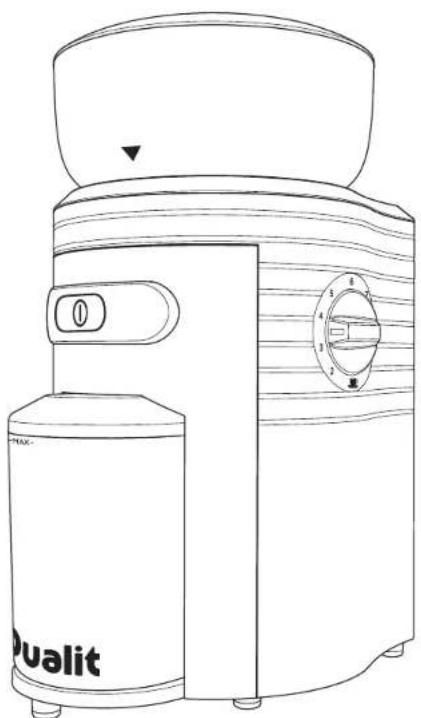
Line drawing of a Dualit blender with control knob and indicator dial (no text or symbols on body)SAFETY PRECAUTIONS
READ ALL THE INSTRUCTIONS CAREFULLY BEFORE USING YOUR DUALIT COFFEE GRINDER. KEEP THESE INSTRUCTIONS SAFE FOR FUTURE REFERENCE.
Always follow these safety precautions when using your Coffee Grinder for your own safety and to avoid damaging the appliance.
• This appliance is designed to operate with an AC power supply. Make sure your network voltage corresponds to the voltage shown on the rating plate underneath the Coffee Grinder
- Do not use the Coffee Grinder if the cord or plug is damaged or after the appliance malfunctions or has been damaged in any manner, return this appliance only to the nearest authorised dealership or Dualt limited
- Never use a plug without the fuse cover fitted. Always make sure a replacement fuse is the same rating as the original
- Replacement fuses should be approved to BS 1362
- NOTE: Any plug cut from its power supply cord should be disposed of immediately. Inserting any cut-off plug into an electrical socket is dangerous
- Unplug the unit when not in use, before fitting or removing parts and before cleaning. To unplug it, hold the plug and pull it out of the socket. Never pull it out by the power cord
- Do not use the Coffee Grinder outdoors
• This product is for domestic use only - Do not use the Grinder on a sloping surface
• Make sure the power cord doesn't hang over the edge of the table or countertop
• Make sure it isn't in contact with anything hot or wet
• This is an attended appliance - Do not touch hot surfaces, use handles or knobs
- Never leave the Coffee Grinder unattended when it is plugged into a wall socket or switched on
- Check bean container for presence of foreign objects before using
• Children should be supervised to ensure that they do not play with the appliance
• Store out of reach of children
- This appliance is not intended for use by persons (including children) with reduced physical, sensory or mental capabilities, or lack of experience and knowledge, unless they have been given supervision or instruction concerning use of the appliance by a person responsible for their safety.
- Ensure that the Coffee Grinder is always kept well out of reach of children
- When moving the Coffee Grinder, use both hands and lift holding the base unit. Never lift the Coffee Grinder using the bean hopper
- Never tamper with the safety systems. They are included for your personal safety
• To prevent clogging and overheating of the motor, never grind above the 'MAX' line of the ground coffee container.
- The bums are extremely sharp; take extra care when handling these parts, especially when removing from the body during cleaning. Avoid touching the sharp edges
• The use of attachments not recommended or sold by Dualit may cause fire, electric shock or injury to the user or the appliance
- Never operate the Coffee Grinder with the bean hopper empty.
- Do not misuse the Coffee Grinder, it is designed for use with Coffee beans
• Before each use, check that the bean hopper contains only coffee beans and nothing else
- Ensure the bean hopper is securely in place before turning the Coffee Grinder on. It will not work without the bean hopper and coffee container locked in place
• Always turn the power off before opening the lid
- Unplug and switch off the appliance before cleaning. Allow burns to cool as they may get hot during use.
- Never remove the bowl or lid until the bums have come to a complete stop
- Never touch moving parts or insert your hand or utensils into the bowl
• The Coffee Grinder features an overheat cut-out that cuts the power if it becomes too hot for any reason. If this occurs the safety cut-out will automatically reset itself within 1 hour and the power will be restored
- Do not submerge the motor housing, cord or plug in water or any other liquids
- Clean after each use
- Do not dishwasher
In the interest of improving products, Dualt Ltd. reserves the right to change the product specification without prior notice.
SAVE THESE INSTRUCTIONS
4
SETTING UP
NOTE: THE GRINDER WILL NOT OPERATE WITHOUT THE HOPPER OR GROUND CONTAINER CORRECTLY IN POSITION.
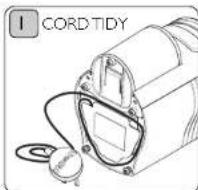
Unreel the required length of cord. It is important to keep the cord short. Pack the excess cord length in the cord tidy, then plug-in.
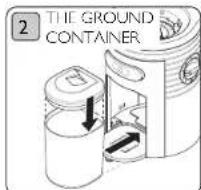
Clean and dry ground container before using. Slide the coffee container in. Place the grinder on a level surface.
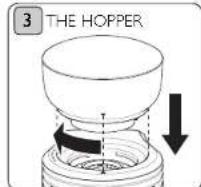
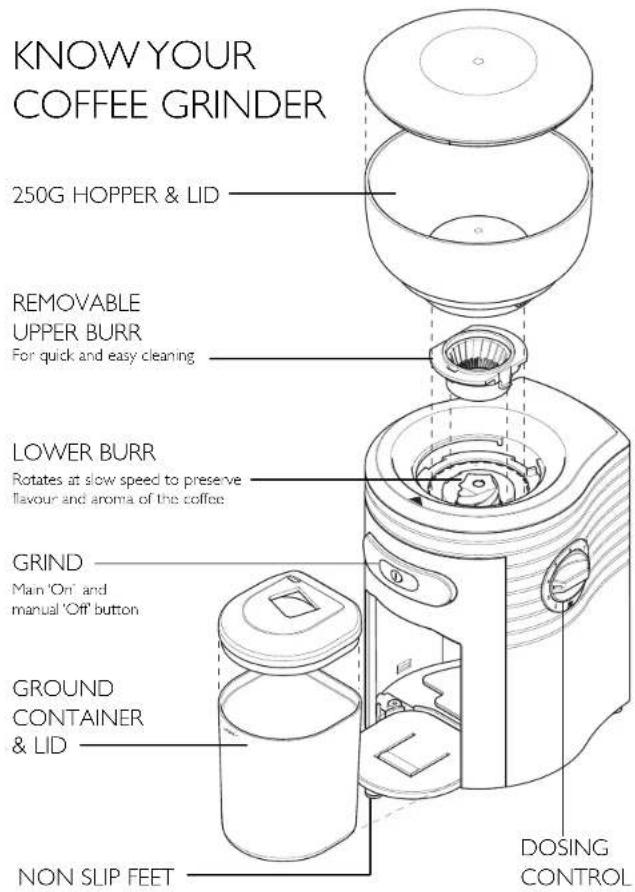
Place the hopper with lid on the main body, align the arrow on the main body to the arrow on the hopper and rotate the hopper clockwise so the arrow is above the grind control.
GRIND CONTROL
Fill with beans after setting the courseness control. The grinding control must not be operated when the motor is running.
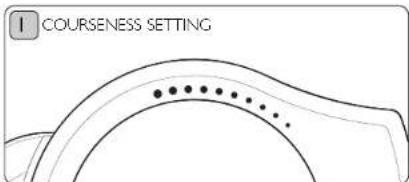
Adjust the degree of grinding by twisting the hopper and aligning the arrow on the hopper with the desired setting.
● = Fine grinding (e.g. for espresso coffee machine)
● = Medium grinding (e.g. for filter coffee machines)
● = Course grinding (e.g. for coffee percolator)

Add your beans in to the hopper. Check no foreign objects are in the hopper before grinding. Remember only grind what you need. Replace the lid.
5
DOSING & GRINDING
ONLY GRIND WHAT YOU NEED. TO PREVENT OVERHEATING, DO NOT GRIND FOR MORE THAN 3 MINUTES OR 2 X 10 DOSE CYCLES IN A ROW
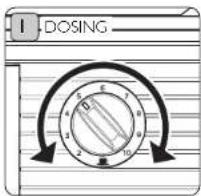
The dosing control is a rough guide for how many cups of coffee will be required, e.g. setting 8 for 8 cups. Set to required number of cups.
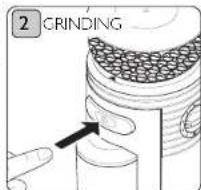
To start press the 'Grind' button. Once the portion is complete the grinder will automatically stop.
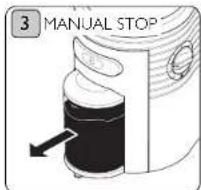
To manually stop grinding press the 'Grind' button. If the ground container is at 'Max' empty to prevent overheating. Tap the coffee container before decanting.
CLEAN AFTER EACH USE
ALWAYS DISCONNECT FROM THE MAINS SUPPLY BEFORE CLEANING. NO PARTS OF THE GRINDER ARE SUITABLE FOR A DISHWASHER.
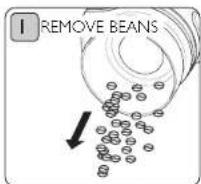
Remove any beans from the hopper by turning it upside down over a bowl or plate.
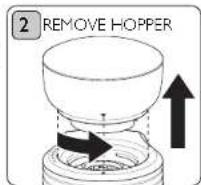
Rotate the hopper anti-clockwise until the arrows meet then lift the hopper up and off.
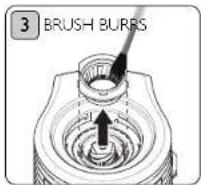
The upper burr can then be removed by lifting it straight up. Use a soft-bristle brush to clean the burrs. Wipe the body clean with a damp cloth.
GUARANTEE
This appliance is of excellent quality and construction. However, if any defects in materials or workmanship do appear during the relevant guarantee period, we will, at our discretion, either repair or replace the defective parts, free of charge, subject to the terms and conditions of our Guarantee shown below.
This Guarantee covers both parts and labour. Carriage is not included.
Your guarantee period is as follows:
• 1 years
This Guarantee provides benefits which are additional to, and do not affect, your statutory rights. This guarantee does not cover the cost of returning the product to the dealer from whom it was purchased or to ourselves. This guarantee applies only to products sold and located in mainland Great Britain. It does not cover liability in respect of or replacement of plugs, cables or fuses and also does not cover defects due to:
- Failure to use or maintain product in accordance with Dualit's instructions.
• The product being connected to an unsuitable electricity supply. - Accidental damage to or abuse or misuse of the product.
• The product has not been modified except by Dualt or approved agent. - Dismantling of or interference with the product.
- Theft or attempted theft of the product.
Before returning any product under this guarantee, please check that:
- You have followed the product instructions correctly.
- Your mains electricity supply is functional.
• The defect is not due to a blown fuse. If you wish to claim under this guarantee you should: - Send the product, postage or carriage paid, to the dealer from whom it was purchased or to Dualit direct.
- Ensure that the product is clean and packed carefully (preferably in its original carton).
- Enclose details of your name, address and telephone number and when and where the product was purchased, together with proof of purchase (e.g. a till receipt).
- Give exact details of the nature of the defect.
This Guarantee does not cover any other claims whatsoever, including, without limitation, any liability for incidental indirect or consequential damage, nor does it cover any claims for conversion or modification or for the costs of repair carried out by any third party without the prior consent of Dualts. If replacement parts are fitted to the product this will not extend the period of the guarantee.
For further advise contact the Dualit customer helpline on +44 (0)1293 652 500 (09:00 to 17:00 Monday to Friday).
Alternatively, email Dualit at info@dualit.com or visit www.dualit.com
IB-CCG2-A - 23.03.11 _Layout 1 31/03/2011 13:02 Page 8
Dualit®

Dualit Limited County Oak Way Crawley West Sussex RH11 7ST
Telephone: +14 (0) 1293 652 500 Facsimile: +14 (0) 1293 652 555
Email: info@dualit.com Web: www.dualit.com
G0031
- Dualit.
- SAFETY PRECAUTIONS
- READ ALL THE INSTRUCTIONS CAREFULLY BEFORE USING YOUR DUALIT COFFEE GRINDER. KEEP THESE INSTRUCTIONS SAFE FOR FUTURE REFERENCE.
- SAVE THESE INSTRUCTIONS
- SETTING UP
- NOTE: THE GRINDER WILL NOT OPERATE WITHOUT THE HOPPER OR GROUND CONTAINER CORRECTLY IN POSITION.
- GRIND CONTROL
- DOSING & GRINDING
- ONLY GRIND WHAT YOU NEED. TO PREVENT OVERHEATING, DO NOT GRIND FOR MORE THAN 3 MINUTES OR 2 X 10 DOSE CYCLES IN A ROW
- CLEAN AFTER EACH USE
- ALWAYS DISCONNECT FROM THE MAINS SUPPLY BEFORE CLEANING. NO PARTS OF THE GRINDER ARE SUITABLE FOR A DISHWASHER.
- GUARANTEE
- Dualit®
Brand : DUALIT
Model : CCG2 Burr
Category : Coffee grinder