
Stereo Box DS - Receiver PRO-JECT - Free user manual and instructions
Find the device manual for free Stereo Box DS PRO-JECT in PDF.


| Product Type | Stereo Receiver / Integrated Amplifier |
| Brand | Pro-Ject Audio Systems |
| Model | Stereo Box DS |
| Power Output | 2 x 35W (8 ohms), 2 x 60W (4 ohms) |
| Frequency Response | 20Hz - 20kHz (-0.1dB, +0.2dB) |
| Total Harmonic Distortion (THD) | 0.1% at 10W |
| Channel Separation | >65dB at 20kHz |
| Signal-to-Noise Ratio | >100dB (A-weighted) |
| Gain | 33dB |
| Line-Level Inputs | 4 pairs RCA/phono sockets |
| USB Input | Mini B socket (USB 1.1, PCM up to 48kHz/16-bit) |
| Speaker Outputs | 4mm banana plugs, spades, or naked wire (4 ohms minimum) |
| Input Sensitivity | 350mV |
| Input Impedance | 100k ohms |
| D/A Converter | Texas Instruments PCM2706 (16-bit/48kHz, Delta Sigma, 128x oversampling) |
| Power Supply | Outboard 24V/5A DC (suitable for your country's mains) |
| Power Consumption | 5A DC; <1W in standby |
| Dimensions (W x H x D) | 103 x 72 x 104 mm (122 mm with sockets) |
| Weight | 670g (without power supply) |
| Remote Control Battery | 1 x CR2032 or CR2025 (3V) |
| Safety | Use only supplied power supply; avoid liquids; disconnect before cleaning |
| Maintenance | Clean with a soft, dry cloth; do not use solvents |
| Service & Repairs | Contact your dealer or distributor for service; no user-serviceable parts inside |
| Warranty | Manufacturer warranty; modifications void warranty |
Frequently Asked Questions - Stereo Box DS PRO-JECT
User questions about Stereo Box DS PRO-JECT
0 question about this device. Answer the ones you know or ask your own.
Ask a new question about this device
Download the instructions for your Receiver in PDF format for free! Find your manual Stereo Box DS - PRO-JECT and take your electronic device back in hand. On this page are published all the documents necessary for the use of your device. Stereo Box DS by PRO-JECT.
USER MANUAL Stereo Box DS PRO-JECT
BY PRO-JECT AUDIO SYSTEMS
INSTRUCTIONS FOR USE Pro-Ject Stereo Box DS
Dear music lover,
thank you for purchasing a Pro-Ject Audio Systems' amplifier.
In order to achieve maximum performance and reliability you should study these instructions for use carefully.

Warning of a hazard for the user, the unit or possible misuse

Important notice
Safety instructions
AC outlet voltages vary from country to country. Before connecting to the mains, make sure that the voltage in your area meets the voltage requirements printed on the power supply. The power cord is used to disconnect the unit from the mains. Make sure that the power cord is easily accessible at all times. Never handle the device, the power cord/power supply while your hands are wet or damp. Avoid letting liquids enter the device or the power supply. Never place any item containing liquid such as a flower vase on or near the device. Never spill any liquid on the device or the power supply. Never place any naked flame sources, such as lighted candles on or near the device. The product shall be used in damp or wet locations, next to a bathtub, sink, swimming pool or any other similar condition
Connectors
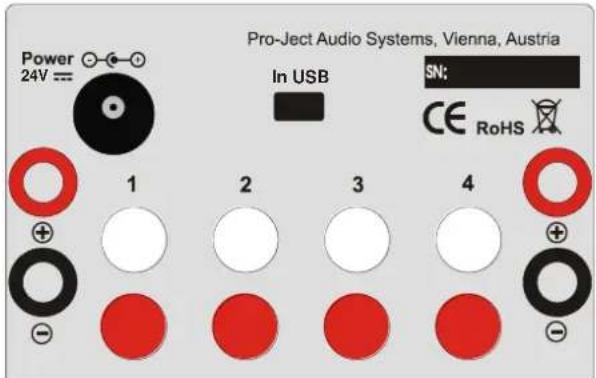
Make all connections, except the connection to the computer, whilst the unit is disconnected from the power supply.
Take care to connect the left and right channels correctly. The right channel is usually marked red, the left channel black or white.

The red speaker terminals carry the positive signal (+), the black speaker terminals the negative signal (−). Make sure the polarity of the connection is correct at each end of the cables.
Only connect one loudspeaker with an impedance not less than 4 ohms per channel.
Never use any other power supply than the one supplied with the unit.
Inputs
Line level sources such as CD player radio or TV can be connected to the input sockets marked 1 - 4.
USB input
A computer, used as a source, can be connected to the USB input.
Connection to the speakers
The output terminals accept loudspeaker cables terminated with 4mm ∅ Banana plugs, spades connectors or naked wire.
Mains power connection
Connect the low voltage plug from the power supply to the 24V= socket of the amplifier before connecting the power supply to the mains.
Remote control
chemical
Chemical structure diagram showing a cross-shaped arrangement of CH+ and CH- groups with VOL- and VOL+ labels, marked with ON/OFF indicator
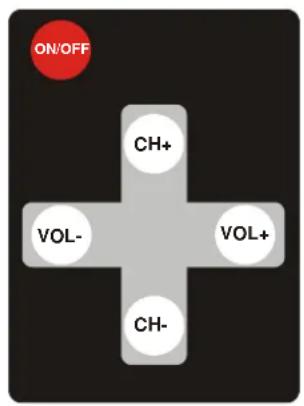
short press turns the unit on, long press takes it back into standby. d on, a short press activates and deactivates mute

and

adjust the sound volume

and

select the inputs
Front panel controls
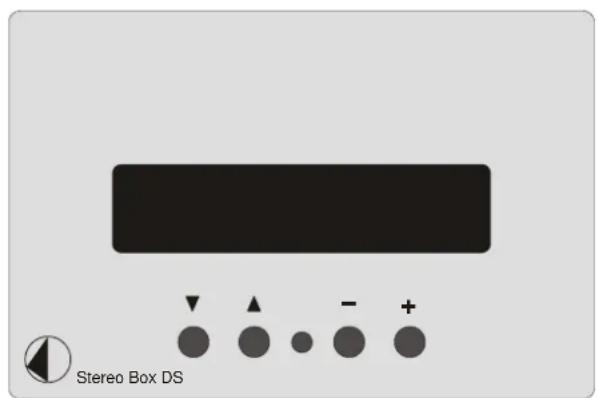
To switch on from standby or to standby
▼ on the front turns the unit on or back into standby. The display shows STANDBY when the unit is in standby. While switching off, the unit saves the settings for input, volume and mute, to be set automatically after next power on.
Dimming the display
Press and hold the buttons ▲ and + will change the display brightness - full, half and one third.
Input selector
Pressing the Input Select buttons ▲ and ▼ selects the inputs 1 - 4 in turns. The selected input will be shown in the display.
Volume
Adjust the volume (95 steps) to the desired level using the buttons and .The volume level will be shown in the display. -95dB indicates min., 00dB max..
Mute
While the unit is powered on,

activates and deactivates Mute

Connecting to a Computer
Connect the USB-input of the amplifier (unit must be switched on) to a free USB-socket on your computer and turn it on/make sure it is powered on. The amp will be automatically recognised by the computer. There is no need to install a driver manually.

Please note: Connection should be made to an USB-socket of your computer directly. Connecting to USB-hubs or switches can cause problems.
Potential incorrect use and fault conditions
No signal on one or both channels:
No connection between headphone and headphone amplifier ore amplifier. This could be due to a faulty plug, broken wire or solder joint or simply loose plug/socket connection.
Headphone does not work:
Headphone volume control is at minimum.
Amplifier Tape-Monitor circuit is not activated.
Replacing batteries
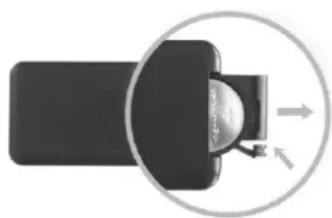
Proceed as follows:
- Unlock and slide open the battery case cover
- Replace the battery.
Make sure the battery is the right way round!
- Close the battery case cover
Battery type: 1 x CR2032 / 3V or 1 x CR2025 / 3V
natural_image
Diagram showing a device with an arrow pointing to a circular component, no text or symbols present
Do not dispose the batteries as ordinary domestic refuse. Please dispose your exhausted batteries at the appropriate collection sites - usually located at supermarkets and drugstores.
Technical specifications Pro-Ject Stereo Box DS
Power output: 2 x 35W/60W at 8 ohms/4 ohms (both channels driven)
Frequency response: 20Hz - 20kHz (-0,1dB, +0,2dB)
Channel separation: >65dB at 20kHz
Noise floor: >100dB (A weighted)
THD: 0,1% at 10W
Gain: 33dB
Line-level inputs: 4 pairs RCA/phono sockets
Input sensitivity: 350mV
Input impedance: 100kohms
USB-input: Mini B socket.
USB signal: Digital serial data protocol USB 1.1
D/A converter: Texas Instruments PCM2706. 16-Bit /48kHz Delta Sigma, 128-times oversampling
Supported audio format: PCM (LPCM). No support for formats like Dolby ^® Digital or DTS ^™
Sampling rates: 44,1kHz and 48kHz
Speaker connectors: 4mm ∅ banana plugs, spades connectors or naked wire
Outboard power supply: 24V/5A DC, suitable for your country's mains supply
Power consumption: 5A DC, <1W in standby
Replacement battery remote control: 1 x CR2032 / 3V or 1 x CR2025 / 3V
Dimensions W x H x D (D with sockets): 103 x 72 x 104 (122)mm
Weight: 670g without power supply
Service
Should you encounter a problem which you are not able to alleviate or identify despite the above information, please contact your dealer for further advice. Only when the problem cannot be resolved there should the unit be sent to the responsible distributor in your country.
Warranty

The manufacturer accepts no responsibility for damage caused by not adhering to these instructions for use. Modification or change to any part of the product by unauthorized persons, release the manufacturer from any liability over and above the lawful rights of the customer.
Copyright, trademarks
Pro-Ject Audio Systems is a Registered Trademark of H. Lichtenegger.
This guide was produced by: Pro-Ject Audio Systems Copyright © 2015. All rights reserved.
The information was correct at the time of going to press. The manufacturer reserves the right to make changes to the technical specification without prior notice as deemed necessary to uphold the ongoing process of technical development.
Windows XP ^® , Windows Vista ^® , Windows 7 ^® and Windows 8 ^® are trademarks of the Microsoft group of companies. Mac ^® and Mac OS ^® are trademarks of Apple Inc., registered in the U.S. and other countries. Dolby ^® is a registered trademark of Dolby Laboratories. DTS ^™ is a registered trademark of DTS, Inc..
- INSTRUCTIONS FOR USE Pro-Ject Stereo Box DS
- Safety instructions
- Connectors
- Inputs
- USB input
- Connection to the speakers
- Mains power connection
- To switch on from standby or to standby
- Dimming the display
- Input selector
- Volume
- Mute
- Connecting to a Computer
- Potential incorrect use and fault conditions
- Replacing batteries
- Technical specifications Pro-Ject Stereo Box DS
- Service
- Warranty
- Copyright, trademarks
Brand : PRO-JECT
Model : Stereo Box DS
Category : Receiver