Fractal Design Adjust 2 - Uncategorized

Adjust 2 - Uncategorized Fractal Design - Free user manual and instructions

Find the device manual for free Adjust 2 Fractal Design in PDF.

📄 2 pages English EN Download 💬 AI Question 10 questions ⚙️ Specs
Notice Fractal Design Adjust 2 - page 1
Pick your language and provide your email: we'll send you a specifically translated version.
Product Type ARGB Controller
Brand Fractal Design
Model Adjust 2
Input Voltage 5V DC
Input Current 2.6A
Power Connector SATA
Max Supported LEDs 40 (serial)
Included Accessories ARGB Splitter Cable, 5V RGB Y-Splitter
Supported RGB Standard Addressable RGB (5V, 3-pin)
Control Method Manual via onboard buttons
Lighting Effects Multiple preset effects (color cycle, breathing, static, etc.)
Dimensions Approximately 60 x 30 x 15 mm
Weight Approximately 30 g
Material Plastic
Color Black
Compatibility ARGB devices with 5V 3-pin connector
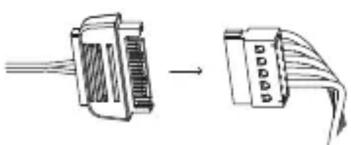
Installation Plug-and-play: connect power via SATA, attach ARGB devices via splitter
Maintenance Wipe with a dry, soft cloth. Avoid liquids.
Safety Use only with a 5V power supply. Do not exceed rated current.
Repairability Non-user-serviceable. Replace if defective.
Warranty Contact Fractal Design for warranty details.
Additional Features Includes 5V RGB Y-Splitter for parallel connections

Frequently Asked Questions - Adjust 2 Fractal Design

How do I install the Adjust 2 ARGB Controller?
Connect the controller to your power supply using the SATA power connector. Then, attach your ARGB devices to the included ARGB splitter cable and connect the splitter to the controller. No software installation is required.
What power supply connector does the Adjust 2 use?
It uses a SATA power connector for 5V input. Ensure your power supply has an available SATA power cable.
How many LEDs can the Adjust 2 support?
It supports up to 40 serial LEDs (addressable RGB LEDs). For parallel connections, use the included Y-splitter.
Can I connect non-Fractal Design ARGB devices?
Yes, as long as they use the standard 5V 3-pin ARGB connector. Many third-party ARGB fans, strips, and coolers are compatible.
Does the Adjust 2 come with a remote control?
No, the Adjust 2 does not include a remote control. It is controlled manually via onboard buttons on the controller unit itself.
How do I change the lighting effects?
Press the buttons on the controller to cycle through preset lighting effects such as color cycle, breathing, static, and more. Refer to the manual for the full list.
Can I sync the Adjust 2 with my motherboard's RGB software?
No, the Adjust 2 is a standalone controller and does not connect to a motherboard RGB header. It operates independently via its onboard controls.
What is the input voltage and current for the Adjust 2?
Input voltage: 5V, input current: 2.6A. Total power draw is approximately 13W.
Is the ARGB Splitter cable included?
Yes, the package includes an ARGB splitter cable and a 5V RGB Y-splitter for connecting multiple devices.
What should I do if the controller is not working?
Check the SATA power connection and ensure your power supply is delivering 5V. Verify that your ARGB devices are correctly connected. If issues persist, contact Fractal Design customer support for assistance.

User questions about Adjust 2 Fractal Design

0 question about this device. Answer the ones you know or ask your own.

Ask a new question about this device

The email remains private: it is only used to notify you if someone responds to your question.

No questions yet. Be the first to ask one.

Download the instructions for your Uncategorized in PDF format for free! Find your manual Adjust 2 - Fractal Design and take your electronic device back in hand. On this page are published all the documents necessary for the use of your device. Adjust 2 by Fractal Design.

USER MANUAL Adjust 2 Fractal Design

Adjust 2 ARGB Controller

2 120 mm

ARGB Splitter Cable

Fractal Design Adjust 2 - 2

Adjust 2

Manual Addressable RGB controller

Fractal Design Adjust 2 - Adjust 2 - 1

natural_image Line drawing of a FreeJet car key with function buttons (no text or symbols)

fractal-design.com

Adjust 2 Installation guide

Fractal Design Adjust 2 - Adjust 2 Installation guide - 1

  1. (Optional) Connect ARGB compatible hardware to the ARGB Splitter

Fractal Design Adjust 2 - Adjust 2 Installation guide - 2

natural_image Diagram showing two types of electrical connectors with internal components and directional arrows indicating connection (no text or symbols)
  1. Connect ARGB Splitter to Adjust 2

Diagram showing a device connected to a plug with a blue arrow indicating direction, likely illustrating a process or operation.

  1. Connect Adjust 2 to power supply

Fractal Design Adjust 2 - Adjust 2 Installation guide - 4

natural_image Diagram showing two connected electrical connectors with wires, no text or symbols present

You are now done with the installation.

fractal-design.com

Fractal Color — Red Green Blue Orange Cyan Yellow Purple White Color cycle Freeze color Long rainbow Short rainbow — Pulse & Motion Northern lights Constant light Slow breathing Fast breathing Slow single pulse Fast single pulse Slow marquee Fast marquee Dual color Off Brightness 5 levels

5V D GND Connector pinout

Input voltage: 5V Input current: 2.6A Serial LEDs supported: 40 Power connector: SATA

5V RGB Y-Splitter included to connect multiple devices in parallel.

fractal-design.com
Table of contents Click a title to access it
Manual assistant
Powered by Anthropic
Waiting for your message
Product information

Brand : Fractal Design

Model : Adjust 2

Category : Uncategorized