
19LHN123D - Television Manta - Free user manual and instructions
Find the device manual for free 19LHN123D Manta in PDF.


Pick your language and provide your email: we'll send you a specifically translated version.
| Product Type | LED TV |
| Brand | Manta |
| Model | 19LHN123D |
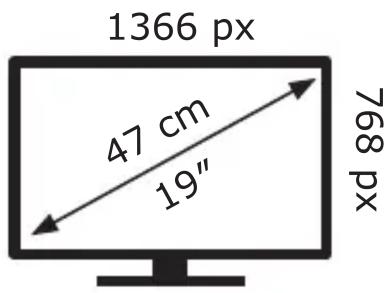
| Screen Diagonal | 19 inches (48 cm) |
| Resolution | 1366 x 768 pixels (HD) |
| Width | 47 cm |
| Height | Approx. 26 cm |
| Depth | Approx. 5 cm |
| Weight | Approx. 2.5 kg |
| Power Consumption | 17 kWh per 1000 hours |
| Energy Efficiency Class | C (based on 17 kWh/1000h) |
| Power Supply | AC 100-240 V, 50/60 Hz |
| Backlight Technology | LED |
| TV Tuner | Built-in DVB-T/T2/C |
| Connectivity | HDMI, USB, AV Input |
| Remote Control | Included |
| Cleaning Instructions | Wipe with a soft, dry cloth; do not use liquids |
| Safety Warnings | Keep away from water and heat sources; do not attempt internal repairs |
| Spare Parts | Contact Manta support |
Frequently Asked Questions - 19LHN123D Manta
How do I connect external devices to my Manta TV?
Use the HDMI port for devices like set-top boxes or gaming consoles. Insert the cable firmly, then select the correct input source using the Source button on the remote.
Why is there no picture or sound?
Check if the TV is powered on and the power cable is connected. Ensure the correct input source is selected. Try a different HDMI cable or device to isolate the issue.
How can I improve the picture quality?
Access the Picture Settings menu and adjust brightness, contrast, and sharpness. For HD content, ensure you're receiving an HD signal via HDMI.
How do I set up the TV for the first time?
Connect the antenna cable, plug in the TV, and turn it on. Follow the on-screen setup wizard to select language, country, and scan for channels.
Why is my remote control not working?
Check the batteries and replace if needed. Remove any obstacles between remote and TV sensor. Try resetting the TV by unplugging for a few minutes.
How do I clean the TV screen safely?
Power off the TV and use a soft, dry microfiber cloth. Gently wipe in circular motions. Do not spray any liquid directly on the screen.
Is it safe to mount the TV on a wall?
Yes, if a compatible wall mount is used. Ensure the mount supports the 19-inch size and weight. Contact a professional for installation.
What should I do if the TV turns off automatically?
Check the sleep timer setting in the menu. Also, overheating can cause shutdown; ensure proper ventilation around the TV.
How do I update the firmware?
This model may not support firmware updates via USB. Check the Manta support website for any manuals or updates.
Can I connect headphones?
If the TV has a 3.5mm headphone jack, you can connect wired headphones. Alternatively, use Bluetooth headphones if supported.
User questions about 19LHN123D Manta
0 question about this device. Answer the ones you know or ask your own.
Ask a new question about this device
No questions yet. Be the first to ask one.
Download the instructions for your Television in PDF format for free! Find your manual 19LHN123D - Manta and take your electronic device back in hand. On this page are published all the documents necessary for the use of your device. 19LHN123D by Manta.
USER MANUAL 19LHN123D Manta
17 kWh/1000h
Manual assistant
Powered by Anthropic
Waiting for your message
Product information
Brand : Manta
Model : 19LHN123D
Category : Television