
IQ Verify - Uncategorized Godrej - Free user manual and instructions
Find the device manual for free IQ Verify Godrej in PDF.


| Product Type | Smart Lock |
| Brand | Godrej |
| Model | IQ Verify |
| Dimensions (Exterior) | 75 mm x 75 mm x 35 mm |
| Dimensions (Interior) | 160 mm x 75 mm x 55 mm |
| Weight | Approx. 1.2 kg |
| Power Supply | 4 x AA batteries (DC 6V) |
| Backup Power | USB Type-C (emergency) |
| Battery Life | Up to 12 months |
| Locking Mechanism | Motorized deadbolt |
| Unlock Methods | Fingerprint, PIN code, RFID card, App via Bluetooth/WiFi |
| Connectivity | Bluetooth 5.0, WiFi 802.11 b/g/n |
| Compatible Platforms | iOS 12+ and Android 8+ |
| Voice Assistant | Amazon Alexa, Google Assistant |
| Operating Temperature | -20°C to 60°C |
| Water Resistance | IP65 (exterior unit) |
| Maintenance | Clean with soft dry cloth; avoid chemicals |
| Safety Features | Anti-peep PIN, auto-lock, tamper alarm |
| Spare Parts Availability | Batteries, screws, faceplate (contact support) |
| Repairability | Managed by authorized service centers |
| Warranty | 2 years from purchase |
| General Information | Designed for residential use; easy DIY installation |
Frequently Asked Questions - IQ Verify Godrej
User questions about IQ Verify Godrej
0 question about this device. Answer the ones you know or ask your own.
Ask a new question about this device
Download the instructions for your Uncategorized in PDF format for free! Find your manual IQ Verify - Godrej and take your electronic device back in hand. On this page are published all the documents necessary for the use of your device. IQ Verify by Godrej.
USER MANUAL IQ Verify Godrej
Gone are the days of bulky musters and registers. It's time to switch to IQ-Verifi, the latest access and attendance system, from Godrej Security Solutions.
IQ-Verifi is an IP based finger print biometrics reader cum controller, to drive the door lock for access. It is equipped with software and applications to enrol, manage templates and give entry reports. IQ-Verifi hardware supports dual options of Proximity and Smart card, for the fingerprint-based authentication system. With the choice of Identification and Verification modes, IQ-Verifi is tailor-made to match any user requirement. IQ-Verifi is a fully scalable system which can be installed as a standalone device, or scaled to a multiple controller system.
IQ-Verifi has a scratch-free fingerprint optical sensor, which has a multiple award winning fingerprint algorithm, assuring undivided speed and accuracy. The two template auto-learning and finger template enhancement alogorithm results in faster and accurate template detection.
The fingerprint algorithm used is recognised by:
• International competition focused on Fingerprint Verification Competition (FVC) on software assessment
- Minutiae Interoperability Exchange Test (MINEX) by US Government's National Institute of Standards and Technology (NIST)


SECURITY SOLUTIONS
FEATURES
- Reader cum controller
- Ease of installation and connectivity
• Easy operation and management - Fast and accurate fingerprint identification and verification
- Scalable from standalone to complex network systems on RS485 or Ethernet
- Easy and secured enrollment through software/configuration cards
- Enrolling Duress Finger: Option to interface with Godrej Automatic Telephone Dialer or with Godrej GSM system, for getting alerts in duress condition through a telephone call or SMS respectively
- Optional feather touch 4x3 keypad with navigation keys
- Can be integrated with Godrej/Panasonic Network Camera to capture images while placing fingers
SELECTABLE OPERATING MODES:
- Identification mode (1:N match) - Finger only / Finger + PIN (Only in keypad models)
- Verification mode (1:1 match) - Card + Finger OR Card Only (Useful for persons with worn out fingers)
- Card + Finger + PIN (Only in keypad models)
- Template on Smart card + Finger (Only with model IQ-Verifi Smart RW)
ENROLMENT TEMPLATE MANAGEMENT AND REPORT GENERATION SOFTWARE
IQ-Verifi Template Management and Entry Report Management software runs on an MS Windows based PC platform. To avoid double entry, the user database can be imported from CSV or excel formats. The software enrolls one or multiple fingers of users on any of IQ-Verifi network devices, thus eliminating the need for a dedicated enrolment device. While the enrolment process is on, the software informs the enroller of finger quality, by displaying the finger template score. For bad scores, the software automatically asks the enroller to re-enrol that finger. These templates can be downloaded in the other IQ-Verifi machines on the RS485/Ethernet (IP) network. The software manages user, template, IQ- Verifi devices and real time monitoring of events. The software gives the facility to blacklist enrolled users, to deny access.
IQ-Verifi Software generates various entry reports (All entries, First & Last Entry, In/Out Entry, Odd Entry etc.) based on selectable options of users, user groups, date and time, IQ-Verifi devices, etc. The software logs the operations carried out by all users, making it fully secured. Similarly it details logs of fingerprint devices as well. Reports detail exit switch, fire and device tamper logs as well. These reports can be exported in Excel, PDF, CSV formats and can be integrated with any third party software.
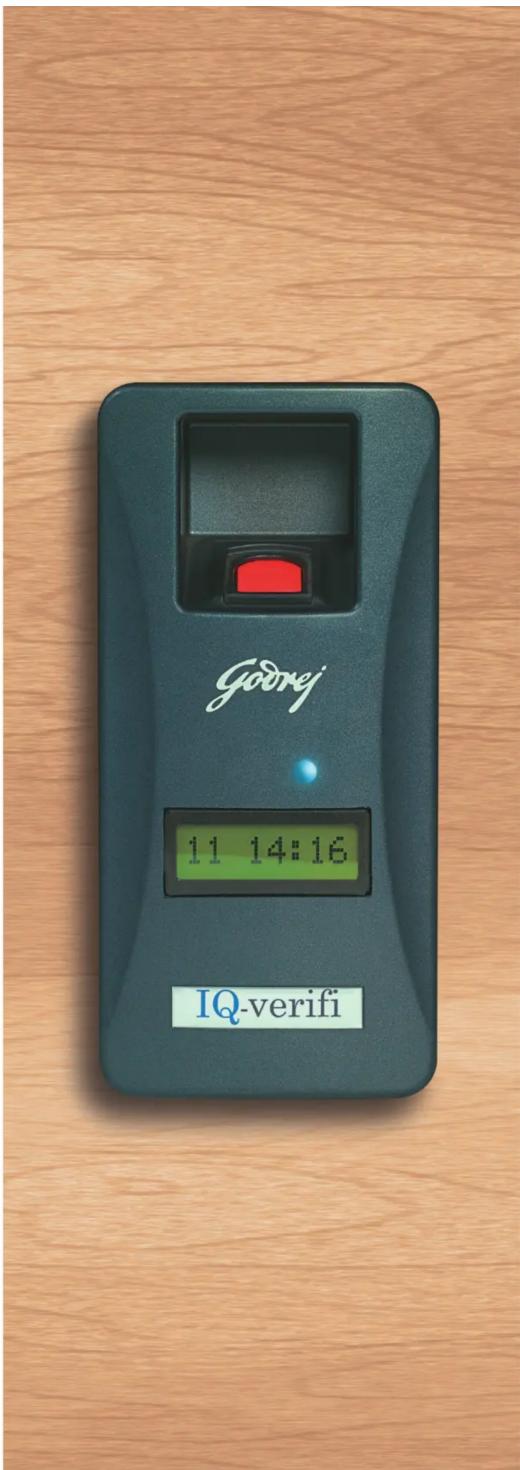
IQ-verifi


SECURITY SOLUTIONS
MODELS
| Sensor Type | Optical | Optical | Optical | Optical |
| Reader type | 125 kHz Proximity | Mifare Smart Wiegand serial reader (13.6MHz, ISO14443A) | Mifare Smart serial reader (13.6MHz, ISO14443A) | |
| Model | IQ-Verifi | IQ-Verifi - Prox | IQ-Verifi - Smart | IQ-Verifi Smart RW (Template on smart card) |
| Model with keypad | IQ-Verifi Kpd | IQ-Verifi - Prox Kpd | IQ-Verifi - Smart Kpd | IQ-Verifi Smart RW Kpd |
TECHNICAL SPECIFICATIONS
| CPU and Memory | 400MHz Digital signal processor (DSP) with 4MB flash |
| Fingerprint Sensor | 500 dpi optical sensor |
| Sensing Area (mm) | 16.0 X 19.0 |
| Image Size (Pixel) | 272 X 320 |
| Matching Speed (1:N) | 1 : 2,000 < 1 sec |
| Fingerprint Capacity | 9,000 templates (4,500 users in two template mode) |
| Template Size | 384 bytes |
| Log Capacity | 12,800 events |
| Enrollment Time | <1 Second |
| Verification Time | <1 Second |
| False Acceptance Ratio (FAR) | From 0.01% to 0.0001% . Adjustable with sensitivity levels in verification modeFrom 0.01% to 0.000001% Automatically adjusts depending on enrolled templates in identification mode |
| False Rejection Ratio (FRR) | <0.1% (Is inversely proportional to FAR) |
| RF Card | Proximity (EM), smart card (ISO14443A), HID (External Reader) |
| Network Interface | Ethernet conforming to IEEE 802.3 specifications and fully supporting 10BASE-T and 100BASE-TX standards.RS485 port also available. |
| Wiegand Output | 26 bit Wiegand or configurable to 34 bit |
| External Inputs and Outputs | Exit switch, door sensor and cabinet tamper, fire (configurable) |
| Internal Relay | Deadbolt, EM lock, door strike, automatic door |
| Sound and Interface | Multi-colour LED and 8 X 1 LCD and buzzer |
| Keypad | 4 x 3 feather touch keyboard (optional) |
| Operating Voltage.Temperature and Humidity | 12V DC, from -10°C to 45°C, from 20% to 95% relative humidity |
| Certification | CE certified tested as per IEC 60950-1:2005 (2nd Edition) standards at ERTL (Electronics Regional Testing Laboratory which is part of STQC) |
| Size | 900x1850x660 mm (WxHxD) |
Disclaimer:
In view of the Godrej policy of continuous development and improvement, the dimensions and specifications may be changed without prior notice or obligation. Colours of the products shown in this catalogue may not match the actual colour of the product due to printing limitations.
Godrej & Boyce Mfg. Co. Ltd.
Plant No. 17, Piroishanagar, Vikhroli (E), Mumbai-400 079
Tel. No.: 022 6796 1700/1800 Fax No.: 022 6796 1509
Toll-Free No.: 1800 209 99 55 | SMS 'GSS' to 53636 | secure@godrej.com | www.godrejsecure.com
(Service across 20 branches and an extensive dealership network.)
ISO 9001:2008 & 14001:2004 & OHSAS 18001:2007
Follow us on:

GSS/PSS/INSTITUTIONAL/IQ VERIFIER/ORCHARD/122313/V2
Makes an accurate impression. Every time.
IQ-verifi
Brand : Godrej
Model : IQ Verify
Category : Uncategorized