
DELTA 2 Max Smart Extra Battery - Power bank ECOFLOW - Free user manual and instructions
Find the device manual for free DELTA 2 Max Smart Extra Battery ECOFLOW in PDF.


| Product Type | Smart Extra Battery for DELTA 2 Max |
| Model | EFD350-EB |
| Capacity | 2,048Wh |
| Battery Type | LFP (LiFePO4) |
| Cycle Life | 3,000 cycles to 80%+ capacity |
| Weight | Approximately 19 kg (42 lbs) |
| Dimensions | 464 × 235 × 283 mm (18 × 9 × 11 in.) |
| Input Port (Extra Battery Port) | 51.2V, 2,000W Max (X-Stream and solar dual charging) |
| Output Port (Extra Battery Port) | 51.2V, 3,200W Max |
| Protection Features | Over Voltage, Overload, Over Temperature, Short Circuit, Low Temperature, Low Voltage, Overcurrent Protection |
| Operating Temperature (Discharge) | -10°C to 45°C (14°F to 113°F) |
| Operating Temperature (Charge) | 0°C to 45°C (32°F to 131°F) |
| Optimal Storage Temperature | 20°C to 30°C (68°F to 86°F) |
| Usage Compatibility | Designed exclusively for DELTA 2 Max (cannot be used separately) |
| Connectivity | Connects to DELTA 2 Max via Extra Battery Cable (included); supports up to two extra batteries |
| LCD Display | Shows remaining battery percentage, charging/discharging time, warnings, and input/output power |
| Standby and Auto-Off | Sleep mode after 5 minutes; auto-off after 2 hours of no load (adjustable via app) |
| Cleaning | Wipe ports with a dry cloth; clean exterior with dry, soft, clean cloth |
| Storage Recommendations | Store in dry, ventilated place at room temperature; for long-term, discharge to 0% then recharge to 60% every 3 months |
| Disposal | Fully discharge and dispose in designated battery recycling bin; follow local regulations |
| Safety Warnings | Keep away from water, heat, metal objects; do not disassemble, puncture, or use near strong static/magnetic fields |
| Warranty | Warranty void if battery not charged/discharged for over 6 months |
Frequently Asked Questions - DELTA 2 Max Smart Extra Battery ECOFLOW
User questions about DELTA 2 Max Smart Extra Battery ECOFLOW
0 question about this device. Answer the ones you know or ask your own.
Ask a new question about this device
Download the instructions for your Power bank in PDF format for free! Find your manual DELTA 2 Max Smart Extra Battery - ECOFLOW and take your electronic device back in hand. On this page are published all the documents necessary for the use of your device. DELTA 2 Max Smart Extra Battery by ECOFLOW.
USER MANUAL DELTA 2 Max Smart Extra Battery ECOFLOW
EcoFlow DELTA 2 Max Smart Extra Battery
User Manual
V1.0

Disclaimer
Read this user manual carefully before using the product to ensure that you completely understand the product and can correctly use it. After reading this user manual, keep it properly for future reference. Improper use of this product may cause serious injury to yourself or others, or cause product damage and property loss. Once you use this product, it is deemed that you understand, approve and accept all the terms and content in this document. EcoFlow is not liable for any loss caused by the user's failure to use this product in compliance with this user manual.
In compliance with laws and regulations, EcoFlow reserves the right to final interpretation of this document and all documents related to this product. This document is subject to changes (updates, revisions, or termination) without prior notice. Please visit EcoFlow's official website to obtain the latest product information.
Contents
Specifications 1
Safety Instructions 2
What's in the Box 3
Product Details 3
Overview 3
LCD screen 4
Power On/Off 5
Usage 5
With DELTA 2 Max 5
With Smart Generator 6
Storage and Maintenance 6
FAQ 7
Troubleshooting 7
Specifications
| General Info | |
| Model EFD350-EB | |
| Weight Approximately 19 kg (42 lbs) | |
| Dimension 464 × 235 × 283 mm (18 × 9 × 11 in.) | |
| Capacity 2,048Wh | |
| Input Ports | |
| Extra battery port input 51.2V 2,000W Max (X-Stream and solar dual charging) | |
| Output Ports | |
| Extra battery port output 51.2V 3,200W-Max | |
| Battery Info | |
| Battery Type LFP | |
| Cycle Life 3,000 cycles to 80% + capacity | |
| Protection Type | Over Voltage Protection, Overload Protection,Over Temperature Protection, Short Circuit Protection,Low Temperature Protection, Low Voltage Protection,Overcurrent Protection |
| Operating Temperature | |
| Optimal Operating Temperature 20°C ~ 30°C (68°F ~ 86°F) | |
| Discharging Temperature -10°C ~ 45 °C (14°F ~ 113°F) | |
| Charging Temperature 0°C ~ 45°C (32°F ~ 131°F) | |
| Storage Temperature | -10°C ~ 45°C (14°F ~ 113°F)(Optimal: 20°C ~ 30°C (68°F ~ 86°F)) |

Whether the product can be charged or discharged depends on the actual temperature of the battery pack.
Usage
- Do not use the product near a heat source, such as a fire source or a heating furnace.
- Avoid contact with liquids of any kind. Do not use it in the rain or in high humidity.
- Do not use around strong static electricity or magnetic fields.
- Do not disassemble in any way or puncture.
- Avoid using wires or other metal objects that may result in a short circuit.
- Do not use third-party components or accessories. Consult official EcoFlow channels if you need to replace any component or accessory.
- When using the product, please strictly follow the operating environment temperature specified in this user manual. If the temperature is too high, it may result in a fire or explosion; if the temperature is too low, the product performance may be severely reduced, or the product may cease to work.
- Do not stack any heavy objects on the product.
- Do not lock the fan forcibly during use or place the product in an unventilated or dusty area.
- Ensure that the product is not hit, dropped, or heavily vibrated. Securely fasten the product when transporting it to avoid damage. If severely damaged, turn off the power source immediately and discontinue using the product.
- If you accidentally drop the product into the water during use, please place it in a safe open area, and stay away from it until it is completely dry. The dried product should not be used again, and should be properly disposed of according to Section "Disposal Guide" below. If the product catches fire, we recommend that you use the fire extinguishers in the following order: water or water mist, sand, fire blanket, dry powder, and finally a carbon dioxide fire extinguisher.
- Only clean the ports with a dry cloth.
- Place on a flat surface to keep the product from falling over. If the product is overturned and severely damaged, turn it off immediately, place the battery in an open area, keep it away from people and combustibles, and dispose of it in accordance with local laws and regulations.
- Keep out of reach of children and pets.
Disposal
- If conditions permit, make sure that the battery is fully discharged before disposing it in a designated battery recycling bin. The product contains batteries with potentially dangerous chemicals, so it is strictly prohibited to dispose of it in ordinary trash cans. For more details, please follow the local laws and regulations on battery recycling and disposal.
- If the battery cannot be fully discharged due to a product failure, please do not dispose of the battery directly in the battery recycling box. In such a case, you should contact a professional battery recycling company for further processing.
- Please dispose of over-discharged batteries that cannot be recharged.
What's in the Box
DELTA 2 Max
Smart Extra Battery

DELTA 2 Max
Extra Battery Cable

User Manual & Warranty
Card

Product Details
Overview
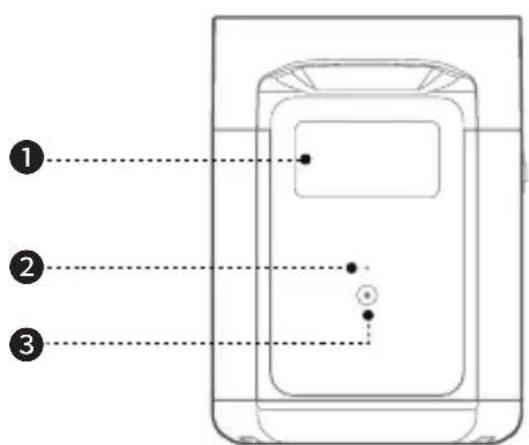


- LCD screen
- Power indicator
- Power button
- Extra battery port
- Storage compartment
LCD Screen
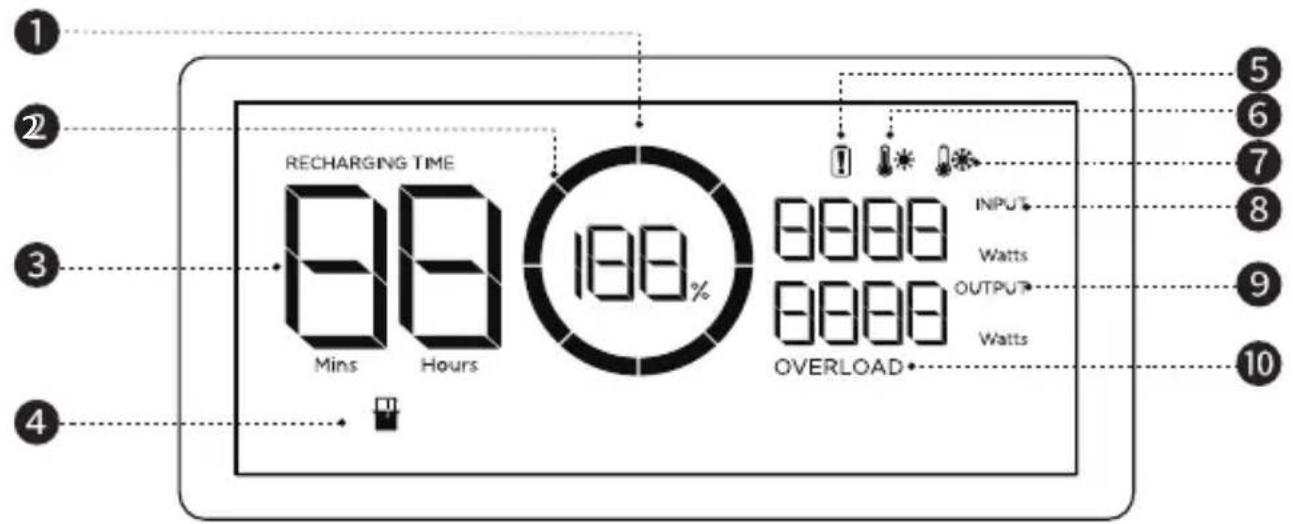
- Remaining battery percentage
- Battery level indicator
- Remaining charging/discharging time
- Extra Battery indicator
-
Battery failure warning
-
High temperature warning
- Low temperature warning
- Input power
- Output power
- Overload warning
| Icon Name Status | ||
 | Remaining battery percentage | Charging: rotates clockwiseFully charged: displays 100%0% battery: icon flashes |

Check "Troubleshooting" for details.
Power On/Off
Press the power button to turn on the product. The LCD screen lights up with the battery level indicator figure displayed. Press and hold the power button to turn off the product.


-
The Extra Battery is meant to be used with DELTA 2 Max, it cannot be used separately.
-
If the product is not used for 5 minutes, it will enter sleep mode with the LCD screen shut off. When you start to use the product again, the LCD screen will turn on automatically.
-
The product defaults to 2 hours of standby time. With the output power buttons turned off and no other load for 2 hours, the product will shut off automatically. You can set the standby duration in the app.
Usage
With DELTA 2 Max
DELTA 2 Max can be connected to one or two Extra Battery to meet more extensive requirements.


-
Make sure both DELTA 2 Max and the Extra Battery are turned off before connecting.
-
The Extra Battery icons will show up on LCD screens after you connect the product to the DELTA 2 Max; afterwards, you can start charging or discharging.
-
Do not connect the DELTA 2 Max to the battery during charging/discharging process.
-
Do not touch the metal pins of the ports with your hands or other objects. Gently wipe the product clean with a clean and dry cloth when necessary.
With a Smart Generator
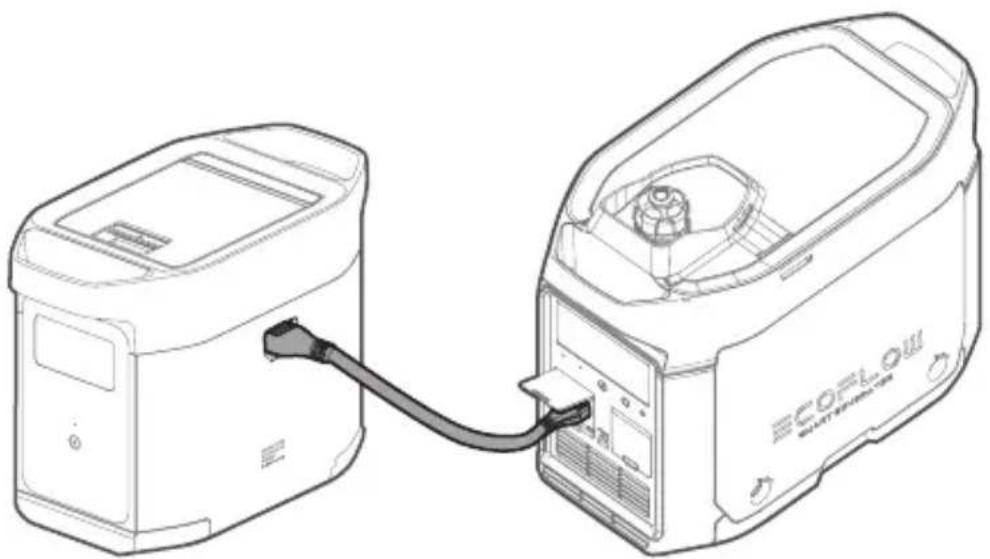
You may recharge the product with a Smart Generator, please refer to the Smart Generator User Manual for details.
Storage and Maintenance
-
Keep the product away from water, heat sources, or metal objects.
-
Store the product in the places of 20°C to 30°C to extend its battery life.
-
For long-term storage, please discharge the product every three months (firstly discharge it to 0%, then fully recharge it, and lastly discharge it to 60%); the product will not be covered by the warranty if it is not charged or discharged for more than 6 months.
-
For safety, do not use or store the product in places of below -10° C or above 45° C for a long time.
-
If the product is left unused for a long time, it'll enter sleep mode. Please charge the product before you need to use it again.
FAQ
- What battery does the product use?
It uses a high-quality LFP battery.
- How do I know if the product is charging?
When it's charging, the remaining charging time will be shown on the LCD Screen. Meanwhile, the charging indicator icon begins to rotate with the remaining battery percentage and the input power shown on the right of the circle.
- How do I clean the product?
Please gently wipe it with a dry, soft, clean cloth or paper towel.
- How do I store the product?
Before storing, please turn off the product first, and then store it in a dry, ventilated place at room temperature. Do not place it near water sources. For long-term storage, please discharge and recharge the product every three months to extend its battery life.
- Can I take the product on a plane?
No.
Troubleshooting
| Indicator Problem Solution | |||
| RECHARGING TIME | ! | Flashing | High temperature charging protection |
| ! | Flashing | High temperature discharging protection | |
| RECHARGING TIME | ! | Flashing | Low temperature charging protection |
| ! | Flashing | Low temperature discharging protection | |
| Overload | Flashing | Battery discharging overload/short circuit protection | |
| Solid Battery failure Contact the after-sales service | |||

If a warning sign shows on the LCD screen during use and does not disappear after a restart, please stop using it immediately (do not try to charge or discharge). If you require more assistance, please contact EcoFlow customer service.
ECOFLOW


Brand : ECOFLOW
Model : DELTA 2 Max Smart Extra Battery
Category : Power bank