
Navis F240 ARGB - PC Cooling SilentiumPC - Free user manual and instructions
Find the device manual for free Navis F240 ARGB SilentiumPC in PDF.


| Product Type | All-in-One Liquid CPU Cooler |
| Brand | SilentiumPC |
| Model | Navis F240 ARGB |
| Compatibility | Intel LGA 1700, 1200, 115X, 2066, 2011-3 |
| Radiator Size | 240 mm (2 x 120 mm fans) |
| Radiator Material | Aluminum |
| Fan Size | 120 mm x 25 mm |
| Fan Speed | 500 - 1500 RPM (PWM) |
| Fan Noise Level | 18 - 27 dBA |
| Pump Speed | ~2800 RPM |
| Pump Noise Level | < 20 dBA |
| Lighting | Addressable RGB (ARGB) - 5V 3-pin |
| Connectors | Pump: SATA power + 4-pin PWM; Fans: 4-pin PWM + 3-pin ARGB |
| Included Controller | Nano-Reset ARGB Controller (SATA powered) |
| Mounting Kit | Backplate for Intel LGA 1700/1200/115X, thumb nuts |
| Pump Orientation | Any orientation allowed |
| Tube Length | ~400 mm |
| Maintenance | Sealed system, no refill needed |
| Warranty | 2 years |
| Net Weight | ~1.2 kg |
Frequently Asked Questions - Navis F240 ARGB SilentiumPC
User questions about Navis F240 ARGB SilentiumPC
0 question about this device. Answer the ones you know or ask your own.
Ask a new question about this device
Download the instructions for your PC Cooling in PDF format for free! Find your manual Navis F240 ARGB - SilentiumPC and take your electronic device back in hand. On this page are published all the documents necessary for the use of your device. Navis F240 ARGB by SilentiumPC.
USER MANUAL Navis F240 ARGB SilentiumPC
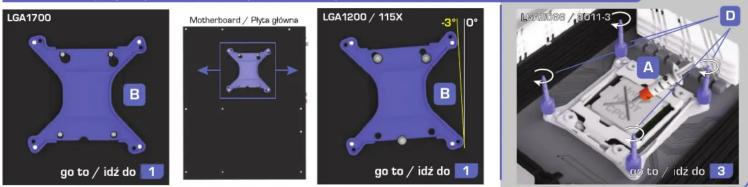
Choose the socket / Wybierz podstawke - LGA1700 / LGA1200. 115X / LGA2066. 2011-3
1
4

INFO
EN: Pump can be installed in any orientation.

SILENTIUMPC
Need more information?
8
9

INFO
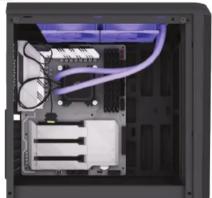
EN: Recommended radiator placement and tubing
arrangement inside chassis
EN: The red line shows how to correctly connect the pump. Connect the power to a SATA plug and control signal to a 4-pin fan connector. Configure your motherboard for speed control in PWM mode (consult the motherboard manual for details).
EN: The pink line shows the connection required for automatic fan speed control by the motherboard. Connect all Navis fans to the CPU_FAN header and configure your motherboard for speed control in PWM mode (consult the motherboard manual for details).
A EN: The green line shows the connection required to control the fans' ARGB lighting by compatible motherboards. Configure the lighting in UERI or using software from your motherboard manufacturer (consult the motherboard manual for details).
B EN: The yellow line shows the connection required to control the fans' ARGB lighting using the included Nano-Reset ARGB controller.
Need more information?
1

2

3

4

5

6

7

INFO
9
10


SILENTIUMPC
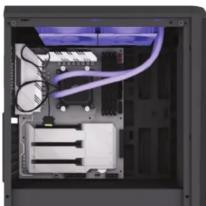
1 EN: The red line shows how to correctly connect the pump. Connect the power to a SATA plug and control signal to a 4-pin fan connector. Configure your motherboard for speed control in PWM mode (consult the motherboard manual for details).
EN: The pink line shows the connection required for automatic fan speed control by the motherboard. Connect all Navis fans to the CPU_FAN header and configure your motherboard for speed control in PWM mode (consult the motherboard manual for details).
A EN: The green line shows the connection required to control the fans' ARGB lighting by compatible motherboards. Configure the lighting in UERI or using software from your motherboard manufacturer (consult the motherboard manual for details).
B EN: The yellow line shows the connection required to control the fans' ARGB lighting using the included Nano-Reset ARGB controller.

Brand : SilentiumPC
Model : Navis F240 ARGB
Category : PC Cooling