
C500 PANORAMIC STEALTH ICE - PC Case GIGABYTE - Free user manual and instructions
Find the device manual for free C500 PANORAMIC STEALTH ICE GIGABYTE in PDF.


| Product Type | ATX Mid-Tower PC Case |
| Brand | Gigabyte |
| Model | C500 Panoramic Stealth ICE |
| Color | White (ICE) |
| Motherboard Support | ATX, Micro-ATX, Mini-ITX |
| Max CPU Cooler Height | 176 mm |
| Max GPU Length | 410 mm |
| Max PSU Length | 200 mm |
| Drive Bays - 3.5" HDD | 2 (with screws D) |
| Drive Bays - 2.5" SSD | 4 (with screws A) |
| Expansion Slots | 7 |
| Cooling Support - Front | 3 x 120mm or 2 x 140mm fans (not included) |
| Cooling Support - Top | 3 x 120mm or 2 x 140mm fans (not included) |
| Cooling Support - Rear | 1 x 120mm fan (not included) |
| Radiator Support - Front | Up to 360mm |
| Radiator Support - Top | Up to 360mm |
| Radiator Support - Rear | 120mm |
| Front I/O Ports | 2x USB 3.0, 1x USB Type-C, 3.5mm Audio Jack |
| Side Panel | Tempered Glass (left side) |
| Material | Steel chassis, Tempered Glass side panel |
| Dimensions (L x W x H) | 462 x 230 x 480 mm (approx.) |
| Weight | 8.5 kg (approx.) |
| Included Accessories | Screws (A, B, C, D), Standoffs, Cable Ties, PCI-E Vertical Bracket Cover |
| Warranty | Limited warranty (see gigabyte.com) |
Frequently Asked Questions - C500 PANORAMIC STEALTH ICE GIGABYTE
User questions about C500 PANORAMIC STEALTH ICE GIGABYTE
0 question about this device. Answer the ones you know or ask your own.
Ask a new question about this device
Download the instructions for your PC Case in PDF format for free! Find your manual C500 PANORAMIC STEALTH ICE - GIGABYTE and take your electronic device back in hand. On this page are published all the documents necessary for the use of your device. C500 PANORAMIC STEALTH ICE by GIGABYTE.
USER MANUAL C500 PANORAMIC STEALTH ICE GIGABYTE
natural_image
Simple line drawing of a 3D geometric structure with no text or symbolsC500 PANORAMI STEALTHICE
ATX Mid-Tower PC Case
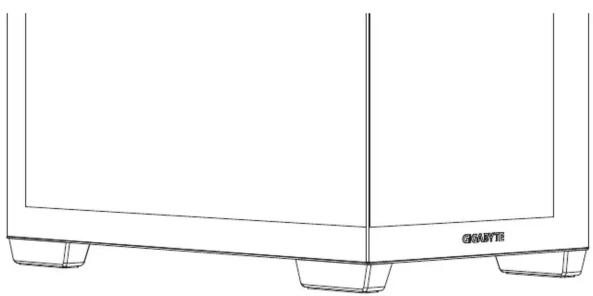
natural_image
Line drawing of a rectangular container with three side supports and a label 'GRAVTE' on the side (no other text or symbols)INSTALLATION GUIDE
安裝說明書 / 安裝说明书
Please visit www.gigabyte.com for more product information.
| Figure | Part's Name | Qty | Used For |
| Screw A | 19 | Motherboard (9) / SSD (8) / VGA vertical installation (2) | |
| Screw B | 4 | PSU | |
| Screw C | 4 | VGA installation | |
| Screw D | 8 | 3.5"HDD | |
| Standoff – 6.5mm | 7 | Motherboard (4, pre-installed) / Backup (3) | |
| Standoff – 16mm | 2 | VGA vertical installation | |
| Cable Tie | 10 | Cable management | |
| PCI-E Vertical Bracket Cover | 1 VGA | vertical installation |
Max CPU Height: 176mm / Max GPU Length: mm / Max PSU Length: 200mm

Warranty
Gigabyte provides limited product warranty. For the latest and current terms of the Limited Product Warranty, please visit http://www.gigabyte.com/support-downloads/customer-service.aspx.
WEEE Information
This symbol on the product or in the instructions means that your electrical and electronic
equipment should be disposed at the end of its life separately from your household waste.
There are separate collection systems for recycling in the EU
For more information, please contact the local authority or your retailer where you purchased the product.
Address: No.6, Baoqiang Rd., Xindian Dist., New Taipei City 231
Tel: +886-2-8912-4000
http://www.gigabyte.com
China
GIGABYTE CHINA
Address: 24/F, HaiTong Securities Tower, No.689 Guangdong Road, Shanghai, China
Tel: +86-21-6340-0912
Europe
G.B.T. TECHNOLOGY TRADING GMBH Germany
Address: Bullenkoppel 16, 22047 Hamburg, Deutschland
Tel: +49-40-25 33 040
North America
G.B.T. INC. USA
Address: 17358 Railroad Street, City of Industry, CA91748 USA
Tel: +1-626-854-9338
THE I/O CONNECTORS AND RGB LIGHTING POWER
natural_image
Pure electrical connector diagram showing multiple leads and connectors without any text or symbolsnatural_image
Line drawing of a server rack unit with heat exchangers and cooling fins (no text or symbols)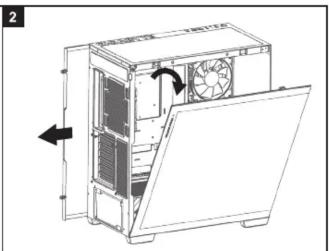
natural_image
Technical line drawing of a computer case with fan and ventilation system (no text or symbols)*Be careful when handling the tempered glass panel.
*拿取強化玻璃側板時請小心
*拿取强化玻璃侧板时请小心
- Install the motherboard / 安裝主機板 / 安裝主板


*The quantity of standoff 6.5mm depends on motherboard's type.
*銅柱所需數量取決於主機板類型
*铜柱所需数量取决于主机板类型


natural_image
Technical line drawing of an internal computer or hardware unit with fans and a small object, no visible text or symbols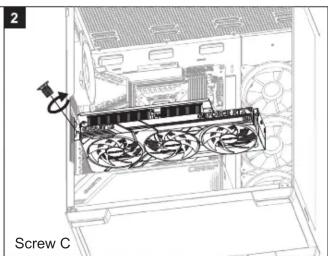
natural_image
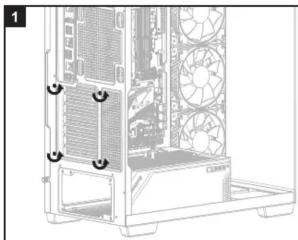
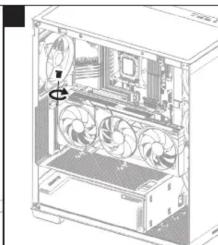
Technical line drawing of a screw assembly with fan and drive components (no text or symbols)4.2 Vertical VGA card installation (requires optional PCI-E x16 riser cable)
垂直式顯示卡安裝 (需額外添購PCIE延伸線) / 垂直式显卡安裝(需額外添购PCIE延伸线)
natural_image
Technical diagram of a desktop computer tower showing internal fan layout and ventilation slots (no text or labels)

natural_image
Technical line drawing of an internal computer case with ventilation duct and drive bays (no text or symbols)
natural_image
Technical line drawing of an internal server or rack with fans and drive bays (no text or symbols)*Before installing vertically, please adjust the bracket's direction first.
*垂直安裝前,請先調整檔板支架方向。
*垂直安装前,请先调整档板支架方向。
- Install the additional system fan(not included)
natural_image
Technical line drawing of a computer tower internal structure with ventilation fans and drive bays (no text or labels)
natural_image
Technical line drawing of a computer tower with mounting holes and ventilation slots (no text or symbols)Brand : GIGABYTE
Model : C500 PANORAMIC STEALTH ICE
Category : PC Case