
AC-011 - Air conditioner Orava - Free user manual and instructions
Find the device manual for free AC-011 Orava in PDF.


| Brand | Orava |
| Model | AC-011 |
| Product Type | Evaporative Air Cooler with Fan, Humidifier, Air Purifier, and Heater (4-in-1) |
| Power Supply | 230 V ~ 50 Hz |
| Maximum Power Consumption | 1800 W |
| Cooling Power Consumption | 65 W |
| Water Tank Capacity | 8 L |
| Maximum Airflow | 400 m³/h |
| Fan Speed (Max) | 8.2 m/s |
| Noise Level | 62 dB(A) |
| Operating Temperature Range | -10 °C to 50 °C |
| Dimensions (W x D x H) | 370 x 330 x 680 mm |
| Weight (without water) | 7.6 kg |
| Timer | Auto-off: 1, 2, or 4 hours |
| Modes | COOL (humidification/cooling), HEAT (2 levels), NATURE (natural airflow simulation), FAN only |
| Control | Manual control panel and remote control |
| Oscillation (Swing) | Yes, automatic horizontal rotation of front grille |
| Filter | Washable rear dust filter (replace annually) |
| Cooling Accumulators | 2 pre-filled containers (freeze before use) |
| Wheels | 4 castors included (installable) |
| Water Level Indicator | Yes, window on front door (High, Medium, Low) |
| Safety Class | Class I (protective earthing) |
| Included Accessories | Remote control (2x AAA batteries not included), 2 cooling accumulators, 4 wheels, user manual |
Frequently Asked Questions - AC-011 Orava
User questions about AC-011 Orava
0 question about this device. Answer the ones you know or ask your own.
Ask a new question about this device
Download the instructions for your Air conditioner in PDF format for free! Find your manual AC-011 - Orava and take your electronic device back in hand. On this page are published all the documents necessary for the use of your device. AC-011 by Orava.
USER MANUAL AC-011 Orava
natural_image
White Orava air conditioner unit with control panel and wheels (no visible text or symbols)CE
AC-011
The intended use of the device
- The device is designed exclusively to adjust humidity, temperature, cleanliness and air distribution in enclosed living areas to the extent specified by the technical and operating parameters and functions, safety and user instructions and external influences of the operating environment.
- Do not use the device to modify the humidity and ambient temperature in which specific instruments, food, plants, works of art or animals are stored, as this could affect the performance, quality and life of the items and the health of the animals.
Warning for users of air conditioning and humidity devices
- The use of humidity and air temperatures in living and working areas causes the influence of the thermoregulatory processes of the persons present. Thermoregulatory processes and their functioning usually related to the age of these people, their overall health and other lifestyle circumstances. The human organism seeks to adapt to this change in transitions to a heat-dissimilar environment by means of high performance thermoregulatory mechanisms. If these major changes last for a long time and if they are very common and intensely, the body is overloaded and weighing. The negative effects of these phenomena usually do not occur immediately, but only after a long time.
- In order, not to damage the air humidity and air conditioning equipment but to serve personal comfort and comfort, it is recommended to use it in such a way that the temperature difference between the indoor and outdoor environment is not higher than 5 to 7 degrees Celsius.
- Unwanted body reactions such as various breathing problems, colds, angina, sore throat, headaches, etc. may result in long-term use of the device and failure to observe optimal temperature and humidity settings. Incorrect orientation and intense air in the face can cause skin dryness, inflammatory diseases of the eyes, ears and nasal cavities.
- No less important factor in creating thermal comfort in the living space by means of the device is maintaining the purity of air-conditioning systems. This requires considerable attention. It is necessary to check the equipment regularly and to ensure that it is regularly cleaned and replaced according to the manufacturer's instructions.
- Therefore, despite some risks associated with the use of air conditioning and humidity devices, these are important help in creating comfort in living spaces, not only during hot summer months.
- ORAVA electrical appliances are manufactured according to current state of the engineering and recognized safety-technical rules. Nevertheless, incorrect or improper use, or use contrary to designation may result in the risk of injury or endanger the life of the user or third person, damage to the device and other material values.
1. GENERAL SAFETY INSTRUCTIONS AND WARNINGS
- This document contains important safety instructions and warnings for safe, correct and economical operation of the electrical equipment. Its compliance helps the user avoid risks, increase reliability and product life.
- In this document, the general term product is used in text parts such as: electrical equipment - any device used for the production, conversion, transmission, distribution or use of electricity.
-
From the point of view of the purpose of using electricity, the concept of electrical equipment in the strict sense of the word will include the following categories:
-
household electric appliances,
- information and communication equipment,
- consumer electronics,
- lighting equipment,
- electrical and electronic tools,
- toys and equipment for sporting and recreational purposes,
- medical devices (aids),
- monitoring and control devices,
- vending machines.
1.1 General safety instructions
- Before operating the unit, we recommend that you carefully read the instruction manual and operate the equipment in accordance with the instructions!
- The safety instructions and warnings in this manual do not cover all the possible conditions and situations that may arise when using the device. The user must understand that a factor that can not be incorporated into any of the products is personal responsibility and caution. These factors must therefore be ensured by users serving this device.
- Failure to follow the safety instructions and warnings is forbidden by the manufacturer for any damage to health or property!
- Keep the instruction manual as close to the device as possible throughout its service life. Always keep the instruction manual together with the appliance for future use and use by new users.
- Use the appliance only for the intended purpose and in the manner specified by the manufacturer.
- The appliance is intended for home and similar indoor use without special focus.
-
This appliance is intended, in addition to domestic use, for the following uses:
-
in shops, offices and other similar work environments;
- in economic buildings;
- in hotels, motels and other residential environments;
-
in bed and breakfast establishments.
-
It is not a professional device for commercial use.
- Do not change the technical parameters and features of the device by unauthorized modification or modification of any part of the device.
- The manufacturer is not responsible for damages caused during transportation, misuse, damage or destruction of the equipment due to adverse weather conditions.
1.2 Safety of the operating environment
- Do not use the device in an industrial environment or outside environment!
-
Do not expose the appliance to:
-
sources of excessive heat or open flame,
- dripping or splashing water,
- vibration and excessive mechanical stress,
- insects, animals and plants,
-
aggressive and chemical substances.
-
The operating environment of the device must always be in accordance with the basic characteristics set out.
-
Features of the operating environment:
-
Ambient temperature: +5 ÷ +40 °C
- Humidity: 5 ÷ 85%
- Altitude: ≤ 2 000 m
- Occurrence of water: intermittent condensation of water or occurrence of water vapor
- Occurrence of foreign objects: quantity and type of dust are insignificant
-
Protection degree: min. IP20 (device protected from touching dangerous parts by hand and non-waterproof)
-
This degree of protection is not indicated on the product and on the technical parameters in the operating instructions.
- If the protection class of the product is different from IPX0, this information is then displayed on the label of the appliance or in the technical data of the operating instructions.
- Other characteristics of the domestic operating environment (mechanical stress - vibrations, occurrence of plant, animals, weather effects ...) are negligible in terms of effect on the correct and safe use of electrical equipment.
1.3 Electrical safety
- Before connecting the appliance to the power supply for the first time, make sure that the voltage on the appliance label corresponds to that of the household electrical socket.
- The electric appliance is designed to power from 1/N/PE \~ 230 V 50 Hz.
- The electrical safety of the appliance is guaranteed only if it is properly connected to the mains.
- Electrical protection class I equipment is equipped with a protection against electric shock by means of protective earthing of inanimate parts, which can become dangerous when the device is malfunctioning. Always connect such devices to properly installed mains sockets that are equipped with earthing conductors and have a properly grounded earthing conductor.
All electrical equipment is equipped with a three-wire power supply.
- Class II electrical equipment is protected against electric shock by double insulation or by enhanced insulation of hazardous live electrical parts. Device of protection class II it must not be equipped with means to connect protective earthing.
All electrical equipment is equipped with two-wire power supply.
- Class III electrical equipment is a device that is powered by a small safe voltage source (battery or accumulator) and does not present any danger to the user from electrical shock.
- In order to provide increased safety against the risk of electric shock due to the use of electrical appliances by laypersons, it is recommended to install the power supply circuit for sockets with a rated current not exceeding 20 A RCD with a rated operating current not exceeding 30 mA.
To ensure the safety and correctness of the electrical installation, consult a qualified electrician.
- Only use a power cord with a plug (mains lead) supplied with the device and compatible with a wall outlet. Using another cable may result in fire or electric shock.
- Always connect an electrical appliance to an easily accessible mains socket. In the event of an operating fault, the appliance must be switched off as soon as possible and disconnected from mains supply.
- The power cord and mains plug must always be easily accessible for safe disconnection of the electrical appliance from the power supply.
- Do not pull the power cord by pulling it. Disconnect the power cord by pulling the plug behind the power cord / power cord plug.
- If you use an extension cord, make sure that the total rated power of all devices connected to the extension cord does not exceed the max. current load of the extension cable.
- If you need to use an extension cord or power supply block, make sure that the extension cord or power pack is plugged into a power socket, and not to another extension cord or power supply. The extension power cord or power supply block must be designed for grounded electrical plugs and connected to a properly grounded electrical socket.
- The power plug of the appliance must be compatible with the mains socket. Never use any adapters or modify the socket in any other way. Do not use inappropriate or damaged sockets!
- To avoid electrical shock, plug the power cables into properly grounded electrical socket. If the device is equipped with a 3-pole plug, do not use adapters that do not have a grounding element or remove the grounding element from the plug or adapter.
- Do not bend, crush or otherwise expose the power cord of the appliance to mechanical stress or external heat sources. Damage to the power cord may result in electric shock.
- When the power cord is damaged, disconnect the appliance from the mains and do not use it again.
- If the power cord is damaged, it must be replaced by the manufacturer, its service department or a similarly qualified person to avoid the risk of electric shock.
- Regularly check and maintain the electrical appliance as well as the power cord and power socket. Disconnect the power plug regularly and clean it if necessary. Pollution by dust or other substances may cause disruption of the insulating state and consequently fire.
- Do not expose the appliance to water or moisture. The ingress of water into the appliance increases the risk of electric shock.
If the power cord is wet or the water has penetrated the, disconnect it immediately from the mains. If the appliance is plugged into a mains socket and if possible, turn off the power circuit before attempting unplug the power. If you are pulling wet wires from a live power source, be very careful.
- If the electrical equipment is installed (connecting) the protective covers are dismantled, the electrical parts must not be accessible to the user when the installation is finished.
1.4 Safety of persons
- This appliance is intended for use and operation by persons without electrotechnical qualification - lay people, according to the instructions specified by the manufacturer.
- Device operation includes activities such as switching on and off, user manipulation and setting of operating parameters, visual or auditory inspection of the equipment, and user cleaning and maintenance.
- This appliance can be used by children under the age of 8 and persons with reduced physical, sensory or mental capabilities or lack of experience or knowledge when supervised or instructed to use the appliance safely and understand the dangers involved.
• Children may not play with the appliance. - Cleaning and maintenance for users may not be performed by children unattended.
- Always keep the appliance out of reach of children during use and operation. Be aware the appliance can pull out by freely accessible power cord.
- Always be careful when operating the electric appliance! Do not use an electric appliance if you are overly tired, under the influence of medication or narcotic drugs that reduce attention and focus.
- Inattention during operation may result in serious injury
1.5 Cleaning, maintenance and repairs
- Observe the normal user cleaning and maintenance of the appliance in the recommended way. Do not use solvents or harsh cleaners for cleaning. Pollution and visible stains from finger contact, respectively. The hands can be cleaned using detergent detergents specially designed to clean household appliances.
- If you do not use the appliance, clean it or disconnect the appliance from the power supply when the appliance is faulty.
- Electrical appliances that are cleaned after use and are not intended to be completely or partly immersed in water or other liquid, protect against the effects of dripping and / or splashing water and before immersion.
- Electric household appliances, like all other technical devices, are subject to the surrounding environment and natural wear. Since the legal framework of regular maintenance is not laid down for lay-in electrical household appliances, the manufacturer recommends that the user have the appliance checked and cleaned at least once a year by a specialist workshop.
- By doing so, it is possible to achieve safety, operational reliability and increased service life.
-
Do not disassemble the electric appliance! The appliance works with a dangerous voltage. For this reason, always switch off the appliance and disconnect it from the mains supply during user maintenance. In the event of a fault, please have the repair serviced by an authorized service center.
• Before calling a service: -
Verify that you are unable to remedy the malfunction yourself according to the procedure described in the chapter „Remedy of operating faults“.
- Turn the appliance off and on to make sure the fault reappears.
-
If the malfunction of the appliance persists after these operations, call the nearest specialist service center.
-
Never repair the electric appliance yourself!
- Unauthorized, unqualified and improper use of an electric appliance may result in electric shock or other serious injury.
- Only carry out the warranty or post-warranty repair of an electrical appliance to an authorized qualified person (*).
2. Special Safety Instructions. Read carefully!
Electrical equipment is designed and manufactured in such a way as to allow for safe operation and use by persons without a professional qualification. Despite all the measures taken by the manufacturer to ensure safe use, handling and use, it carries with it some residual risks and associated potential hazards.
To warn of possible hazards, the following symbols and their meanings were used on the device and in the accompanying documentation:
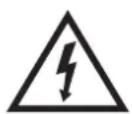
This symbol alerts users that the device is operating with dangerous electrical voltage. Do not remove protective covers on the device. Failure to observe the safety instructions during use and operation of the device may result in:
Danger of electric shock!
Danger of serious injury or life threatening!
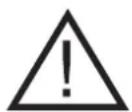
This symbol alerts users to the following: Risk of serious injury or life threatening when not following the safety instructions when using and operating the unit!
Danger of damage to equipment or other damage to property!

This symbol alerts users that:
The device is designed for use in tropical climate.

This symbol used on the product supersedes the sentence: CAUTION! Not to obstruct.
Transportation/Carriage
- When transporting and carriage, be careful when moving to avoid overturning and damage.
- Transport/carry the equipment only after thorough inspection of the space and the routes, which must be unobstructed.
- Transport/carry the machine in the working (vertical) position.
- For increased safety (in terms of size and weight), carry the device using two capable and physically fitting persons.
- Do not transfer the device until all cable connections have been disconnected. Never transfer the device while in operation.
- Transfer the device firmly with both hands by the handle or behind the lower edge of the base and the fixed parts of the covers.
- Make sure that your hands and equipment are not damp or slippery when carrying.
There is a risk of serious injury or life threatening!
There is a risk of damage to the device!
Unpacking/Package
- Unpack and remove all parts and accessories of packaging materials, stickers and labels before putting the device into operation. Keep all packaging materials in a safe place or keep them out of the reach of children and inappropriate persons.
There is a risk of 'serious injury!
There is a risk of choking!
Check/Commissioning
- We recommend performing both initial and subsequent regular machine inspections. Before installation and first commissioning, check that the device is complete and shows no visible signs of damage.
- Do not use the appliance if it is incomplete, damaged, or damaged during transportation or use. In this case, have the machine repaired by a specialized service center.
- Do not attempt to interfere with the construction or adjustment of the component parts in any way.
- Clean the machine before commissioning as described in the „Commissioning“/ “Before first use” section.
- Never clean the device (the body with the electrical parts and the control panel) and the power cord with the plug in a way that could cause the liquid to flow into the device. Clean these parts with a damp cloth and wipe dry or let it dry.
There is a risk of serious injury!
Location/Installation
- The device is intended for use as a stand-alone. Do not attach the appliance to the building parts of the living spaces - walls, ceilings, etc.
- Only use the device in a working (vertical) position on a flat surface where there is no risk of overturning it.
- Do not place the appliance in front of an open window or door, as the optimal function and efficiency will be compromised.
- The appliance must be installed in accordance with national and local safety regulations applicable to the connection of electrical equipment with protective earthing. To ensure additional protection against the risk of electric shock, it is recommended to install it to the power supply circuit of the device, a current protector (RCD) with a rated trip current not exceeding 30mA.
- If you have any questions about the electrical installation, ask for advice from a qualified electrician.
- Do not place or operate the appliance where it is likely to overturn it.
- Do not place the appliance:
- to unstable tables or parts of furniture,
- on an uneven and dirty surface,
- near containers with water or other liquids.
- Place the appliance only on flat, stable and stable flooring - floors and floorings that have a stable and solid structure (eg. wood, ceramic tiles, etc.). Do not place the appliance on floorings that have an unstable structure such as: carpets or other decorative flooring with long fibers.
- Do not place or use the appliance on „soft“ surfaces, bed mattresses, upholstered sofas and chairs, and so on.
- Always make sure that the place you want to place the device has enough space, mechanical strength and stability.
There is a risk of damage to the equipment or other property damage!
- Do not place or use equipment near water containers, including the pool. If the appliance falls into the water, do not remove it. First, pull the power cord plug out of the mains socket and then select the appliance from the water. In such cases, take the device for inspection to a specialist service to check that it is safe and working properly.
Operation/Supervision
- The device is intended for use in smaller residential and work areas.
- The equipment must not be used in areas where there is a risk of fire or explosion, in the presence of chemical and flammable substances and their vapors, mist or dust, and under atmospheric conditions where air is easily propagated after ignition of the combustion.
- Do not use the appliance near gas stoves or open flame sources.
- Do not expose the appliance to rain or the effects of other sources of moisture, water or other liquids to avoid a hazardous situation.
There is a danger of fire!
There is a risk of electric shock!
There is a risk of damage to equipment or other property damage!
- Do not use the appliance to dry fabrics, clothing, footwear or any other items.
There is a danger of fire!
• Always be supervised during use and operation!
- This device is not intended to be operated via an external programmer, automatic timer and remote control because there is a risk of fire if the appliance is covered or incorrectly placed.
- Use only its own controls and the supplied remote control to control the device.
- Do not cover the appliance partly. Do not add anything to the device. Do not insert or allow the foreign objects to enter the holes of the device.
- Do not cover the openings of the airflow covers. Air ventilation ensures safe and reliable operation of the device.
- Leave plenty of free space around the device to ensure the desired air circulation. It is recommended to keep min. 50 cm from all sides.
There is a risk of electric shock!
There is a danger of fire!
- Do not place objects on the device, or allow foreign bodies to enter the holes. Do not use the device near freely moving textiles - hangings, curtains, etc. Ensure that no dirt from the environment, such as dust, clumps of dust, fibers, and the like do not enter the holes of the device.
- Take care during use and operation of the appliance so that you do not get in touch with the rotating parts with your fingers, hair, loose chains, or loose clothing.
- Do not place any containers of water or other liquid on the device to prevent liquids from spilling or ingressing into the inside of the device.
- To avoid a dangerous situation, do not touch the device if you have wet or moist hands.
There is a risk of electric shock!
- Prevent children from handling the device. The device may overturn and cause serious injury. Mechanical damage (breakage or breakage of parts and covers) of the device can cause serious injury.
There is a risk of serious injury!
There is a risk of damage to equipment or other property damage!
- Do not leave the appliance unattended during operation, especially if there are children, inappropriate persons or animals nearby.
- Make sure that the main switch (controller) is set to „OFF“ / „0“ position before each connection to the power supply.
- Do not switch the device on or off by plugging in or pulling out the power cord plug from the wall socket.
- Always connect the appliance to mains power supply for normal use, then turn on the main power switch.
- When you have finished using the appliance, turn off the main switch and then pull out the power cord plug from the mains socket.
- Do not use the device if the main power switch does not work.
- The device is under dangerous voltage when the power supply is connected.
There is a risk of electric shock!
- The electrical socket and power cord must remain easily accessible for safe disconnection of the device from the power supply.
- Take extra care to avoid damage to the power cord, loose on the floor.
- Never leave the appliance unattended and freely accessible with a free power cord. Children, inappropriate persons, or animals could overturn the device by the power cord.
- Unplug the power cord from the socket when not in use. Store the device with a fixed power cord at the solid parts of its covers.
There is a risk of serious injury!
- Never overload the equipment beyond the limits specified by the technical specifications!
- Observe the operating mode of the machine in accordance with the instruction manual. If you notice any unusual occurrences (sounds, smell, smoke, ...) while using the device, switch off the device immediately and unplug it from the power supply.
Have the appliance checked by a specialized service center.
- Never attempt to repair, disassemble or otherwise modify the device yourself.
- Before carrying out user maintenance and cleaning of the equipment and in cases when the protective covers are dismantled always turn off the device first with the main switch and disconnect the power supply from the electrical socket.
- Always make sure that the device is off and disconnected from the power supply.
- Clean the machine regularly and thoroughly!
- Incorrect and irregular cleaning of the equipment may cause internal contamination (bacterial contamination), which may result in the spread of harmful micro-organisms in the air.
Risk of harm to health!
- If any safety component / part (mechanical, electrical) is part of the device, never disable this part / component! If the safety component / part is damaged or not working, do not use the appliance!
- Children under 3 years of age must be prevented from accessing the appliance unless they are under constant supervision.
- Children under 3 years of age and under the age of 8 must not plug, regulate or clean the appliance or perform user maintenance.
CAUTION!
- Some parts of this product may become very hot and may cause burns. Pay special attention when vulnerable people or children are present.
- Never underestimate possible hazards and be careful!
Power Supplies / Batteries
Safety instructions for replacing the batteries for remote-control (RC).
Warning!
- The device is equipped with a power source that can be exchanged by the user - batteries for powering the remote.
- In case of incorrect replacement and non-observance of the safety instructions, there is a danger of accumulators - electric short circuit, explosion, leakage of electrolyte, corrosion.
- Replace the batteries exclusively with the same or equivalent type specified by the manufacturer and always the recommended way.
- Dispose of batteries in accordance with applicable regulations and provisions for disposal of electronic devices.
Warning!
- Always store batteries out of reach of children, inappropriate persons and pets.
- Carefully keep the batteries in use so that children can not swallow them. In case of battery swallowing, seek medical help immediately.
- Use only the same or equivalent type of battery specified by the manufacturer. Do not use new batteries together with old ones. This can lead to RC damage.
- Wipe the batteries with a dry cloth before inserting them into the RC. This will ensure a better electrical contact.
- Insert the batteries to match the „+“ and „-“ symbols on the batteries and on the inside of the RC cover.
- Do not handle the batteries with metal tools (eg tweezers, etc.). Conductive contact between the two poles of the battery may cause a short circuit.
- If you are not using for a long time, it is recommended to remove the batteries from the device. This protects your device from damage from leaking batteries. If the batteries leak out, have RC cleaned in an authorized service.
Caution!
- Do not charge, heat, or disassemble or burn in a fire.
- Batteries may explode when used improperly.
- Contact your doctor for assistance.
There is a risk of serious injury or life threatening! There is danger of explosion!
There is a risk of corrosion from the leaked electrolyte!
Technical specifications
Model: A C - 0 1 1
Power supply: 230 V\~50 Hz
Power consumption: 1 800W
Water tank volume: 8 l
Maximum airflow: 400 m ^3 /hod.
Fan speed: 8,2 m/sek.
Dimensions: 370 x 330 x 680 mm (WxDx H)
Operating temperature: -10 °C až 50 °C
Standard insulation resistance: 100 M
Standard Dielectric Strength: 2 500 V/0,5 mA/1 m
Weight: 7,6 kg (bez vody)
Noise: 62 dB (A)
The declared noise emission of this appliance is 62 dB (A), which represents the level of acoustic power A with respect to the reference sound power of 1 pW.
The right to change is reserved!
Location
- Leave free space around the device to ensure proper ventilation.
- Do not place any objects on the machine.
- Place the device near an easily accessible electrical socket. Do not use extension cords or splitters. If you notice problems, disconnect the device from the power supply immediately.
Device information
AC-011 is an efficient air cooler that improves the thermal properties of medium-sized spaces.
Orava AC-011 is an intelligent combination of air conditioning and a fan that sends a cold air stream to the room. Cooling is achieved by evaporating the cooled water from an 8 l water tank. In addition to air cooling, the AC-011 differs from conventional fans, as well as humidifying and cleaning the air to improve the climate in the room.
The advantage of the air cooler over conventional air conditioning systems is high energy efficiency. With the use of only 65 W, the device will refresh smaller and medium sized rooms up to 50 m ^3 .
If necessary, the device can also be used to heat the ambient air in the room.
Using a two-stage control, it is possible to choose slow or fast heating.
It is possible to operate the device using the control panel located on devices, or by using the remote control
Description of funkcions and features:
Air cooler and fan with additional humidification, air purification function 4-in-1 features: cooler, humidifier, air cleaner, and air heater
- Economical power input 65 W - Water consumption 1 liter per hour efficiency increases the evaporator construction in the shape of a honeycomb
• Air flow 400 m ^3 per hour - ideal for medium sized rooms - Fast blowing or automatic rotation of the lamellae to cover the entire space
- Supplied including 2 cooling accumulators for continuous use, which must be frozen before use.
• 3 power levels (low, medium, high) - NATURE mode - to achieve uneven airflow and simulation of natural airflow in the room
- Integrated adjustable timer up to max. 4 hours
• Operation with coolant accumulators (container) or ice cubes
• Water tank capacity: 8 liters - The water / ice tank is not removable and is fixed in the unit
• Water level indicator - Integrated water filtration system
- The handles on the side to carrying
- Rear integrated dust filter
• Power saving feature - Possibility to control by supplied remote control
Package Contents:
Device (1 pc.)
Remote Control (1 pc)
Cooling accumulator (container) (2 pcs)
The containers are filled with a special cooling emulsion already in production.
Do not empty! Put them in the freezer before use.
Wheels (4 pcs)
Part description
Carefully remove the device from the packaging material.
Remove any residual packaging material from the device. Make sure you have all the accessories listed.
If necessary, install 4 transport wheels.
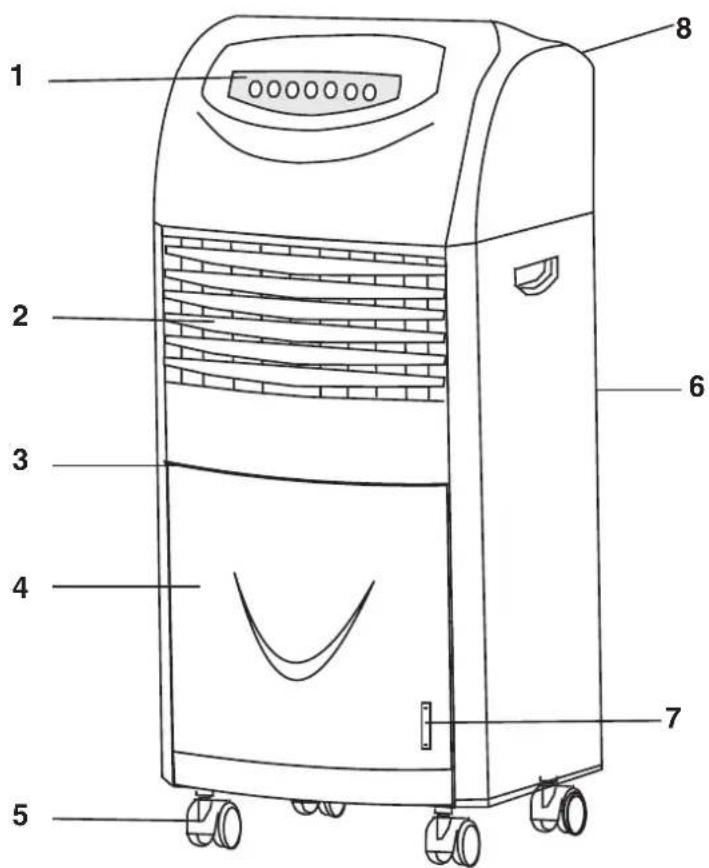
1 Control panel
2 Air blow grille and slats
3 Door handle
4 Door
5 Wheels
6 Rear filter with cover
7 Window for water level indicator /HIG (max), MID (medium), LOW (low)/
8. Power switch (ON/OFF)
Control panel
The control panel contains the controls needed to operate the device.
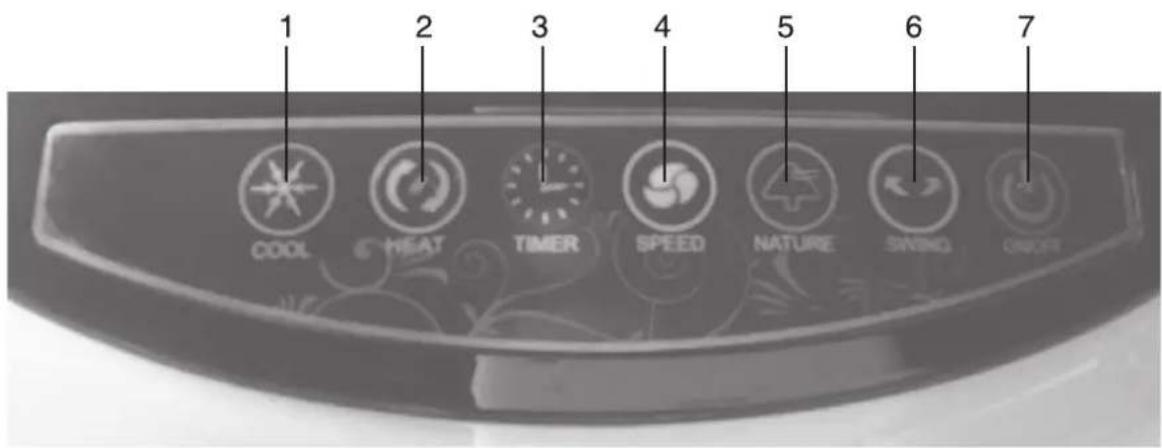
1 COOL button
Activate air humidifi cation / cooling function
2 HEAT button
Setting the hot air flow function (2 levels)
3 TIMER button
Setting the Auto Power Off Timer (1, 2, and 4 hours)
4 SPEED button
Fan speed setting (3 levels)
5 NATURE button
Activate the natural NATURE operating mode
6 SWING button
Activate the automatic rotation of the grid
7 ON/OFF button
Turn device on / off
Using the device
Connect the appliance to the designated electrical socket. Place the power cord so that it does not slip or do not jump on it.
FAN SPEED ON/OFF AND SETTING
1 Turn the machine on standby by turning the mechanical power switch on the back from position 0 to position I.
2 Turn on the machine by pressing the ON/OFF button on the control panel. The device turns on and the power indicators and fan speed indicators light up. The default fan speed is high when it is turned on (3rd stage). The fan indicator is displayed at high speed.
3 After setting the fan, set the SPEED button to low, medium or high speed. The corresponding LED symbol will indicate the set speed.
4 Switch off the machine by pressing the ON/OFF button and then switch the mechanical switch on the back from position I to position 0.
AIR HEATING / FUNCTION FUNCTION
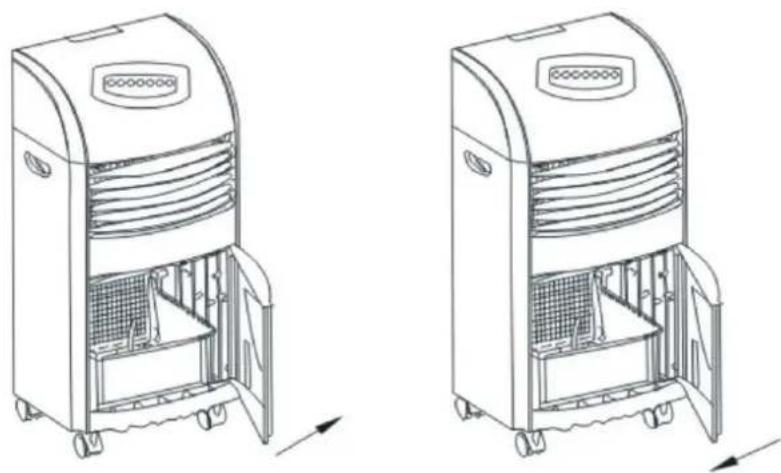
1 Grasp the front door by the handle and open it.
2 Pour clean, cold water into the water tank.
To humidify and cool the air, add 1 coolant or ice to the water after filling the tank. The coolant/ice removes heat from the water and keeps it cooler for several hours.
Monitor the volume of water in the tank through the peephole and indicator.
3 Close the front door.
natural_image
Line drawings of two industrial air purifiers with internal compartments and wheels, shown from front and side views (no text or symbols)4 Turn the machine on standby by switching the mechanical power switch on the back from position 0 to position I.
5 Turn on the machine by pressing the ON/OFF button on the control panel. The device turns on and the power indicators and fan speed indicators light up. The default fan speed is high when it is turned on. The fan indicator is displayed at high speed.
6 After the fan has been started, set the desired speed with the SPEED button.
The corresponding LED symbol will indicate the set speed.
7 Activate the humidifying / cooling function by pressing the COOL button.
The COOL indicator lights up and the fan speed will have the speed you set. If you do not set the speed, the fan automatically switches to high speed.
If the water tank is emptied, repeat the steps 1 to 6 to refill the water tank.
8 Press the COOL button to turn off the humidification/cooling function to turn off the COOL indicator.
The device will continue in its original operating mode.
9 Turn off the machine by pressing the ON/OFF button and then switch the mechanical switch on the back from position I to position 0.
Warning!
The tank capacity is 8 liters. Do not fill the tank above the maximum water level indicator.
Before use, place the coolant cartridges for several hours in the freezer.
HOT AIR FUNCTION
1 Turn the machine on standby by turning the mechanical power switch on the back from position 0 to position I.
2 Turn on the machine by pressing the ON/OFF button on the control panel. The device turns on and the power indicators and fan speed indicators light up.
The default fan speed is high when it is turned on. The fan indicator is displayed at high speed.
3 Press the HEAT button to activate the hot air function. After the first press, the warmish indicator lights up and the fan speed switches to low operation. After the second press of the HEAT button, the hot air indicator lights up.
4 Use the SPEED button to set the desired fan speed.
The corresponding LED symbol will indicate the set speed.
5 Press the HEAT button to turn off the hot air function to turn off the relevant indicator.
The device will continue in its original operating mode.
6 Switch off the machine by pressing the ON/OFF button and then switch the mechanical switch on the back from position 1 to position 0.
NATURE OPERATION MODE SETTING
1 Turn the machine on standby by turning the mechanical power switch on the back from position 0 to position I.
2 Turn on the machine by pressing the ON/OFF button on the control panel. The device turns on and the power indicators and fan speed indicators light up.
The default fan speed is high when it is turned on. The fan indicator is displayed at high speed.
3 After setting the fan, press the SPEED button to set the desired speed.
The corresponding LED symbol will indicate the set speed.
4 Press the NATURE button to activate the natural mode.
The NATURE indicator lights up and uneven air flow is activated to simulate the natural flow of air in the room. At the same time, the fan speed switches to high and after a few seconds the fan turns off briefly, then reactivates its high speed, which will cyclically alternate with the low and shutting down the fan.
5 To turn off the natural NATURE mode, press the NATURE BUTTON to turn off the NATURE indicator. The device will continue in its original operating mode.
6 Switch off the machine by pressing the ON/OFF button and then switch the mechanical switch on the back from position 1 to position 0.
AUTOMATIC ROTATING GRID
To activate the automatic rotation of the front grid, press the SWING button during operation.
The SWING indicator is displayed and the front grid (internal vertical slats) will turn from left to right and back.
To turn off automatic grid rotation, press the SWING button again to turn off the SWING indicator.
You can also adjust the air flow direction manually by rotating the outer horizontal blades up or down.
SETTING THE AUTOMATIC POWER OFF
The TIMER button is set to the auto-off time of 1, 2 or 4 hours.
During operation, press TIMER repeatedly.
Each time you press the indicator 1h, 2h, 4h, or the indicator turns off. If left for example by the 4h, the device automatically turns off after 4 hours.
If you do not want to use the timer, press the TIMER button until no timer indicator is lit.
USING REMOTE CONTROL
The functions of the remote control buttons are the same as those of the buttons on the control panel. To use the remote control, point it to the control panel level.
The maximum range of the remote control signal is approx. 6 m.
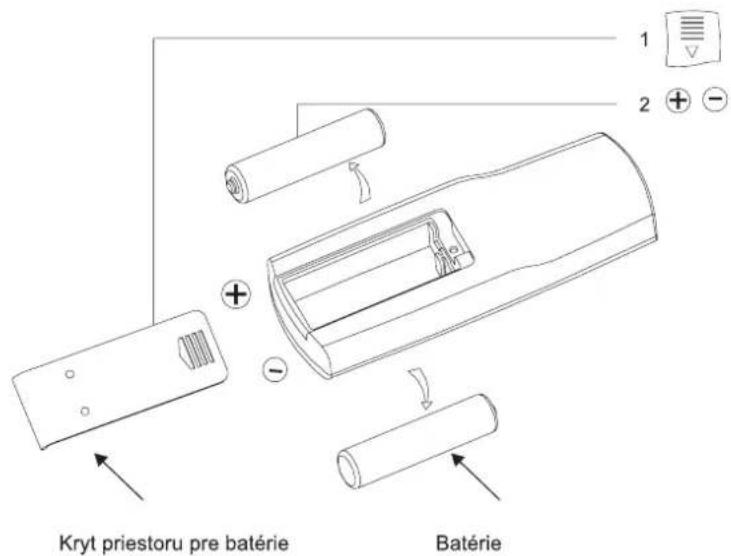
Insert the batteries
1 Open the battery compartment cover (not supplied) on the remote control and insert 2 AAA batteries into the battery compartment, then close the cover.
2 Observe the correct polarity + and -.
Notes:
- If there are obstacles between the remote control and the control panel, signal transmission may not work.
- When inserting batteries, make sure that the correct polarity is displayed inside the battery compartment.
Do not mix old batteries with new ones. Always replace both batteries.
- Dispose of old batteries in accordance with applicable regulations and standards in order to protect the environment.
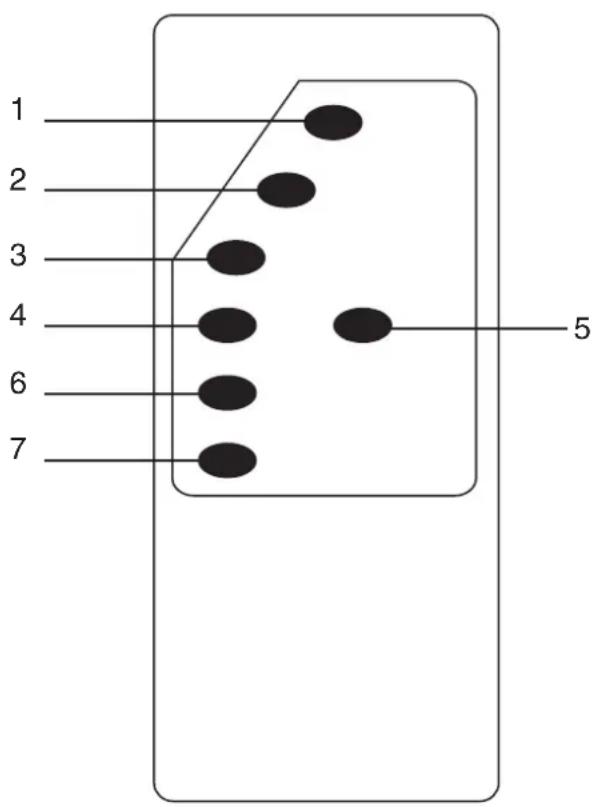
Description of the buttons on the remote control
1 ON/OFF button
Turn device on/off
2 SPEED button
Fan speed setting (3 levels)
3 SWING button
Activate the automatic rotation of the grid
4 HEAT button
Setting the heating function (2 levels)
5 TIMER button
Setting the Auto Power Off Timer (1, 2, and 4 hours)
6 NATURE button
Activate the natural NATURE operating mode
7 COOL button
Activate air humidification/cooling function
Cleaning, maintenance and storage of equipment
Turn the appliance off by the switch on the back, disconnect the power cord from the mains and let it cool down completely.
1. Cleaning the surface of the device
Never immerse the appliance in water or other liquid!
Use a slightly moistened cloth in a mild detergent solution to clean the surface of the device.
Do not use any solvent or abrasive cleaner.
They can damage the surface finish.
2. Cleaning the inside of the appliance and the water tank
Use only a slightly moistened cloth in a mild detergent solution to clean the inside of the appliance. Do not use any solvent or abrasive cleaner. They can damage the surface finish.
If there is water in the water tank, pour it out. Calcium deposits should be removed at least once a month at regular intervals.
To remove calcium deposits, use a clean cloth and hot water solution and neutral detergent. After using the detergent, rinse the container with clean water. After cleaning, thoroughly dry the inside of the appliance and the container freely in the air.
3. Clean the control panel and door
Clean the door and the control panel with a dry cloth.
If necessary, use a slightly moistened cloth in clean water. Do not use any solvent or abrasive cleaner. They can damage the control panel and the door.
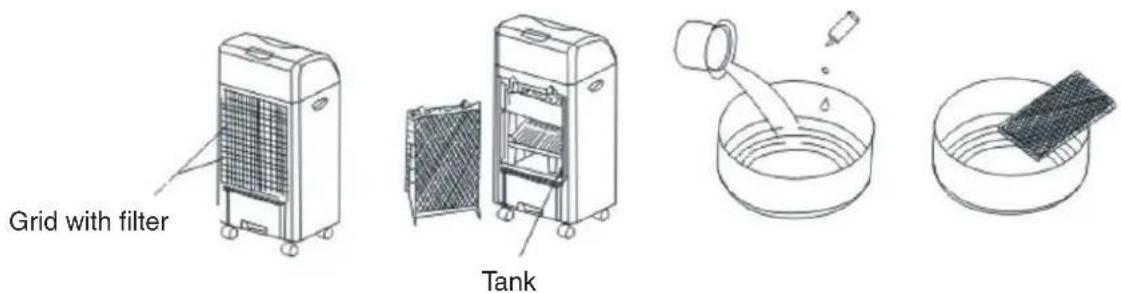
4. Clean and replace the filter
The filter is already factory-fitted at the back of the device, but must be cleaned or changed after a certain amount of time.
Follow the instructions below:
1 Slide the cover grid with the net up and select it.
2 Unscrew 1 screw at the top of the cover grid, push two latches in the top of the grid down and select the grid with the filter inserted.
3 Select the filter from the grid. Bend it with a hard pad.
If it is very dirty, soak it in a container of water and a neutral detergent solution. Then rinse it with water.
After washing, allow it to dry thoroughly in the air.
4 Insert the cleaned or new filter into the grid and place the grid in place so that it clicks.
Then screw it with the top screw.
5 Slide the cover grid with the net grid down to its place.
Note:
The filter can be used for approximately one year, and in case of damage, replace it immediately.
5. Storage of the device
If you do not plan to use the device for a long time, empty the tank and clean the tank and the device.
On a sunny day, keep the appliance in normal fan mode for about 30 to 60 minutes.
This way the device is completely dried and moisture is prevented during storage.
Then store the device, preferably in the original packaging, in a dry and cooler place.
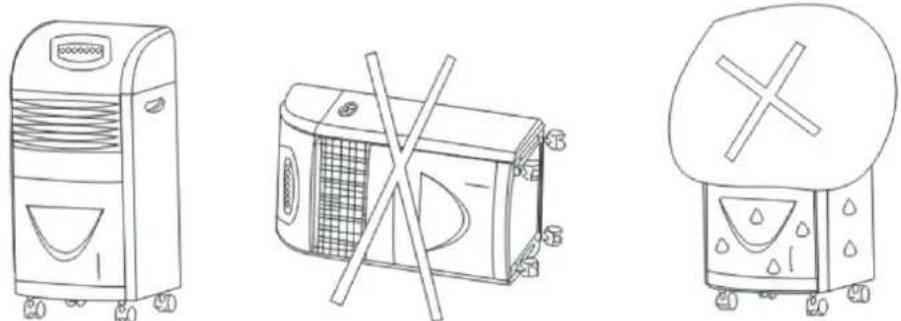
Store the device in a vertical position and do not place any objects on it.
natural_image
Line drawings of three different household appliances: a front-loading air purifier, a microwave with a crossed-out handle, and a front-loading washing machine (no text or symbols present)Producer:
ORAVA retail 1, a.s.
Seberíniho 2
821 03 Bratislava
Slovenská republika
Importer:
ORAVA retail 1, a.s.
Seberíniho 2
821 03 Bratislava
Slovenská republika
ORAVA distribution CZ, s.r.o.
Ostravská 494
739 25 Sviadnov
Česká republika
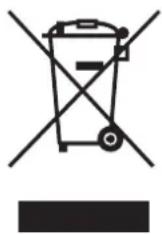
DISPOSAL OF USED ELECTRICAL AND ELECTRONIC EQUIPMENT
The symbol on the product or on its packaging indicates that this product does not belong to household waste. It is necessary to take it to a collection point for electrical recycling and electronic equipment.
By ensuring proper disposal of this product, you will help prevent negative consequences to the environment and human health that would otherwise be caused by inappropriate disposal of this product. For more detailed information about recycling of this product, please contact your local authority, your household waste disposal service or the shop where you purchased the product.
This product meets all the essential requirements of the EU directives that apply to it.
- The intended use of the device
- Warning for users of air conditioning and humidity devices
- GENERAL SAFETY INSTRUCTIONS AND WARNINGS
- General safety instructions
- Safety of the operating environment
- Electrical safety
- Safety of persons
- Cleaning, maintenance and repairs
- Special Safety Instructions. Read carefully!
- Transportation/Carriage
- Unpacking/Package
- Check/Commissioning
- Location/Installation
- Operation/Supervision
- CAUTION!
- Power Supplies / Batteries
- Safety instructions for replacing the batteries for remote-control (RC).
- Warning!
- Technical specifications
- Location
- Device information
- Description of funkcions and features:
- Package Contents:
- Part description
- Control panel
- COOL button
- HEAT button
- TIMER button
- SPEED button
- NATURE button
- SWING button
- ON/OFF button
- Using the device
- FAN SPEED ON/OFF AND SETTING
- AIR HEATING / FUNCTION FUNCTION
- HOT AIR FUNCTION
- NATURE OPERATION MODE SETTING
- AUTOMATIC ROTATING GRID
- SETTING THE AUTOMATIC POWER OFF
- USING REMOTE CONTROL
- Insert the batteries
- Notes:
- Description of the buttons on the remote control
- ON/OFF button
- SPEED button
- SWING button
- HEAT button
- TIMER button
- NATURE button
- COOL button
- Cleaning, maintenance and storage of equipment
- Cleaning the surface of the device
- Cleaning the inside of the appliance and the water tank
- Clean the control panel and door
- Clean and replace the filter
- Note:
- Storage of the device
- Producer:
- Importer:
- DISPOSAL OF USED ELECTRICAL AND ELECTRONIC EQUIPMENT
Brand : Orava
Model : AC-011
Category : Air conditioner