
Jewel Vegas BLV900B - Shredder Eldom - Free user manual and instructions
Find the device manual for free Jewel Vegas BLV900B Eldom in PDF.


| Product Type | Paper Shredder |
| Brand | Eldom |
| Model | Jewel Vegas BLV900B |
| Cut Type | Cross-cut (particle cut) |
| Sheet Capacity (A4, 70g/m²) | 8-10 sheets |
| Shred Size | 4 x 40 mm |
| Working Width | 220 mm |
| Bin Capacity | 15 liters |
| Dimensions (L x W x H) | 350 x 200 x 400 mm |
| Weight | 4.5 kg |
| Power Supply | 220-240 V, 50/60 Hz |
| Power Consumption | 200 W |
| Noise Level | ≤ 60 dB(A) |
| Material | Plastic casing, steel cutting blades |
| Color | Black |
| Safety Features | Thermal overload protection, auto-stop when bin is removed |
| Operation Mode | Auto start/stop, reverse function |
| Maintenance | Regular oiling of blades recommended; empty bin when full |
| Warranty | 2 years |
Frequently Asked Questions - Jewel Vegas BLV900B Eldom
User questions about Jewel Vegas BLV900B Eldom
0 question about this device. Answer the ones you know or ask your own.
Ask a new question about this device
Download the instructions for your Shredder in PDF format for free! Find your manual Jewel Vegas BLV900B - Eldom and take your electronic device back in hand. On this page are published all the documents necessary for the use of your device. Jewel Vegas BLV900B by Eldom.
USER MANUAL Jewel Vegas BLV900B Eldom
natural_image
Close-up of a metallic tool tip and a white plastic tube with orange arrows indicating direction (no text or symbols)fot. 2
UŻYTKOWANIE URZĄDZENIA
- Rated power: 550W
- Mains supply: 230V \~ 50 Hz
- Brief operation without interruption - 30 seconds
- Time of the interruption before switching on again: 5 minutes
natural_image
Close-up of a metallic tool and a white plastic component with orange arrows indicating direction (no text or symbols)phot. 2
OPERATION OVERVIEW
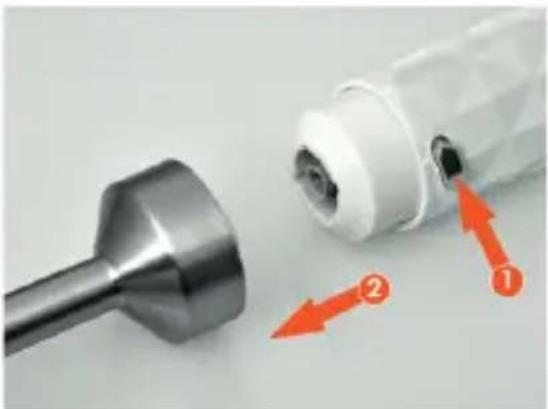
Before using the blender for the first time please disassemble the drive shaft (4), wash it carefully and dry. It should be washed by hand with regular dishwashing liquid. Never immerse the whole blender in water. The only washable part is the drive shaft with metal blade. The mode of assembling the device has been illustrated on the photography 2.
To begin the work press and hold the switch (2). The blender is working as long as one of the switches is pressed.
Depending on the products processed, select with a switch (1) low or high speed. It is recommended to read carefully the safety instructions specified below. Do not extend the recommended operation time of the blender. Such extensions and lack of interruptions can cause serious and irreversible damage of the motor unit. In case of blocking pull the plug of the socket before cleaning.
CLEANING AND MAINTENANCE
Before cleaning pull the plug of the socket. The device cannot be immersed in water or washed in a dishwasher. Motor unit should be cleaned dry with a slightly moist cloth. The drive shaft can be disassembled from the motor unit and cleaned in water with dishwashing liquid. It can never be immersed entirely in water. Only the blades can be immersed.
Never clean the blades with fingers use brush instead.
Do not use sharp or abrasive clothes or sponges for cleaning as they can scratch or damage the blender.
SAFETY INSTRUCTIONS
- please acquaint precisely with whole of this instruction before using the blender for the first time,
- the power cable must be plugged in the socket with parameters the same as those given in that instruction manual
- do not immerse the power cable or the device in water
- do not use outdoors
- do not allow children close to the device without supervision
- the device is not intended for use by people (including children) with limited physical, sensorial or mental capabilities unless they are supervised by person responsible for their safety
- do not touch the blender with wet hands
- always pull the plug of the socket before cleaning
- do not use blender for crumbling ice, bones or other hard products or for grinding nuts, coffee and dried legumes
- do not crumble hot products
- the blade is uncovered from below – please handle it with utmost care
- do not touch the blade when the device is on, after switching it of only after it stops,
- do not extend the recommended operation time of the blender,
- do not use the device in case of the damage of the power cable, when it dropped or was damaged in other way. Only allow authorised service to repair the device. The list of the service centres can be found in attachment or on the website www.eldom.eu,
- the device can work only with originally attached drive shaft
- all repairs can be made by authorised service centre
All modernizations or using spare parts or elements other than original is forbidden and dangerous for the users safety.
ENVIRONMENT PROTECTION
- the device is made of materials that can be reused or recycle
- it should be handed to the special collection point, that deals with collection and recycling of electronic and electric devices,
WARRANTY
- the blender is only intended for household use,
- it cannot be used for commercial purposes
- the warranty loses validity in case of inappropriate use,
For warranty conditions see attachment.
Návod k obsluze

PONORNÉHO MIXERU BLV900W/BLV900B
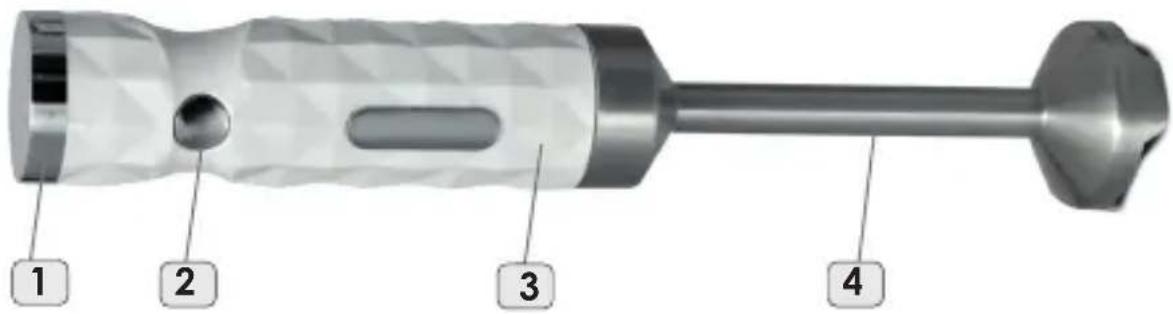
foto 1
natural_image
Close-up of a dental tool tip and its internal component with orange arrows indicating direction (no text or symbols)foto 2
Používání zařízení
natural_image
Close-up of a metallic tool and a white cylindrical device with orange arrows indicating components (no text or symbols)Bild 2
GERÄTEGEBRAUCH
natural_image
Close-up of a metallic tool and a white plastic cylindrical component with orange arrows indicating parts (no text or symbols)фот.2
natural_image
Close-up of a mechanical component with two orange arrows indicating parts of the tool (no text or symbols present)fot. 2
POUŽIVANIE ZARIADENIA
natural_image
Close-up of a metallic tool tip and a white plastic bottle with orange arrows indicating movement or adjustment (no text or symbols)- sz. fotó
A KÉSZÜLÉK HASZNÁLATA
Brand : Eldom
Model : Jewel Vegas BLV900B
Category : Shredder