
SP16A5 - Extension block GoGen - Free user manual and instructions
Find the device manual for free SP16A5 GoGen in PDF.


| Product Type | Extension Block with Surge Protection |
| Brand | GoGen |
| Model | SP16A5 |
| Number of Sockets | 5 (Type F, 16A) |
| Rated Voltage | ~250V |
| Rated Current | 16A |
| Maximum Load | 3680W |
| Overvoltage Protection Level | Type 3, UC ~250V |
| Protection Features | Overvoltage protection (red indicator), Proper grounding indicator (green LED) |
| Dimensions (approx.) | 300 x 100 x 50 mm |
| Weight (approx.) | 0.5 kg |
| Cable Length | 1.5 m (estimated) |
| Material | Flame-retardant plastic |
| Indoor Use Only | Yes |
| Safety Certifications | CE, RoHS (assumed) |
| Operating Temperature | 0°C to 40°C |
| Storage Conditions | Dry, cool place |
| Cleaning | Wipe with dry cloth; do not use water or solvents |
| Repairability | No user-serviceable parts; do not open |
| Warranty | 2 years (standard) |
Frequently Asked Questions - SP16A5 GoGen
User questions about SP16A5 GoGen
0 question about this device. Answer the ones you know or ask your own.
Ask a new question about this device
Download the instructions for your Extension block in PDF format for free! Find your manual SP16A5 - GoGen and take your electronic device back in hand. On this page are published all the documents necessary for the use of your device. SP16A5 by GoGen.
USER MANUAL SP16A5 GoGen
NOTE: Please read this user manual completely before the first use of the product.
PRODUCT OVERVIEW
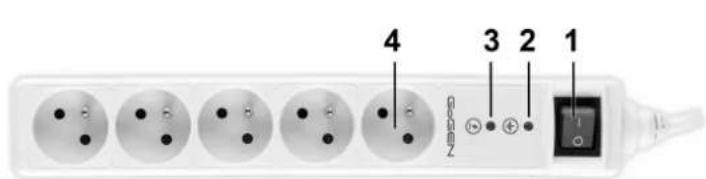
- Switch
- Indicator light of proper grounding
- Indicator light of overvoltage protection
4.5 x 16A socket
OPERATING INSTRUCTIONS
To use the product, plug it to the mains, and turn on the switch (1). The product provides over-voltage protection to all appliances plugged in.

Green indicator light of proper grounding (2). If the product is connected to the mains and switched on, the green indicator light will turn on, indicating that the socket is properly grounded. If this indicator does not turn on, it means there is a problem in the electric power distribution network in your building. The problem must be resolved by a qualified electrician with the respective authorisation.
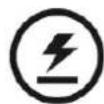
Red indicator light of overvoltage protection (3). After the product is connected and switched on, the red indicator light of overvoltage protection will turn on, indicating that the overvoltage protection protects all electrical appliances connected to the sockets from electric surges. If the red indicator light goes off, the overvoltage protection function is no longer active. You may still use the product as a normal set of sockets. End of overvoltage protection function is not a reason for complaint during the guarantee period.
Note: If the red indicator light does not turn on after the product is connected to the mains and switched on for the first time, it means that the product is damaged and does not protect the connected appliances. Please file a complaint.
SAFETY PRECAUTIONS AND WARNINGS
• The product is intended for use in interior only.
- Do not expose the product to water.
- Do not install the product in the environment with high temperature and humidity.
- Do not use this product to power aquarium equipment.
- Do not install the product during storms with atmospheric discharges.
- Do not connect multiple appliances in series.
- Do not cover the product when in use.
- Disconnect the product from the socket by holding the plug, not by pulling the power cord.
SPECIFICATION
• Rated load: Max.3680 W
• Rated current: 16 A
- Rated voltage: \~ 250V
• Overvoltage protection UC: \~ 250V
TYPE 3
Uoc: 3 kV (pro L / N, L / N-PE)
Up = 1,8 kV (pro L / N, L / N-PE)
Brand : GoGen
Model : SP16A5
Category : Extension block