
3CAM 4K05WR - Action Camera SENCOR - Free user manual and instructions
Find the device manual for free 3CAM 4K05WR SENCOR in PDF.


| Product Type | Action Camera |
| Brand | Sencor |
| Model | 3CAM 4K05WR |
| Video Resolution | 4K at 30 fps, 1080p at 60 fps |
| Photo Resolution | Up to 20 MP |
| Field of View | 170° wide angle |
| Waterproof | Up to 30 meters with waterproof housing |
| Battery | Rechargeable Li-ion, 1050 mAh |
| Battery Life | Approximately 90 minutes at 4K |
| Connectivity | Wi-Fi, Bluetooth, USB-C |
| Storage | microSD card up to 256 GB |
| Dimensions | 59 x 41 x 24 mm |
| Weight | 75 g (without housing) |
| Display | 2.0 inch IPS touchscreen |
| Stabilization | Electronic Image Stabilization (EIS) |
| Main Functions | Video recording, photo, time-lapse, loop recording, burst mode |
| Care & Cleaning | Wipe with soft dry cloth; avoid abrasive cleaners |
| Safety | Avoid extreme temperatures; do not disassemble; use only certified charger |
| Spare Parts & Repairability | Replacement battery, USB cable, adhesive mounts available; non-user-serviceable internal components |
| General | Includes: camera, waterproof housing, adhesive mounts, USB cable, manual |
Frequently Asked Questions - 3CAM 4K05WR SENCOR
User questions about 3CAM 4K05WR SENCOR
0 question about this device. Answer the ones you know or ask your own.
Ask a new question about this device
Download the instructions for your Action Camera in PDF format for free! Find your manual 3CAM 4K05WR - SENCOR and take your electronic device back in hand. On this page are published all the documents necessary for the use of your device. 3CAM 4K05WR by SENCOR.
USER MANUAL 3CAM 4K05WR SENCOR
EN
- OK
- LED indicator
- Switching/mode
- HDMI
- Lens
- USB
- Microphone
- microSD
-
Red light LED - charging
-
Blue light LED - operation
- Screen
- Button - arrow down
- Button - arrow up
- WiFi
- Speaker
CZ
water resistant case
vodotěsné pouzdro vodotesné puzdro vizhatlan tok obudowa wodoszczelna
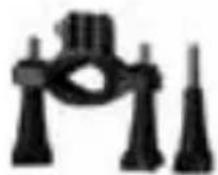
holder for bicycle/ long rod držák na kolo/ dlouhá lyč držiak na bicykel/ dlhá lyč keréktartó/hosszú bol uchwyl na rower/ długi kijek

natural_image
Close-up of a mechanical component with no visible text or symbols
natural_image
Group of people in a stadium or arena setting, possibly at a construction site or event (no visible text or symbols)water resistant case vodotęsné pouzdro vodotesné puzdro vizhatlan tok obudowa wodoszczelna
(Tips: Some properties of the above features may vary depending on the current model, without notice.)
(Tipy: Některé vlastnosti výše uvedených funkcí se mohou lišit v závislosti od aktuálního modelu, bez dalšího upozornění.)
(Tipy: Niektoré vlastnosti vyssie uvedených funkcii sa mózu lišič v závislosti od aktualneho modelu, bez dalšieho upozornenia.)
(Tipp: A fent említett funkciók bizonyos tulajdonságai az aktuális modelltól függnek, egyéb figyelmezletés nélkül.)
(Wskazówka: Niektóre właściwości powyższych funkcji mogą się różnic w zależności od aktualnego modelu, bez uprzedniego powiadomienia.)
SENCOR®
Let's live!

Brand : SENCOR
Model : 3CAM 4K05WR
Category : Action Camera