
SWS 4900 - Weather Station SENCOR - Free user manual and instructions
Find the device manual for free SWS 4900 SENCOR in PDF.


Pick your language and provide your email: we'll send you a specifically translated version.
| Product Type | Weather Station |
| Model | SWS 4900 |
| Brand | Sencor |
| Indoor Temperature Range | 0°C to 50°C (32°F to 122°F) |
| Outdoor Temperature Range | -20°C to 60°C (-4°F to 140°F) |
| Indoor Humidity Range | 20% to 99% RH |
| Outdoor Humidity Range | 20% to 99% RH |
| Wireless Sensor Frequency | 433 MHz |
| Maximum Number of Sensors | 3 |
| Transmission Range | Up to 100 meters (328 ft) in open area |
| Display Type | LCD with backlight |
| Power Supply (Main Unit) | 3 x AAA batteries (not included) or USB power adapter (5V, 1A) |
| Power Supply (Sensor) | 2 x AAA batteries (not included) |
| Dimensions (Main Unit) | 120 x 80 x 25 mm (4.72 x 3.15 x 0.98 in) |
| Weight (Main Unit) | 180 g (6.35 oz) without batteries |
| Dimensions (Sensor) | 60 x 40 x 20 mm (2.36 x 1.57 x 0.79 in) |
| Weight (Sensor) | 50 g (1.76 oz) without batteries |
| Clock Function | Radio-controlled DCF77 time signal, or manual setting |
| Alarm Function | Yes, with snooze |
| Weather Forecast | Icon-based (sunny, cloudy, rainy, stormy) |
| Barometric Pressure Trend | Displayed with arrow indicators |
| Mounting Options | Table stand or wall mount |
| Cleaning Instructions | Wipe with a soft dry cloth; do not use harsh chemicals |
| Battery Replacement | Replace batteries when low battery indicator appears |
| Spare Parts Availability | Contact Sencor service center for sensors or accessories |
Frequently Asked Questions - SWS 4900 SENCOR
How do I set up the wireless sensor?
Insert 2 AAA batteries into the sensor and place it outdoors within 100 meters of the main unit. The main unit will automatically detect the sensor within 3 minutes.
Why is the outdoor temperature not showing on the display?
Check that the sensor is powered and within range. Press and hold the 'CH' button on the main unit to initiate a search for the sensor. Ensure no interference from other devices.
How do I set the time manually?
Press and hold the 'TIME' button for 3 seconds. Use the '+' and '-' buttons to adjust the hour and minute. Press 'TIME' again to confirm.
Can I connect more than one outdoor sensor?
Yes, up to 3 sensors can be paired. Press the 'CH' button to cycle through channels. To add a sensor, set the sensor's channel switch to a new number and repeat the pairing process.
What does the barometric pressure trend arrow mean?
An upward arrow indicates rising pressure (improving weather). A downward arrow indicates falling pressure (deteriorating weather). A flat arrow indicates stable pressure.
How do I activate the alarm?
Press the 'ALARM' button once to view the alarm time. Press and hold to set the alarm. Use '+' and '-' to adjust. Press 'ALARM' to confirm and activate. An alarm icon will appear.
Why does the display show '--' for outdoor temperature?
This indicates no signal from the sensor. Check batteries, distance, and obstacles. Press and hold 'CH' to resync. If using multiple sensors, ensure each has a unique channel.
How do I clean the weather station?
Use a soft, dry cloth to clean the display and housing. Avoid water, solvents, or abrasive cleaners. Do not immerse in water.
The batteries are low. How do I replace them?
When the low battery icon appears, replace all batteries in the main unit (3x AAA) and sensor (2x AAA) with fresh ones. Remove old batteries before inserting new ones.
Where can I find replacement parts or accessories?
Contact Sencor customer service or visit the official website for additional sensors, power adapters, or mounting brackets. Use only compatible accessories.
User questions about SWS 4900 SENCOR
0 question about this device. Answer the ones you know or ask your own.
Ask a new question about this device
No questions yet. Be the first to ask one.
Download the instructions for your Weather Station in PDF format for free! Find your manual SWS 4900 - SENCOR and take your electronic device back in hand. On this page are published all the documents necessary for the use of your device. SWS 4900 by SENCOR.
USER MANUAL SWS 4900 SENCOR
Weather Station with Wireless Sensor
natural_image
Line drawing of a rectangular device with a top panel and side panels, no text or symbols present.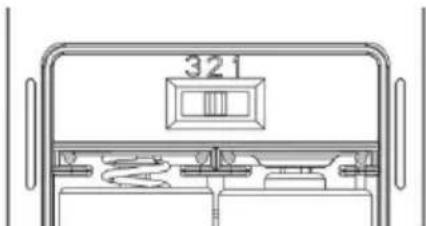
natural_image
Line drawing of a cabinet with front panel and side panels, no text or symbols presentnatural_image
Technical line drawings of three electronic components with no visible text or symbolsVLASTNOSTI
REŽIM NASTAVENÍ ČASU
RF – VENKOVNÍ TEPLOTA A VLHKOST
Table of contents
Click a title to access it
Manual assistant
Powered by Anthropic
Waiting for your message
Product information
Brand : SENCOR
Model : SWS 4900
Category : Weather Station