
PX-A - Headphones Xvive - Free user manual and instructions
Find the device manual for free PX-A Xvive in PDF.


| Product Type | 3-channel mixer and headphone amplifier for personal in-ear monitoring |
| Brand | Xvive |
| Model | PX-A |
| Input Type | Ethernet (Cat 5) for audio and power |
| Output Type | 1/8" TRS (stereo) |
| Output Impedance | 8–80 Ω |
| Max Output Power | 2x 150 mW @ 16 Ω |
| Power Supply | PoE (9V/2A center-negative for up to 5 units, 9V/500mA for one unit) or 2x AAA batteries |
| Battery Life | ~5 hours with 2x AAA batteries |
| Current Draw | ~210 mA |
| Channels | 3 (CH1, CH2, CH3) with individual volume controls |
| Pan Control | DIP switches for each channel: left, right, or both |
| Power Indicator | Blue (PoE or battery 20-100%), Pink (battery 10-20%), Red (battery 0-10%) |
| Chassis Material | Ultra-rugged impact-resistant metal |
| Mounting | Sturdy beltpack clip |
| Compatibility | Xvive PX-B Snake, EC25 Ethernet cable, PX-H Hub |
| Safety Warning | Use low volume to prevent hearing damage; do not listen at high volumes for extended periods |
| Dimensions | Ultra-compact and lightweight (exact dimensions not specified) |
| Weight | Ultra-lightweight (exact weight not specified) |
| Warranty | Limited warranty; contact support@xvive.com for details |
Frequently Asked Questions - PX-A Xvive
User questions about PX-A Xvive
0 question about this device. Answer the ones you know or ask your own.
Ask a new question about this device
Download the instructions for your Headphones in PDF format for free! Find your manual PX-A - Xvive and take your electronic device back in hand. On this page are published all the documents necessary for the use of your device. PX-A by Xvive.
USER MANUAL PX-A Xvive
- 3-channel mixer and headphone amplifier for personal in-ear-monitoring applications
- Ultra-compact and lightweight design
- Cat 5 cable transmits three channels of audio and 9 volts of PoE (Power over Ethernet)
- Level control knob powers off the unit all the way counterclockwise
- DIP switches inside PX-A allow you to control how each channel is panned: left, right, or both
- PoE/battery power switch selects either Cat 5 9V PoE power or 2x AAA battery power
- Runs for up to 5 hours on 2 AAA batteries (not included)
- LED indicates when battery power is being used
- Sturdy beltpack clip
- Ultra-rugged impact-resistant metal chassis
- Compatible with Xvive PX-B Snake, EC25 Ethernet cable, PX-H Hub
SPECIFICATIONS
| Input type: | Ethernet input for audio and power |
| Output type: | 1/8" TRS (stereo) |
| Output impedance: | 8-80 Ω |
| Max. output: | 2x 150 mW @ 16 Ω |
| Power input: | PoE (Power over Ethernet) or 2x AAA batteries |
| Battery life: | ~5 hours |
| Current: | ~210 mA |
PoE power requirement: 9V/2A center-negative (powers up to 5 PX-A units) 9V / 500mA center-negative for one PX-A unit
WARNING
LISTENING TO AUDIO AT EXCESSIVE VOLUMES CAN CAUSE PERMANENT HEARING DAMAGE. USE AS LOW A VOLUME AS POSSIBLE.
Overexposure to excessive sound levels can damage your ears, resulting in permanent noise-induced hearing loss. Do not use earphones for a long time and set the volume below 50%.
LIMITED WARRANTY
For the applicable warranty terms and conditions and additional information regarding the Xvive Limited Warranty, please email support@xvive.com.
LEGAL DISCLAIMER
Xvive accepts no liability for any loss which may be su ered by any person who relies either wholly or in part upon any description, photograph, or statement contained herein. Technical specifications, appearances and other information are subject to change without notice.
PRODUCT OVERVIEW
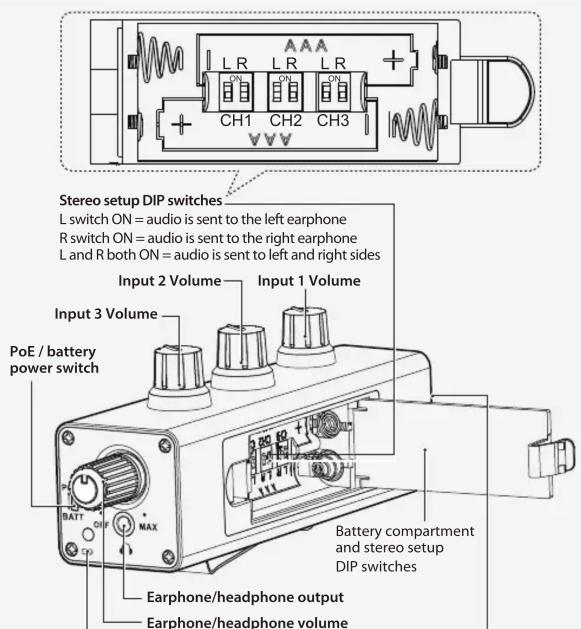
Power LED
PoE mode: solid on
Battery mode:
100% - 20% charged: Blue LED
20% - 10% charged: Pink LED
10% - 0% charged: Red LED
(When the LED is red, the batteries should be replaced)
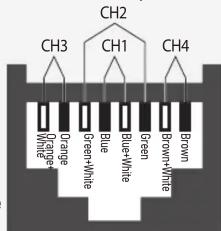
ETHERNET INPUT
CH 1 is input 1 XLR hot and XLR cold, Blue, Blue+White
CH 2 is input 3 XLR hot and XLR cold, Green, Green+White
CH 3 is input 2 XLR hot and XLR cold, Orange, Orange+White
CH 4 is PoE power input, Brown (+), Brown+White (-)
T568B
Ethernet input
APPLICATION EXAMPLES WITH PX-B AND EC25 ETHERNET CABLE
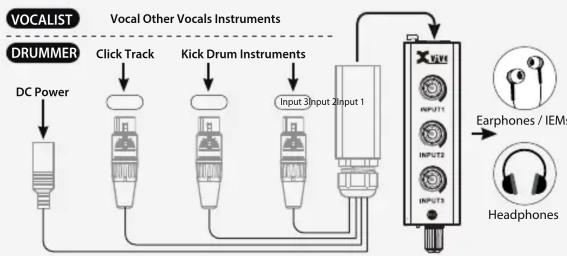
flowchart
graph TD
    A["DRUMMER"] -->|DC Power| B["Headphones"]
    C["Vocal Other Vocals Instruments"] --> D["Adder"]
    E["Input 1 Input 2"] --> F["Device"]
    G["Input 3 Input 4"] --> H["Device"]
    I["Input 5 Input 6"] --> J["Device"]
    K["Input 7 Input 8"] --> L["Device"]
    M["Input 9 Input 10"] --> N["Device"]
    O["Input 11 Input 12"] --> P["Device"]
    Q["Input 13 Input 14"] --> R["Device"]
    S["Input 15 Input 16"] --> T["Device"]
    U["Input 17 Input 18"] --> V["Device"]
    W["Input 19 Input 20"] --> X["Device"]
    Y["Input 21 Input 22"] --> Z["Device"]
    AA["Input 23 Input 24"] --> AB["Device"]
    AC["Input 25 Input 26"] --> AD["Device"]
    AE["Input 27 Input 28"] --> AF["Device"]
    AG["Input 29 Input 30"] --> AH["Device"]
    AI["Input 31 Input 32"] --> AJ["Device"]
    AK["Input 33 Input 34"] --> AL["Device"]
    AM["Input 35 Input 36"] --> AN["Device"]
    AO["Input 37 Input 38"] --> AP["Device"]
    AQ["Input 39 Input 40"] --> AR["Device"]
    AS["Input 41 Input 42"] --> AT["Device"]
    AU["Input 43 Input 44"] --> AV["Device"]
    AW["Input 45 Input 46"] --> AX["Device"]
    AY["Drummer"] --> AZ["Click Track"]
    BA["Kick Drum Instruments"] --> BB["Adder"]
    BC["Input 1"] --> BD["Device"]
    BE["Input 2"] --> BF["Device"]
    BG["Input 3"] --> BH["Device"]
    BI["Input 4"] --> BJ["Device"]
XVIVE CUSTOMER SERVICE
Email: support@xvive.com
Or, you can find your local distributor at www.xvive.com
SHENZHEN FZONE TECHNOLOGY CO., LTD.
2nd floor, Building 12, Xicheng Industrial Area, Xixiang Town, Baoan District,
Shenzhen Guangdong China. 518101

MADE IN CHINA
Brand : Xvive
Model : PX-A
Category : Headphones