
Smart Plug - Smart Plug Growatt - Free user manual and instructions
Find the device manual for free Smart Plug Growatt in PDF.


| Product Type | Smart Plug |
| Brand | Growatt |
| Model | Smart Plug |
| Dimensions (approx.) | 5.0 x 5.0 x 3.5 cm |
| Weight (approx.) | 50 g |
| Power Supply | 230 V AC, 50/60 Hz |
| Rated Current | 10 A |
| Maximum Load | 2300 W |
| Wireless Connectivity | Wi-Fi 2.4 GHz |
| Compatible App | ShinePhone |
| Control Method | Remote control via smartphone app |
| Functions | On/Off, Scheduling, Energy monitoring (if supported) |
| LED Indicator | Wi-Fi status indicator |
| Safety Features | Overload protection, Surge protection |
| Housing Material | Flame-retardant plastic |
| Operating Temperature | 0°C to 40°C |
| Storage Temperature | -20°C to 60°C |
| Humidity Range | 10% to 90% (non-condensing) |
| Certifications | CE, RoHS (assumed) |
| Maintenance | Wipe with a soft, dry cloth; do not use liquids. |
| Repair and Spare Parts | Not user-serviceable; contact professional support. |
Frequently Asked Questions - Smart Plug Growatt
User questions about Smart Plug Growatt
0 question about this device. Answer the ones you know or ask your own.
Ask a new question about this device
Download the instructions for your Smart Plug in PDF format for free! Find your manual Smart Plug - Growatt and take your electronic device back in hand. On this page are published all the documents necessary for the use of your device. Smart Plug by Growatt.
USER MANUAL Smart Plug Growatt
ShinePhone
Download
ShinePhone
Use the QR code on the mobile phone to scan the manual to download the "ShinePhone" APP; (You can also search for "ShinePhone" in the APP store to download the app)
Setting
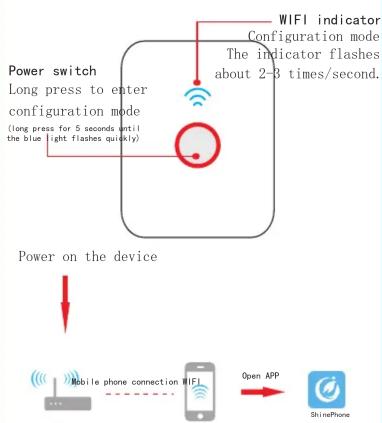
flowchart
graph TD
    A["Power switch"] --> B["Long press to enter configuration mode (long press for 5 seconds until the blue light flashes quickly)"]
    B --> C["WIFI indicator Configuration mode The indicator flashes about 2-3 times/second."]
    D["Power on the device"] --> E["Mobile phone connection WIFI"]
    E --> F["Open APP"]
    F --> G["ShinePhone"]
Register/login
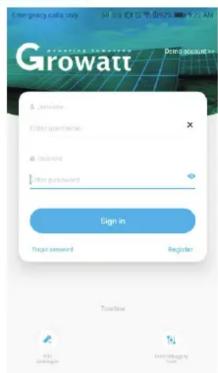
Wh en y ou l og i n to t he a pp f or t he f ir st t th e "L og in /R eg is tr at ion" i nt er fa ce w ap pe ar . If y ou a lr ea dy h av e th e ac co un t Sh in eP ho ne" AP P, y ou c and dir ect tl y se le Lo gi n"; if t he re i s no a cc ount , se le ct "R eg is te r"; fo ll ow t he p romp ts t o com th e op er at ion.
Configuration
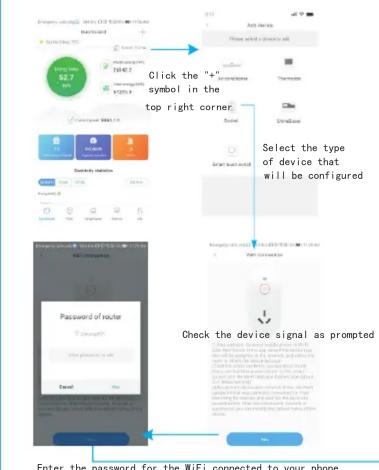
flowchart
graph TD
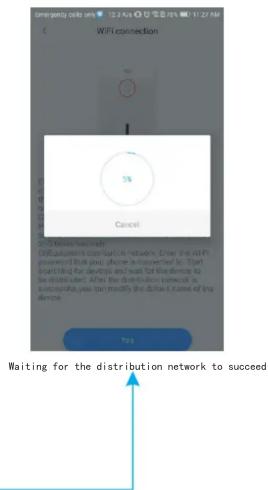
    A["Enter the password for the WiFi connected to your phone."] --> B["Password of router"]
    B --> C{Check the device signal as prompted}
    C -->|Yes| D["Select the type of device that will be configured"]
    C -->|No| E["Select the device symbol in the top right corner"]
    D --> F["Add device"]
    F --> G["Select device symbol in the top right corner"]
    G --> H["User with a device call"]
Configuration
Operation
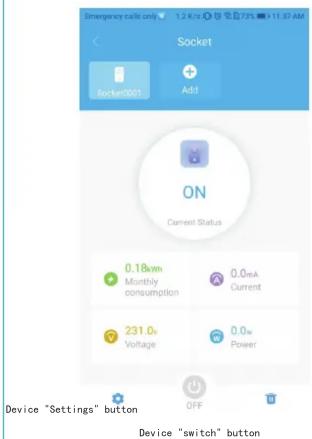
m = 311
Precautions
● There is high prices surre ins id e the e ip ment. I f you ne ed mai nt en an ce, p fi nd a pro fe ss io na l.
Do not exceed the rated load of the ec tr ic al e qu ip ment
- If the WiFi signal lights on, it is at es that the device is di sc on net from the net work or there are ot he no rm al it ie s;
- If the r ou te r na me l in ke d to t he d ev is C hi ne se , th e di st ri bu ti on n et wo ma y fa il .
- Th is pro du ct o nl y su pp or ts 2 .4 G ne and d do es n ot s up po rt w ir el es s ne tw in o th er f re qu en cy b an ds ;
The in terf ace of dif fer rent spe ci fi ions is diff er en t. P le as e re fer to ac tu al i nf or ma ti on of the pr od uc t.
Brand : Growatt
Model : Smart Plug
Category : Smart Plug