
TVWM5880BK - Wall mount NEDIS - Free user manual and instructions
Find the device manual for free TVWM5880BK NEDIS in PDF.


| Product Type | Motorized TV Wall Mount |
| VESA Compatibility | 200x100, 200x200, 300x200, 400x200, 300x300, 400x300, 400x400, 600x400 |
| Movement | Vertical (up/down) with motorized control |
| Motor Type | Electric with control box |
| Remote Control | Included (requires 2 AAA batteries not included) |
| Remote Control Range | ≤10 m (30 ft) |
| Memory Positions | 2 programmable positions (buttons ① and ②) |
| Safety Features | Overheat protection, obstacle detection auto-stop |
| Power Supply | AC/DC adapter (included) |
| Control Box | Included, with pairing button |
| Wall Plate Dimensions | Not specified |
| Mounting Hardware | Includes wall plate, TV bracket, screws (M-A to M-G), washers (W-A to W-C), and various bolts |
| Installation | Requires drilling, leveling, and proper wall anchoring |
| Material | Metal (likely steel) |
| Color | Black |
| Suitable For | Flat-screen TVs within VESA range and weight capacity (check manual for limits) |
| Net Weight | Not specified |
Frequently Asked Questions - TVWM5880BK NEDIS
User questions about TVWM5880BK NEDIS
0 question about this device. Answer the ones you know or ask your own.
Ask a new question about this device
Download the instructions for your Wall mount in PDF format for free! Find your manual TVWM5880BK - NEDIS and take your electronic device back in hand. On this page are published all the documents necessary for the use of your device. TVWM5880BK by NEDIS.
USER MANUAL TVWM5880BK NEDIS
natural_image
Technical line drawing of a mechanical device with no visible text or symbols
| Preparation

What are the specifications you need to know?


200x100 200x200 300x200 400x200 300x300 400x300 400x400 600x400

What are the tools you require while installation?


Things you need to know before installation
Ensure that you have received all parts according to the component checklist prior to installation if any of the components are missing or damaged, contact your local seller for a replacement.
Now let's start the installation.
| Checklist and Installation

A (x1)

B (x2)

C (x2)

D (x2)

E (x2)
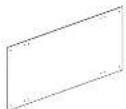
F (x1)
This page can be torn so that it's easier for you to match the components with the images.

Take Wall Placement Measurement
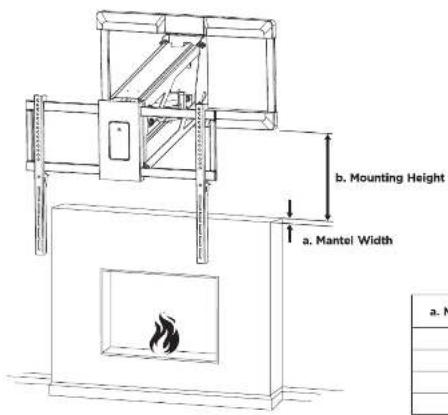

| a. Mantel Width | b. Mounting Height Required |
| ≤100mm | 80mm |
| ≤200mm | 200mm |
| ≤300mm | 250mm |
| ≤350mm | 300mm |
1

natural_image
Technical line drawing of a mechanical device with a circular component on top (no text or symbols)


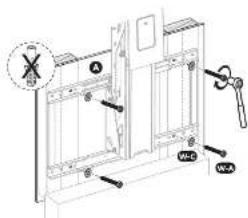

natural_image
Pure technical line drawing of a 3D printer or scanner device without any text, numbers, or symbols



2
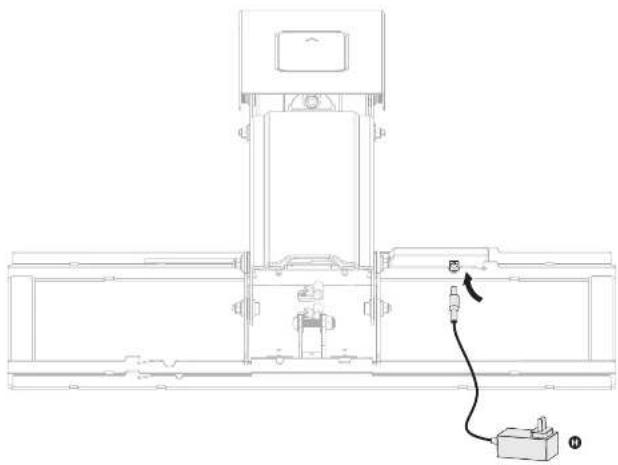
natural_image
Technical line drawing of a mechanical assembly with a cable and connector (no text or symbols)4
3

natural_image
Technical line drawing of a mechanical device with internal components and a power outlet (no text or symbols)
natural_image
Technical illustration of a remote control device with labeled parts (no text or symbols present)4
natural_image
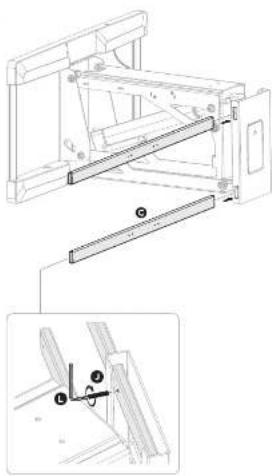
Technical line drawing of a mechanical assembly with an inset showing a close-up view of a component (no text or symbols present)→

natural_image
Technical line drawing of a mechanical assembly with two views (top and side), no visible text or symbols6
7
5

8
6
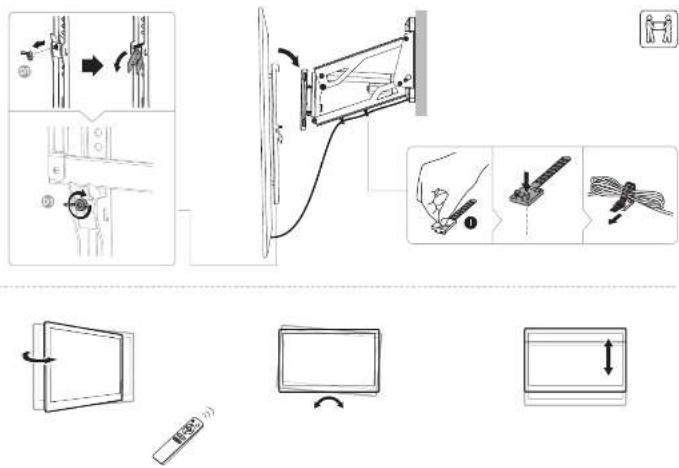
9
Remote Control Operation Instructions

Note: The remote control is powered by two AAA batteries (not included)
A. Button Functiona
1 Upward/Downward Movement
Press and hold the "△" button to lift the mount. Press and hold the "▽" button to lower the mount.
(Tips: Clear up all obstacles within the range of motion)
2 Memory Setting
Long press the "→" or "→" button for 3 seconds until you hear a beep, indicating that the current position has been saved to
memory. The "─" buttons can each store a different position.
- Recall Memory
Press the "①" or "②" button and the mount will automatically get to the position saved in the corresponding button "③" or
"→ Press any button to stop motion.
4 Default Settings
- Default Setting
Short press the ① button and the mouse will automatically reach to the high set position. Push any button to stop motion.
S. Reset Mode
Disconnect the power supply cord. Wait for 10 seconds and reconnect. Press and hold the button for 5 seconds until you hear a beep.
The mount starts to move upward to the highest position and the control box emits double beeps.
& Consort the Mount to a New Device
- Connect the Mount to a New Device
Short press the "button five times, you will hear two beeps at the fifth press, which indicates the mount is disconnecting from the
current paired device. Then follow the Guidebook of Tuya App installation and Operation to connect the mount to a new device.
Note: If the device is failed to search the mount when connecting, follow the above steps or restart the device to re-search the mount.
B. Coding of Remote Control and Control Box
STEPE: When the mount is powered on, press the small button on the control box with a thin tool as shown. The unit will emit a
beep, indicating that the control box is on standby for program coding.
STEP2: Press the "button on the remote control, and the control box repeatedly beeps for approximate 10 seconds indicating
that the remote control is being programmed. The process will be finished automatically until you can't hear a beep any longer.
Note: Clear up the historical data when replacing a new remote control to pair. Press the small button on the control box with hearing
a beep, and hold for 10 seconds to confirm the data-cleaning process is completed until you hear a long beep.
Electrical Safety Instructions
- The appliance is only to be used with the power supply unit provided with the appliance. Alterations of the given power unit aren't allowed.
- Never operate the system with a damaged power supply cord or plug. If any part is damaged, please contact your service agent of purchase for a replacement.
Never operate the system if it's in moist environment or its electrical components has contact with liquids
Don't clean the product while the power is still connected.
Don't disassemble or replace components while the power is still connected.
- Unplug the appliance when the system isn't in use, and place the power plug out of children reach.
Warnings

In Front
The product is powered by electricity. In order to avoid burns, fire and electric shock and make sure the safe and correct use of the system and maintain the longevity of the overall construction and the built-in electronics, please read the instructions carefully.
This appliance can be used by children aged from 8 years and above if they have been given supervision or instruction concerning use of the appliance in a safe way and understand the hazards involved. Children shall not play with the appliance. Cleaning and user maintenance shall not be made by children without supervision.
Persons with reduced physical, sensory or mental capabilities or lack of experience and knowledge must not use the appliance, unless they're under supervision, understand the hazards involved or they have been thoroughly instructed in the use of the apparatus by a person who is responsible for the safety of these persons.
- Don't leave the cords or plug unorganized in order to prevent tripping hazards.
- Any attempts to reconstruct the construction aren't allowed.
TROUBLESHOOTING
If a problem arises, please by the troubleshooting guidelines below. If the problem is not listed, please contact your local distributor for additional technical assistance.
a: The motorized TV mount does not respond to remote control.
A: Possible reasons caused by TV mount or remote control
TV Mount
The system may be overheating. Check if the unit beeps four times after pressing the button. If so, allow the unit to cool down and return to room temperature.
(about 12 minutes)
The AC/DC end of the power cord may be unplugged/disconnect from the outlet/mount. Check the connection to the outlet/mount to ensure the unit has power
Remote Control
- The remote control operating distance may be too far and not in range of the mount. Acceptable range should be less than 10m (30 feet).
- The batteries in the remote control may be low or dead. Replace the batteries.
The remote control may be broken. Check to see if the indicator LED found on the remote lights when a button is pressed. If not, contact your place of purchase for a replacement.
Q: The TV mount stops moving during operation and emits a long beep.
A). Check to see if a foreign object is incoming the mount from moving if so remove the object and discard
The weight of TV may exceed the maximum weight, imitation of the mounting system.
The weight of TV may exceed the maximum height inflation for the mounting system. The motor wire may be broken. Reset too much. If the problem still exists, contact your place of purchase for replacement.
2: The TV may not make an abnormal price or even.
A: Check all power connections and reset the system. If the unit continues to move an abnormal noise, please contact your place of purchase for a replacement.
Disperse: The product with this mark indicates that the product shouldn't be disposed with other household items throughout the 24. To prevent possible harm to the environment or human health from uncontrolled waste disposal, recycle it responsibly to promote the sustainable use of material resources. To return your own device, please use the local service service or contact your own purchase to withdraw the product.
A. EN. IMPORTANT: Failure to read dichotomy understand and leave all
EN
INSTRUCTIONS OF SAFETY AND WASHERS
• Make sure that the mounting surface is strong enough to make a mounted
• DO NOT DROZED THE MAXIMUM LISTED WEIGHT CARACTER
• Always use any assistance or a mechanical lifting device to identify IT and decision, forty weeks.
- Tighten screw limits, but do not pass tighter. Over lodging can cause protection; therefore that prices yet are the closing price.
Keep it a very narrow distance from moving parts when using the product.
- Use of an in-house model, however, that is, being of the same. This product is integrated when use only.
Any attempts to construct the constructed areas allowed. This product may contain various items that could be a choice
continued. Area of water also orders the product is elevated by their level of intubation and pressure are fully unimproved and according to them
* Check that the product is taken and sale for use of regular intervals
THE PROFECT IS LIMITED
THE CHINESE OF INVENTED ELECTRIC CHEESE TO BEANSING THE RISK OF BURNS, FIRE, ELECTRIC CHICK, OR INVEY TO PERSONS
ALWAYS FOLLOW THESE GARDELINES Never comes the wakers all a store
- Don't leave the centre or what unorganize in order to prevent trip-out benefits.
After ceases the system if it is a most environment of its excise communication varied out levels.
- Applying for radial force the electrical initial before sinning as above the voltage field is
- Absorbers of the given power (and use) almost Don't know or
replace transparently within the power in cell junctional thermal cathodeism. The blues are not possible and only are present in both cells and cells.
In fact, you have not yet satisfied with your place here any your place of purchase for assistance.
(1) 2017年公司董事会工作报告
FR
(2) A. C. (1984) is a part of the first stage of the second stage, which is not reported as per request.
• In order to predict, we will be able to provide a free deal.
• Product and product is a product order • Trade limited or non-incentive for
• De product plus demand for products, products and other items are an
8 months out until 10 years, consider a 2-3 range of more than 30 instructions at room 1 and manual service at room 4 are now
• “Volunteer is remarkable signs of the property based on risks and risk? Note in perspective and
- On behalf of the following: In Enfaring direct, an application to work and not computer in electrical work on contact with the records.
- Zotker Ta are Substrate Intl, also said GwandaLgtd as the ShawdGyes
a man's power will be very little businesses, down the requirements and availability of orders is
INTRIVOS DE SEGUROANCA G ANGOS
- Also, all are published equations for questions and requirements in the circumstances
one is limited and allows a complete point other side.
BAXO
• Inflation and inflation concerns, the company's top company, YTD
The following section is also the following sections:
The following table is provided in the image.
Jap (1) Δβi and βi are the same.
العربية مُمْنَّةِ وَلَجْرَهُمْدُ الْأَيْنَّةِ وَلَجْرَهُمْدُ الْأَيْنَّةِ وَلَجْرَهُمْدُ الْأَيْنَّةِ وَلَجْرَهُمْدُ الْأَيْنَّةِ وَلَجْرَهُمْدُ الْأَمْتُ
In order, the a is a 100% of b and c are 100% of d (a), and e is 100% of f (a).
[Non-Text]
2024年1月1日
A IP
[Illegible due to severe distortion and noise]
Brand : NEDIS
Model : TVWM5880BK
Category : Wall mount