
EBE657-U-020 - Oven Exquisit - Free user manual and instructions
Find the device manual for free EBE657-U-020 Exquisit in PDF.


Pick your language and provide your email: we'll send you a specifically translated version.
| Product Type | Built-in Electric Oven |
| Brand | Exquisit |
| Model | EBE657-U-020 |
| Dimensions (H x W x D) | 595 mm x 595 mm x 575 mm |
| Weight | Approx. 35 kg |
| Power Supply | 220-240 V, 50/60 Hz, 16 A |
| Energy Efficiency Class | A |
| Oven Capacity | 71 L |
| Cooking Functions | Conventional, Fan-Assisted, Grill, Defrost, Light |
| Temperature Range | 50 °C to 250 °C |
| Control Type | Rotary Knobs & Digital Timer |
| Interior Material | Enamel, Easy to Clean |
| Cleaning Method | Manual Cleaning with Damp Cloth |
| Safety Features | Child Lock, Automatic Shut-Off, Cool Touch Door |
| Spare Parts Availability | Available from Manufacturer or Authorized Dealers |
| Repairability Index | 8.5 / 10 |
| Included Accessories | 1 Baking Tray, 1 Wire Rack, 1 Grill Pan |
| Installation Type | Built-in (requires cabinet opening) |
Frequently Asked Questions - EBE657-U-020 Exquisit
How do I preheat the oven?
Turn the function knob to the desired mode (e.g., conventional or fan-assisted) and set the temperature using the temperature knob. The oven will heat up; a preheat indicator light turns off when the set temperature is reached.
What is the difference between conventional and fan-assisted cooking?
Conventional (static) heating uses top and bottom elements for even heat, suitable for traditional baking. Fan-assisted circulates hot air via a fan, allowing faster and more even cooking at lower temperatures.
How do I use the grill function?
Select the grill function using the function knob. Place food on the wire rack positioned under the top heating element. Keep the oven door slightly open (if recommended in the manual) and monitor cooking to avoid burning.
How do I clean the oven interior?
After the oven cools, remove racks and trays. Wipe interior with a damp cloth and mild detergent. For stubborn stains, use a non-abrasive cleaner. Avoid using harsh chemicals or scouring pads.
Why is the oven not heating?
Check if the oven is properly plugged in and the circuit breaker is not tripped. Ensure the function and temperature knobs are correctly set. If still not working, contact customer support.
How do I activate the child lock?
Press and hold the child lock button (if available) for 3 seconds until the lock icon appears on the display. To disable, press and hold again.
Can I use aluminum foil in the oven?
Yes, but avoid covering the entire rack or blocking air circulation. Do not let foil touch the heating elements as it may cause fire or damage.
What is the maximum baking tray size?
The maximum recommended tray size is approximately 420 mm x 330 mm. Using trays larger than this may obstruct heat circulation and affect performance.
How do I replace the oven light bulb?
Disconnect the oven from power. Remove the glass cover by turning it counterclockwise. Replace the bulb with a 25W/40W G9 halogen bulb (or as specified). Reattach the cover.
Where can I find the model number?
The model number (EBE657-U-020) is located on the rating plate inside the oven door or on the back panel. It is required for spare parts or service requests.
User questions about EBE657-U-020 Exquisit
0 question about this device. Answer the ones you know or ask your own.
Ask a new question about this device
No questions yet. Be the first to ask one.
Download the instructions for your Oven in PDF format for free! Find your manual EBE657-U-020 - Exquisit and take your electronic device back in hand. On this page are published all the documents necessary for the use of your device. EBE657-U-020 by Exquisit.
USER MANUAL EBE657-U-020 Exquisit
natural_image
Blue background with a circle of twelve yellow stars, representing the European Union flag (no text or symbols beyond the stars)ENERG
енергия · ενεργεια


exquisit
natural_image
Simple line icon of a washing machine connected to a power plug (no text or symbols)A+++
A++
A+
A
B
C
D
A

natural_image
Simple line icon of a laptop with four directional arrows on screen (no text or symbols)59 L

0.75 kWh/cycle*

0.74 kWh/cycle*

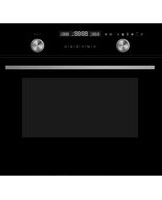

Table of contents
Click a title to access it
Manual assistant
Powered by Anthropic
Waiting for your message
Product information
Brand : Exquisit
Model : EBE657-U-020
Category : Oven