
CUBE-10GX - Guitar amplifier BOSS - Free user manual and instructions
Find the device manual for free CUBE-10GX BOSS in PDF.


| Product Type | Guitar Amplifier |
| Brand | BOSS (Roland) |
| Model | CUBE-10GX |
| Maximum Power Output | 10 W |
| Speaker | 20 cm (8 inches) |
| Amplifier Modeling | COSM: CLEAN (JC-120), CRUNCH (JMP1987), LEAD (Rectifier) |
| Effects | Chorus, Delay, Reverb (including Spring) |
| Controls | POWER switch, AMP TYPE switch, GAIN, VOLUME, BASS, MIDDLE, TREBLE, EFFECT knob |
| Input Connectors | INPUT: 1/4-inch phone type; AUX IN: Stereo miniature phone type |
| Output Connectors | REC OUT/PHONES: Stereo miniature phone type |
| Power Supply | AC adaptor (DC 5.7 V) |
| Current Draw | 700 mA |
| Dimensions (W x D x H) | 346 x 179 x 317 mm (13-5/8 x 7-1/16 x 12-1/2 inches) |
| Weight | 4.7 kg (10 lbs 6 oz) excluding AC adaptor |
| Accessories | Owner's manual, AC adaptor |
| App Control | CUBE-10GX app mode for custom amp types via smartphone (iOS/Android) |
| Recording/Headphone Output | REC OUT/PHONES jack with COSM speaker modeling |
| Safety Features | Protection circuit, proper power on/off sequence recommended |
| Recommended Use | Practice at home, portable |
Frequently Asked Questions - CUBE-10GX BOSS
User questions about CUBE-10GX BOSS
0 question about this device. Answer the ones you know or ask your own.
Ask a new question about this device
Download the instructions for your Guitar amplifier in PDF format for free! Find your manual CUBE-10GX - BOSS and take your electronic device back in hand. On this page are published all the documents necessary for the use of your device. CUBE-10GX by BOSS.
USER MANUAL CUBE-10GX BOSS
natural_image
Front view of a CUBE audio amplifier with hexagonal grid pattern (no text or symbols visible)10-watt output, compact, high-performance guitar amp with built-in 20 cm (8-inch) speaker
Ideal for practicing at home. Its compact size makes it easy to take it with you whenever you need it.
Three types of COSM amplifiers
- Three choices of COSM amp type optimized for electric guitar are provided: CLEAN, CRUNCH, and LEAD. These types cover the tonal range from transparently clean sounds to hard distortion.
- You can customize the CUBE-10GX by using a dedicated smartphone app to replace each COSM amp (CLEAN, CRUNCH, and LEAD) with your own favorite.
Three types of effects
Three types of effect are provided: chorus, delay, and reverb. Reverb also offers spring reverb.
Equipped with an AUX IN jack, which is convenient for your practice sessions
Use this to play along with sounds from an audio player etc.
* COSM (Composite Object Sound Modeling) is proprietary Roland modeling technology, which analyzes the way in which sound is affected by elements such as electronic circuitry, structure, and materials, and combines these elements to reconstruct the desired sound.
Before using this unit, carefully read the sections entitled "USING THE UNIT SAFELY" and "IMPORTANT NOTES" (separate sheet "Read Me First"). These sections provide important information concerning the proper operation of the unit. Additionally, in order to feel assured that you have gained a good grasp of every feature of your new unit, read Owner's Manual in its entirety. This manual should be saved and kept on hand as a convenient reference.
Copyright © 2014 ROLAND CORPORATION
All rights reserved. No part of this publication may be reproduced in any form without the written permission of ROLAND CORPORATION.
Top Panel (Adjusting the Guitar Sound)
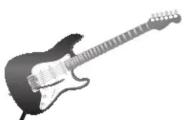
INPUT jack
Connect your guitar here.
EQUALIZER
[BASS] knob
Adjusts the sound level of the low-frequency range.
[MIDDLE] knob
Adjusts the sound level of the middle-frequency range.
[TREBLE] knob
This adjusts the sound level of the high-frequency range.
[POWER] switch
Turns the power on and off.
COSM AMPLIFIER
[AMP TYPE] switch/AMP TYPE indicator
The amp type will change each time you press the switch.
| Indicator Type Explanation | ||
| Green CLEAN | A modeled Roland JC-120 amp | |
| Orange | CRUNCH | A modeled Marshall JMP1987 amp |
| Red LEAD | A modeled MESA/Boogie Rectifier amp | |
To select CUBE-10GX app mode, long-press the [AMP TYPE] switch to make the AMP TYPE indicator blink.
→ refer to "CUBE-10GX App Mode."
To exit CUBE-10GX app mode, press the [AMP TYPE] switch once again.
[GAIN] knob
Adjusts the amount of distortion for the amp.
[VOLUME] knob
Adjusts the volume of the guitar sound.
EFFECT
[EFFECT] knob
Turn this knob to chorus, delay, or reverb to select the corresponding effect.
The position of the knob determines the depth of the effect.
To use spring reverb, set the knob to "SPRING."
Restoring the amp types to the factory settings
Turn on the power while holding down the [AMP TYPE] switch; the AMP TYPE indicator blinks, and the amp types are restored to their factory settings.
Rear Panel (Connecting Your Equipment)
NOTE
To prevent malfunction and equipment failure, always turn down the volume, and turn off all the units before making any connections.
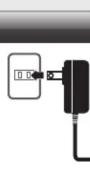
To prevent the inadvertent disruption of power to your unit (should the plug be pulled out accidentally), and to avoid applying undue stress to the DC IN jack, anchor the power cord using the cord hook, as shown in the illustration.
REC OUT/PHONES jack

You can use this either as an output jack for recording or as a headphone jack.
This features COSM speaker modeling, enabling production of impressive guitar sound.

* If a plug is inserted in this jack, no sound will be output from the CUBE's own speaker.
DC IN jack
Connect the included AC adaptor here.
* Use only the included AC adaptor. The use of any other AC adaptor may cause malfunction.
AUX IN jack
Connect an audio player etc.
Stereo mini-plug connection is supported.

* The speaker and REC OUT/PHONES output is mono.
* Determine the volume level by adjusting the volume control of the connected device.
* When connection cables with resistors are used, the volume level of equipment connected to the inputs (AUX IN) may be low. If this happens, use connection cables that do not contain resistors.
* The product names mentioned in this document are registered trademarks or trademarks of their respective owners. In this manual, these names are used because it is the most practical way of describing the sounds that are simulated using COSM technology.
Turning the Power On and Off
Once everything is properly connected, be sure to follow the procedure below to turn on their power. If you turn on equipment in the wrong order, you risk causing malfunction or equipment failure.
When turning the power on: Turn on the CUBE-10GX last.
When turning the power off: Turn off the CUBE-10GX first.
* This unit is equipped with a protection circuit. A brief interval (a few seconds) after turning the unit on is required before it will operate normally.
* Before turning the unit on/off, always be sure to turn the volume down. Even with the volume turned down, you might hear some sound when switching the unit on/off. However, this is normal and does not indicate a malfunction.
CUBE-10GX App Mode
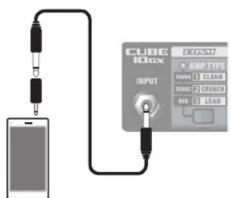
In CUBE-10GX app mode, you can replace the currently selected amp type with an amp type that you select using the dedicated smartphone app, and then store your selection in the CUBE-10GX.
* Connect your smartphone to the CUBE's INPUT. You'll also need an adaptor plug.
For details on the connection, dedicated app, and on CUBE-10GX app mode, refer to the Roland website.
http://www.roland.com/
Main Specifications
Roland CUBE-10GX: Guitar Amplifier
| Maximum Power Output | 10 W |
| Nominal Input Level (1 kHz) | INPUT: -10 dBu (1 MΩ)AUX IN: -10 dBu |
| Speaker 20 cm (8 inches) | |
| Controls | POWER switchAMP TYPE switch(CLEAN, CRUNCH, LEAD)GAIN knobVOLUME knobBASS knobMIDDLE knobTREBLE knobEFFECT knob(CHORUS, DELAY, REVERB, SPRING) |
| Indicator AMP TYPE | |
| Connectors | INPUT jack:1/4-inch phone typeAUX IN jack :Stereo miniature phone typeREC OUT/PHONES jack:Stereo miniature phone typeDC IN jack |
| Power Supply AC adaptor (DC 5.7 V) | |
| Current Draw 700 mA | |
| Dimensions | 346 (W) x 179 (D) x 317 (H) mm13-5/8 (W) x 7-1/16 (D) x 12-1/2 (H) inches |
| Weight | 4.7 kg/10 lbs 6 oz(excluding AC adaptor) |
| Accessories | Owner's manualAC adaptor |
* 0 dBu= 0.775 Vrms
* In the interest of product improvement, the specifications and/or appearance of this unit are subject to change without prior notice.
- 10-watt output, compact, high-performance guitar amp with built-in 20 cm (8-inch) speaker
- Three types of COSM amplifiers
- Three types of effects
- Equipped with an AUX IN jack, which is convenient for your practice sessions
- Top Panel (Adjusting the Guitar Sound)
- EQUALIZER
- [BASS] knob
- [MIDDLE] knob
- [TREBLE] knob
- [POWER] switch
- COSM AMPLIFIER
- [GAIN] knob
- [VOLUME] knob
- EFFECT
- [EFFECT] knob
- Restoring the amp types to the factory settings
- Rear Panel (Connecting Your Equipment)
- NOTE
- REC OUT/PHONES jack
- DC IN jack
- AUX IN jack
- Turning the Power On and Off
- CUBE-10GX App Mode
- Main Specifications
Brand : BOSS
Model : CUBE-10GX
Category : Guitar amplifier