
Tapo T300 - Home Automation TP-LINK - Free user manual and instructions
Find the device manual for free Tapo T300 TP-LINK in PDF.
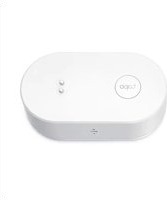


| Product Type | Motion Sensor |
| Brand | TP-Link |
| Model | Tapo T300 |
| Category | Home Automation |
| Dimensions | 5.2 x 4.8 x 2.2 cm (2.05 x 1.89 x 0.87 in) |
| Weight | 35 g (1.23 oz) |
| Power Source | 2 AAA batteries (1.5V each) |
| Battery Life | Up to 1 year under normal usage |
| Connectivity | Wi-Fi 2.4 GHz (IEEE 802.11 b/g/n) |
| Wireless Range | Up to 30 m (indoor, depending on environment) |
| Detection Range | Up to 8 m (110° horizontal, 60° vertical) |
| Operating Temperature | -10°C to 45°C (14°F to 113°F) |
| Operating Humidity | 5% to 95% (non-condensing) |
| Functions | Motion detection, push notifications, smart scene linking, schedule setting |
| Maintenance & Cleaning | Wipe gently with a soft dry cloth; avoid water and solvents |
| Safety | Low battery alert, tamper detection (removal alarm) |
| Spare Parts & Repairability | No user-serviceable parts; replacement recommended if faulty |
| Compatibility | Works with Amazon Alexa, Google Assistant, and TP-Link Tapo app |
| Installation | Wall-mountable with adhesive tape or screws (included) |
Frequently Asked Questions - Tapo T300 TP-LINK
User questions about Tapo T300 TP-LINK
0 question about this device. Answer the ones you know or ask your own.
Ask a new question about this device
Download the instructions for your Home Automation in PDF format for free! Find your manual Tapo T300 - TP-LINK and take your electronic device back in hand. On this page are published all the documents necessary for the use of your device. Tapo T300 by TP-LINK.
USER MANUAL Tapo T300 TP-LINK
User Guide
Tapo Smart Water Leak Sensor
© 2023 TP-Link 1B10013487 REV1.00
Contents
About This Guide 1
Introduction 2
Appearance 3
Tapo Smart Ecosystem 4
Set Up Your Smart Sensor 5
Use Your Smart Sensor 7
How to Reset Your Smart Sensor 9
How to Replace Battery....10
Authentication 11
About This Guide
This guide provides a brief introduction to the Smart Water Leak Sensor and the Tapo app, as well as regulatory information.
Please note that features available in Tapo may vary by model and software version. Tapo availability may also vary by region. All images, steps, and descriptions in this guide are only examples and may not reflect your actual Tapo experience.
Conventions
In this guide, the following convention is used:
| Convention | Description |
| Blue | Key information appears in blue, including management page text such as menus, items, buttons and so on. |
| Underline | Hyperlinks are in blue and underlined. You can click to redirect to a website. |
| ■Note: Ignoring this type of note might result in a malfunction or damage to the device. | |
More Info
- Specifications can be found on the product page at https://www.tapo.com. • Our Technical Support and troubleshooting information can be found at https://www.tapo.com/support/.
- The setup videos can be found at https://www.tp-link.com/support/setup-video/#smart-sensors.
Introduction
The Tapo Smart Water Leak Sensor notifies you via different methods in case of an emergency. Get alerted immediately when a water leak occurs, so you can respond quickly to prevent further damage.
- Drip & Leak Alert - Features 6 highly sensitive sensor probes to quickly and consistently respond to drips and leaks for faster protection of your property.
- Built-in 90 dB Alarm - Alerts you immediately with its adjustable 90 dB alarm when leakage occurs. Press once to silence the alarm after you find the spot.
- Instant App Notifications - Receive an instant app notification when a leak happens. Find out even while away from home to prevent worse water damage.
- Tapo Hub Alarm - Set a Smart Action and trigger the Hub alarm for additional audible alert coverage in your home when water leakage is detected.
- Visible Alarm with Smart Lights - Set up Smart Actions in the Tapo app to get a visual alert from your Tapo smart light bulb before disaster strikes. (Tapo smart lights sold separately)
- IP67 Rating - Provides high-grade water resistance and dust protection and a long service life. Ideal for humid and dusty environments.
- Flexible Placement - No wiring required and simple to use. Place the sensor anywhere leaks or flooding may occur, like near a washing machine, water heater, sink/bathtub, and more.
- 3 Year+ Battery - Uses two replaceable AAA/LR03 batteries (pre-installed out of box) and provides you with up to three years of protection. Receive in-app reminders when the batteries are low. *Battery life of up to 3 years is based on TP-Link's laboratory results when in standby mode. Actual battery life may vary depending on working conditions and environments.
Appearance


① Control Button

② LED Indicator
| Blinking | Enter pairing mode |
| Blinks once | Adjusted alarm volume level to Mute |
| Blinks twice | Adjusted alarm volume level to Low |
| Blinks 3 times | Adjusted alarm volume level to Normal |
| Blinks 4 times | Adjusted alarm volume level to High |
Tapo Smart Ecosystem
Tapo is the easy way to turn your home into a smart home. With the Tapo Hub as a bridge, Tapo Smart Sensor works with a wide range of Tapo accessories. So you can easily control and monitor your home from anywhere.

Set Up Your Smart Sensor
Watch setup videos at https://www.tp-link.com/support/download/tapo-t300/
Before You Start
A Tapo Hub is required. Make sure your Tapo Hub's firmware is updated to the latest version and successfully set up via the Tapo app.

1. Set Up Your Sensor
Tap the Ⓐ button in the Tapo app, tap Sensors, and select your model.

2. Power Up & Check LED
Remove the battery insulation tab to power up your sensor. The LED should blink. Follow the app instructions to complete setup.

3. Test Your Sensor
After setup, single press the control button on your sensor and check if the hub sounds an alarm.

4. Place Your Sensor
Lay the sensor flat to monitor water leaks.

Use Your Smart Sensor
After you successfully set up your hub and sensor, you will see your devices listed on the home page. With the Tapo app, you can view and manage your devices and get instant notifications anytime, anywhere.
Home Page
This page lists all the devices you've added and you can view them directly and manage them easily. Tap the card to enter its Status page.

Home Page Settings
Long press on a card, then you can reorder cards, tap to remove your device from your account, share your device, favorite/unfavorite device, or relocate your device to other Home.

Status Page
You can check the event logs. Slide the panel up to check more settings or tap the gear icon to enter the Settings page.

Featured Smart Actions
The sensor can work with other Tapo devices to automate your home. You can customize smart actions based on the templates.

Device Settings
Check/edit the basic info, set notifications schedules, adjust the alarm volume, or remove your device from your account.

How to Reset Your Smart Sensor
Option 1. Via the Button
Press and hold the button for at least 5 seconds until the LED starts blinking.

Option 2. Via the Tapo App
Long press the card on the home page and tap 📋 or go to the Device Settings page and tap the Remove button to remove your sensor from your account.

OR
How to Replace Battery
a. Remove the two screws securing the batteries and remove the back cover.
b. Replace with the new batteries (AAA/LR03).

Two screws securing batteries

Authentication
FCC Compliance Information Statement

Product Name: Tapo Smart Water Leak Sensor
Model Number: Tapo T300
Responsible party:
TP-Link USA Corporation
Address: 10 Mauchly, Irvine, CA 92618
Website: http://www.tp-link.com/us/
Tel: +1 626 333 0234
This equipment has been tested and found to comply with the limits for a Class B digital device, pursuant to part 15 of the FCC Rules. These limits are designed to provide reasonable protection against harmful interference in a residential installation. This equipment generates, uses and can radiate radio frequency energy and, if not installed and used in accordance with the instructions, may cause harmful interference to radio communications. However, there is no guarantee that interference will not occur in a particular installation. If this equipment does cause harmful interference to radio or television reception, which can be determined by turning the equipment off and on, the user is encouraged to try to correct the interference by one or more of the following measures:
- Reorient or relocate the receiving antenna.
- Increase the separation between the equipment and receiver.
- Connect the equipment into an outlet on a circuit different from that to which the receiver is connected.
- Consult the dealer or an experienced radio/ TV technician for help.
This device complies with part 15 of the FCC Rules. Operation is subject to the following two conditions:
- This device may not cause harmful interference.
- This device must accept any interference received, including interference that may cause undesired operation.
Any changes or modifications not expressly approved by the party responsible for compliance could void the user's authority to operate the equipment.
Note: The manufacturer is not responsible for any radio or TV interference caused by unauthorized modifications to this equipment. Such modifications could void the user's authority to operate the equipment.
FCC RF Radiation Exposure Statement
This equipment complies with FCC RF radiation exposure limits set forth for an uncontrolled environment. This device and its antenna must not be co-located or operating in conjunction with any other antenna or transmitter.
To comply with FCC RF exposure compliance requirements, this grant is applicable to only Mobile Configurations. The antennas used for this transmitter must be installed to provide a separation distance of at least 20 cm from all persons and must not be co-located or operating in conjunction with any other antenna or transmitter.
We, TP-Link USA Corporation, have determined that the equipment shown above complies with the applicable technical standards, FCC part 15. There is no unauthorized change made in the equipment and the equipment is properly maintained and operated.
Issue Date: 2023.08.05
CE Mark Warning
CE
This is a class B product. In a domestic environment, this product may cause radio interference, in which case the user may be required to take adequate measures.
Operating Frequency / Nominal Operating Frequency / Max Output Power:
863~865MHz / 863.35MHz / 25mW (e.r.p)
863~865MHz / 864.35MHz / 25mW (e.r.p)
868~868.6MHz / 868.35MHz / 25mW (e.r.p)
EU declaration of conformity
TP-Link hereby declares that the device is in compliance with the essential requirements and other relevant provisions of directives 2014/53/EU, 2009/125/EC, 2011/65/EU and (EU) 2015/863.
The original EU declaration of conformity may be found at https://www.tapo.com/en/support/ce/
RF Exposure Information
This device meets the EU requirements (2014/53/EU Article 3.1a) on the limitation of exposure of the general public to electromagnetic fields by way of health protection.
The device complies with RF specifications when the device is used at 20 cm from your body.
Restricted to indoor use.
UKCA Mark
UK CA
UK Declaration of Conformity
TP-Link hereby declares that the device is in compliance with the essential requirements and other relevant provisions of the Radio Equipment Regulations 2017.
The original UK declaration of conformity may be found at https://www.tapo.com/support/ukca/
Korea Warning Statements:
- Keep the device away from fire or hot environments.
- Do not attempt to disassemble, repair, or modify the device. If you need service, please contact us.
- Do not use the device where wireless devices are not allowed.
- Please read and follow the above safety information when operating the device. We cannot guarantee that no accidents or damage will occur due to improper use of the device. Please use this product with care and operate at your own risk.
- Do not ingest battery, Chemical Burn Hazard
CAUTION!
Risk of explosion if the battery is replaced by an incorrect type.
CAUTION!
Avoid replacing a battery with an incorrect type that can defeat a safeguard.
Avoid disposing of a battery into fire or a hot oven, or mechanically crushing or cutting a battery, as this can result in an explosion.
Do not leave a battery in an extremely high temperature surrounding environment, as this can result in an explosion or the leakage of flammable liquid or gas. Do not leave a battery subjected to extremely low air pressure, as this may result in an explosion or the leakage of flammable liquid or gas.
Warnings
Operating Temperature: 0 °C–40 °C (32°F–105°F)
Operating Humidity: 10%-90% RH, Non-condensing
Handling Instructions for Battery
Please read and follow the handling instructions for the battery before use. Improper use of the battery may cause heat, fire, explosion, damage, or capacity deterioration of the battery.
Do not place or leave the battery and equipment in the reach of infants so that they are not able to swallow or mistreat the battery by mistake.
In case of ingestion, consult a doctor immediately.
Do not let leaked electrolyte come into contact with eyes or skin.
In such a case, immediately wash the area of contact with clean water and seek help from a doctor.
If not treated soon, prolonged contact may cause serious injury.
- Do not put the battery into a fire. Do not use it or leave it in a place near fire, heaters, or high temperature sources.
In such a case, the insulator in the battery may be melted, the safety vent and structure may be damaged, or the electrolyte may catch fire, all of which may cause heat generation, explosion, or fire.
- Do not submerge the battery in water, or wet the battery.
- Do not use or leave the battery near fire or in a car under the blazing sun. Such a high temperature may cause damage of the protecting device in the battery, which may result in an abnormal reaction, and then heat generation, explosion, or fire.
- Do not connect the battery reversed in positive (+) and negative (-) terminals in the equipment.
- Do not let the battery terminals (+ and -) contact a wire or any metal (like a metal necklace or a hairpin) with which it carried or stored together.
In such a case, the battery will be shorted and cause an excessive current, which may result in heat generation, explosion, or fire.
- Do not connect the battery directly to an electric outlet or cigarette heater socket in car.
With a high voltage applied, the battery may overheat, explode, or cause fire.
- Do not throw or drop the battery.
Strong impact may damage the protecting device, which may cause an abnormal chemical reaction during charging and result in heat generation, explosion, or fire of the battery.
- Do not drive a nail in, hit with a hammer, or stamp on the battery.
In such a case, the battery may be deformed and shorted, which may cause heat generation, explosion, or fire of the battery.
- Do not solder the battery directly.
Heat applied during soldering may damage the insulator of the safety vent and mechanism, which may result in heat generation, explosion, or fire of the battery.
The battery employs a safety mechanism and a protecting device in order to avoid any danger.
If these are damaged, heat, explosion or fire may be caused.
CAUTION
- Do not put the battery in a microwave or a pressure cooker.
Sudden heat may damage the seal of the battery and may cause heat generation, explosion, or fire of the battery.
- Do not use the battery with other maker's batteries, different types and / or models of batteries such as dry batteries, nickel-metal hydride batteries, or nickel-cadmium batteries.
- Do not leave the battery in a equipment if it generates an odor and /or heat, changes color and / or shape, leaks electrolyte, or causes any other abnormality.
- Do not use the battery in the place where the static electricity (more than the limit of the manufacturer's guarantee) occurs. Otherwise, the protecting device in the battery might be damaged and cause heat generation, explosion, or fire.
- Do not use the battery in other than the operating conditions; otherwise, the battery might cause heat generation, damage, or deterioration of its performance.
Please read and follow the above safety information when operating the device. We cannot guarantee that no accidents or damage will occur due to improper use of the device. Please use this product with care and operate at your own risk.
Explanation of the symbols on the product label
Symbols may vary from products
| Symbol Explanation | |
| Class II equipment | |
| Class II equipment with functional earthing | |
| ~ | Alternating current |
| --- | DC voltage |
| Polarity of output terminals | |
| Indoor use only | |
| Dangerous voltage | |
| [GBHG] | Caution, risk of electric shock |
 | Energy efficiency Marking |
 | Protective earth |
 | Earth |
 | Frame or chassis |
 | Functional earthing |
 | Caution, hot surface |
 | Caution |
 | Operator's manual |
 | Stand-by |
 | "ON"/"OFF" (push-push) |
 | Fuse |
 | Fuse is used in neutral N |
 | RECYCLINGThis product bears the selective sorting symbol for Waste electrical and electronic equipment (WEEE). This means that this product must be handled pursuant to European directive 2012/19/EU in order to be recycled or dismantled to minimize its impact on the environment.User has the choice to give his product to a competent recycling organization or to the retailer when he buys a new electrical or electronic equipment. |
 | Caution, avoid listening at high volume levels for long periods |
 | Disconnection, all power plugs |
| m Switch of mini-gap construction | |
| μ | Switch of micro-gap construction (for US version)Switch of micro-gap / micro-disconnection construction (for other versions except US) |
| ε Switch without contact gap (Semiconductor switching device) | |

- USER GUIDE
- TAPO SMART WATER LEAK SENSOR
- CONTENTS
- ABOUT THIS GUIDE
- CONVENTIONS
- MORE INFO
- INTRODUCTION
- APPEARANCE
- ① CONTROL BUTTON
- ② LED INDICATOR
- TAPO SMART ECOSYSTEM
- SET UP YOUR SMART SENSOR
- BEFORE YOU START
- SET UP YOUR SENSOR
- POWER UP & CHECK LED
- TEST YOUR SENSOR
- PLACE YOUR SENSOR
- USE YOUR SMART SENSOR
- HOME PAGE
- HOME PAGE SETTINGS
- STATUS PAGE
- FEATURED SMART ACTIONS
- DEVICE SETTINGS
- HOW TO RESET YOUR SMART SENSOR
- OPTION 1. VIA THE BUTTON
- OPTION 2. VIA THE TAPO APP
- HOW TO REPLACE BATTERY
- AUTHENTICATION
- FCC RF RADIATION EXPOSURE STATEMENT
- CE MARK WARNING
- CE
- OPERATING FREQUENCY / NOMINAL OPERATING FREQUENCY / MAX OUTPUT POWER
- EU DECLARATION OF CONFORMITY
- RF EXPOSURE INFORMATION
- UKCA MARK
- UK CA
- UK DECLARATION OF CONFORMITY
- KOREA WARNING STATEMENTS
- CAUTION
- WARNINGS
- EXPLANATION OF THE SYMBOLS ON THE PRODUCT LABEL
Brand : TP-LINK
Model : Tapo T300
Category : Home Automation