
CBF 221 BIX NF - Refrigerator LERAN - Free user manual and instructions
Find the device manual for free CBF 221 BIX NF LERAN in PDF.


Pick your language and provide your email: we'll send you a specifically translated version.
| Product Type | Refrigerator |
| Brand | LERAN |
| Model | CBF 221 BIX NF |
| Energy Class | A+ |
| Total Net Capacity | 221 L |
| Refrigerator Net Capacity | 180 L |
| Freezer Net Capacity | 41 L |
| Dimensions (H x W x D) | 1550 x 600 x 650 mm |
| Weight | 55 kg |
| Climate Class | N-ST |
| Noise Level | 42 dB |
| Annual Energy Consumption | 220 kWh |
| Adjustable Shelves | Yes, 4 glass shelves |
| Crisper Drawer | Yes, 1 humidity-controlled |
| Freezer Drawers | 3 |
| Cooling System | Static with fan |
| Defrosting | Manual (freezer), automatic (fridge) |
| Interior Light | LED |
| Door Reversible | Yes |
| Refrigerant | R600a |
| Warranty | 2 years |
Frequently Asked Questions - CBF 221 BIX NF LERAN
How do I adjust the temperature on my LERAN CBF 221 BIX NF refrigerator?
Use the temperature control dial inside the fridge compartment. Turn clockwise for colder and counterclockwise for warmer. We recommend setting it to medium (3-4) for optimal performance.
Why is my refrigerator not cooling properly?
Check if the power cord is plugged in and the thermostat is set correctly. Ensure the door seals are clean and airtight. Also, avoid overloading and ensure proper ventilation around the appliance.
How often should I defrost the freezer?
Defrost the freezer when ice buildup exceeds 5 mm (approx. every 6 months). Unplug the appliance, remove food, and let ice melt naturally. Do not use sharp objects.
Can I reverse the door opening direction?
Yes, the door is reversible. Please refer to the user manual for step-by-step instructions. You will need a screwdriver and some basic tools.
What should I do if the interior light is not working?
First, check if the appliance is powered. If the light still doesn't work, the LED bulb may need replacement. Contact a qualified technician or LERAN customer service.
How do I clean the refrigerator?
Unplug the fridge and remove all food. Clean interior surfaces with a mild detergent and warm water. Wipe dry with a soft cloth. Clean the condenser coils at least twice a year.
What is the recommended temperature for storing food?
The ideal temperature for the fridge compartment is between 3°C and 5°C (37-41°F). The freezer should be at -18°C (0°F) or lower.
Why is there water pooling inside the refrigerator?
This may be due to a blocked defrost drain. Check the drain hole at the back of the fridge and clean it with a pipe cleaner or warm water. Also ensure the door is closed properly.
Can I store hot food in the refrigerator?
No, allow hot food to cool to room temperature before placing it in the fridge to avoid raising internal temperature and overworking the compressor.
Where can I find spare parts for my LERAN refrigerator?
Contact LERAN customer service or visit their official website. Authorized service centers carry genuine parts. Use only specified parts to maintain warranty.
User questions about CBF 221 BIX NF LERAN
0 question about this device. Answer the ones you know or ask your own.
Ask a new question about this device
No questions yet. Be the first to ask one.
Download the instructions for your Refrigerator in PDF format for free! Find your manual CBF 221 BIX NF - LERAN and take your electronic device back in hand. On this page are published all the documents necessary for the use of your device. CBF 221 BIX NF by LERAN.
USER MANUAL CBF 221 BIX NF LERAN
natural_image
Symbol of a trash bin crossed with no visible text or labelsnatural_image
Isometric line drawing of a mechanical bracket with a circular hole and curved end (no text or symbols)natural_image
Technical line drawing of a mechanical bracket component (no text or symbols)natural_image
Technical line drawing of a mechanical clamp or bracket component (no text or symbols)natural_image
Technical line drawing of a mechanical clamp or bracket with a screwdriver inserted (no text or symbols)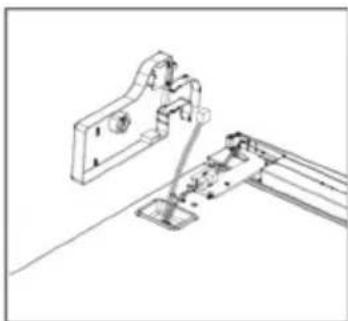
natural_image
Technical line drawing of a mechanical assembly with mounting bracket and railings (no text or symbols)
natural_image
Line drawing of a screwdriver inserted into a component on a flat surface (no text or symbols)
natural_image
Technical line drawing of two mechanical bracket components with mounting holes and a cylindrical base (no text or symbols)
natural_image
Technical line drawing of two mechanical components with mounting holes and a central knob (no text or symbols)natural_image
Pure mechanical diagram showing two symmetrical components with circular features, no text or symbols present
natural_image
Line drawing of a simple rectangular frame with control panels and a small door (no text or symbols)
natural_image
Line drawing of a simple rectangular frame with vertical supports and a small inset panel (no text or symbols)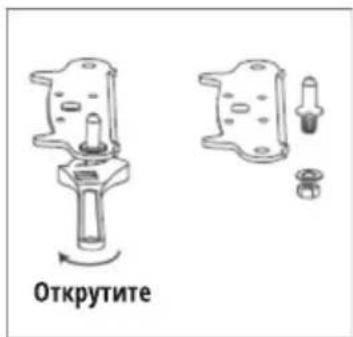
natural_image
Simple line drawing of a rectangular frame with supports and a small inset panel (no text or symbols)
natural_image
Simple line drawing of a rectangular frame with corner supports and a small square marker (no text or symbols)
natural_image
Line drawing of a computer drive chassis with a cable, showing no text or symbols
natural_image
Line drawing of a computer drive casing with ports and cable (no text or symbols)natural_image
Abstract diagram with overlapping geometric shapes and arrows, no readable text or symbols
natural_image
Line drawing of a mechanical clamp or bracket assembly (no text or symbols)
natural_image
Technical line drawing of a screwdriver inserted into a bracket (no text or symbols)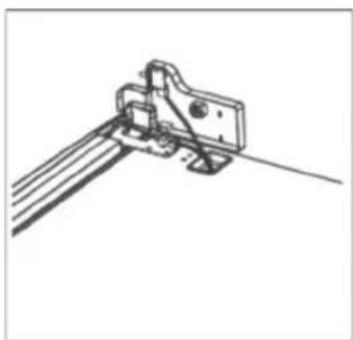
natural_image
Technical line drawing of a mechanical bracket or clamp assembly (no text or symbols)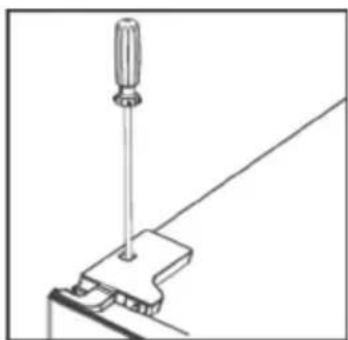
natural_image
Technical line drawing of a screwdriver inserted into a clamp or bracket (no text or symbols)Панель управления
Кнопки
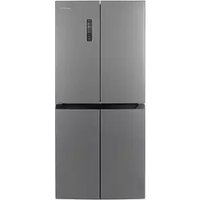
Table of contents
Click a title to access it
Manual assistant
Powered by Anthropic
Waiting for your message
Product information
Brand : LERAN
Model : CBF 221 BIX NF
Category : Refrigerator