
SCT 5052BMR - Radio SENCOR - Free user manual and instructions
Find the device manual for free SCT 5052BMR SENCOR in PDF.


Pick your language and provide your email: we'll send you a specifically translated version.
| Product Type | Portable Radio |
| Brand | Sencor |
| Model | SCT 5052BMR |
| Dimensions (approx.) | 250 x 150 x 80 mm |
| Weight (approx.) | 0.5 kg |
| Power Supply | Batteries (4 x AA) or AC adapter (6V, not included) |
| Band Coverage | FM (87.5-108 MHz), AM (520-1710 kHz) |
| Display | LCD with backlight |
| Preset Stations | 30 (FM) + 30 (AM) |
| Connectivity | Headphone jack (3.5mm), AUX input |
| Alarm Function | Clock, alarm, sleep timer, snooze |
| Antenna | Telescopic rod antenna for FM |
| Speaker | Built-in, mono, 3W |
| Controls | Buttons for volume, tuning, mode, and settings |
| Additional Features | RDS (Radio Data System), Auto-scan, Stereo indicator |
| Safety | Do not expose to moisture or extreme temperatures. Use only specified batteries and adapters. |
| Maintenance | Clean with a soft, dry cloth. Avoid solvents. |
| Spare Parts | Batteries (AA), optional AC adapter (model not specified) |
| Reparability | Battery compartment accessible; internal components not user-serviceable |
| Included in Box | Radio, user manual |
Frequently Asked Questions - SCT 5052BMR SENCOR
How do I set the clock on my Sencor SCT 5052BMR radio?
Press and hold the Clock button until the hour flashes. Use the Tuning +/- buttons to adjust, then press Clock again to set minutes. Press Clock once more to confirm.
How can I preset radio stations?
Tune to the desired station. Press and hold a Preset button (1-30) until you hear a beep. The station is saved.
Does this radio support RDS?
Yes, it displays RDS information like station name and song title where available.
What type of batteries does the SCT 5052BMR use?
It uses 4 x AA batteries (not included). You can also power it with a 6V DC adapter (not included).
How do I set the alarm?
Press the Alarm button repeatedly to select alarm 1 or 2. When the time flashes, adjust with the Tuning buttons. Press Alarm again to set the wake-up source (buzzer or radio) and confirm.
Why is the FM reception poor?
Fully extend the telescopic antenna. For best reception, place the radio near a window and away from electronic interference.
Can I use headphones with this radio?
Yes, there is a 3.5mm headphone jack on the side. Inserting headphones will mute the built-in speaker.
How do I use the sleep timer?
Press the Sleep button repeatedly to set the timer (15, 30, 60, 90 minutes). The radio will turn off automatically after the set time.
What does the 'TA' button do?
TA stands for Traffic Announcement. When enabled, the radio will temporarily switch to a traffic announcement if available, then return to the previous source.
How do I reset the radio to factory settings?
With the radio on, press and hold the Reset button (usually recessed) for 5 seconds. All presets and settings will be cleared.
User questions about SCT 5052BMR SENCOR
0 question about this device. Answer the ones you know or ask your own.
Ask a new question about this device
No questions yet. Be the first to ask one.
Download the instructions for your Radio in PDF format for free! Find your manual SCT 5052BMR - SENCOR and take your electronic device back in hand. On this page are published all the documents necessary for the use of your device. SCT 5052BMR by SENCOR.
USER MANUAL SCT 5052BMR SENCOR
Odstranění
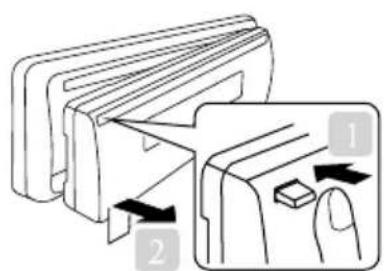
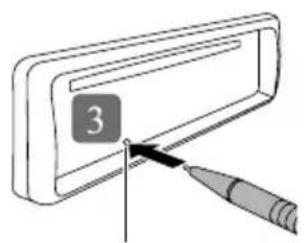
Resetování
natural_image
Isometric line drawing of a rectangular electronic device housing (no text or symbols visible)natural_image
Technical line drawing of a mechanical component with no visible text or symbolsPřední panel
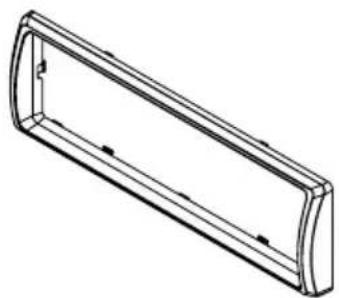
natural_image
Technical line drawing of a rectangular mechanical part with curved ends and internal features (no text or symbols)Přední rámeček
natural_image
Two electronic component packages labeled A and B, showing parallel leads (no text or symbols beyond labels)ISO konektor (A/B)

natural_image
Simple line drawing of a rectangular block with three horizontal layers (no text or symbols)4. INSTALACE PŘÍSTROJE
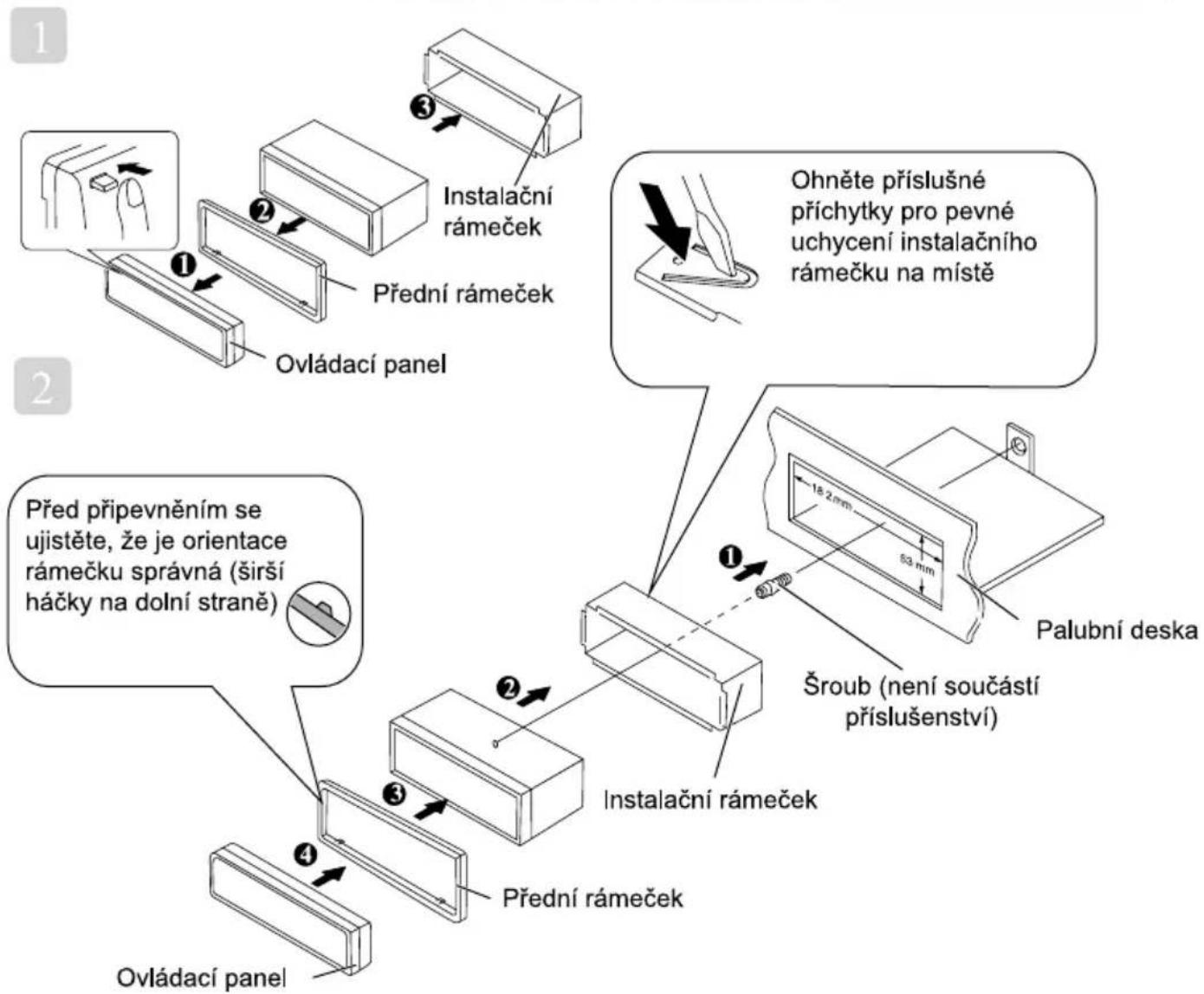
AF (Alternative Frequencies)
TA (Traffic Announcement)
PI (Program Identification)
PS (Program Service Name)
TP (Traffic Program)
PTY (Program Type Codes)
natural_image
Illustration of a hand using a tool to adjust or install a component, showing a magnified view of the switch mechanism (no text or symbols present)
Table of contents
Click a title to access it
Manual assistant
Powered by Anthropic
Waiting for your message
Product information
Brand : SENCOR
Model : SCT 5052BMR
Category : Radio