
DWA-185 - Uncategorized D-LINK - Free user manual and instructions
Find the device manual for free DWA-185 D-LINK in PDF.


| Product Type | Wireless USB Adapter |
| Model | DWA-185 |
| Brand | D-Link |
| Wireless Standard | IEEE 802.11ac |
| Frequency Band | 2.4 GHz / 5 GHz |
| Maximum Speed | Up to 600 Mbps |
| Interface | USB 2.0 |
| Antenna | Internal |
| Security | WPA/WPA2, WEP |
| Dimensions | 42 x 18 x 10 mm |
| Weight | 10 g |
| Power Source | USB bus-powered |
| Supported Operating Systems | Windows, Mac OS X, Linux |
| Operating Temperature | 0°C to 40°C |
| Storage Temperature | -20°C to 70°C |
| Humidity | 10% to 90% non-condensing |
| Compliance | FCC, CE |
| LED Indicators | Link/Activity |
| Maintenance | Clean with dry cloth; avoid liquids |
Frequently Asked Questions - DWA-185 D-LINK
User questions about DWA-185 D-LINK
0 question about this device. Answer the ones you know or ask your own.
Ask a new question about this device
Download the instructions for your Uncategorized in PDF format for free! Find your manual DWA-185 - D-LINK and take your electronic device back in hand. On this page are published all the documents necessary for the use of your device. DWA-185 by D-LINK.
USER MANUAL DWA-185 D-LINK
Wireless AC Wave 2 Technology
Browse websites, stream videos, chat or play online games without lag, using the Wireless AC1300 with MU-MIMO technology
Dual-Band Connectivity
Utilising dual-band connectivity for blazing-fast, interference-free bandwidth
Enhanced Wireless Range
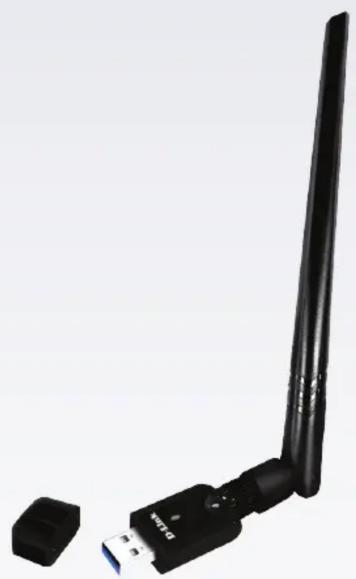
High-gain antenna allows for enhanced wireless reception and reliable connection
natural_image
Black USB device with extended left antenna and external port, isolated on white background (no text or symbols visible)DWA-185
AC1300 MU-MIMO Wi-Fi USB Adapter
Features
Dual band 802.11ac Wave 2 Technology
- Fully utilise the power and speed of your Wireless AC Wave 2 network ^1
- Dual Band technology offers flexibility and versatility depending on your connectivity needs
- MU-MIMO support to get the most from your Wireless AC Wave 2 Wi-Fi router
- USB 3.0 support maximises data transfer speeds for compatible devices ^2
Enhanced Wireless Security
- Connect to wireless networks securely using the latest encryption methods
• Supports WPA3 encryption for high-level wireless security
Extended Wireless Range
- Detachable high-gain omni-directional 5 dBi antenna with integrated omni-directional 2 dBi antenna
The AC1300 MU-MIMO Wi-Fi USB Adapter delivers powerful Wireless AC technology to your desktop or notebook computer. Simply plug the adapter into an available USB port and connect to a wireless network to access a secure, high-speed Internet connection over the 2.4 GHz (400 Mbps) or 5 GHz (up to 867 Mbps) bands ^1 . In addition, the detachable high-gain antenna provides extended range to give you a faster and more reliable connection. MU-MIMO support allows you to get the most from any Wireless AC Wave 2 routers for optimised network efficiency and performance.
802.11ac Wave 2 for Improved Performance
The AC1300 MU-MIMO Wi-Fi USB Adapter features the updated 802.11ac Wave 2 specification, which improves on the bandwidth and speed of 802.11ac Wave 1. The new and improved specification increases maximum speed for the 5 GHz band and adds more channels for a faster connection and less RF interference.
Interference-Free Bandwidth
The AC1300 MU-MIMO Wi-Fi USB Adapter delivers Dual Band MU-MIMO technology to your home network for intelligent, versatile, interference-free bandwidth. Check your email, surf the Internet on the 2.4 GHz band, or play online games, make VoIP calls, and stream HD movies to multiple devices using the cleaner, interference-free 5 GHz band.
USB 3.0 for Maximum Data Transfer Speeds
The AC1300 MU-MIMO Wi-Fi USB Adapter also supports the high-speed USB 3.0 specification. When connected to a compatible USB 3.0 device and using the 5 GHz wireless band, the device will automatically switch to USB 3.0 mode, allowing you to achieve the highest possible data transfer rates and fully utilise the speed benefits of the Wireless AC Wave 2 standard.
| Technical Specifications | |
| General Specifications | |
| Interfaces • USB 3.0 | 2 |
| LED • Status | |
| Standards • IEEE 802.11a/b/g/n/ac/ac Wave 2 | |
| Maximum Wireless Speed1 | • 867 Mbps (5 GHz) • 300 Mbps (2.4 GHz) |
| Security • 64/128-bit WEP | • Wi-Fi Protected Setup (WPS)WPA/WPA2/WPA3 |
| Antenna Type | • Detachable 5 dBi antenna • Integrated 2 dBi antenna |
| Requirements | |
| Operating System • Windows 7/8/10 | • LinuxMac OS |
| Interface • USB port | 2 |
| Physical | |
| Dimensions • 47 x 20.5 x 12 mm | |
| Temperature • Operating: 0 to 40 °C • Storage: -40 to 70 °C | |
| Humidity | • 10% to 90% (non-condensing) • 5% to 95% (non-condensing) |
| Certifications | • CE |
^1 Maximum wireless signal rate derived from IEEE 802.11ac specification. Actual data throughput will vary. Network conditions and environmental factors, including volume of network traffic, building materials and construction, and network overhead, lower actual data throughput rate. Environmental factors may adversely affect wireless signal range.
2 Using a USB 1.1 or USB 2.0 port will affect device performance. USB 3.0 port is recommended

For more information: eu.dlink.com
D-Link (Deutschland) GmbH, Schwalbacher Strasse 74, 65760 Eschborn, Germany
D-Link (Europe) Ltd, Artemis Building, Odyssey Business Park, West End Road, South Ruislip HA4 6QE, United Kingdom
Specifications are subject to change without notice. D-Link is a registered trademark of D-Link Corporation and its overseas subsidiaries. All other trademarks belong to their respective owners. ©2022 D-Link Corporation. All rights reserved. E&OE.
Updated August 2022
Brand : D-LINK
Model : DWA-185
Category : Uncategorized