
SLSBIN21 - Uncategorized SereneLife - Free user manual and instructions
Find the device manual for free SLSBIN21 SereneLife in PDF.


| Product Type | Storage Bin with Combination Lock |
| Brand | SereneLife |
| Model | SLSBIN21 |
| Internal Capacity | 21 Gallons (78 Liters) |
| Maximum Load | 100+ lbs (45+ kg) |
| Material | Reinforced Engineered ABS Plastic |
| Lock Type | Manual 4-Digit Numeric Combination |
| Dimensions (External) | 9.3 x 16.3 x 23.2 inches (23.6 x 41.4 x 58.9 cm) |
| Weight | Approximately 12 lbs (5.4 kg) |
| Construction | Heavy-Duty, Impact Resistant, Scratch & Stain Resistant |
| Opening Mechanism | Lift-Top Hinges |
| Handle | Side Panel Carry Handle Grips |
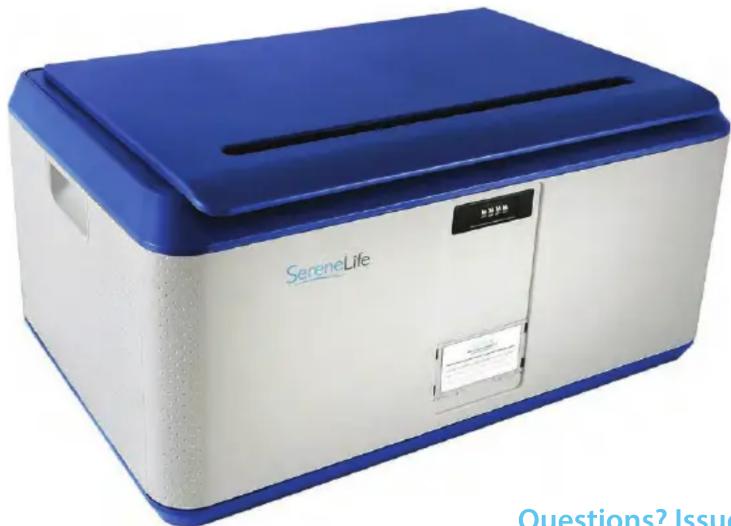
| Color | Black (as pictured) |
| Assembly Required | Yes (detailed instructions included) |
| Custom Passcode | User-Defined, Set via Internal Switch |
| Default Passcode | 0000 |
| Usage | Home, Office, School, Business, Mobile |
| Warranty | Contact manufacturer for details |
| Cleaning | Wipe with damp cloth; mild detergent if needed |
| Climate Resistance | Indoor use recommended, can withstand light outdoor exposure |
Frequently Asked Questions - SLSBIN21 SereneLife
User questions about SLSBIN21 SereneLife
0 question about this device. Answer the ones you know or ask your own.
Ask a new question about this device
Download the instructions for your Uncategorized in PDF format for free! Find your manual SLSBIN21 - SereneLife and take your electronic device back in hand. On this page are published all the documents necessary for the use of your device. SLSBIN21 by SereneLife.
USER MANUAL SLSBIN21 SereneLife
ASSEMBLY INSTRUCTIONS & LAYOUT
Please Note:
-
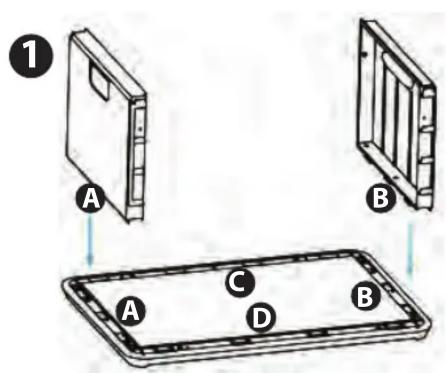
Be sure to check the letters marked on the sides of the bin and align as shown in the images for proper orientation.
• Reference the images on the corresponding page! -
Lay the bottom of the bin down and starl by adding in the side plates.
- You will feel the plastic latch engage when the sides are firmly pressed into place.
-
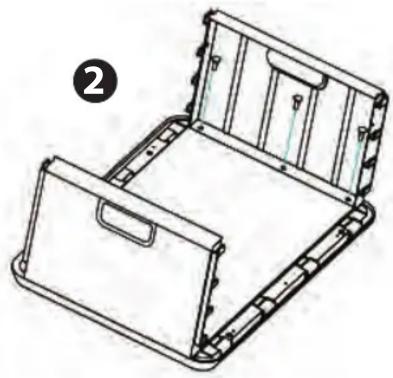
Add 3 screws each side to secure in the side plates.
-
Now we add the front and back plates.
-
First align the front and back plates with the side plates in the "Y" direction, and push down latching onto the base.
-
Then push in to secure the latches in the "X" direction latching to the side plates.
-
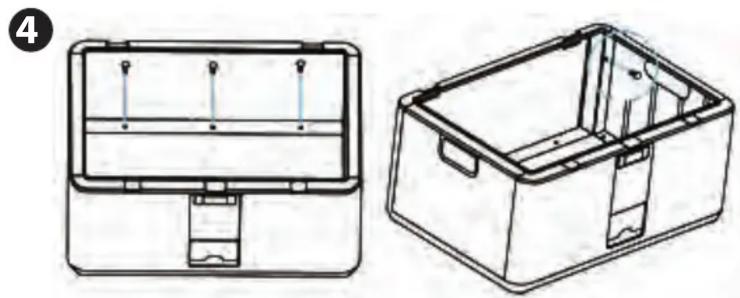
Add 3 screws on each side to secure in the front and back plates to the bottom panel.
- Add 4 screws (See second image) in the comers to securely attach the front and back plates to each side plate.
-
Align the hinge of the lid and attach with 2 screws on each side.
-
Set your own password following instructions below.
natural_image
Technical line drawing of a mechanical device with internal compartments and mounting brackets (no text or symbols)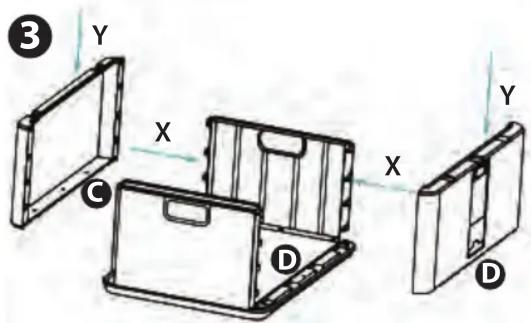
natural_image
Technical line drawing of a two-part mechanical device with internal compartments and mounting points (no text or symbols)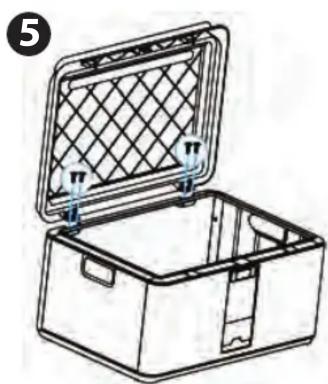
natural_image
Line drawing of an open plastic container with a mesh lid and side clips (no text or symbols)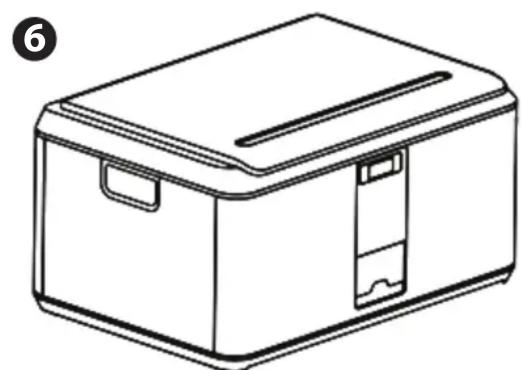
natural_image
Line drawing of a rectangular electronic device with lid and side slots (no text or symbols)HOW TO SET A CUSTOM PASS CODE:
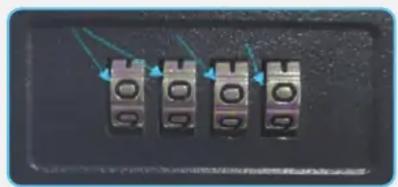
- Adjust the pin to your current pass code (By default, the lock pin is set to "0000").
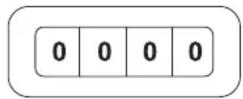
- Completely remove the top drawer from the cabinet and on the inside of the cabinet switch the lever located on the lock from the B to A position.

- While lever is in A position - set the desired new code. Make sure the 4 dials you set are exactly parallel and lined up - you don't want to set to the wrong number by mistake! (Sample below).
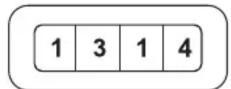
- Once your new pass code is entered, change the lever back from A to the B position.

- Make sure to write down & remember your code! There is no way to recover it once it is set!
If you want to change the pass code, follow this steps:
Step 1: Seeing from the gaps, pull the 4 lock of the gaps unified to the same orientation
Step 2: Such as the gap unified direction in the above figure 0 position, pull each lock pull 5 times, but ensure that each pull only a number
Step 3: After the second step is completed, you can open and change the new lock
natural_image
Close-up of four metallic connector terminals with green wiring (no visible text or symbols)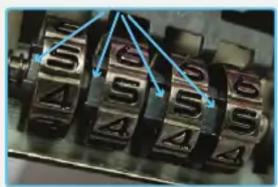
Features:
- Convenient Storage Box Solution
- Integrated Combination Lock for Security
- User-Defined Number Pass Code Setting
- Safe, Rugged, Reliable Construction
• Heavy-Duty Impact Resistance
• Anti-Scratch & Stain-Resistant Housing - Easy Access Lift-Top Hinges
- Clean & Streamline Modern Style
- Side Panel Carry Handle Grips
- Perfect for Home, Office, School, Business & Mobile Use
Technical Specs:
- Internal Storage Capacity: 21 Gallon/78 Liter
• Maximum Support Weight: 100+ lbs. - Construction Material: Reinforced Engineered ABS
• Pass Code Type: Manual 4-Digit, Numerical
• Dimensions: 9.3" x 16.3" x 23.2"
Questions? Issues?
We are here to help!
Phone: (1) 718-535-1800
Email: support@pyleusa.com
Brand : SereneLife
Model : SLSBIN21
Category : Uncategorized