
Wezzer PLUS LP10 - Weather station Levenhuk - Free user manual and instructions
Find the device manual for free Wezzer PLUS LP10 Levenhuk in PDF.


| Product Type | Thermohygrometer (Weather Station) |
| Brand | Levenhuk |
| Model | Wezzer PLUS LP10 |
| Temperature Measurement Range | -10 to +50 °C |
| Temperature Units | °C |
| Humidity Measurement Range | 10 to 99% RH |
| Humidity Units | % (RH) |
| Time Format | 12-hour / 24-hour selectable |
| Weekday Display Language | English |
| Display Type | Color LCD with LED backlight |
| Backlight Control | LIGHT button |
| Power Supply Options | AC/DC adapter 5V 500 mA (not included) or 3× AAA batteries (not included) |
| Included Cable | USB cable, 1.5 m (4.9 ft) |
| Dimensions (H×W×D) | 200 × 25 × 200 mm (7.8 × 0.9 × 7.8 in) |
| Included Items | Thermohygrometer, USB cable, user manual, warranty card |
| Warranty | Lifetime (product); 6 months (accessories) |
| Recommended Use | Indoor home or office environment |
| Features | Calendar, week display, table stand, battery backup |
Frequently Asked Questions - Wezzer PLUS LP10 Levenhuk
User questions about Wezzer PLUS LP10 Levenhuk
0 question about this device. Answer the ones you know or ask your own.
Ask a new question about this device
Download the instructions for your Weather station in PDF format for free! Find your manual Wezzer PLUS LP10 - Levenhuk and take your electronic device back in hand. On this page are published all the documents necessary for the use of your device. Wezzer PLUS LP10 by Levenhuk.
USER MANUAL Wezzer PLUS LP10 Levenhuk
Levenhuk Wezzer PLUS LP10 Thermohygrometer
EN User Manual
Levenhuk® is a registered trademark of Levenhuk, Inc. © 2006–2022 Levenhuk, Inc. All rights reserved.
www.levenhuk.com
levenhuk
Zoom&Joy
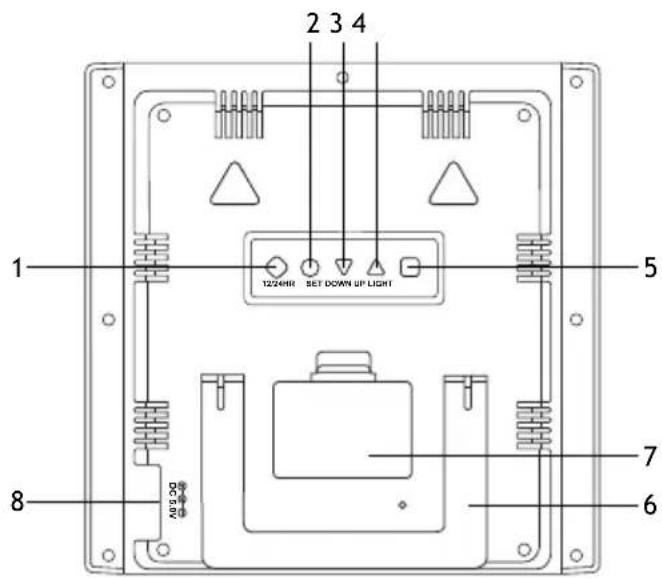
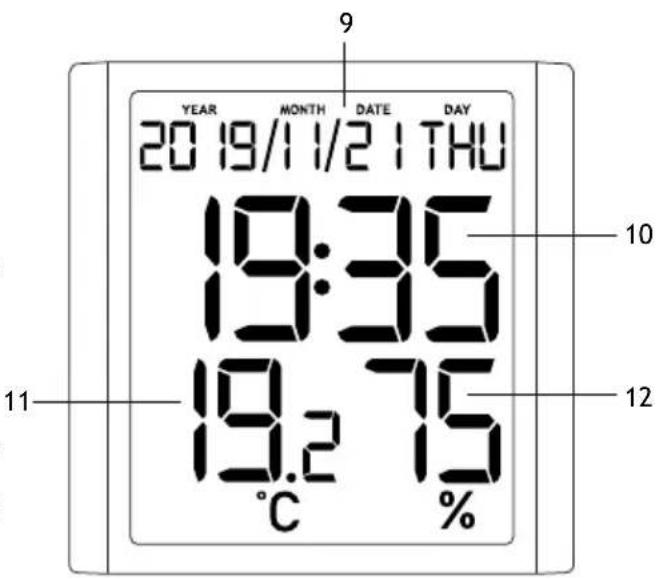
EN Parts overview and screen interface
1 12/24HR button
2 SET button
3 DOWN button
4 UP button
5 LIGHT button
6 Table stand (fold-out)
7 Battery compartment
8 Power input
9 Calendar and week display
10 Time display
11 Indoor temperature
12 Indoor humidity
The kit includes: thermohygrometer, USB cable, user manual, and warranty.

Caution! Please remember that mains voltage in most European countries is 220–240V. If you want to use your device in a country with a different mains voltage standard, remember that use of a converter is absolutely necessary.
Getting started
- Connect the power cable to the device and the DC adapter (not included) via a USB plug and connect to the AC power supply; or
- Open the battery compartment cover (7) and insert 3 batteries according to the correct polarity. Close the cover.

NOTE! It is recommended to use an adapter for the continuous operation of the base station, although battery power is also possible.
- Wait until the indoor temperature is displayed on the base station.
Time setting
Press the SET button and hold it for 3 seconds. The digits that are to be set are flashing. Press UP or DOWN to change the value, and then press SET to continue.
The setting order: Year > Month > Date > Hours > Minutes.
The language and the selected abbreviations for each day of the week are shown in the following table.
| Language Mon | day Tuesday | Wednesday | Thursday Friad | Saturday Suncay | |||
| English, EN M | ON TUE WED | THU FRI SAT SUN | |||||
Backlight
Press the LIGHT button to turn on the backlight.
Specifications
| Type | thermohygrometer |
| Air humidity, units of measurement | % (RH) |
| Operating humidity range | 10... 99% |
| Temperature, units of measurement | °C |
| Operating temperature range | -10... +50 °C |
| Time format | 24 hours, 12 hours |
| Weekday display language | English |
| Screen | color, with an LED backlight |
| Power supply | AC/DC adapter 5V 500 mA (not included), 3 AAA batteries (not included) |
| USB cable | 1.5m (4.9ft.), included |
| Dimensions | 200x25x200 mm (7.8x0.9x7.8in.) |
The manufacturer reserves the right to make changes to the product range and specifications without prior notice.
Care and maintenance
- Take the necessary precautions when using the device with children or others who have not read or who do not fully understand these instructions.
- Do not try to disassemble the device on your own for any reason. For repairs and cleaning of any kind, please contact your local specialized service center.
- Protect the device from sudden impact and excessive mechanical force.
- Store the device in a dry, cool place away from hazardous acids and other chemicals, away from heaters, open fire, and other sources of high temperatures.
- Operate the device only in a completely dry environment and do not touch the device with wet or damp body parts.
- Only use accessories and spare parts for this device that comply with the technical specifications.
- Check this device and its cables and connections for any possible damage before use.
- Never attempt to operate a damaged device or a device with damaged electrical parts! Damaged parts must be replaced immediately by an authorized service agent.
- If a part of the device or battery is swallowed, seek medical attention immediately.
- Children should use the device under adult supervision only.
Battery safety instructions
Always purchase the correct size and grade of battery most suitable for the intended use. Always replace the whole set of batteries at one time; taking care not to mix old and new ones, or batteries of different types. Clean the battery contacts and also those of the device prior to battery installation. Make sure the batteries are installed correctly with regard to polarity (+ and -). Remove batteries from equipment that is not to be used for an extended period of time. Remove used batteries promptly. Never short-circuit batteries as this may lead to high temperatures, leakage, or explosion. Never heat batteries in order to revive them. Do not disassemble batteries. Remember to switch off devices after use. Keep batteries out of the reach of children, to avoid risk of ingestion, suffocation, or poisoning. Utilize used batteries as prescribed by your country's laws.
Levenhuk International Lifetime Warranty
All Levenhuk telescopes, microscopes, binoculars, and other optical products, except for their accessories, carry a lifetime warranty against defects in materials and workmanship. A lifetime warranty is a guarantee on the lifetime of the product on the market. All Levenhuk accessories are warranted to be free of defects in materials and workmanship for six months from the purchase date. The warranty entitles you to the free repair or replacement of the Levenhuk product in any country where a Levenhuk office is located if all the warranty conditions are met.
For further details, please visit: www.levenhuk.com/warranty
If warranty problems arise, or if you need assistance in using your product, contact the local Levenhuk branch.
BG
The original Levenhuk cleaning accessories

natural_image
Four black-and-white icons representing telescope, Hubble, microscope, and camera (no text or symbols)Levenhuk Cleaning Pen LP10

natural_image
Black levenhuk handheld hairdryer tool with handle and spout (no visible text or symbols)- Removes dust with a brush
- The soft tip is treated with a special cleaning fluid that removes greasy stains
- Does not damage optical coatings of the lenses
• Leaves no smudges or stains
Levenhuk Inc. (USA): 928 E 124th Ave. Ste D, Tampa, FL 33612, USA,
+1-813-468-3001,contact_us@levenhuk.com
Levenhuk Optics s.r.o. (Europe): V Chotejně 700/7, 102 00 Prague
102, Czech Republic, +420 737-004-919, sales-info@levenhuk.cz
Levenhuk ^® is a registered trademark of Levenhuk, Inc.
© 2006–2022 Levenhuk, Inc. All rights reserved.
www.levenhuk.com
16112021
Brand : Levenhuk
Model : Wezzer PLUS LP10
Category : Weather station