
Osmo Action 3 Multifunctional Battery Case - Battery charger DJI - Free user manual and instructions
Find the device manual for free Osmo Action 3 Multifunctional Battery Case DJI in PDF.


| Product Type | Multifunctional Battery Case/Charger |
| Brand | DJI |
| Model | Osmo Action 3 Multifunctional Battery Case |
| Compatible Batteries | DJI Osmo Action 3 Standard Batteries (1770 mAh, 7.7 V) |
| Number of Battery Slots | 3 |
| Charging Input | USB-C, 5V – 12V, up to 18W |
| Charging Output per Slot | 8.8V – 0.8A max (single slot) |
| Charging Time | Approx. 2.5 hours for 3 batteries (using 18W charger) |
| Dimensions | Approx. 130 x 75 x 33 mm |
| Weight | Approx. 135 g (without batteries) |
| Material | Polycarbonate, silicone grips |
| Protection Features | Overcharge, over-discharge, short circuit, temperature control |
| LED Indicators | 3 LEDs per slot (charging status) |
| Operating Temperature | 0°C to 45°C (charging) |
| Storage Function | Yes, protects batteries when not in use |
| Included Accessories | Battery case, USB-C cable (not included in some packages) |
| Maintenance | Clean with dry cloth, avoid moisture |
| Safety Warnings | Use only DJI approved chargers; do not disassemble |
| Repairability | Non-user serviceable; contact DJI support |
Frequently Asked Questions - Osmo Action 3 Multifunctional Battery Case DJI
User questions about Osmo Action 3 Multifunctional Battery Case DJI
0 question about this device. Answer the ones you know or ask your own.
Ask a new question about this device
Download the instructions for your Battery charger in PDF format for free! Find your manual Osmo Action 3 Multifunctional Battery Case - DJI and take your electronic device back in hand. On this page are published all the documents necessary for the use of your device. Osmo Action 3 Multifunctional Battery Case by DJI.
USER MANUAL Osmo Action 3 Multifunctional Battery Case DJI
Multifunctional Battery Case
Product Information
产品信息
產品資訊
製品情報
제품 정보
Produktinformationen
natural_image
Line drawing of a rectangular electronic device casing with buttons and a square button (no text or symbols)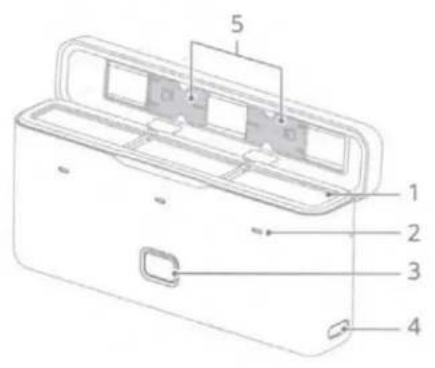
natural_image
Diagram of a device casing with internal compartments and an upward arrow indicating motion (no text or symbols)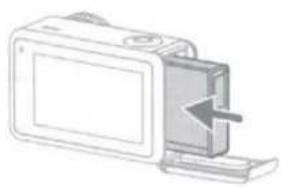
natural_image
Diagram of a device with an arrow pointing to a component, no text or symbols present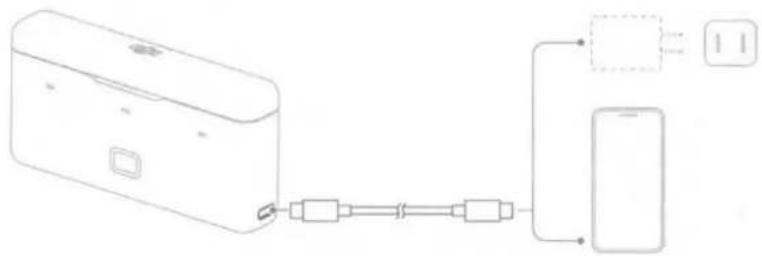
flowchart
graph LR
    A["Device"] --> B["Port 1"]
    A --> C["Port 2"]
    A --> D["Port 3"]
    A --> E["Port 4"]
    A --> F["Port 5"]
    G["Smartphone"] --> H["Port 6"]
    G --> I["Port 7"]
| 1 | 2 | 3 | 4 | 5 |
| Battery Ports | Status LEDs | Status Button | Power Port (USB-C) | microSD Card Holder |
| 电池收纳槽位 | 状态指示灯 | 状态按键 | 电源接口(USB-C) | microSD卡收纳槽位 |
| 電池收纳槽位 | 狀態指示燈 | 狀態按键 | 電源連接埠(USB-C) | microSD卡收纳槽位 |
| バッテリーボート | ステータスLED | ステータスポタン | 電源ポート(USB-C) | microSDカード収納部 |
| 배터리 포트 | 상태 LED | 상태 버튼 | 전원 포트(USB-C) | microSD 카드 흩더 |
| Akkuschacht | Status-LEDs | Status-Taste | Stromanschluss (USB-C) | microSD-Kartenhalter |
| Puertos para las baterias | Ledes de estado | Botón de estado | Puerto de alimentación (USB-C) | Soporte para tarjetas microSD |
| Ports de batterie | Voyants LED d'état | Bouton d'état | Port d'alimentation (USB-C) | Support de carte microSD |
| Vani batterie | LED di stato | Pulsante di stato | Porta di alimentazione (USB-C) | Porta-scheda microSD |
| Accupoorten | Ledlampjes voor status | Knop voor status | Voedingspoort (USB-C) | microSD-kaarthouder |
| Portas da bateria | LED de estado | Botão de estado | Porta de alimentação (USB-C) | Suporte do cartão microSD |
| Entradas da bateria | LEDs de status | Botão de status | Entrada de alimentação (USB-C) | Compartimento do cartão microSD |
| Порты для аккумуляторов | Светодиодные индикаторы состояния | Кнопка состояния | Порт питания (USB-C) | Ячейка для карты памяти microSD |
EN
Disclaimer
By using this product, you signify that you have read, understand, and accept the terms and conditions of this guideline and all instructions at www.dji.com/action-3. EXCEPT AS EXPRESSLY PROVIDED IN AFTER-SALES SERVICE POLICIES AVAILABLE AT (HTTP://WWW.DJI.COM/SERVICE), THE PRODUCT AND ALL MATERIALS AND CONTENT AVAILABLE THROUGH THE PRODUCT ARE PROVIDED "AS IS" AND ON "AS AVAILABLE BASIS" WITHOUT WARRANTY OR CONDITION OF ANY KIND.
Warnings
- When using the OSMO™ Action 3 Multifunctional Battery Case (hereinafter referred to as "battery case") to charge the Osmo Action 3 Extreme Batteries, it is recommended to use the DJI 30 W USB-C Charger or a USB-C charger that supports Power Delivery or PPS (Programmable Power Supply).
- Place the battery case on a flat and stable surface when in use. Ensure the device is properly insulated to prevent fire hazards.
- DO NOT attempt to touch the metal terminals on the battery case.
- Clean the metal terminals on the battery case with a clean, dry cloth if there is any noticeable buildup.
- The battery case is not waterproof. DO NOT place in water or spill any liquids on the case.
Introduction
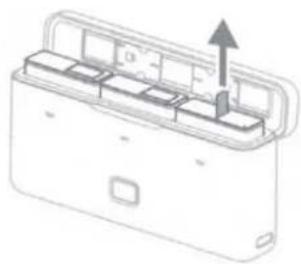
The Osmo Action 3 Multifunctional Battery Case is designed to store 3 Osmo Action 3 Extreme Batteries safely. Users can check the battery levels by pressing the status button once or opening the battery case. The status LEDs will display the battery level.
When the case is connected to a charger with the batteries inserted, the case will charge the batteries. The batteries with the highest power level will be charged first and the remaining batteries will be charged in sequence. When an external device is connected to the case using the USB-C port, the case can be used as a power bank. The batteries with the lowest power level will be discharged first and the remaining batteries will be discharged in sequence.
Status LED Indicator Descriptions
Each battery port has its corresponding status LED.
| Status LED Descriptions | Status |
| Solid Red | 0% ≤ Battery Level < 20% |
| Solid Yellow | 20% ≤ Battery Level < 80% |
| Solid Green | 80% ≤ Battery Level ≤ 100% |
| Off | The battery in the corresponding battery port is fully charged or discharged. |
| Blink Green Successively | No battery is inserted. |
| Blinks Red | Abnormal battery is inserted into the corresponding battery port. |
Visit https://www.dji.com/action-3 (User Manual/Safety Guidelines) to learn more about how to use this product.
Specifications
| Model | AC2CH |
| Compatible DJI Charger | DJI 30 W USB-C Charger |
| Compatible DJI Battery | BCX202-1770-3.85 Osmo Action 3 Extreme Battery |
| Operating Temperature | 5° to 40° C (41° to 104° F) |
| Input | 5 V-10 V@3 A |
| USB-C Port Output | Max: 5 V @2 A |
| Weight | Approx. 108 g |
| Charging Time* | For three BCX202-1770-3.85 batteries: Approx. 2 hours |
*Charging time was tested using a DJI 30 W USB-C Charger in a lab environment and should be used as reference only.
CHS
免责声明和警告
FCC Compliance Statement: Supplier's Declaration of Conformity
Product name: Osimo Action 3 Multifunctional Battery Case
Model Number: AQOH
Responsible Party: Dill Technology, Inc.
Responsible Party Address: 201 S. Victory Blvd., Burbank, CA 91502
Website: www.d8.com
We, DJF Technology, Inc., being the responsible party, declares that the above mentioned model was tested to demonstrate complying with all applicable FCC rules and regulations.
This device complies with part 15 of the FCC Rules. Operation is subject to the following two conditions: (1) This device may not cause harmful interference, and (2) this device must accept any interference received, including interference that may cause undesired operation.
Any changes or modifications not expressly approved by the party responsible for compliance could void the user's authority to operate the equipment.
ISED Compliance
CAN ICES-003 (RV/NMB-003)(B)

EU Compliance Statement: SZ DJ Osmo Technology Co., Ltd. hereby declares that this device(AC2CH) is in compliance with the essential requirements and other relevant provisions of the Directive 2014/30/EU.
A copy of the EU Declaration of Conformity is available online at www.dji.com/euro-compliance
EU contact address: Dji GmbH, industriestrasse 12, 97618, Niederlauer, Germany
GB Compliance Statement: SZ DJI Osmo Technology Co., Ltd. hereby declares that this device (AC2CH) is in compliance with the essential requirements and other relevant provisions of Electromagnetic Compatibility Regulations 2016.
A copy of the GB Declaration of Conformity is available online at www.djl.com/euro-compliance
Environmentally friendly disposal

Old electrical appliances must not be disposed of together with the residual waste, but have to be disposed of separately. The disposal at the communal collecting point via private persons is for free. The owner of old appliances is responsible to bring the appliances to these collecting points or to similar collection points. With this little personal effort, you contribute to recycle valuable raw materials and the treatment of toxic substances.
Contact
DJI SUPPORT

微信扫一扫
获取技术支持

https://www.dji.com/action-3/downloads
※ This content is subject to change without prior notice.

and OSMO are trademarks of DJI.
Copyright © 2022 DJI OSMO All Rights Reserved.

YCBZSS00213002
Brand : DJI
Model : Osmo Action 3 Multifunctional Battery Case
Category : Battery charger