
CO30 - Meter Extech - Free user manual and instructions
Find the device manual for free CO30 Extech in PDF.


| Product Type | Carbon Monoxide Meter |
| Measurement Range | 0 to 1000 ppm |
| Resolution | 1 ppm |
| Accuracy | ±5% or ±10 ppm (whichever is greater) |
| Sensor Type | Electrochemical |
| Display | Digital LCD with backlight |
| Alarm | Audible (85 dB) and visual (flashing LED) |
| Data Hold | Yes |
| Auto Power Off | After 15 minutes of inactivity |
| Low Battery Indicator | Yes |
| Power Supply | One 9V battery (approx. 200 hours continuous use) |
| Operating Temperature | 0°C to 50°C (32°F to 122°F) |
| Storage Temperature | -20°C to 60°C (-4°F to 140°F) |
| Dimensions | 160 x 83 x 38 mm (6.3 x 3.3 x 1.5 in) |
| Weight | 180 g (6.3 oz) |
| Warranty | 1 year |
| Included Accessories | Carrying case, 9V battery, instruction manual |
| Maintenance | Keep sensor clean; avoid exposure to solvents; recalibrate annually |
| Safety Standards | CE, RoHS compliant |
| Spare Parts & Repairability | Battery and sensor are user-replaceable; contact Extech for service |
Frequently Asked Questions - CO30 Extech
User questions about CO30 Extech
0 question about this device. Answer the ones you know or ask your own.
Ask a new question about this device
Download the instructions for your Meter in PDF format for free! Find your manual CO30 - Extech and take your electronic device back in hand. On this page are published all the documents necessary for the use of your device. CO30 by Extech.
USER MANUAL CO30 Extech
Thank you for selecting the Extech Instruments Model CO30. The CO30 is a 3-in-one Carbon Monoxide (CO), temperature measurement, and humidity measurement meter. This device is shipped fully tested and calibrated and, with proper use, will provide years of reliable service. Please visit our website (www.extech.com) to check for the latest version of this User Guide, Product Updates, and Customer Support.
Description
Meter Description
- Compensation adjustment
- Control button
- AC Adaptor jack
- LCD Display
- LED indicator
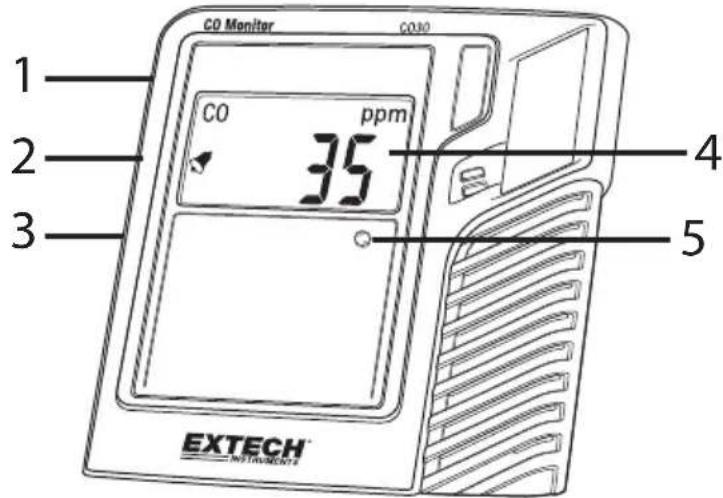
Note: Tilt Stand, Wall mount access, and battery compartment located on rear of meter.
IMPORTANT SAFETY NOTES
The CO30 Carbon Monoxide Monitor is intended for general purpose Air Quality monitoring only, and has not been certified for use pursuant to any state or city safety Carbon Monoxide Alarm or Monitoring requirements.
The CO30 Carbon Monoxide Monitor has not been tested by an independent lab to comply with UL 2034 or IAS 6-96 standard.
It is the responsibility of the customer to obtain and apply current local, state, and national regulations with regard to CO alarms, monitoring and testing.
Powering the meter
If the meter is supplied without batteries installed, install the supplied batteries in the rear battery compartment to power the meter. Please observe proper polarity.
If the meter is supplied with the batteries installed, and a protective battery strip is installed in the battery compartment, remove the protective strip to power the meter.
Alternatively, plug the AC adaptor into the jack on the side of the meter and then into an AC power source to power the meter.
Normal Operation Mode
When switched ON, the LCD displays '0000' for a period of time, depending on the time that the meter has been inactive. The meter will then proceed to the normal mode of operation where the LCD displays the current CO levels in ppm, the Temperature (°C/°F), and RH% (relative humidity) alternately every 6 seconds.
Status Indicator LED
The Front panel status LED uses a color-coding system to inform the user as to the measured CO concentration; Green for Good (<10ppm); Yellow for Caution (10 to 29ppm); Red for Danger (>30ppm). If the LED fails to illuminate, please return the unit for service.
Control button
The Control button located on the left side of the meter is used to control and program a variety of meter functions. Press and hold the Control button for at least 3 seconds to access the Control Setup Mode. Repeated presses of the Control button cycle through the available parameters. These parameters, in order, are:
- ZERO Calibration
• Temperature Unit selection (°C/°F)
• Temperature compensation (used in conjunction with side potentiometer) - Humidity compensation (used in conjunction with side potentiometer)
• Alarm Beeper Threshold (25, 30, 35, 50, 100, 200 ppm)
• Factory Default setting reset - Escape/Return (abort and return to normal mode)
ZERO Calibration
Ensure that the Zero Calibration is performed in a clean air environment (no CO gases).
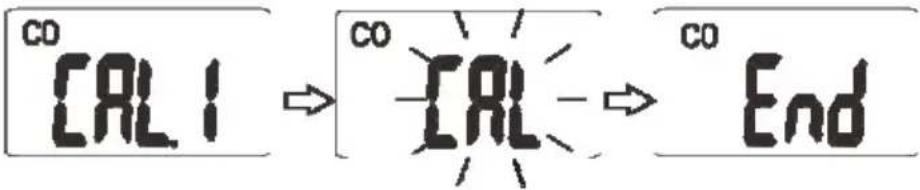
Press and hold the Control button for 3 seconds (until 'CAL' appears on the LCD screen) and then press and hold the Control button again to enter the calibration mode ('CAL' should appear on the display).
Release the Control button and wait approximately 20 seconds for the calibration to complete. The meter will display 'END' for 2 seconds when calibration is complete and will then return to the normal mode of operation.
Changing Temperature Units C/F
When [-F_2] is shown on the display, press and hold the Control button to display the current temperature unit. Momentarily press the Calibration Control button to toggle °C and °F units. To save setting, press and hold the Control button. The meter will return to the normal mode.
![CO [-F2]cF → CO t → CO F](/content/2026/05/848748/images/b22e70f8ce4e3680b424845411e4a9ccf91764a638eb2bbf28dffbbcfb990830.jpg)
Temperature Compensation Adjustment
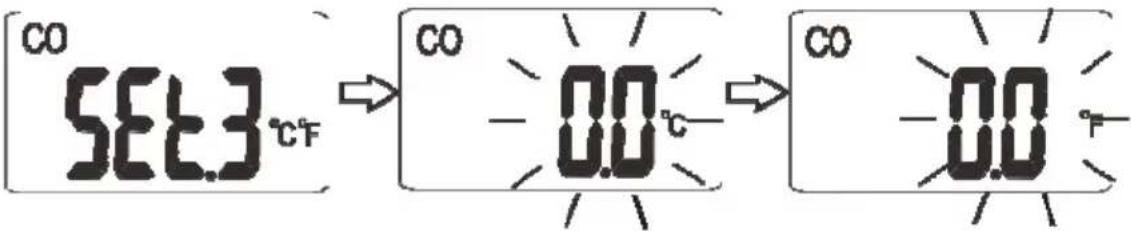
When SEE3 is shown on the display, press and hold the Control button. The factory default '0.0' value will flash. Turn the compensation potentiometer clockwise to increase the temperature offset or counterclockwise to decrease offset). The range is -5.4°F to +5.4°F (-3.0°C to +3.0°C). When done, press and hold the Control button to save the setting. The meter will return to the normal measurement mode and will reflect the offset when temperature readings are displayed.
Note: To perform an accurate offset adjustment, a standard reference is required for comparison.
Relative Humidity Compensation Adjustment
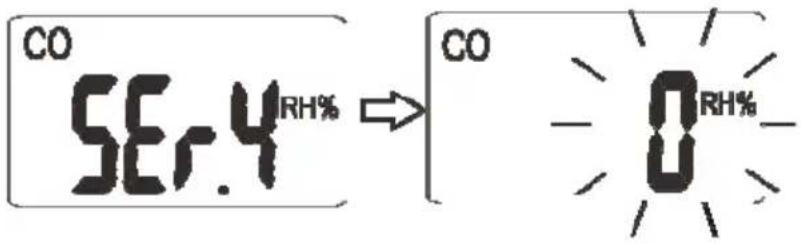
When SER4 is shown on the display, press and hold the Control button to enter the relative humidity compensation adjustment mode. Momentarily press the Control button to make a step change in the RH% offset; the range is -9 to +9 RH %. When done, press and hold the Control button to save the setting. The meter will return to the normal mode.
Note: To perform an accurate offset adjustment, a standard reference is required for comparison.
Warning: While performing temperature or RH% compensation adjustments do not touch the slotted openings on the meter housing, these are where the sensors are located. Otherwise, accuracy may be compromised.
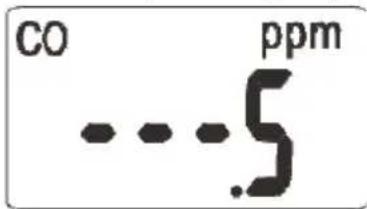
Note: If the meter displays '...5' press the Control button to step to the next setting.
Alarm Beeper Threshold Selection
When bPr6 is shown on the display, press and hold the Control button. The factory default setting will flash. Momentarily press the Control button to choose a 25ppm, 30ppm, 35ppm, 50ppm, 100ppm, or 200ppm threshold. After the selection, press and hold the Control button to save and return to the normal mode.
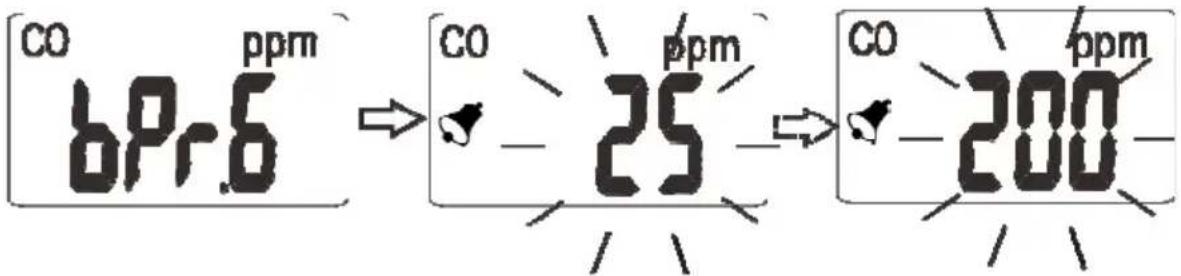
The alarm beeper prompts personnel to evacuate an area because of the detection of unsafe concentrations of CO. The meter alarms when the CO concentration exceeds the default or user-programmed threshold.
The beeper may be temporarily silenced for approximately 4 minutes by pressing the Control button. After this time, if the meter continues to detect a CO concentration exceeding the threshold, it will alarm again. For safety purposes, the meter alarm function cannot be completely disabled.
Revert to Factory Default Settings
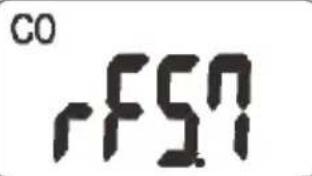
When rFSN is shown on the LCD display, press and hold the Control button to reset the CO30 to its default (factory) settings.
Escape/Return Function
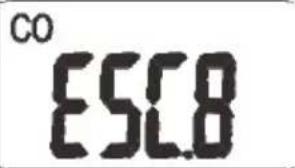
When ESCB is shown on the LCD display, press and hold the Control button for 3 seconds to abort the current programming step and return to the normal measurement mode.
Maintenance
Low Battery Condition
When the battery icon (☐) appears on the LCD, the batteries must be replaced. If the meter is low on battery voltage, erratic or inaccurate CO concentration readings may result. Never use the meter with the low battery icon displayed.
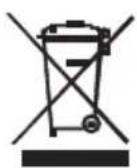
Never dispose of used batteries or rechargeable batteries in household waste.
As consumers, users are legally required to take used batteries to appropriate collection sites, the retail store where the batteries were purchased, or wherever batteries are sold.
Disposal: Do not dispose of this instrument in household waste. The user is obligated to take end-of-life devices to a designated collection point for the disposal of electrical and electronic equipment.
Troubleshooting Error Codes
The following errors may appear on the CO30 display:
E-1: CO measurement exceeds specified measurement range
E-2: Temperature measurement exceeds specified measurement range
E-3: Relative Humidity (RH %) measurement exceeds specified measurement range
Specifications
| Display | Multifunction LCD displays CO concentration, Air Temperature, and Relative Humidity |
| Status LED indicator | Tri-color status indication (Green <10ppm, Yellow: 10 to 29ppm, and Red >30ppm) |
| CO measurement range | 0 to 999ppm |
| CO accuracy | ±5% of reading or ± 10ppm |
| CO Resolution | 1ppm |
| Operating Temperature | 0 to 50°C (32 to 122°F) |
| Temperature Resolution | 0.1°C (0.1°F) |
| Operating Relative Humidity | 0 to 95%RH |
| RH Resolution | 1% RH |
| Temperature Accuracy | ±1°C/1.8°F |
| Relative Humidity Accuracy | ±5% |
| Storage Temperature | -20 to 50°C (-4 to 122°F) |
| Storage Humidity | 0 to 95%RH (avoid condensation) |
| Alarm functionality | Meter beeps and displays the alarm bell icon when the CO level exceeds the alarm setpoint (default setpoint is 30ppm, user adjustable) |
| Temperature and RH Compensation | Manual; user-adjustable |
| CO Calibration | Standard user function |
| Zero Calibration | Standard user function |
| Power | 4 x AAA batteries or supplied Universal AC adaptor |
| Meter dimensions | 113 x 108 x 53mm (4.4 x 4.3 x 2.1 in.) |
| LCD display dimensions | 48 x 28mm (1.9 x 1.1 in.) |
| Weight | 159g (5.6 oz.) |
- Description
- Meter Description
- IMPORTANT SAFETY NOTES
- Powering the meter
- Normal Operation Mode
- Status Indicator LED
- Control button
- ZERO Calibration
- Changing Temperature Units C/F
- Temperature Compensation Adjustment
- Relative Humidity Compensation Adjustment
- Alarm Beeper Threshold Selection
- Revert to Factory Default Settings
- Escape/Return Function
- Maintenance
- Low Battery Condition
- Troubleshooting Error Codes
Brand : Extech
Model : CO30
Category : Meter