
HP-1 - Receiver ART - Free user manual and instructions
Find the device manual for free HP-1 ART in PDF.


| Product Type | Personal In-Ear Monitor Amplifier |
| Brand | ART (Applied Research and Technology) |
| Model | HP-1 |
| Dimensions (H x W x D) | 5.4 x 1.72 x 1.6 inches (137 x 43.7 x 40.6 mm) |
| Weight | 0.51 lbs (0.23 kg) |
| Power Supply | 2 x 1.5V AA batteries (alkaline recommended) |
| Battery Life | Over 40 hours (with alkaline batteries) |
| Input Connections | Locking 1/4" / XLR combo jack (balanced TRS or XLR) |
| Output Connections | 3.5mm stereo jack (1/8") |
| Gain | +9 dB |
| Max Output Power | 105 mW @ 0.1% THD |
| THD (Total Harmonic Distortion) | ≤ 0.02% @ 1 kHz typical |
| Input Impedance | 5 kΩ |
| Max Input Level | +6.6 dBu |
| Controls | Variable volume control (also acts as power switch) |
| Switch | Balanced Mono / Unbalanced Stereo switch |
| Belt Clip | Sturdy, detachable belt clip included |
| LED Indicator | Green when powered, red when batteries low |
| Construction | Rugged extruded aluminum housing with heavy-duty jacks |
| Warranty | 3 years limited (USA), check local distributor for other regions |
| Accessories Included | 2 AA batteries, belt clip |
| Recommended Use | Live performance, studio monitoring, in-ear monitoring |
Frequently Asked Questions - HP-1 ART
User questions about HP-1 ART
0 question about this device. Answer the ones you know or ask your own.
Ask a new question about this device
Download the instructions for your Receiver in PDF format for free! Find your manual HP-1 - ART and take your electronic device back in hand. On this page are published all the documents necessary for the use of your device. HP-1 by ART.
USER MANUAL HP-1 ART
Personal In-Ear Monitor Amplifier
ARTcessories

APPLIED RESFARCH AND TECHNOLOGY
IMPORTANT SAFETY INSTRUCTION – READ FIRST


This symbol, whenever it appears alerts you to the presence of uninsulated dangerous voltage inside the enclosure-voltage that may be sufficient to constitute a risk of shock.

This symbol, whenever it appears, alerts you to important operating and maintenance instructions in the accompanying literature. Please read the manual.
Read Instructions: Retain safety and operating instructions for future reference. Heed all warnings printed here and on the equipment. Follow the operating instructions printed in this user manual.
Environment: Protect from excessive dirt, dust, heat, and vibration when operating and storing. Avoid tobacco ash, drink spillage and smoke, especially that associated with smoke machines.
Handling: Protect the controls from damage during transit. Use adequate padding if you need to ship the unit. To avoid injury to yourself or damage to the equipment, take care when lifting, moving or carrying the unit.
Servicing: Refer servicing to qualified technical personnel.
Installation: Install the unit in accordance with the instructions printed in the user manual.
CAUTION: Battery Installation

2X1.5vAA batteries
When installing alkaline batteries, be sure to line up the "+" sign on the battery with the "+" sign on the product's battery compartment. Improper installation can cause a battery to leak or overheat and lead to serious injury.
- Do not use different types of batteries together
- Do not mix old batteries with new ones
- Do not mix rechargeable batteries with non-rechargeable ones
- Do not use batteries that are swollen, dented or damaged in any way
INTRODUCTION
Thank you for purchasing Applied Research and Technology's HP-1. The HP-1 is a belt worn; battery powered headphone amplifier that brings excellent performance to portable applications. With a locking 1/4"/XLR Combo input jack, sturdy belt clip and output volume control, it provides reliable performance both on and off the stage. The HP-1 provides a high output level when used with a variety of different headphones and is great for in-ear monitoring applications. Its long battery life will not leave you stranded. The HP-1 is packaged in a rugged extrusion, with heavy duty jacks for years of reliable operation.
Get the very best out of your headphones with the HP-1!
FEATURES
• High Output Headphone Amplifier
- Locking 1/4 "/XLR Combo Input Jack
• Balanced Mono/ Unbalanced Stereo Switch
• Variable Volume Control
- Sturdy Belt Clip
• Over 40hrs from 2 AA Batteries
• 3.5mm Output Connector
- Rugged Design
INSTALLATION and OPERATION
Connect the output of a mixer to the 1/4 " or XLR input of the HP-1. The locking Combo jack allows for a secure cable connection.
The volume control adjusts the output level and acts as a power switch. To turn the HP-1 off, simply turn the volume pot fully counterclockwise, or remove your headphones from the output jack to preserve the battery life.
A green LED indicates the HP-1 is powered. This indicator will turn red when the batteries are close to being depleted.
Balanced Mono/Unbalanced Stereo Switch
The inner switch should be set to balanced mono when the HP-1 is used with a mixer's aux send or any other mono source and set to unbalanced stereo when it is connected to a headphone output or other stereo source.
CONNECTIONS

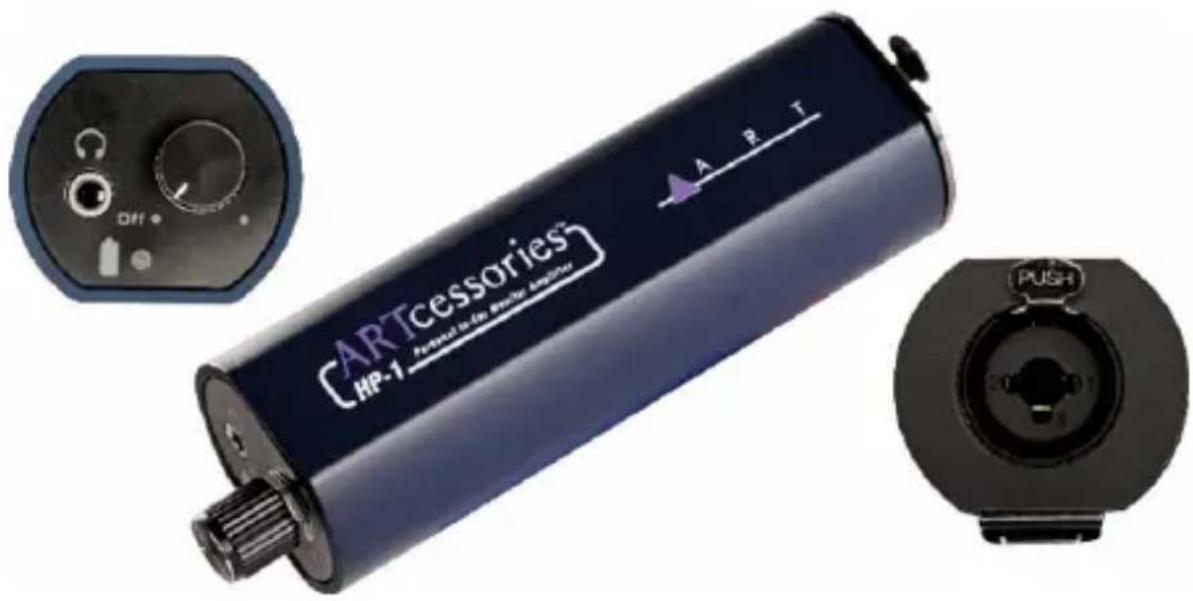
- The input Combo jack, for connections to a monitor mix as an example. Accepts both XLR and TRS 1/4 -inch jacks.
- The Volume knob controls the output level and will power down the HP-1, when turned fully counterclockwise.
- The green led will light when the power is on and acts as a battery indicator. Replace the batteries when red.
- The Headphone output has a 1/8" stereo jack.
- The Belt clip attaches to a belt or pant waistline for hands-free use.
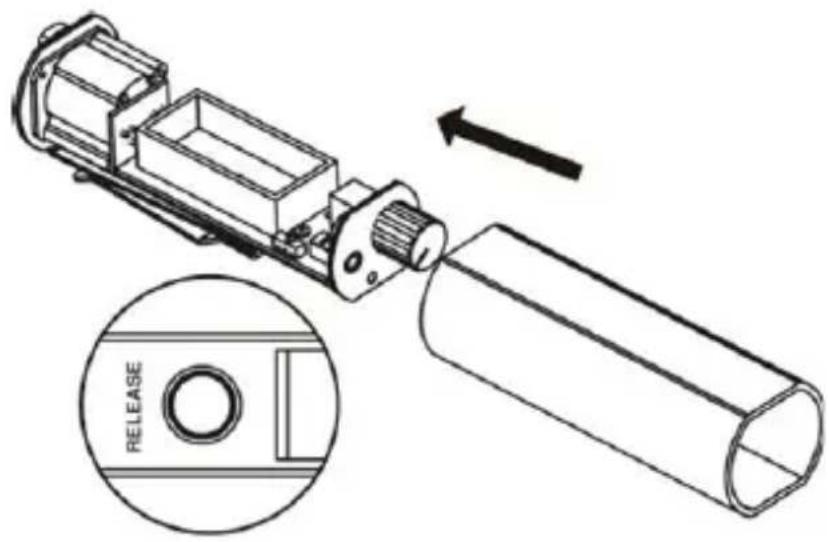
- The Battery storage area button. Pressing the button and sliding the shell toward the headphone jack opens the compartment.
- The Battery storage section allows the unit to be powered by a pair of AA batteries. Please observe the correct polarity when inserting new batteries.
- The switch should be set to mono when you are using the HP-1 with a mixer's aux send or any other mono source (near battery position) and set to stereo when you are connected to a headphone output or other stereo sources (near input connector).
HOW TO INSTALL THE BATTERY
This button allows access to the battery compartment. Hold the RELEASE button down and slide the outer shell down toward the headphone jack to expose the unit's interior. Insert the batteries into the battery compartment and slide the unit back into the shell.
APPLICATIONS
Perfect for: Live use, Project studios, Home and Commercial use!

WARRANTY INFORMATION
Limited Warranty
Applied Research and Technology will provide warranty and service for this unit in accordance with the following warrants:
Applied Research and Technology, (A R T) warrants to the original purchaser that this product and the components thereof will be free from defects in workmanship and materials for a period of three years from the date of purchase. Applied Research and Technology will, without charge, repair or replace, at its option, defective product or component parts upon prepaid delivery to the factory service department or authorized service center, accompanied by proof of purchase date in the form of a valid sales receipt.
Exclusions
This warranty does not apply in the event of misuse or abuse of the product or as a result of unauthorized alterations or repairs. This warranty is void if the serial number is altered, defaced, or removed.
A R T reserves the right to make changes in design or make additions to or improvements upon this product without any obligation to install the same on products previously manufactured.
A R T shall not be liable for any consequential damages, including without limitation damages resulting from loss of use. Some states do not allow limitations of incidental or consequential damages, so the above limitation or exclusion may not apply to you. This warranty gives you specific rights and you may have other rights, which vary from state to state.
For units purchased outside the United States, an authorized distributor of Applied Research and Technology will provide service
Fill in the following information for your reference:
Date of purchase ____
Purchased from ____
SERVICE
The following information is provided in the unlikely event that your unit requires service.
-
Be sure that the unit is the cause of the problem. Check to make sure the unit has power, all cables are connected correctly, and the cables themselves are in working condition. You may want to consult with your dealer for assistance in troubleshooting or testing your particular configuration.
-
If you believe that the ART unit is at fault, go to www.artproaudio.com. Select "Support", then "Return Authorization Request" to request a return authorization number.
-
If you are returning the unit for service, pack the unit in its original carton or a reasonable substitute. The original packaging may not be suitable as a shipping carton, so consider putting the packaged unit in another box for shipping. Print the RA number clearly on the outside of the shipping box. Print your return shipping address on the outside of the box.
-
Include, with your unit, a note with the RA number and your contact information, including a return shipping address (we cannot ship to a P.O. box) and a daytime phone number, and a description of the problem, preferably attached to the top of the unit. Also include a copy of your purchase receipt.
SPECIFICATIONS
Input Connections Locking 1/4 "/XLR combo jack
Input Impedance 5K Ohms
Max Input level +6.6dBu
Output Connections 3.5mm Jack (1/8")
Gain +9dB
THD ≤ .02% @1kHz typ.
Max Output 105mW @ 0.1% THD
Typical run time 40 hrs. (Alkaline batteries)
Power Requirements 2-AA batteries Included
Dimensions (HxWxD) 5.4"x1.72"x1.6"
(137×43.7×40.6 mm)
Weight 0.51 lbs. / 0.23kg

APPLIED RESEARCH AND TECHNOLOGY
www.artproaudio.com
E-mail: support@artproaudio.com
© 2022 Applied Research & Technology / Yorkville Sound
HP-1
HP1-5004-101



- PERSONAL IN-EAR MONITOR AMPLIFIER
- ARTCESSORIES
- IMPORTANT SAFETY INSTRUCTION – READ FIRST
- CAUTION: BATTERY INSTALLATION
- 2X1.5VAA BATTERIES
- INTRODUCTION
- FEATURES
- INSTALLATION AND OPERATION
- BALANCED MONO/UNBALANCED STEREO SWITCH
- CONNECTIONS
- HOW TO INSTALL THE BATTERY
- APPLICATIONS
- WARRANTY INFORMATION
- LIMITED WARRANTY
- EXCLUSIONS
- SERVICE
- SPECIFICATIONS
Brand : ART
Model : HP-1
Category : Receiver